June 6, 2026
Security Analyst Agent: Really simplified!
You already have a SIEM. An EDR. A SOAR with seventeen playbooks (just a foolish number) that may or may not be firing correctly. A backlog…

Yash Mudaliar
11 min read
You already have a SIEM. An EDR. A SOAR with seventeen playbooks (just a foolish number) that may or may not be firing correctly. A backlog of "we'll tune it later" analytics that grows slightly longer every week.
So when Microsoft announces yet another AI capability for the SOC, the skepticism is warranted. You've sat through the demos. 🥱 You've seen the dashboards. 🙄 You know how often "AI-powered" is marketing for slightly better autocomplete. 😕
The Security Analyst Agent is different — not because of what it claims, but because of where it sits in the SOC workflow and what_ problem it was actually built to solve_. This post walks through what it is, how it works, and why it might be the one recent Security Copilot capability worth properly understanding before you form an opinion.
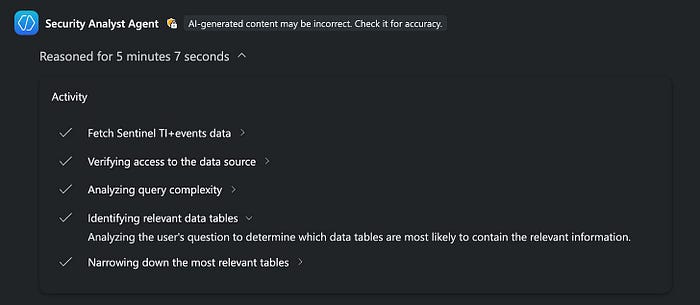
Before we proceed, I want to acknowledge that I wasn't able to get a real output with enterprise data from the agent YET! Its a Microsoft problem that I got confirmed by their support in my tenant's region and I promise to update the article by posting some output screenshots once the issue gets resolved! Thanks for understanding!
The problem it's quietly solving ⁉️
SOC teams don't usually struggle to collect data. After years of SIEM tuning, EDR rollout, and cloud logging, most mature environments have more telemetry than they know what to do with. The bottleneck is not the data. It's the distance between raw telemetry and a defensible conclusion about what that data means.
You know the pattern. Defender and Sentinel generate a constant stream of alerts and events. You spend a whole afternoon (or maybe more) to hunt a hypothesis — write KQL, join a few tables, export to CSV, maybe crack open a notebook — and then you get pulled into three P1s. That deeper analysis gets deferred. Sometimes permanently.
**What analysts actually need is not another alert. It is the answer to a harder question: **what does this data mean, and which risks actually matter right now?
Getting there requires stitching together signals across identity, endpoint, and data — correlating timelines, running anomaly detection, ranking entities by risk — and then documenting it clearly enough that your CISO can understand it and your auditors can challenge it.
AND THAT is precisely what the Security Analyst Agent is built to do.
What it actually is 👀
The Security Analyst Agent is a first-party Security Copilot agent that performs deep, multi-step investigations across Microsoft Defender XDR and Microsoft Sentinel telemetry. It's available in both the standalone Security Copilot experience and embedded directly inside Microsoft Defender, accessible from the Advanced Hunting panel.
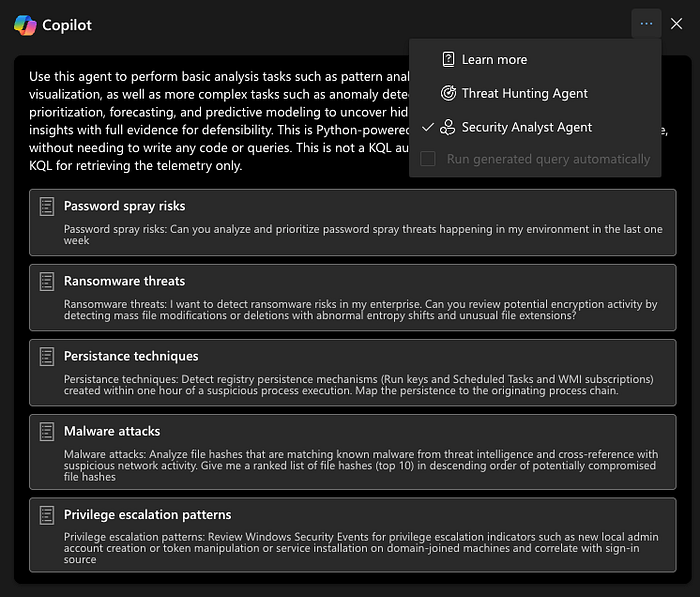
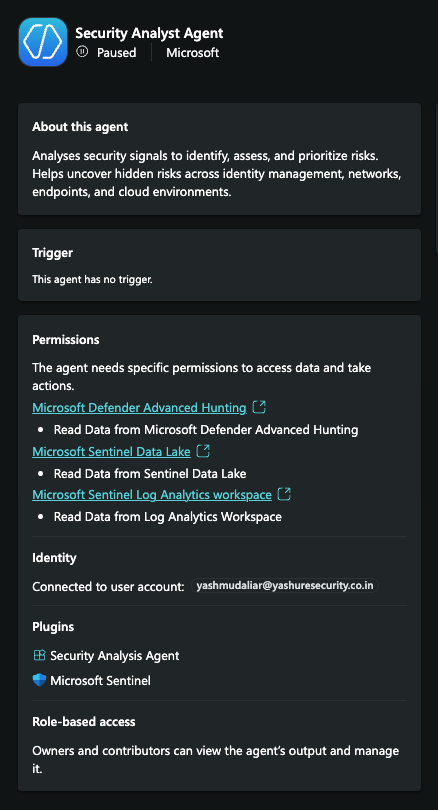
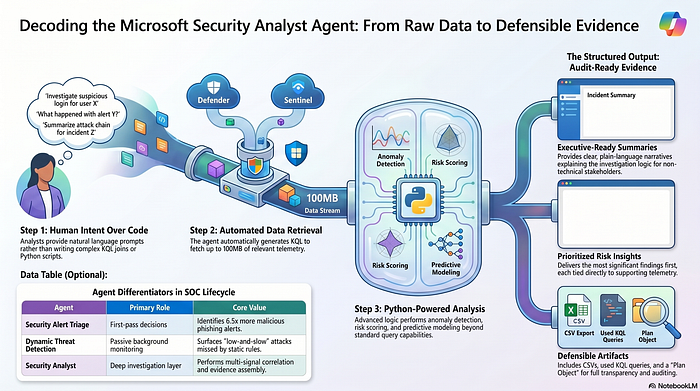
The architecture behind it has a clean division of labor. The agent uses KQL to retrieve data from your configured source — Defender XDR, Sentinel Log Analytics, or Sentinel Data Lake — but all the heavy analysis happens in Python. That means the agent can go well beyond what KQL alone can express:
- Anomaly detection
- Clustering
- Risk scoring
- Forecasting
- Predictive modeling
All over datasets of up to approximately 100MB per investigation. That ceiling is not an industry estimate or external benchmark. It is Microsoft's own stated design point, referenced in their RSA Conference 2026 announcement.
The practical outcome: Python-powered advanced analytics in a chat-first experience, with no queries or code required from you unless you want them.
A useful mental model: think of a senior L3 analyst who lives permanently in Defender and Sentinel, speaks KQL fluently, knows Python cold, and whose only job is to run the complex analysis jobs your team never gets time for — while documenting every step in a format you can actually defend.
Where it sits in the agentic SOC picture 🤖
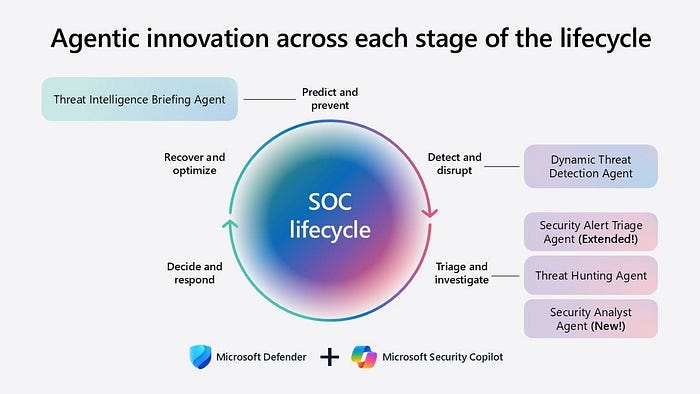
Microsoft's trajectory here is worth understanding before you decide where this agent belongs in your workflows. At Ignite 2025, Microsoft introduced the concept of agentic AI for Defender — the idea that AI would move from assistive suggestions toward autonomous execution of specific tasks across the SOC lifecycle. By RSA Conference 2026, that vision had materialized into a set of distinct agents with clearly differentiated roles:
The Security Alert Triage Agent handles first-pass decisions on high-volume, high-noise alert categories — phishing, identity compromise signals, cloud container threats — at speed and scale. It provides natural language verdicts with transparent, step-by-step reasoning. Microsoft's own controlled trial data puts it at identifying 6.5 times more malicious alerts than human analysts working alone on phishing triage. A meaningful number.
The Dynamic Threat Detection Agent runs in the background continuously, correlating signals across Defender and Sentinel to surface the false negatives that static, rule-based detections miss — particularly low-and-slow attacks, living-off-the-land techniques, and behaviors that blend into normal operational noise. It generates "Security Copilot"-sourced alerts directly into your existing incident queue. You don't invoke it. It just works.
The Security Analyst Agent is neither a first-pass triage decision engine nor a passive background monitor. It is "the" investigation layer. You engage it with deliberate intent when you need genuine analytical depth across your telemetry — not a verdict on a single alert, but a comprehensive, evidence-backed understanding of what patterns, risks, and entities actually matter across a body of data.
Three agents. Three distinct jobs. They don't compete with each other; they compose.
How a session actually flows 🛠️
Step 1️⃣ : intent, not a query 🗣️
When you engage the Security Analyst Agent — from the standalone experience or from the Advanced Hunting panel in Defender — you describe what you want to understand, not how to fetch it:
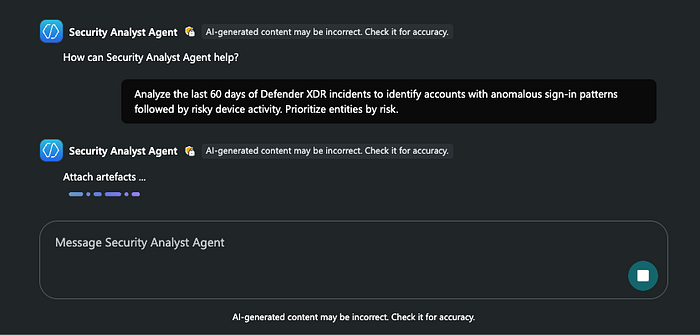
"Analyze the last 7 days of Defender XDR and Sentinel incidents to identify accounts with anomalous sign-in patterns followed by risky device activity. Prioritize entities by risk."
No table names. No joins. Just intent. If the request is broad enough that the agent cannot scope it meaningfully — say, "find anomalies in my environment" — it will ask clarifying questions about time range, workload scope, and specific data sources before proceeding. This is deliberate behavior, not a limitation.
Step 2️⃣ : binding to a data source 🔌
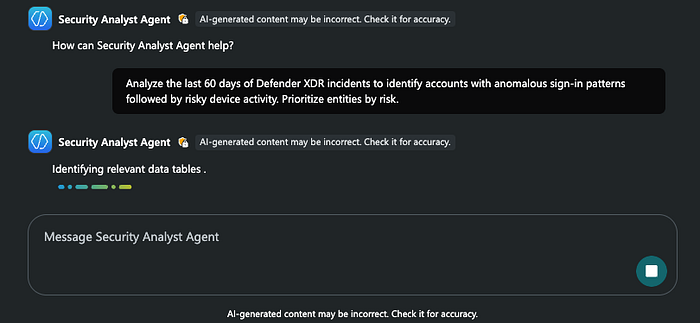
A point worth knowing for Defender users specifically: setup is optional. You can run the Security Analyst Agent directly in Defender without any pre-configuration. The simplest approach is to specify the data source in your prompt itself — "use Sentinel Log Analytics for this" — and the agent honors that instruction for the rest of the session.
If you do not specify a source, the agent first tries Defender XDR. If XDR data is unavailable or you lack the required permissions, it retries from Sentinel Log Analytics. The fallback is automatic. For environments where the data topology matters — what lives in XDR versus Log Analytics versus Data Lake — this default cascade is worth understanding, because it directly shapes what the agent can see.
Step 3️⃣ : KQL retrieves, you see it all 👁️
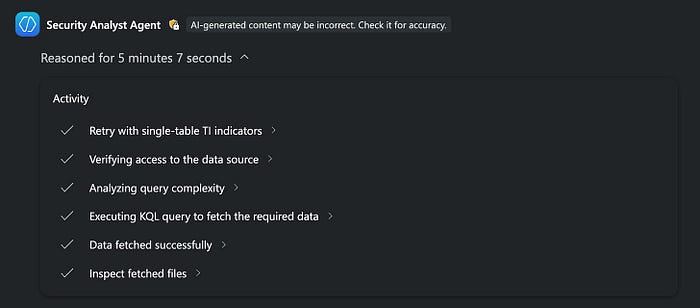
With scope and source established, the agent generates KQL to pull the relevant dataset: sign-ins, alerts, device activity, privileged role changes, whatever matches the analytical intent. The important detail here is that the generated KQL is not hidden from you. The final report artifacts include the exact queries used for data retrieval. You can copy them into Advanced Hunting, turn them into analytic rules, or simply use them as a sanity check on what the agent actually looked at.
If you have already run a KQL query in Advanced Hunting and want to analyze the results rather than start from scratch, the Analyze with Copilot option below the query results tab sends that dataset directly to the agent. You stay in control of the query layer when you want to be, but you are not required to start there.
Step 4️⃣ : the real work happens in Python 🐍
Once the dataset is assembled, the agent shifts to Python for analysis. The range of analytics it can run is substantial: pattern and distribution analysis, time-series and trend analysis, anomaly detection, clustering and segmentation, entity ranking and risk scoring, forecasting, and predictive modeling. These aren't "marketing labels". Anomaly detection means the agent can flag accounts whose behavioral profile has deviated from their own historical baseline, even if no existing detection rule fires. Clustering means it can group Sentinel incidents by shared entity relationships and surface which clusters represent the highest actual risk.
From the analyst's seat, you see the conclusions —
Prioritized entities, Risk scores, Anomaly explanations, and most importantly, Evidence!
— not a notebook you have to configure and run yourself. 🥱
Step 5️⃣ : iterate with context 🔄
The session holds its state throughout. After an initial analysis, you follow up naturally:
- "Drill into the top three accounts you flagged."
- "Overlay this with VPN sign-in data from Sentinel."
- "Exclude service accounts and rerun the anomaly detection."
The agent carries the investigation thread across turns. This is not a stateless API that forgets everything on each prompt; it behaves more like a thinking partner who remembers what just happened and builds on it.
What you actually get back ⭐️
The output is structured, not a wall of text. Microsoft's documentation defines four consistent sections, and understanding this anatomy matters for how you use the output beyond your own desk:
⚡️Executive summary — a clear narrative of how the analysis was performed: the data considered, filtering criteria, time ranges, and ranking logic, written in plain language. A non-technical reader can follow it.
⚡️Key insights — the most significant findings, prioritized, each with a brief explanation of why it matters and references to supporting evidence. These are the findings you act on or escalate.
⚡️Visualizations — charts and graphs where they add interpretive value. Not a fixture on every report; only included when they help you see a pattern that would be harder to grasp in tabular form.
⚡️Artifacts — the supporting material that makes findings defensible: a comprehensive CSV of all analyzed entities, the KQL queries used for data retrieval, and a plan object that documents the step-by-step reasoning path the agent followed through the investigation.
That last element deserves emphasis. The plan object means you can audit what the agent did, replay the queries, and challenge the conclusions.
For an enterprise SOC, this is the difference between an AI-generated opinion and an AI-generated investigation you can actually take to an auditor.
Where it earns its keep: concrete use cases 🎯
✴️ Hypothesis-driven threat hunting:
You have a suspicion but do not want to spend thirty minutes building the hunt from scratch. Hand it to the agent.
"Do we have users whose sign-in behavior changed sharply in the last 14 days, and did those users subsequently access sensitive devices or data?"
"Are there endpoint lateral movement patterns this month that don't match our typical administrative activity profiles?"
✴️ Alert noise reduction:
Use the agent's pattern and trend analysis capabiliity as a tuning lens — across large datasets, not just one alert at a time. Surface recurring noise sources, cluster similar incidents, and identify detections that deserve tuning.
"Analyze the last 30 days of Defender alerts. Which workloads and rules generate high-volume, low-value alerts?"
"Cluster Sentinel incidents by shared entity relationships and rank the riskiest clusters."
✴️ Cross-signal correlation:
This is where the agent earns its seat in the SOC most convincingly. Instead of examining identity, endpoint, and data workloads in separate tools, you can ask it to connect the dots and surface suspicious sequences that would otherwise stay buried across siloed telemetry.
"Find sequences over the last 30 days where a risky sign-in was followed by privileged role elevation and subsequent access to devices or data labeled Highly Confidential. Prioritize by blast radius."
✴️ Executive-ready reporting:
Use it when you need something you can hand to a manager or auditor without rebuilding the narrative yourself.
- Post-incident analysis documented with real telemetry.
- Monthly risk posture reviews.
- Control effectiveness assessments after a new policy rolls out.
Why architects and SOC leads should pay attention 🚨
The most important thing to understand about this agent is what it is not trying to do. As mentioned before, it is not primarily about accelerating L1 triage — the Security Alert Triage Agent and Dynamic Threat Detection Agent serve that layer. The Security Analyst Agent is about scaling the kind of work your strongest analysts already do: multi-signal correlation, evidence assembly, and documented, prioritized conclusions.
For architects, the data-source design implication is real and immediate. What lands in Defender XDR versus Sentinel Log Analytics versus Sentinel Data Lake will directly shape the agent's investigative reach. The agent is only as good as the telemetry it can see. Your ingestion architecture decisions become consequential in a new way when an automated investigator depends on them.
For SOC leads, the structured output format changes the operational calculus. The queries, findings, and evidence trail are not disposable chat. They can seed new analytic rules, support post-incident reviews, serve as audit artifacts, and document control effectiveness over time. Each investigation becomes a reusable asset rather than knowledge that lives only in an analyst's head.
For anyone managing Security Compute Unit (SCU) consumption: a deep, multi-signal investigation across noisy telemetry is exactly the kind of workload that justifies the capacity spend. The agent concentrates SCU consumption where it produces the highest analytical value, rather than on tasks that generate one-line summaries of things you already knew.

The fine print 🔎
Microsoft is clear that this is a preview feature, with the standard caveat that capabilities may be substantially modified before general availability. A few specifics to hold in mind:
CSV upload for custom dataset analysis — useful for investigations involving data outside your Defender/Sentinel environment — is currently available in the standalone Security Copilot experience but not yet in Defender. The documentation says it will be available shortly in Defender, but verify the current state in the docs before building a workflow that depends on it.
If you are switching data sources mid-session in Defender, Microsoft recommends limiting that to three changes per session for reliable performance. It is worth factoring this into how you structure investigations that span multiple sources.
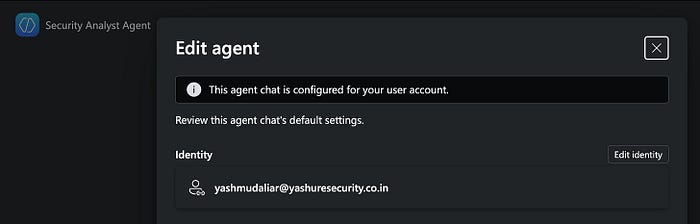
Agent configuration is tied to individual identities — when you configure it, it applies to your user instance. Other users in the same tenant can configure their own instances against the data sources they have access to. This has access-control implications worth planning for in shared environments.
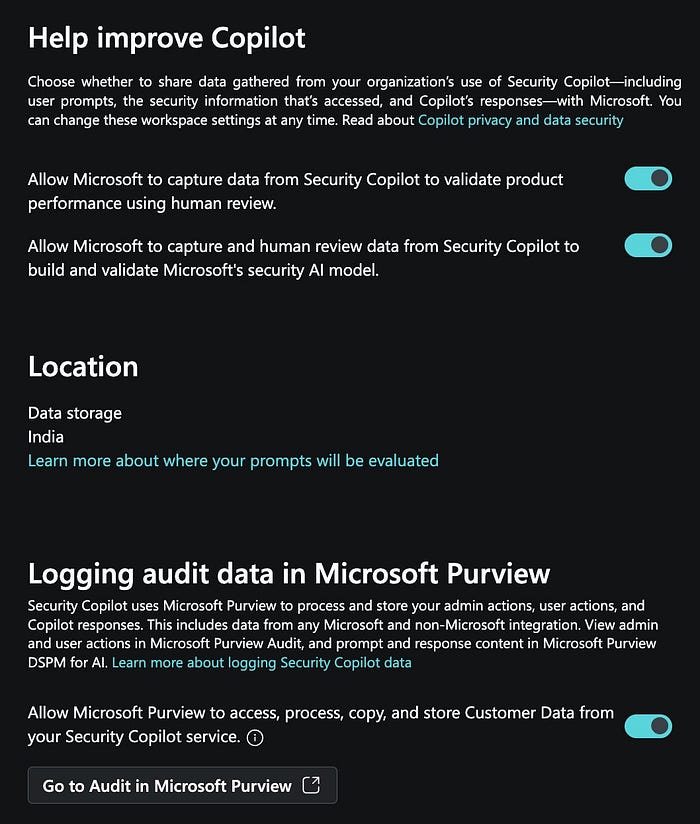
Finally, on governance: Security Copilot activity is logged in the Microsoft audit ecosystem. Data sharing for product improvement is enabled by default in many Copilot tenants. Review that setting before deploying agents at scale in environments with sensitive or regulated data.
Closing thought 💭
Microsoft's framing for the agentic SOC is direct:
Autonomous agents handle the execution of complex, repeatable analytical tasks; humans stay in the decision seat.
The Security Analyst Agent is a concrete expression of that commitment — not just a product feature, but a structural bet about where the human-AI division of labor in security investigation should sit.
Done well, it doesn't replace analyst judgment. It clears the path to it. Faster evidence assembly, less time in KQL, and structured findings you can actually defend.
The analyst who never tires of staring at telemetry (unlike me 🥱), never forgets to document the steps (again unlike me 🫣), and will cheerfully re-run the same complex analysis next week when someone asks whether anything has changed (unlike most of us 😖).
That is the role. Whether your environment is ready for it to play that role depends entirely on how well your telemetry, data architecture, and analyst workflows are positioned to support it.