What Is Quishing?
QR codes are everywhere. You scan them to view menus, make payments, log in to apps, and claim event tickets. They've become so routine that most people scan without a second thought, and that's exactly what cybercriminals are counting on.
QR Code Phishing, widely known as Quishing, is a cyberattack technique where criminals embed malicious links inside QR codes to trick victims into visiting fraudulent websites, surrendering sensitive credentials, or downloading malware.
What makes quishing especially dangerous is its invisibility. Unlike a suspicious email link you can hover over, a QR code reveals nothing to the naked eye. You won't know where it leads until it's too late.
How Quishing Works
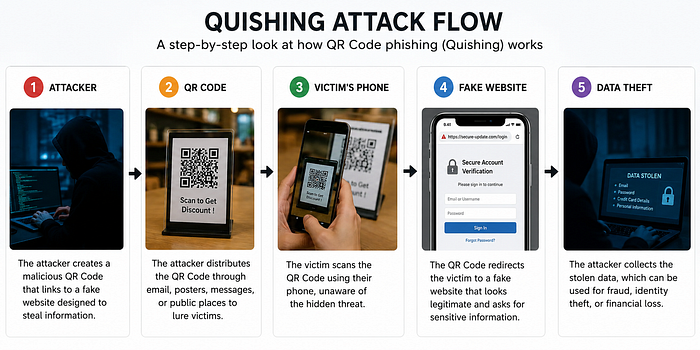
The anatomy of a quishing attack is deceptively simple:
- The attacker creates a malicious QR code linked to a phishing site, credential harvester, or malware payload.
- The QR code is distributed embedded in emails, printed on fake invoices, plastered on posters, or placed as stickers over legitimate codes in public spaces.
- The victim scans the code using their smartphone, usually without suspicion.
- They're redirected to a convincing fake page, a fake bank login, a spoofed Microsoft sign-in, or a fraudulent payment portal.
- Credentials are stolen, or malware is installed, often before the victim realizes anything is wrong.
Where Attackers Are Hiding Malicious QR Codes
Quishing attacks show up in more places than most people expect:
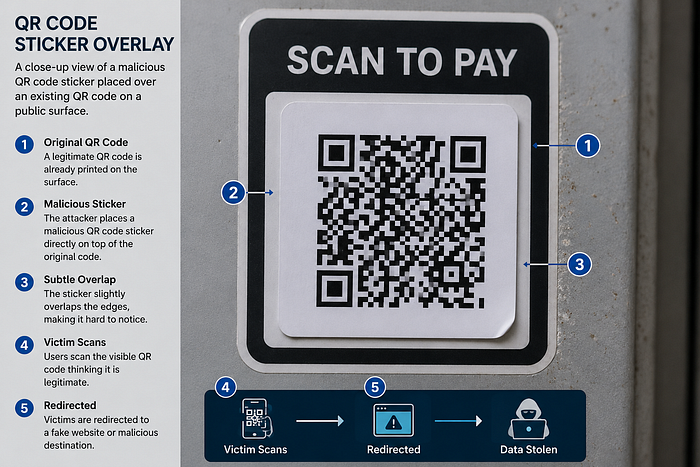
Fake Payment Terminals: QR codes at checkout counters, parking meters, or food stalls are swapped with attacker-controlled ones. You think you're paying a business, you're paying a criminal.
Email Verification Scams: An email arrives claiming your account is at risk. To "verify your identity," you're asked to scan a QR code. The link leads to a phishing page built to steal your login.
Tampered Public Codes: Stickers placed over legitimate QR codes in airports, shopping centers, and university campuses. Everything looks normal, until it isn't.
Cryptocurrency Fraud: Fake wallet QR codes redirect payments to attacker-controlled addresses. Crypto transactions are irreversible.
Malware Delivery: Scanning triggers an automatic download of a malicious app or spyware onto your device.
Why This Attack Is So Effective
Quishing exploits a specific blind spot in both human psychology and security infrastructure.
QR codes hide their destination. There's no URL to inspect before you commit to the scan. By the time the page loads, the redirect has already happened.
Mobile devices have fewer defenses. Most QR codes are scanned on smartphones, which typically lack the enterprise-grade endpoint protection found on corporate laptops and desktops.
Users trust QR codes by default. Businesses, governments, and healthcare providers use them constantly. That familiarity breeds complacency.
Email security filters often miss them. Traditional tools scan for suspicious links and attachments, not images containing embedded URLs. A QR code in an email body can sail straight through.
QR code adoption exploded post-pandemic. The COVID-19 era normalized QR codes globally and at speed. Attackers followed the adoption curve.
How to Spot a Malicious QR Code
No QR code announces itself as dangerous. But there are warning signs worth knowing:
- The QR code is a sticker placed over what looks like a printed code
- You received it in an unsolicited email urging urgent action
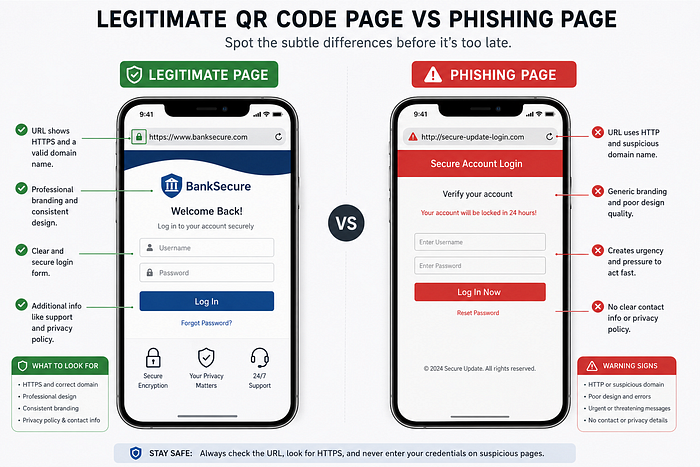
- The landing page asks for a password, card number, or personal data
- The URL displayed after scanning looks suspicious or mismatched to the claimed brand
- You're prompted to download an unfamiliar app after scanning
- The page design looks slightly off, with wrong fonts, low-quality logos, and awkward layout
How to Protect Yourself
Preview the URL before opening it. Most smartphones display the destination link after a scan. Take two seconds to read it before tapping "Open."
Be sceptical of QR codes in emails. Legitimate organisations rarely require you to scan a code to verify your account or reset a password. If in doubt, go directly to the official website instead.
Don't scan codes on public surfaces without reason. A QR code on a random poster or stuck to a table deserves more scrutiny than one in a printed menu at a restaurant you walked into.
Use mobile security software. Reputable antivirus apps for iOS and Android can flag malicious URLs before they load.
Enable Multi-Factor Authentication (MFA). Even if an attacker steals your password through a quishing attack, MFA creates a second line of defence before they can access your account.
Keep your devices updated. Software patches frequently close security vulnerabilities that attackers exploit once devices land on malicious pages.
What Organizations Need to Do
Individual awareness only goes so far. Organizations bear significant responsibility for reducing quishing risk across their teams.
Effective measures include:
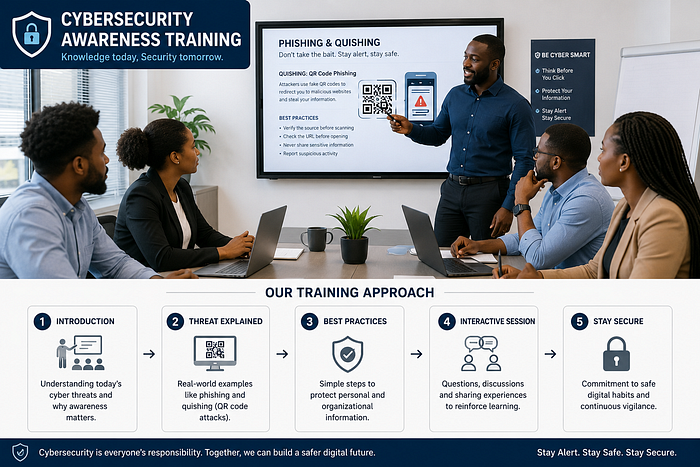
- Including quishing scenarios in regular cybersecurity awareness training
- Deploying email security solutions capable of analyzing QR codes embedded in messages
- Running simulated quishing exercises alongside phishing simulations
- Establishing clear reporting channels so employees can flag suspicious codes
- Auditing and securing any QR codes used in official communications or physical spaces
What's Coming Next
As QR code usage grows, so will the sophistication of quishing attacks. Artificial intelligence is already being used to generate highly personalised phishing content, and that capability will extend to quishing campaigns as well.
The cybersecurity industry is responding. Emerging solutions include AI-powered QR code analysis, real-time malicious URL detection at the point of scan, encrypted QR code standards, and browser-level phishing prevention. But technology alone won't close the gap.
Awareness will always be part of the defense.
Final Thought
A QR code is just a container. Like any container, what matters is what's inside, and who put it there.
The next time you reach for your camera to scan a code, pause for a moment. Verify the source. Preview the URL. Trust your instincts if something feels off.
In cybersecurity, the most powerful tool isn't software. It's a habit of skepticism, applied consistently, especially in moments of convenience.
Found this useful? Share it with someone who still scans every QR code they see without thinking twice.