
As someone learning cybersecurity and wireless security, I wanted to experiment with packet sniffing in a controlled, safe environment. This project documents my first experience capturing and analyzing Wi-Fi traffic on my own home network.
The goal was to understand how Wi-Fi networks communicate, how packets can be observed without connecting, and how tools like Wireshark can be used for analysis — all ethically, on a network I own.
Tools and Environment :
For this lab, I used:
- Kali Linux (my penetration testing platform)
- TP-Link USB wireless adapter (supports monitor mode)
- Home Wi-Fi router (my own network for testing)
- Wireshark for packet analysis
Step 1: Setting Up the Wireless Adapter in Monitor Mode
The first step was to enable monitor mode on my TP-Link adapter, allowing it to listen to all wireless traffic in the area without connecting.
iwconfig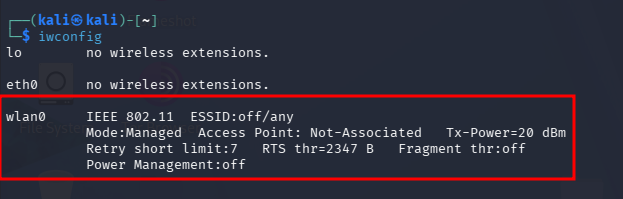
Now that we know that our external wifi adaptor has been connected and detected as wlan0 we need to put it on monitor mode.
airmon-ng start wlan0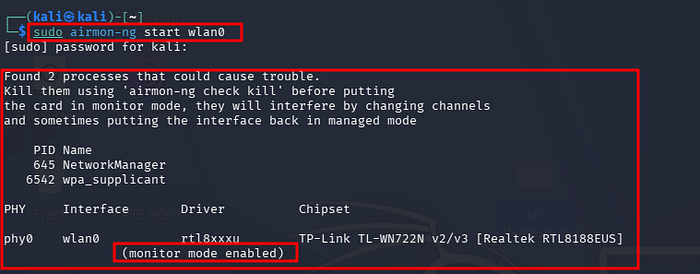
Step 2: Scanning Nearby Wi-Fi Networks

Next, I scanned the Wi-Fi networks around me to see which networks were broadcasting. This allowed me to locate my own home Wi-Fi and confirm that my adapter could capture network data.
sudo airodump-ng wlan0The scan output showed all nearby networks, including SSID, BSSID, encryption type, and signal strength. I identified my own network from the list.
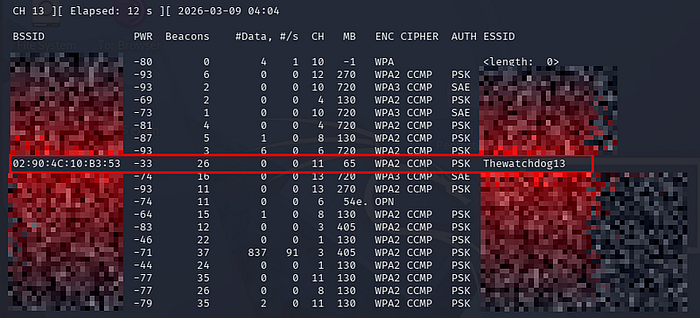
The scan output showed all nearby networks, including SSID, BSSID, encryption type, and signal strength. I identified my own network from the list.
Once my network was identified, I captured packets to observe the traffic. Importantly, I did not connect to the network, demonstrating that Wi-Fi traffic can be passively captured when the adapter is in monitor mode.
sudo airodump-ng - bssid 02:90:4c:10:B3:53 - channel 11 - write test wlan0I saved the captured packets for analysis in Wireshark.
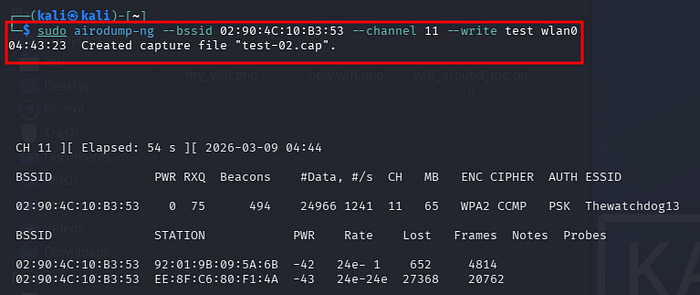
I saved the captured packets for analysis in Wireshark.
Wireshark provided a detailed view of the captured packets. I could inspect:
- Management frames (beacon, authentication)
- Control frames (acknowledgments)
- Data frames (encrypted, but showing metadata such as source/destination)
This hands-on analysis was invaluable for understanding how Wi-Fi networks communicate, even without connecting to them.
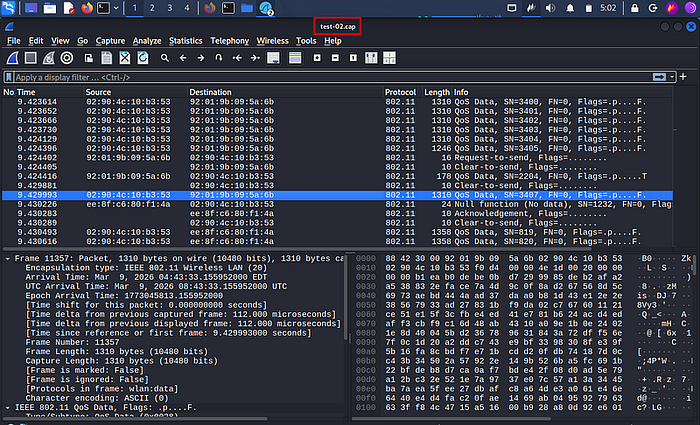
This hands-on analysis was invaluable for understanding how Wi-Fi networks communicate, even without connecting to them.
From this lab, I learned:
- Monitor mode is essential for observing wireless traffic passively.
- Wi-Fi packets broadcast metadata (like SSID and MAC addresses), even if the network is encrypted.
- Tools like Wireshark allow deep inspection of network traffic, which is essential for understanding wireless security.
- Ethical considerations are critical — only test networks you own or have permission to test.
Conclusion
This home lab was a great first step into wireless security and packet analysis. By safely experimenting on my own network, I gained practical skills in:
- Setting up and using a monitor-mode wireless adapter
- Scanning and identifying Wi-Fi networks
- Capturing and analyzing network traffic
Next steps for me include learning about WPA2 handshake captures and ethical penetration testing in controlled environments.
Ethics Disclaimer
All testing was performed on my own home network. Never attempt to capture traffic or perform penetration testing on networks you do not own or do not have explicit permission to test. Unauthorized activity is illegal.