
In this room, we will learn how to hunt these vulnerabilities in digital devices, as well as some tools to automate this hunting and utilize one of the tools to see how it is done.
Learning Objectives:
- Understand the vulnerability scanning and its types
- Learn the tools used for vulnerability scanning
- Understand OpenVAS vulnerability scanner demonstration
- Get hands-on experience from practical exercise
— — — — — — — — — — — — — — — — — — — — — — — — — — — — — — — —
This room consists of 6 tasks: 1. What Are Vulnerabilities? 2. Vulnerability Scanning 3. Tools for Vulnerability Scanning 4. CVE & CVSS 5. OpenVAS 6. Practical Exercise
I will walkthrough each room with my own answer method
===============================================================
- Task 1: What Are Vulnerabilities?
Vulnerabilities simply means the weaknesses that exists in the system, which might lead to significant problems in the future if not addressed properly and punctually. The name of the process of fixing the vulnerabilities is called Patching. Vulnerabilities might occur inside the software or hardware, where attacker can leverage to compromise the digital device.
Q1) What is the process of fixing the vulnerabilities called?
Answer: Patching
===============================================================
- Task 2: Vulnerability Scanning
The way to inspect digital systems to find weaknesses is basically called Vulnerability Scanning. It is also crucial to be done regularly especially in a big company, in case of the existence of vulnerabilities.
Manually conducting the vulnerability scanning will take lots of time and effort. However, thanks to automated vulnerability scanning, they made our life much easier, as we can just utilize those automated tools. We just need to install one of them and give it an IP address for a host or a network range for a network, and ultimately provide us an easy-to-read report with the details vulnerabilities found.
Vulnerabilities scan can be categorized into many types, but the major categorization of these scans are explained below:
- Authenticated vs Unauthenticated Scans Authenticated scans require host credentials to examine the internal configurations and applications for threats that could be exploited by someone with system access. Unauthenticated Scans only need a network address to probe for vulnerabilities exploitable by an external attacker without any special access. They are simpler to execute and reveal the threat surface from an outsider's point of view.
- Internal vs External Scans Internal Scans are performed within a network's perimeter to identify vulnerabilities accessible to threats already inside. They help assess the damage potential and lateral movement risk after a security breach. External Scans target the publicly accessible interfaces of a network from the outside. This activity also often refers to mimicking an attacker's approach to find entry points from the internet.
Q1) Which type of vulnerability scans require the credentials of the target host?
Answer: Authenticated
Q2) Which type of vulnerability scan focuses on identifying the vulnerabilities that can be exploited from outside the network?
Answer: External
===============================================================
- Task 3: Tools for Vulnerability Scanning
There are many tools available for performing automated vulnerability scanning, where each of them offers unique features. In this task, we will briefly discuss some of them:
- Nessus: originally open-source, now a proprietary tool by Tenable, which offers both limited free and comprehensive paid versions. It is an on-premises solution popular in large enterprises for its extensive vulnerability scanning capabilities.
- Qualys: A cloud-based subscription service that provides continuous vulnerability scanning, compliance checks, and asset management without requiring on-premises hardware. It automates monitoring and alerts based on discovered vulnerabilities.
- Nexpose: A subscription-based tool from Rapid7 that performs continuous asset discovery and scanning. It assigns risk scores based on asset value and vulnerability impact. Moreover, Nexpose also supports both on-premises and hybrid (cloud and on-premises) deployments and includes compliance checking.
- OpenVAS (Open Vulnerability Assessment System): An open-source vulnerability scanner maintained by Greenbone Security, where it provides basic scanning against a known vulnerability database. While less extensive than commercial tools, it offers a complete scanner experience. (will be discussed further in the next task)
Q1) Is Nessus currently an open-source vulnerability scanner? (Yea/Nay)
Answer: Nay
Q2) Which company developed the Nexpose vulnerability scanner?
Answer: Rapid7
Q3) What is the name of the open-source vulnerability scanner developed by Greenbone Security?
Answer: OpenVAS
===============================================================
- Task 4: CVE & CVSS
CVE stands for Common Vulnerabilities and Exposures. As it has a unique number for each of them (developed by MITRE Corporation), we can easily search it through CVE database. This is to make people aware of these vulnerabilities so they can apply protective measures to remediate them.
Here is the example of one of the CVE number: CVE — 2024–9374
- CVE prefix: Every CVE number has the prefix "CVE" in the beginning.
- Year: Next on the second part, is the year when that vulnerability is discovered (e.g. 2024)
- Arbitrary Digits: The last part contains four or more arbitrary digits (e.g. 9374)
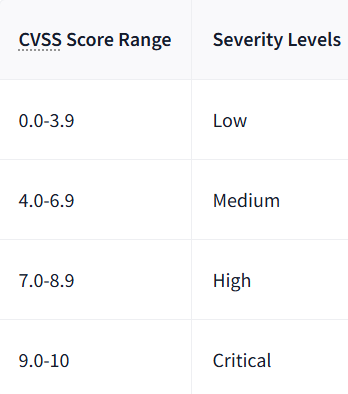
CVSS stands for Common Vulnerability Scoring System, where this is to make us aware which vulnerability should be prioritized first . In the computing world, just as each vulnerability has a CVE number (uniquely identified), and each of them has a CVSS Score telling us its severity.
Q1) CVE stands for?
Answer: Common Vulnerabilities and Exposures
Q2) Which organization developed CVE?
Answer: MITRE Corporation
Q3) What would be the severity level of the vulnerability with a score of 5.3?
Answer: Medium
===============================================================
- Task 5: OpenVAS
The installation of OpenVAS might be very hectic since it has many dependencies. That's why, we will use docker (container) to install OpenVAS
let's run this command on our Ubuntu machine : sudo apt install docker.io
After installing it, we can proceed to install OpenVAS within a docker container. We will use the docker image provided by Immauss as it fits everything within a single docker image. Please run this command: sudo docker run -d -p 443:443 — name openvas immauss/openvas
Once we are done with this, we can now access the OpenVAS web interface by opening any of our browser and typing the following in the URL (use localhost IP address): https://127.0.0.1
And the interface should be like this:
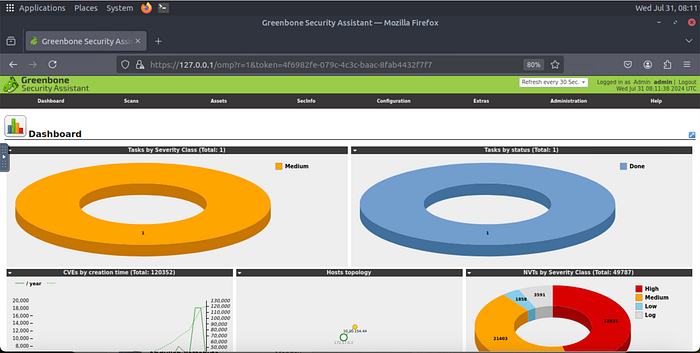
Q1) What is the IP address of the machine scanned in this task?
Answer: 10.10.154.44
Q2) How many vulnerabilities were discovered on this host?
Answer: 13
===============================================================
- Task 6: Practical Exercise
In this task, we will be doing a practical exercise about using OpenVAS to scan the vulnerabilities. Given the scenario that we are the information security engineer working on the reputable firm, and this firm currently needs to do a vulnerability scan on a server (10.49.187.8).
We have to start the OpenVas via Linux Machine, then type this URL in our browser: https://127.0.0.1/login/login.html
where, our login credentials are: Usn: admin Pass: admin

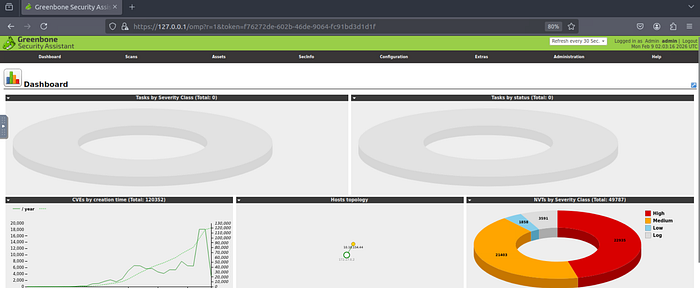
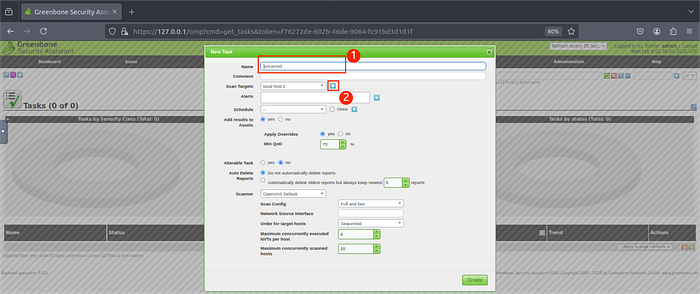
To start scanning the IP address, we have to create the new task. For reference, please view the image attached below.
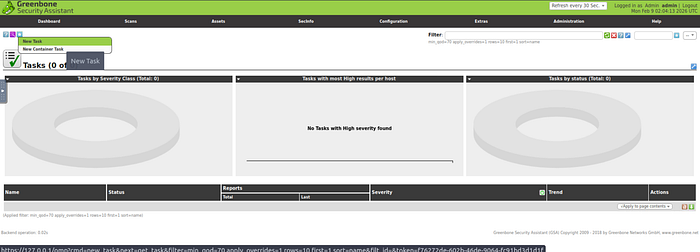
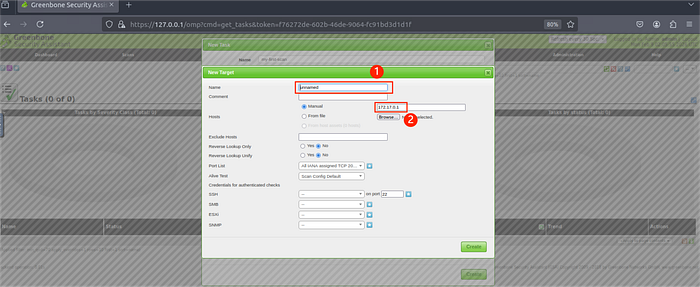
Then, we can put the Name(marked by "1") and click the star to put the IP address(marked by "2")
Once, it is clicked, please enter the Machine name and its IP address
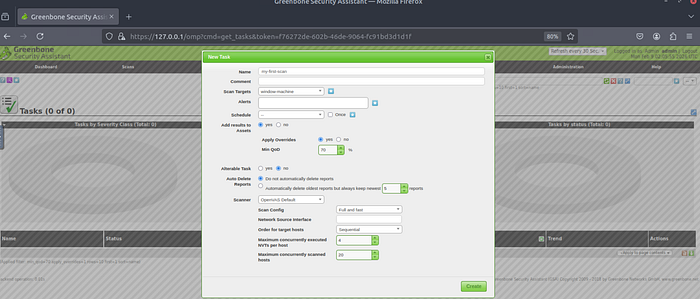
Then we can simply click "Create"
To execute the scanning, we have to click the "play" button on the "Action" card on the bottom right
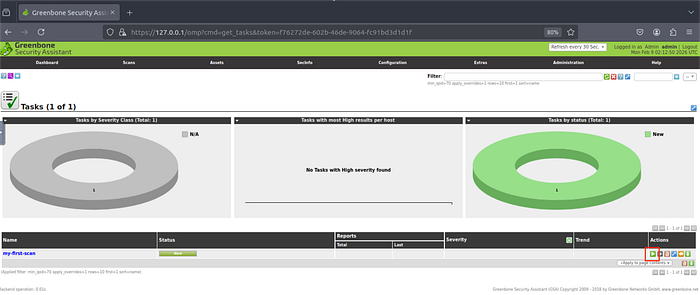
Once the scan is done, we can see the severity level. In addition, in order to view the more detail information, we can click on the Task Name on the left hand side
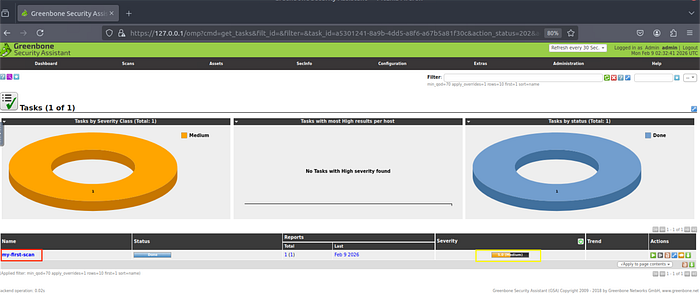
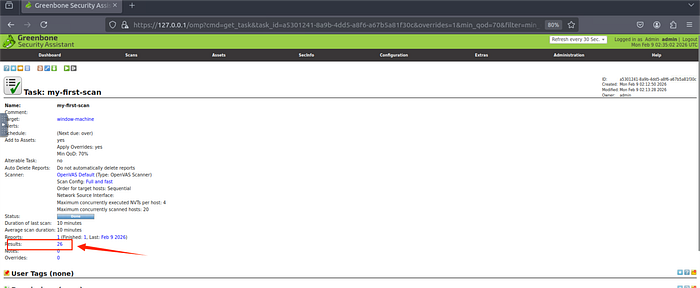
Then, we can click on the "Results" to see each vulnerabilities
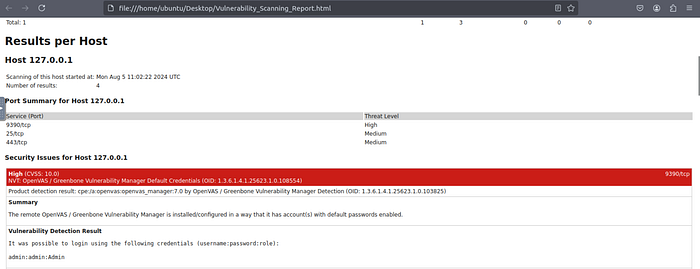
So, as we can see on the image attached above, there is a high-level severity vulnerabilities scanned.
Q1) What is the score of the single high-severity vulnerability found in the scan?
Answer: 10
Q2) What is the solution suggested by OpenVAS for this vulnerability?
Answer: Change the password of the mentioned account(s).
===============================================================