As part of my cybersecurity learning journey, I worked on a beginner-level malware traffic analysis using Wireshark. The goal was simple but important: understand how malware communicates over a network and learn how to trace its behavior from start to finish.
In this investigation, I analyzed a PCAP file containing malicious traffic and uncovered how an infected system communicated with external servers, leading to the download of a suspicious executable file.
Objective of the Investigation
The main goals of this analysis were: • Identify the infected host in the network • Analyze suspicious traffic patterns • Trace the malware delivery chain • Understand basic malware behavior
Tools Used: • Wireshark • Kali Linux Terminal • Mozilla Firefox (Virustotal)
Initial Investigation
After opening the PCAP file in Wireshark, the first thing I focused on was identifying the infected host.
By examining the first few packets, I noticed a private IP address consistently sending traffic to external public IPs. This stood out immediately as suspicious behavior.
The IP address identified was:
10.12.13.103
This became my primary focus for the investigation.

Isolating Suspicious Traffic
To narrow down the analysis, I applied a filter:
ip.src == 10.12.13.103 and tcp
This helped me isolate outgoing TCP traffic from the suspected infected host.
After applying the filter, I began analyzing individual packets and following TCP streams to understand what was happening.

First Suspicious Connection
The first major finding was a TCP connection initiated by the infected host to a public IP address 104.28.11.141.
After following the TCP stream, I observed an HTTP GET request sent to:
www.domaincop247.com (PLEASE DO NOT VISIT THE SITE)
The HTTP GET request contained a long and seemingly random path made up of alphanumeric characters. Unlike typical web requests with readable paths such as /login or /home, this pattern appeared obfuscated and non-human-readable, which is often associated with malicious or dynamically generated requests used in malware delivery.

Redirection Behavior (Key Indicator)
After the initial GET request, the server responded with:
HTTP/1.1 302 Moved Temporarily
This means the request was redirected to another URL:
http://report.domaincop247.com/view/download.php?download_file=Domain_Abuse_Report_Viewer.js (DO NOT CLICK THE LINK)
This is a critical moment in the attack chain.
Attackers often use redirection to: • Hide the actual payload source • Evade detection • Make analysis more difficult

JavaScript Payload Delivery
Following the redirect, I observed another GET request to:
report.domaincop247.com with public IPaddress 104.28.10.141.
The server responded with: • HTTP 200 OK • Content-Type: application/js • File: Domain_Abuse_Report_Viewer.js
This indicates that a JavaScript file was delivered to the victim system.
Further inspection showed that the script was obfuscated, which is a common technique used by attackers to hide malicious intent.
Download of Executable File
While analyzing further traffic, I observed another GET request to IP 185.153.198.117 for a file: File.exe
This is a major red flag.
The server responded with: • HTTP 200 OK • Content-Type: application/octet-stream
This tells the browser to download and run the file instead of displaying it.

Critical Discovery: MZ Signature
While inspecting the TCP stream, I noticed a string:
MZ… This program cannot be run in DOS mode
This is extremely important.
The MZ signature indicates that the file being transferred is a Windows executable file.
At this point, it strongly suggests that malware was downloaded onto the system.

File Extraction and Verification
To confirm my findings, I extracted the file using:
File → Export Objects → HTTP
After saving the file, I generated its SHA256 hash using:
sha256sum "filename".exe
I then checked the hash through virustotal.com and confirmed that the file was flagged as malicious.


Reconstructing the Attack Chain
From the analysis, the attack flow looks like this: 1. Infected host (10.12.13.103) sends HTTP request 2. Connects to domaincop247.com 3. Server responds with 302 redirect 4. Redirect leads to report.domaincop247.com 5. JavaScript file is downloaded 6. Additional request downloads File.exe 7. Executable (malware) is delivered and likely executed
Malware Behavior Analysis (Post-Infection)
After confirming that the malware had been downloaded, I proceeded to analyze how it behaved on the network.
Revisiting HTTP Traffic
To ensure nothing was missed, I revisited HTTP streams and observed another request to IP 37.10.71.202 that resulted in:
HTTP 302 Found
This redirected traffic to location "/0123–4567–89AB-CDEF-0123/intro?nst"
This reinforced the pattern of redirection observed earlier.

Expanding the Scope
Since TCP traffic didn't reveal much, I broadened the filter: ip.src == 10.12.13.103
This exposed a new pattern of behavior.
Discovery of Sequential IP Pattern
I observed that the infected host began sending packets to multiple IP addresses in a sequential and looping pattern:
- 15.49.2.0 → 15.49.2.31
- 122.1.13.0 → 122.1.13.31
- 194.165.16.0 → 194.165.16.255
- 194.165.17.0 → 194.165.17.255
- Then looping back to 15.49.2.0, and the cycle starts again.
All these traffic was carried out on an Ephemeral (Dynamic) port "54972"
This pattern repeated multiple times, all on UDP. This revealed that the suspicious activity was primarily UDP-based.


Loop Characteristics
Each loop differed in size:
- First loop (15.49.2.0 → 194.165.17.255) = 10 bytes per packet.
- Second loop (15.49.2.0 → 194.165.17.255) = 24 bytes per packet.
- Last loop (15.49.2.0 → 194.165.17.255) = 14 bytes per packet.
This is not typical user behavior.
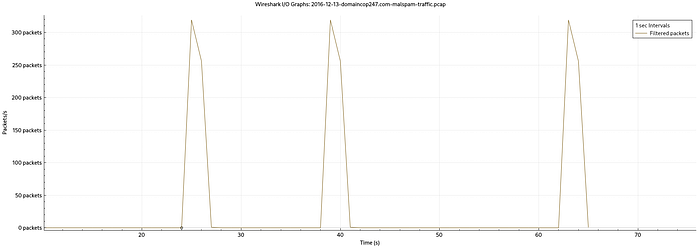
I/O Graph Analysis
Using:
Statistics → I/O Graph
I configured:
- Interval: 1 second
- Filter: UDP traffic
The graph showed clear burst patterns.
Burst Traffic Observations
- Interval 24s → 0 packets
- Interval 25s → 319 packets
- Interval 26s → 256 packets
- Interval 27s → 1 packet
- Interval 28s → 0 packet
Then a pause…
- Interval 39s → 319 packets
- Interval 40s → 256 packets
- Interval 41s → 1 packet
- Interval 42 s → 0 packet
Another pause….
- Interval 63s → 319 packets
- Interval 64s → 256 packets
- Interval 65s → 1 packet
Behavior Interpretation
This pattern suggests:
Scanning Activity
The malware is likely probing multiple IP addresses sequentially.
Predefined Targets
The structured IP sequence suggests the malware is using predefined IP ranges.
Beaconing Pattern
The burst → pause → burst pattern indicates controlled automated behavior designed to avoid detection.
Key Malware Behavior Takeaway
From the observed traffic:
- Activity began after malware execution
- Post-infection malicious traffic was primarily UDP-based
- Sequential IP targeting was observed
- Burst patterns confirmed automated behavior
This strongly indicates network scanning activity, commonly seen in worm-like malware or botnet behavior.
Indicators of Compromise (IOCs)
- Infected Host: 10.12.13.103
- Malicious Domains: domaincop247.com, report.domaincop247.com
- External IPs: 104.28.11.141, 104.28.10.141, 185.153.198.117, 37.10.71.202
- Suspicious Files: Domain_Abuse_Report_Viewer.js, Malicious executable (File.exe).
Key Takeaways
- Redirects often hide payload delivery.
- File signatures like MZ are critical indicators.
- Obfuscated scripts are suspicious
- Post-infection traffic reveals true malware intent.
Conclusion
This investigation demonstrated how network traffic analysis can uncover both the initial infection chain and the behavior of malware after execution.
By carefully analyzing packets, following streams, and visualizing traffic patterns, I was able to move from simple detection to understanding how the malware operates on a network.