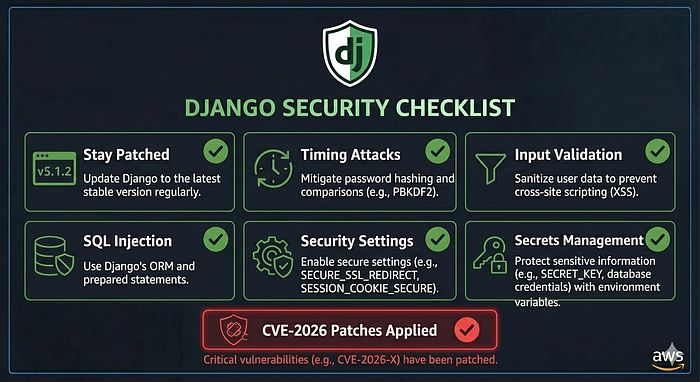

In February 2026, the Django security team issued patches for six vulnerabilities across Django 6.0, 5.2, and 4.2. The patches themselves are straightforward to apply. What is less straightforward is understanding what they reveal about the security risks that persist in Django codebases that are not keeping up.
This is not a post about patching. You should already be on the latest release. This is about what the recent vulnerabilities tell us about the broader security patterns every Django developer needs to get right in production.
What the Recent CVEs Actually Revealed
The Django security team published a notable observation alongside the February 2026 patches: almost every report they receive now is a variation on a prior vulnerability. The same underlying patterns surfacing in similar code paths or under slightly different configurations.
That is a significant signal. It means the attack surface is not expanding in novel directions — it is being exploited in predictable ways that existing Django codebases are not adequately defended against.
The six patched vulnerabilities covered three categories: user enumeration via timing attacks, denial-of-service through malformed input handling, and SQL injection through unsanitized input passed to ORM features. None of these are new classes of problem. All of them have appeared before. All of them are appearing again.
Here is what you need to fix and verify in your own codebase.
1. Upgrade and Stay Current
The most important security action is also the most ignored: run a supported, patched Django version in production.
Django 4.2 LTS is supported until April 2026. If you are on it, you are approaching end of support and need a migration plan to Django 5.2 LTS now, not when the deadline passes. Django 5.2 LTS is supported through April 2028.
Anything below 4.2 is receiving no security patches at all. Running Django 3.x or earlier in production in 2026 means running known, unpatched vulnerabilities in a public-facing system.
Check your version:
python -m django --versionIf you are not on a currently supported release, upgrading is the single highest-impact security action available to you. Everything else in this article assumes you are on a patched version.
2. Timing Attack Vulnerabilities — User Enumeration
One of the February patches addressed a timing attack in Django's mod_wsgi authentication handler that allowed remote attackers to enumerate valid usernames by measuring response time differences between valid and invalid users.
The underlying pattern — response time differences leaking information about internal state — appears throughout web applications in ways Django cannot protect you from automatically.
Audit these patterns in your own codebase:
Login endpoints should return the same response time whether the username exists or not. If your login view fetches the user first and then checks the password, a missing user returns faster than an existing user with a wrong password. This tells an attacker which usernames are valid.
# Vulnerable pattern — timing difference reveals valid usernames
try:
    user = User.objects.get(email=email)
    if not user.check_password(password):
        return error_response()
except User.DoesNotExist:
    return error_response()  # Returns faster — username enumerated
# Better — always run the password check
from django.contrib.auth.hashers import check_password
user = User.objects.filter(email=email).first()
dummy_hash = make_password("dummy")
check_password(password, user.password if user else dummy_hash)
if not user or not authenticated:
    return error_response()
Password reset flows should return the same message whether the email address exists in the system or not. "If an account exists with this email, you will receive a reset link" — not "No account found with this email." The latter tells an attacker which email addresses are registered.
Account existence checks anywhere in your API — profile lookups, invitation flows, contact search — should be rate-limited and should not return distinguishably different responses for existing vs non-existing records when that information should not be public.
3. Denial-of-Service Through Malformed Input
Two of the February patches addressed denial-of-service vulnerabilities triggered by malformed input — one through repeated duplicate headers in ASGI requests causing super-linear computation, another through deeply nested entities in the XML serializer.
The pattern is the same in both: unvalidated input triggering expensive computation proportional to input size or complexity.
Your codebase almost certainly has similar patterns if you are not explicitly defending against them:
Request body size limits — set DATA_UPLOAD_MAX_MEMORY_SIZE and DATA_UPLOAD_MAX_NUMBER_FIELDS in your Django settings. The defaults are permissive. An attacker sending a request with thousands of form fields causes Django to allocate memory for each one.
# settings/production.py
DATA_UPLOAD_MAX_MEMORY_SIZE = 5 * 1024 * 1024  # 5MB
DATA_UPLOAD_MAX_NUMBER_FIELDS = 100
DATA_UPLOAD_MAX_NUMBER_FILES = 10
File upload limits — set FILE_UPLOAD_MAX_MEMORY_SIZE explicitly. Configure Nginx's client_max_body_size to reject oversized requests before they reach Django at all.
# nginx.conf
client_max_body_size 10M;
Deeply nested JSON — if your API accepts arbitrary JSON input, deeply nested structures cause recursive parsing that consumes stack space and CPU. Validate input structure at the serializer level before any processing occurs.
Rate limiting — add rate limiting at the Nginx or application level on all public-facing endpoints, especially authentication, password reset, and any endpoint that accepts user input and performs computation. djangorestframework has built-in throttling:
REST_FRAMEWORK = {
    'DEFAULT_THROTTLE_CLASSES': [
        'rest_framework.throttling.AnonRateThrottle',
        'rest_framework.throttling.UserRateThrottle',
    ],
    'DEFAULT_THROTTLE_RATES': {
        'anon': '20/minute',
        'user': '100/minute',
    }
}
4. SQL Injection Through ORM Misuse
Three of the February patches addressed SQL injection vulnerabilities. All three shared the same root cause: developer-controlled values being passed unsanitized into ORM features that construct raw SQL.
Django's ORM is safe by default when used correctly. SQL injection enters through the gaps: RawSQL, .extra(), .raw(), and — as the recent patches showed — passing user-controlled values as column names or annotation aliases in certain ORM operations.
The rules:
Never pass user input directly to raw query methods. If you are using Model.objects.raw(), connection.cursor(), or RawSQL, every parameter must go through Django's parameterization, never string concatenation.
# Never do this
query = f"SELECT * FROM orders WHERE status = '{user_input}'"
Order.objects.raw(query)
# Always do this
Order.objects.raw(
    "SELECT * FROM orders WHERE status = %s",
    [user_input]
)
Never unpack **kwargs directly into ORM filter calls with user-controlled keys. This is the pattern behind multiple Django CVEs including recent ones. If users can control the field names being filtered on, they can inject ORM lookups that expose data they should not see.
# Dangerous — user controls filter field names
filters = request.data.get('filters', {})
queryset = Order.objects.filter(**filters)  # Never do this
# Safe — whitelist allowed filter fields
ALLOWED_FILTERS = {'status', 'created_at', 'total'}
filters = {
    k: v for k, v in request.data.items()
    if k in ALLOWED_FILTERS
}
queryset = Order.objects.filter(**filters)
Avoid passing user input as column aliases or annotation names. The recent CVE-2026–1287 and CVE-2026–1312 patches targeted user-controlled column aliases. If your application lets users name aggregations or configure reports dynamically, those names must be validated against an explicit whitelist before being used in ORM annotations.
5. The Security Settings Checklist
Beyond the specific CVE patterns, run python manage.py check --deploy against your production settings. Django will tell you about misconfigured security settings directly:
python manage.py check --deployThe settings it checks that are most commonly wrong in production:
# settings/production.py
# HTTPS enforcement
SECURE_SSL_REDIRECT = True
SECURE_HSTS_SECONDS = 31536000  # 1 year
SECURE_HSTS_INCLUDE_SUBDOMAINS = True
SECURE_HSTS_PRELOAD = True
# Cookie security
SESSION_COOKIE_SECURE = True
SESSION_COOKIE_HTTPONLY = True
CSRF_COOKIE_SECURE = True
# Content security
X_FRAME_OPTIONS = 'DENY'
SECURE_CONTENT_TYPE_NOSNIFF = True
SECURE_BROWSER_XSS_FILTER = True
# Production-only
DEBUG = False
ALLOWED_HOSTS = ['yourdomain.com', 'www.yourdomain.com']
SECRET_KEY = env('SECRET_KEY')  # Never hardcoded
Every one of these has a default that is permissive for development and wrong for production. manage.py check --deploy catches most of them. Run it. Fix what it reports.
6. Dependency Scanning
Django itself is only one part of your security surface. Your installed packages — DRF, Celery, Pillow, boto3, every library in your requirements.txt — each carry their own vulnerability history.
Run pip audit regularly:
pip install pip-audit
pip-audit
Add it to your CI pipeline so every pull request checks for known vulnerabilities in dependencies before merging. A Django application running a patched Django version on top of a vulnerable version of Pillow or cryptography is still a vulnerable Django application.
7. Secrets Management
The most common security failure in Django production deployments is not a framework vulnerability. It is a hardcoded secret key, a database password in a committed .env file, or an AWS access key in version control.
Audit your repository history for accidentally committed secrets:
pip install trufflehog
trufflehog git file://. --only-verified
Use environment variables for all secrets. Rotate your SECRET_KEY if there is any possibility it was ever committed to version control — existing sessions will be invalidated but the alternative is an attacker who can forge session cookies.
For production at any meaningful scale, use AWS Secrets Manager or Parameter Store rather than .env files on the server. Secrets Manager handles rotation, access control, and audit logging automatically.
What This Adds Up To
The recent CVE patches are a prompt, not a complete solution. Applying them closes the specific vulnerabilities the Django team found. It does not close the underlying patterns — timing side channels, unbounded input processing, ORM misuse — that produced those vulnerabilities and will produce future ones.
A Django application is secure in production when it runs a patched version, validates and bounds all input, uses the ORM correctly, enforces HTTPS and secure cookie settings, manages secrets properly, and scans its dependencies regularly. Each of these is independently necessary. None of them alone is sufficient.
I build and harden Django backends for production SaaS products. If your application needs a security review or a production-ready deployment that gets these fundamentals right from the start, my Upwork profile is linked in the comments.