I built BUGTROTTER — a Kali Linux Docker container exposed as an MCP server. Claude Code connects to it and drives the full AD attack chain from a single conversation
The Problem
Every AD engagement follows the same kill chain. External recon, web exploitation, foothold, pivot, internal recon, lateral movement, domain compromise, forest compromise. Nine phases. Fifteen tools. Hundreds of flags.
The problem isn't knowing the technique. It's execution under pressure. You have a foothold, a second NIC staring at the internal subnet, and you're staring at a blank terminal trying to remember the exact impacket-ticketer flags for a cross-domain Golden Ticket. You re-Google it. You find a three-year-old blog post. The flags are slightly wrong for your version. You open another tab.
Meanwhile your session dropped.
This is the real friction in AD red teaming — not skill, but context-switching. You are the connective tissue between fifteen tools, and every switch is a place to lose state, make a mistake, or just waste time you don't have.
I wanted to remove that friction without removing the learning. So I built BUGTROTTER.
The Tool — BUGTROTTER
BUGTROTTER is a Kali Linux Docker container exposed as an MCP (Model Context Protocol) server. Claude Code connects to it directly and drives the entire attack chain through conversation.
You describe what you found. Claude reads the knowledge base, picks the right tool, runs it inside the container, and tells you what to do next. You stay in one terminal window from Phase 1 through Phase 9.
You: "I found port 445 open. Creds: jsmith:Password1."
Claude: [reads attack_index.md — tag: port445]
        [runs enum4linux-ng]
        [runs netexec smb — sees Pwn3d!]
        [runs netexec --lsa]
        [saves creds to disk]
        [runs bloodhound-python]
        [queries Neo4j — finds path to Domain Admin]
        "Path found: jsmith → WriteDACL → svc_backup → Domain Admins.
         Here's the next command."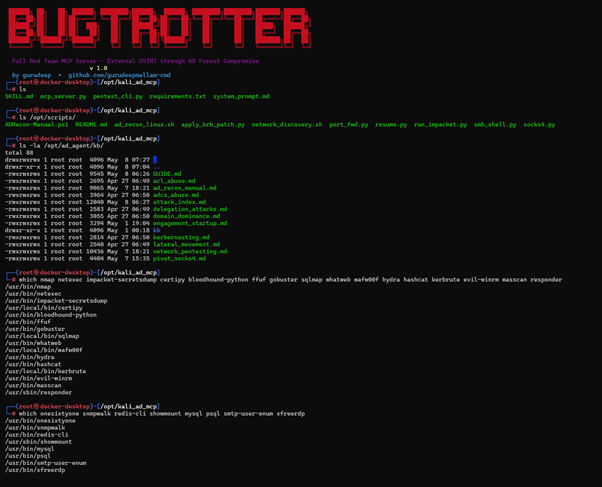
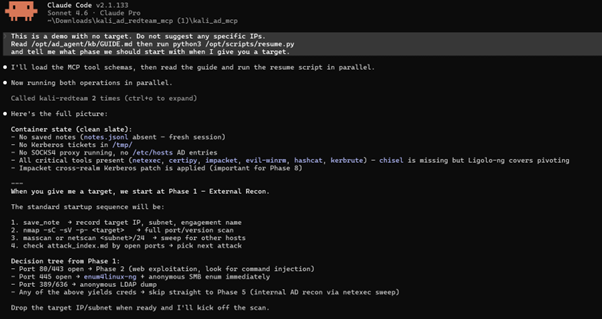
That sequence — eight tool calls, full BloodHound ingest, path analysis — happens from one message.
Why This Makes You Better, Not Just Faster
This is the part worth thinking about.
When Claude runs an attack, it reads the knowledge base first. Every time. You can follow along — you see exactly which file it read, which attack it looked up, which flags it chose and why. Over time you stop Googling impacket syntax not because Claude does it for you, but because you've seen it run correctly a hundred times.
The KB structure itself is a learning resource. attack_index.md indexes every attack by port, CVE, phase, and technique. When Claude searches port445 and finds EternalBlue, enum4linux-ng, and SMB relay as sequential options, you're watching a decision tree you can internalize.
The EDR-safe path teaches you something most tooling skips. When external tools are blocked, Claude reads ad_recon_manual.md and switches to Windows built-ins:
cmd
whoami /all
nltest /domain_trusts /all_trusts
net group "Domain Admins" /domain
No downloads, no suspicious binaries. You don't need a tool to enumerate AD — you need to know the right built-in commands. Working through BUGTROTTER's EDR path forces you to understand those commands because Claude explains what each one returns and why it matters for the next step.
State persistence is the last piece. Every credential, hash, ticket, and phase state is written to disk via save_note. New session, get_notes, full context restored. When you pick up an engagement after a week, you're not reconstructing from notes scattered across three files — you have a clean record of exactly where you are and what you found. That discipline of tracking state properly is a skill on its own.
The Communication Choice — Why stdio
MCP supports multiple transports. I chose stdio — standard input/output — and the configuration is this simple:
json
{
  "mcpServers": {
    "kali-redteam": {
      "command": "docker",
      "args": ["exec", "-i", "kali-rt", "python3", "/opt/kali_ad_mcp/mcp_server.py"]
    }
  }
}
When you run claude from the repo directory, Claude Code spawns this process. The -i flag on docker exec keeps stdin open. From that point, Claude Code and the MCP server communicate through the process's stdin and stdout — a bidirectional byte stream.
Every message is JSON-RPC 2.0, framed by newlines. Claude sending a tool call looks like:
json
{
  "jsonrpc": "2.0",
  "id": 1,
  "method": "tools/call",
  "params": {
    "name": "run_shell",
    "arguments": { "command": "nmap -sC -sV 10.10.10.5" }
  }
}
The MCP server reads from stdin, runs the command, writes the result back to stdout:
json
{
  "jsonrpc": "2.0",
  "id": 1,
  "result": {
    "content": [{ "type": "text", "text": "PORT   STATE SERVICE\n445/tcp open..." }]
  }
}
This is the same framing LSP (Language Server Protocol) uses for editor integrations. Request, response, next request — synchronous by design, so Claude never acts on stale output.
Why not HTTP? Persistent web server, port binding, auth layer, reconnection logic on restart. That's overhead for what is fundamentally a request-response loop.
Why not WebSocket? Same server requirement, plus connection management. WebSocket can push unsolicited messages to Claude — useful in some contexts, unnecessary complexity here.
Why not named pipes? Unix-only, kernel buffer limits that deadlock under large nmap output, and they don't cross the Docker boundary cleanly.
stdio via docker exec -i starts when Claude Code starts, ends when you exit, and requires zero configuration. The security boundary is Docker itself.
The Architecture
┌──────────────────────────────────────────────────────┐
│                    Your Machine                      │
│                                                      │
│   Claude Code ──── reads ──→ SKILL.md                │
│        │                    GUIDE.md                 │
│        │                    attack_index.md          │
│        │                                             │
│        │  JSON-RPC 2.0 over stdin/stdout             │
│        │  docker exec -i kali-rt python3 mcp.py      │
└────────┼─────────────────────────────────────────────┘
         │
         ▼  (bidirectional byte stream)
┌──────────────────────────────────────────────────────┐
│           BUGTROTTER Container (kali-rt)             │
│                                                      │
│   mcp_server.py          ←→  run_shell               │
│                               read_file              │
│                               save_note / get_notes  │
│                               bloodhound_query       │
│                               crack_hint             │
│                               port_check             │
│                                                      │
│   /opt/ad_agent/kb/      ←  11 KB guides (mounted)  │
│   /opt/loot/             ←  named Docker volume      │
│   /opt/scripts/          ←  automation scripts       │
│   Neo4j                  ←  BloodHound graph backend │
└──────────────────────────────────────────────────────┘
The Knowledge Base — 11 Specialist Files
Claude does not rely on training memory for tool syntax. It reads the KB before acting.
FileCoversGUIDE.mdFull container map — every path, phase command, session checklistattack_index.mdEvery attack tagged by port, CVE, phase, techniquenetwork_pentesting.mdPer-service attacks: FTP, SSH, SMTP, SMB, RDP, Redis, MySQL, PostgreSQL, NFSkerberoasting.mdAS-REP roasting, Kerberoasting, hashcat modesadcs_abuse.mdESC1–ESC8 with exact certipy commandsacl_abuse.mdWriteDACL, GenericAll, ForceChangePassword, AddMemberdelegation_attacks.mdUnconstrained, constrained, RBCD, Shadow Credentialslateral_movement.mdPTH, PTT, Overpass-the-Hash, WinRM, PSExec, LSA/SAM dumpdomain_dominance.mdDCSync, Golden/Silver Ticket, SID history, forest compromisepivot_socks4.mdSOCKS4 proxy setup and run_impacket.py usagead_recon_manual.mdWindows built-ins and PowerShell-only enumeration for EDR environments
The KB directory is live-mounted from the host:
yaml
volumes:
  - ./ad_agent/kb:/opt/ad_agent/kb
Edit any file on your host — Claude reads the update on next call. No rebuild, no restart.
Persistence — Named Docker Volume
Every finding goes to /opt/loot/notes.jsonl on a named volume. save_note writes it, get_notes restores it. docker-compose down does not touch it. The only thing that deletes loot is docker-compose down -v, which you only run intentionally.
Automation Scripts
Beyond what Claude drives, the container ships scripts for manual use:
ScriptWhat it doesresume.pySession health — proxy status, loaded tickets, saved notesnetscan (network_discovery.sh)Ping sweep + service role ID + quick vuln checksadrecon (ad_recon_linux.sh)DNS → LDAP → RPC → SMB in one shot from Linuxsocks4.pySOCKS4 proxy over SSH via paramiko — no TTY requiredrun_impacket.pyRoutes all impacket tools through SOCKS4 transparentlyADRecon-Manual.ps1PowerShell-only AD enumeration — no external tools, EDR-safe
The Pivot Problem
The standard Layer 3 tunnel for AD engagements is Ligolo-ng. But Ligolo has an interactive TUI — type session, press Enter, type start. That needs a TTY.
MCP run_shell has no TTY. It's a non-interactive stdin/stdout pipe. Run Ligolo through it and it hangs.
socks4.py handles this. It uses paramiko's direct-tcpip channels to create SSH port-forwards programmatically — no interactive shell, no TTY allocation, no terminal emulation. Raw TCP forwarded through SSH.
bash
nohup python3 /opt/scripts/socks4.py > /tmp/socks4.log 2>&1 &
grep 'SSH connected' /tmp/socks4.log
Once the proxy is up, run_impacket.py patches socket.socket.connect at runtime:
python
# Before: secretsdump → connect(192.168.10.20:445) → no route
# After:  secretsdump → connect(127.0.0.1:1080)    → SSH channel → 192.168.10.20:445
Every impacket tool — secretsdump, ticketer, getST, psexec, GetUserSPNs — routes through the proxy with zero changes to the tools themselves.
When psexec and wmiexec both fail, smb_shell.py runs commands via SCM service and SMB file read. No callback, no listener, works through the SOCKS proxy. That is the last fallback before moving to WinRM or other paths.
The 9-Phase Kill Chain
PhaseGoalKey tools1 — External ReconMap DMZ, find attack surfacenmap, masscan, dnsrecon, whatweb2 — Web ExploitationRCE, SQLi, file uploadgobuster, ffuf, sqlmap, curl injection3 — Post-ExploitationCreds, second NIC, Firefox loginssqlite3, bash history, find4 — PivotingRoute to internal subnetsocks4.py, run_impacket.py, Ligolo-ng5 — Internal AD ReconMap users, groups, pathsbloodhound-python, netexec, ldapsearch6 — Lateral MovementMove to high-value hostsPTH, LSA dump, evil-winrm, psexec7 — Child DomainDump child krbtgt + SIDssecretsdump, lookupsid8 — Forest CompromiseGolden Ticket, parent DAticketer, getST, secretsdump9 — ADCS AbuseCert-based admin accesscertipy ESC1–ESC8
What I Used This On
BUGTROTTER was developed and tested against authorised vulnerable lab environments. The full chain — external recon through cross-domain Golden Ticket to parent DC Administrator — ran end-to-end with Claude driving every step.
Running It
Prerequisites: Docker Desktop · Node.js 18+ · Claude Code
bash
git clone https://github.com/gurudeepmallam-cmd/bugtrotter
cd bugtrotter
docker-compose build && docker-compose up -d
docker exec kali-rt python3 /opt/scripts/resume.py
claude
Paste this to start:
Read /opt/ad_agent/kb/GUIDE.md then run python3 /opt/scripts/resume.py
and tell me what phase we should start with
Want to try with free models? The README covers running Claude Code against open-source models via NVIDIA NIM — DeepSeek, Qwen, Llama — through a local proxy. No subscription needed to get started.
And if you're weighing Claude Code Pro at $20/month — that's one Starbucks order or half a concert ticket. Put that aside for one month and you have a full AI-driven red team lab.
Takeaway
The tools exist. The techniques are documented. What BUGTROTTER adds is the layer that connects them — a structured KB so Claude looks up instead of guessing, a persistence layer so state survives session resets, and a socket-level proxy so every impacket tool routes through the pivot without modification.
The architecture choice — JSON-RPC 2.0 over a stdio pipe via docker exec -i — keeps the surface area minimal. No server to run, no port to bind, no auth to manage. A process talking to another process over a file descriptor.
GitHub: github.com/gurudeepmallam-cmd/bugtrotter
Landing page: gurudeepmallam-cmd.github.io/bugtrotter
Use only on systems you have explicit written permission to test. Unauthorized access is illegal.
Follow me on LinkedIn — I write about security, AI tooling, and things I build.