June 3, 2026
The Gmail “Zombie Token” Google Refused to Kill
Here is how I found a persistent authorization bypass in Gmail’s ‘Send Mail As’ feature, documented it with video proof, and got it closed…

Vivek PS
8 min read
Here is how I found a persistent authorization bypass in Gmail's 'Send Mail As' feature, documented it with video proof, and got it closed as 'Infeasible' — without a single fix.
Quick note — I built HackThrough . It turns real bug bounty writeups into interactive step-by-step challenges. This bug is on there. Go play it instead of just reading if that sounds interesting.
The Vulnerability That Should Not Exist
I reported a vulnerability to Google VRP (Vulnerability Reward Program) on April 22, 2026. The report described a logic flaw in Gmail's "Send Mail As" (also called "Send mail as" or custom SMTP alias) feature — a mechanism that allows users to send emails through Gmail using a different "from" address.
What I found was not a complex zero-day requiring years of research. It was something far more concerning: a broken security boundary hiding in plain sight within one of the most widely used email platforms in the world.
The bug was classified as Severity 4 (S4) initially. I argued for S2. Google's Trust & Safety team closed it on May 29, 2026, with a single line:
"We think the issue might not be severe enough for us to track it as an abuse risk."
Here is the full story — the technical breakdown, the email exchange with Google, and why I believe this vulnerability deserves every beginner bug bounty hunter's attention.
What Is the Bug? A Zombie Token in Gmail
When you set up "Send Mail As" in Gmail, Google sends a confirmation email to the target address with a unique verification URL. If the owner of that address clicks the link, the alias is authorized, and you can now send emails from your Gmail account pretending to be that address.
The vulnerability lies in what happens to that confirmation token after it is clicked.
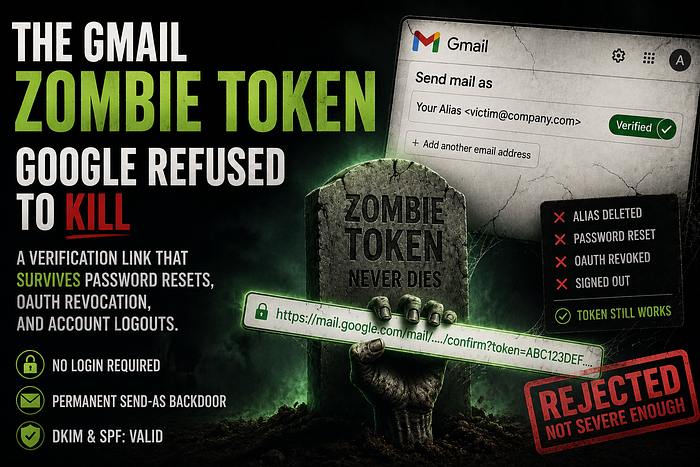
I call it a "Zombie Token" — a token that is:
- Not bound to any user session
- Not invalidated when the victim manually deletes the alias from their settings
- Not invalidated when the victim changes their password and signs out of all sessions
- Not invalidated when OAuth access is revoked
In simpler terms: once the confirmation link is captured, it never dies. Even if the victim does everything right — cancels the alias, resets their password, revokes app access — the attacker can replay that same link in a fresh incognito window and re-activate the backdoor. Zero login required. Zero credentials needed.
The emails sent through this backdoor carry valid DKIM and SPF signatures because they go through Google's own SMTP infrastructure. This means they are indistinguishable from legitimate emails sent by the victim. DMARC policies cannot block them.
The Attack Scenarios Google Ignored
When Google first responded, they said the attack requires the attacker to already control the victim's account. I disagreed and provided three scenarios where that is not the case.
Scenario 1: Token Leakage via URL
The confirmation link is passed entirely via a GET request URL. This means it can be leaked through browser history, corporate web proxies, or Referer headers. An attacker who gains access to proxy logs — without ever having the victim's password or inbox access — can extract this link and establish a permanent send-as backdoor.
Scenario 2: Read-Only OAuth to Full Send Access
A user grants a third-party app a mail.readonly OAuth scope — something millions of users do routinely with CRM tools, email parsers, and AI assistants. The app's backend is breached. The attacker now has readonly access. Using the Gmail API, the attacker reads the incoming "Send Mail As" confirmation email, extracts the link, and escalates from readonly to permanent write/send access. The OAuth scope said "read only." The vulnerability turned it into "send forever."
Scenario 3: The Insider Threat After Termination
A Google Workspace employee knows they will be fired. While they still have access, they initiate a "Send Mail As" request to an external address they control. IT resets the password, revokes sessions, and terminates the account. The former employee clicks the saved link from an incognito window. They now have a persistent backdoor to send DKIM-signed emails as their old corporate identity. The admin has no dashboard indicator this happened.
Google's response to all three: Won't fix.
What Google Actually Said in Their Emails
I want to be transparent. Here is how the email exchange with Google Trust & Safety went down, comment by comment.
First Response (Comment #3): "Hello, In our understanding, this attack requires the attacker to already be in control of the victim's account. We have decided not to track this issue as a security bug."
My Reply (Comment #4): I laid out the three scenarios above — token leakage, OAuth escalation, and the insider threat. I asked them to review it under those contexts specifically.
Second Response (Comment #5): "Are you able to provide a video or screen recording showing an entire attack where this is not the case?"
So I made a proof-of-concept video. A 21 MB screen recording showing the full attack: revoking OAuth access, password resetting, signing out of all sessions, and then replaying the stale token in an incognito window. The backend honored the stale token. The backdoor reopened.
Third Response (Comment #11): "We don't have any new information to share at this time. We hope to be able to complete our review of your submission in the near future."
That was cryptic. It meant they had reopened the case (Comment #9 showed Status: Assigned — Reopened) but were still thinking.
Final Response (Comment #16): "We think the issue might not be severe enough for us to track it as an abuse risk. When we file an abuse risk bug to product teams, we impose monitoring and escalation processes for teams to follow, and the abuse risk described in this report does not meet the threshold."
In other words: the bug is real, but they do not want the engineering overhead of making their teams fix it.
The Broken Cancellation Link
Before I let this go, I left one final comment (Comment #20) on the issue tracker, and I stand by every word of it:
"Your decision means the 'Cancel' link provided in Google's own security alert email is functionally a dummy link. When a victim clicks that link, it removes the alias from the UI but leaves the underlying authorization token 100% active and exploitable by an attacker. It provides the victim with a false sense of security while leaving a backdoor completely open, even after a global password reset."
Think about that for a moment. A security alert email tells the victim they can cancel the unauthorized alias. They click the link. Google's UI says it is cancelled. But the token remains alive. An attacker can replay it later. The victim believes they are safe. They are not.
If that is intended behavior, Google should say it clearly. But calling it anything other than a security defect is a stretch.
For Beginner Bug Bounty Hunters: Why This Matters to You
If you are just starting your bug bounty journey, here is what this report teaches you:
-
Do not assume a "Won't Fix" means your report was wrong. Sometimes, the team on the other side simply disagrees on threat modeling. That does not make the technical finding invalid.
-
Documentation is everything. A video proof-of-concept (21 MB in my case) carries far more weight than text alone. Record your attacks. Show, do not just tell.
-
Persistence in communication matters. I went back and forth with Google for over a month, re-framing the attack model, providing new threat scenarios, and requesting severity re-evaluation. Every time, I learned something new about how enterprise security teams think.
-
Token lifecycle defects are among the most dangerous and most overlooked bugs. A confirmation link that survives password resets is not a nickel bug. It is a fundamental security boundary failure. Learn about bearer tokens, session binding, and token revocation — these concepts appear in almost every modern web application.
-
OAuth scope violations are severely under-reported. The gmail.readonly scope is supposed to mean readonly. If you can find a path from readonly to write/send, that is a scope boundary violation worth reporting. Millions of users trust OAuth permissions daily. Every violation of that trust is real impact.
-
Accept rejection as part of the process. Some bugs will be closed. Some will be deemed out of scope. Some will be ignored entirely. What separates hunters who grow from those who quit is whether they keep researching, keep reporting, and keep building their knowledge despite the setbacks.
What Google Got Wrong
Google Trust & Safety evaluated this as an abuse risk. That is a category for phishing, social engineering, and user behavior patterns. But what I reported was a server-side token lifecycle defect — a broken authorization mechanism in the backend code itself. These are fundamentally different things.
An abuse risk is about how people use a feature. A token invalidation bug is about how the feature was built. You fix abuse risks with policy and monitoring. You fix token lifecycle bugs with code changes.
By categorizing a backend authorization defect as an abuse risk, Google avoided the engineering conversation entirely. No one from the Gmail engineering team ever needed to look at this. No ticket was ever filed against the codebase. The token still does not get invalidated. The backdoor is still open.
The Frustration
I will be honest. This was frustrating. Not because I expected money — bug bounty rewards from Google are notoriously low for S4 bugs, often nothing more than a Hall of Fame mention. It was frustrating because I spent over a month building a proof-of-concept, recording a video, writing detailed threat models, re-framing the attack surface three times, and answering every question Google's team asked. And in the end, the answer was essentially: "We do not want the hassle of fixing this."
For a company that holds billions of user passwords, emails, and identities, treating a persistent authorization bypass that survives password resets as "not severe enough" is a choice. It is a business decision, not a security one.
I spent countless nights on this report while also trying to build products, create content, and figure out my next career move. I could have spent that time learning something new or shipping a feature for my platforms. Instead, I chased a ghost — a zombie token in a system that refuses to kill it.
But here is the thing: writing this article, sharing this publicly, is my way of closing the loop. The bug may be unfixed. The report may be closed. But the knowledge is out now. Anyone who reads this will understand what a broken confirmation token looks like, why it matters, and how to look for similar defects in other applications.
What Google Should Have Done
If I were on the Gmail engineering team, here is the fix I would ship:
- Bind the confirmation token to the user's account. When the alias is cancelled, invalidate the token server-side.
- Bind the token to session state. A global password reset should kill all outstanding tokens.
- Log the token creation with sufficient context so administrators can audit who authorized which aliases and when.
- Add an admin dashboard view in Google Workspace that shows all active "Send Mail As" aliases, including those created via stale tokens.
These are not rocket science fixes. They are basic security hygiene. And the fact that a user-level security researcher had to find this — and Google chose not to fix it — says something about how even the biggest tech companies still struggle with fundamental authorization logic.
Final Thoughts
This report will live on the Google Issue Tracker with a status of "Won't Fix (Infeasible)." That is the official outcome. But I want this article to be the unofficial record of what actually happened.
A confirmation token in Gmail's "Send Mail As" feature is not binded to session state. It survives alias cancellation. It survives password resets. It survives OAuth revocation. An attacker can replay it from an incognito window with zero credentials. Emails sent through it carry valid DKIM and SPF signatures. And Google has decided this is acceptable.
If you are a bug bounty hunter reading this, I want you to remember: your reports matter even when they are rejected. The vulnerability does not disappear just because a company closes the ticket. The knowledge you gain from the process is yours forever.
If you are a product team reading this, I want you to ask: what confirmation tokens in your system are immortal? What links survive a password reset? What authorization tokens are not bound to the user who created them? Because if you have not asked these questions, you probably have a zombie token too.
And if you are just someone who uses Gmail — know that your account security has a design flaw that was reported, demonstrated with video proof, argued for over a month, and still left unfixed. The backdoor is open. Stay informed.
This is the reality of bug bounty hunting in 2026. Not every horse wins the race. But you still have to run.
If you're trying to get your first bug bounty payout
I wrote a guide called Beginner to First $100 Bug Bounty Roadmap. No fluff, no theory, no "mindset" sections. Just the actual process — what to test, where to look, how to write a report that gets accepted. Two full real-world examples included, plus a 7-day plan to get started.
If you're in India: RazorPay (launch price ₹50 for first 20 buyers)
International: GumRoad ($1 for first 20 buyers, then $3.99)