

Hi everyone. With AI on the rise, I've seen a lot of vibe coded applications and applications built solely by AI agents (with no Human intervention), relying on authentication solutions such as AWS Cognito.
What is AWS Congito?
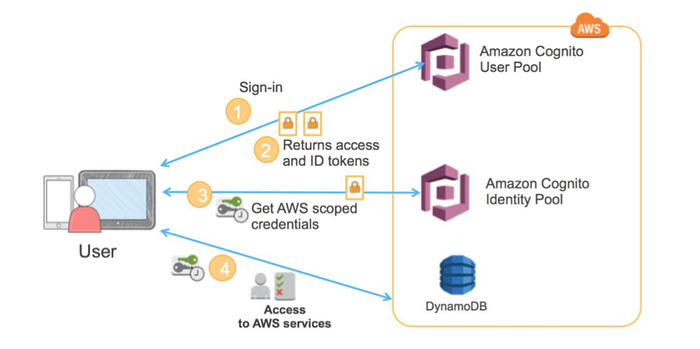
Amazon Cognito is a fully managed AWS service providing secure identity management, authentication, and authorization for web and mobile apps.
There are two main concepts that we need to understand in Cognito:
- User Pools
- Identity Pools
User Pools: It acts as a user directory for sign-up/sign-in. All the users who have an account on the application or who have registered are reflected on the User Pools in AWS Congito. These handle:
- User registration (signup)
- Authentication (login)
- JWT token issuance (after successful login)
Identity Pools: Let's say the application requires users to access certain AWS services such as S3 buckets, etc., then the application can request AWS temporary credentials on behalf of the user and store them on the browser. This handles:
- Exchange JWT tokens (that we got from User Pools after authentication) for temporary AWS credentials
- Map users (or even unauthenticated visitors) to IAM roles
How to Spot Use of Cognito?
To identify if Cognito is being used, there are a few simple methods you can follow.
Method 1:
Look for the below endpoints in your HTTP history. <region> could be us-east-1 , us-east-2, etc., based on the AWS region where Cognito is configured with the application.
https://cognito-idp.<region>.amazonaws.com
https://cognito-identity.<region>.amazonaws.com 
Method 2:
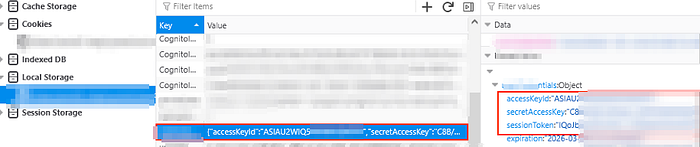
Go to Developer Console > Storage.
Under Local storage or session storage you might find accessKeyId, secretAccessKey and sessionToken listed.
Note: The chances of you finding them under cookies and session storage are quite low. I've always found them under Local Storage.
Attack Methodology
Okay, now that we know that AWS Congito is being used, what else can we do?
Attack 1: Get Valid AWS Temporary Credentials
Assumption: We do not have AWS Credentials in the Browser's storage and Unauthenticated Identities are enabled. Unauthenticated identities allow users to surf the application without logging in.
In this case, what we can do is to look for more identifiers associated with Cognito to get those AWS temporary credentials. We can look for these identifiers in our HTTP history, in JavaScript files, in APK files.
identityPoolId
userPoolId
clientId
aws_cognito_identity_pool_id
region

// you can get an idea about the region from the cognito endpoint that is being used.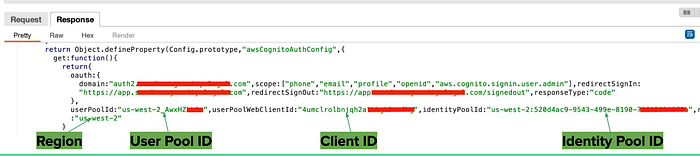
Once we have these with us, we can proceed with the following:
Get an Identity ID. We require a valid Identity Id to fetch AWS temporary credentials. The following command will return an Identity ID.
aws cognito-identity get-id \
  --identity-pool-id <IDENTITY_POOL_ID> \
  --region <REGION>
Once we have the Identity ID, we can use that to get AWS temporary credentials.
aws cognito-identity get-credentials-for-identity \
  --identity-id <IDENTITY_ID> \
  --region <REGION>
Voila! A successful execution of this command, will get us valid AWS temporary credentials. What to do with these AWS Credentials? Scroll to the bottom of the article to get a few test cases.
Attack 2: Self Sign Up
Sometimes, some applications do not allow you to register. You are just provided credentials by someone who owns the application. Cognito, has a feature called Self Signup, which if enabled, can allow users to directly register to an application. The command to check if you can self signup is below. If you get an error, Self Signup is disabled.
aws cognito-idp sign-up \
  --client-id <CLIENT_ID> \
  --username attacker@example.com \
  --password 'Password123!' \
  --region <REGION>
Attack 3: Privilege Escalation via Attributes
If your application allows you to modify your profile, worth checking if you can modify the attributes associated with your user. Append attributes such as custom.isAdmin:true to any API that allows you to modify your profile.
{
  "email": "attacker@example.com",
  "custom:isAdmin": "true"
}
Attack 4: Abusing AWS Temporary credentials
We also have AWS temporary credentials, remember? We can use them to check what permissions are associated with them. For example, these credentials might have s3, lambda or api gateway permissions in which case we can use them for further exploitation.
You can use scripts such as the following to get an idea about what permissions your AWS credentials hold.
enumerate-iam
ScoutSuite
prowler
I have written another post about it where I explain how I exploited AWS credentials to bypass Authorization. The article can be found here — https://infosecwriteups.com/misconfigured-sso-led-to-a-critical-issue-81c4c11d1a48
Hope you enjoyed reading the article. Please consider subscribing and clapping for the article.
In case you are interested in CTF/THM/HTB writeups consider visiting my YouTube channel.