Introduction
In this blog post, I will walk you through a practical solution to a Reflected XSS challenge from the Hackviser platform. This lab is a great example of how modern web applications attempt to defend against XSS attacks, and how subtle implementation flaws can still lead to exploitable vulnerabilities.
If you are exploring Hackviser labs and questions or learning web security, this write-up will help you understand the concept in a simple and beginner-friendly way.
Understanding the Challenge
Question:
This lab is an example that requires the Reflected XSS vulnerability to be triggered from within an HTML Attribute.
To complete the lab, the parameter "q" in the URL must be given a payload that escapes through the HTML Attribute "value".
Find a way to trigger the XSS vulnerability without disrupting the functioning of the website.
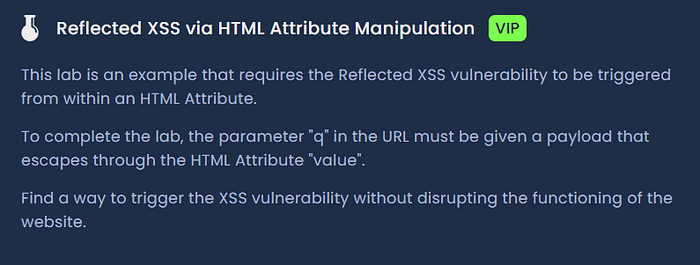
The challenge clearly hints that the q parameter in the URL is being reflected into the page. Our task is to craft a payload that escapes the attribute context and executes JavaScript without breaking the functionality of the website.
Step 1: Analyzing the Web Page
After opening the lab in the browser, the page appears to be a simple search interface. It contains:
- A search input field
- A section that displays results or a message like "No Result Found"
While interacting with the page, it becomes clear that the search query is passed through the URL as:
?q=valueThis indicates that user input is being reflected back into the page, which is a strong indicator of a potential reflected XSS vulnerability.
Step 2: Testing Basic XSS Payloads
The first step in any XSS testing process is to try basic payloads to understand how the application behaves.
I began with the most common payload:
<script>alert()</script>However, the output observed was:
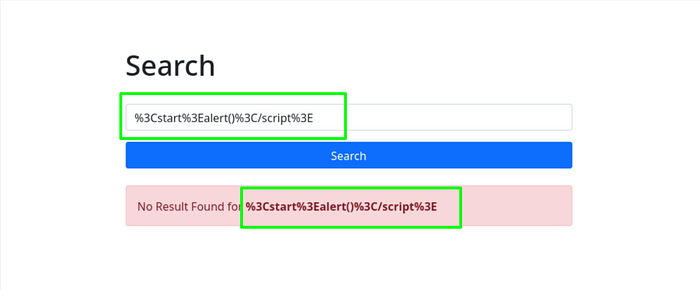
This tells us that:
- The application is encoding special characters
- The angle brackets (< and >) were being URL-encoded, This indicates that the application is sanitizing or encoding user input before rendering it.
This means direct script injection is not possible using simple payloads.
Step 3: Testing HTML-Encoded Payloads
Next, an HTML-encoded version of the payload was tested:
<script>alert("h")</script>The output displayed:
No Result Found for <script>alert("h")</script>This time, the page displayed the decoded in the "No Result Found for <script>alert("h")</script>" message, and the same appeared inside the input field.
However, no alert popped up. The browser treated it as plain text, not executable JavaScript.
This indicates that although the application decodes input for display, it is still not executing scripts. This suggests that the payload is being rendered in a safe HTML context, not as executable code.
Step 4: Inspecting the Application Behavior
At this stage, After Careful observation I found that the input is reflected in two places:
- Inside the error message
- Inside the input field itself
when I inspected the input field itself, I found something very interesting:
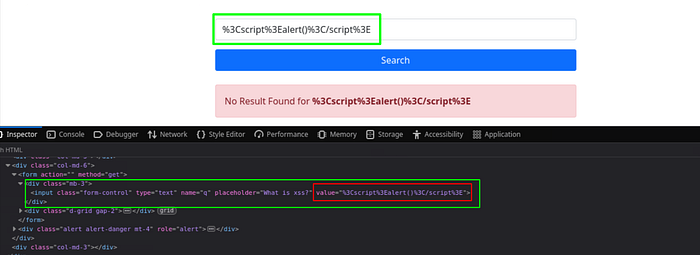
The application is inserting user input directly into the value attribute. However:
- It partially escapes HTML characters
- It does not properly handle quotes (
")
This leads to a situation where:
- The injected double quote (
") breaks out of thevalueattribute - The rest of the payload is interpreted as new HTML attributes
Let me explain this simply:
- The HTML code expected something like: value="user_input_here"
- When we include a double quote in our input, it closes the value attribute early.
- Everything after that quote is now treated as additional attributes or HTML code inside the <input> tag.
Step 5: Crafting the Exploit Payload
Now that I understood the context, I needed a payload that does not rely on <script> tags. Instead, I would break out of the value attribute and add a new event handler attribute that executes JavaScript.
The payload I used was:
1" onfocus="alert(1)How does this payload work?
When this value is inserted into the input field, the resulting HTML becomes:
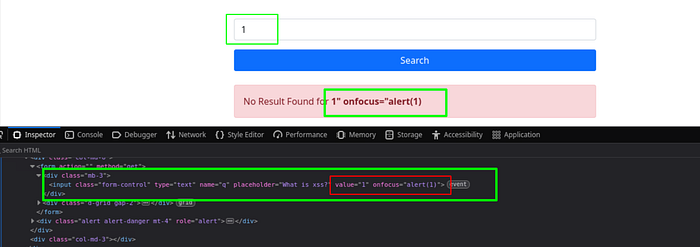
<input class="form-control" type="text" name="q" placeholder="What is xss?"
value="1" onfocus="alert(1)">- The first " closes the original value attribute.
- onfocus="alert(1)" adds a new attribute to the input tag.
- The onfocus event fires when the input field receives focus (for example, when you click on it or tab into it).
- This executes alert(1), proving the XSS vulnerability.
Step 7: Triggering the XSS
Once the payload is injected:
- Clicking inside the input field triggers the
onfocusevent - This executes the JavaScript alert
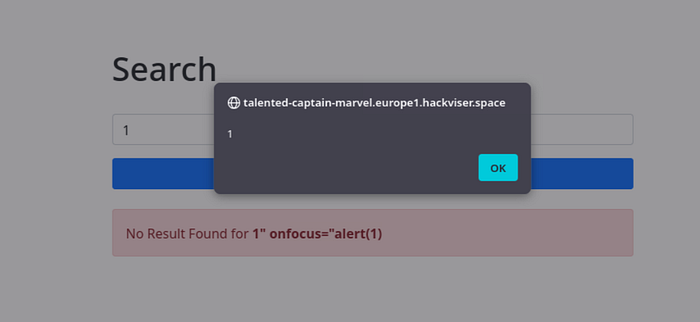
This confirms a successful Reflected XSS attack via HTML attribute manipulation
Alternative Payloads
Other variations that can achieve similar results include:
1" onmouseover="alert(1)This triggers when the mouse hovers over the element.
1" autofocus onfocus="alert(1)This automatically focuses the input field on page load, triggering the payload without user interaction.
Key Takeaways
Key takeaways for beginners:
- Always inspect the HTML source when testing for XSS.
- Understand the context where your input is reflected (inside a tag, inside an attribute, inside JavaScript, etc.).
- Different contexts require different payloads.
- Event handlers like onfocus, onmouseover, onerror, etc., are powerful alternatives to <script> tags.
Conclusion
In this walkthrough, we explored how a seemingly secure application can still be vulnerable to XSS due to improper handling of user input inside HTML attributes.
Have you solved this lab yet? Feel free to share your approach or any other HackViser platform challenges you found interesting in the comments below.
Happy Hacking