
Imagine you shift to a new house but forget to update your address at the post office and with your bank. Your old address is still on record, even though the house is now empty. Later, someone else moves into that house and starts receiving your bank statements, Aadhaar letters, and courier parcels meant for you.
In cloud security, this is exactly how a subdomain takeover happens.
In this blog, we'll break down how subdomain takeovers work, focus on the classic AWS S3 bucket takeover, and cover practical ways to prevent it.
What Is a Subdomain Takeover?
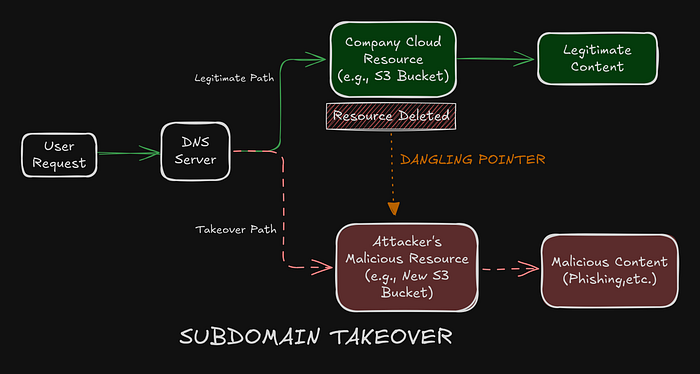
A subdomain takeover occurs when a DNS record (for example, subdomain.example.com) points to a cloud resource such as S3 bucket, GitHub Pages site, or Heroku app that no longer exists.
This situation is known as dangling DNS.
Because the DNS record still exists but the backend resource does not, an attacker can create a new resource with the same name and effectively hijack the subdomain.
How an S3 Subdomain Takeover Works
Let's walk through the mechanics using Amazon S3, one of the most common targets.
1. Legitimate Setup
- A company creates a promotional website.
- An S3 bucket named
promo.company.comis created. - Static website hosting is enabled.
- A DNS CNAME record is added:
promo.company.com → promo.company.com.s3-website-us-east-1.amazonaws.comEverything works as expected users visit the subdomain and AWS serves the content.
2. The Mistake: Dangling DNS
- The promotion ends.
- The DevOps engineer deletes the S3 bucket to reduce costs.
- The DNS record is forgotten.
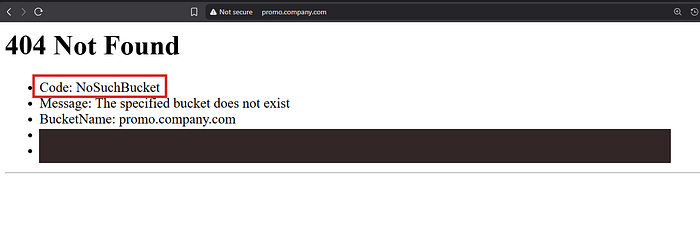
Now, DNS still routes traffic to AWS, but the bucket no longer exists. AWS responds with a distinctive error:
404 Not Found – NoSuchBucketFor attackers, this error is a clear signal that the subdomain is vulnerable.
3. The Attack
Since S3 bucket names are globally unique, deleting the original bucket makes the name available to anyone.
- The attacker notices the
NoSuchBucketerror and identifies the region (e.g.,us-east-1). - The attacker then creates a new S3 bucket named
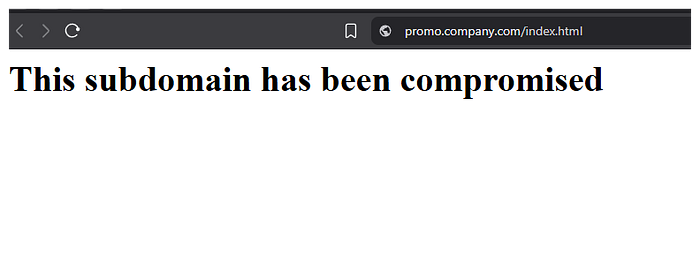
promo.company.comin the same region. - Then upload their own
index.html, often containing phishing or malicious content.
4. The Impact
When a user visits promo.company.com:
- DNS resolves as usual.
- AWS finds the attacker-controlled bucket.
- Malicious content is served under your trusted domain.
At this point, the attacker fully controls the subdomain.
Why This Is Dangerous
This isn't "just" a static website issue. The real risks are serious:
- Phishing
Users trust your domain. A fake login page on
support.company.comcan easily steal credentials. - Cookie Theft
If session cookies are scoped to
.company.com, a compromised subdomain can read them and hijack user sessions. - Reputation Damage Seeing malicious or defaced content on an official subdomain destroys user trust and brand credibility.
How to Prevent Subdomain Takeovers
Prevention is mostly about process and hygiene.
1. Use Infrastructure as Code (IaC)
Tools like Terraform or CloudFormation should manage both:
- The cloud resource
- The DNS record
When a resource is destroyed, the DNS entry should be removed automatically never manually managed in isolation.
2. Prefer Route53 Alias Records
If you use AWS Route53, choose Alias records instead of CNAMEs for AWS services.
Alias records are resource-aware:
- When the underlying S3 bucket is deleted, the DNS record stops resolving.
- This eliminates dangling DNS entirely.
CNAME vs Alias , Route 53 CNAME and ALIAS differences
3. Monitor Your Subdomains
Regularly scan your external assets:
- Look for 404 errors
- Detect fingerprints like
NoSuchBucket
Tools like nuclei, amass, or simple custom scripts can catch these issues before attackers do.
And..
Clean up your DNS.