
After 205+ machines across HackTheBox, TryHackMe, VulnHub, PG Play, and PG Practice, I kept running into the same wall.
I could root a box. But the moment an engagement had more than one machine — the moment it required pivoting, lateral movement, domain compromise — I was building intuition in the dark. CTF labs are isolated. They don't simulate the thing that makes enterprise environments actually hard: the network between machines.
Active Directory is not a vulnerability. It's a trust architecture. And the only way to understand how it breaks is to stand inside one and break it yourself.
So I built Corp-AD-Lab.
What Is It?
Corp-AD-Lab is a fully automated, self-contained Active Directory home lab that simulates a real corporate network. Five virtual machines. Two network segments. One domain. Deliberately misconfigured at every layer.
One PowerShell script configures every Windows machine automatically. One bash script sets up the Kali attacker. You focus on attacking — not on three days of setup.
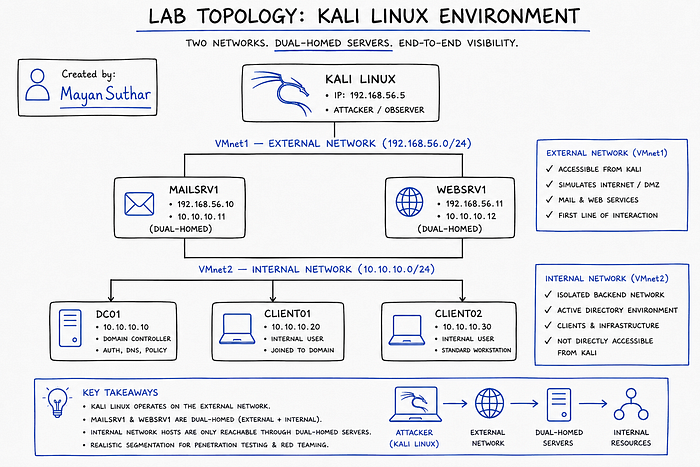
The dual-homed WEBSRV1 and MAILSRV1 are the pivot points. Kali cannot reach the internal network directly. You have to earn your way in.
The Five Machines
DC01 — Windows Server 2022 domain controller for corp.local. Kerberoastable SPNs, AS-REP roastable users, DCSync target. This is the end goal of every attack chain in the lab.
WEBSRV1 — Dual-homed web and SSH server. Weak credentials, HTTP login form, credential files left in plain sight. Your first foothold and your pivot into the internal segment.
MAILSRV1 — Dual-homed mail server with credential bait shares. A second pivot path and a source of Net-NTLMv2 hashes if you set up Responder correctly.
CLIENT01 — Windows 10 workstation loaded with Windows privilege escalation vulnerabilities: service binary hijacking, unquoted service paths, scheduled task abuse, credential hunting.
CLIENT02 — The lateral movement target. itadmin has local admin rights here, and Pass-the-Hash is wide open.
The Full Attack Chain
This is not a collection of isolated techniques. The lab is designed as one continuous chain from external recon to Domain Admin:
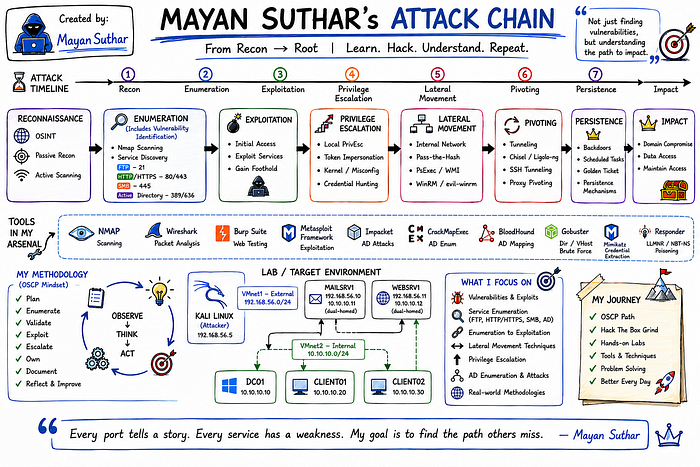
Every node in that chain has a real technique attached to it. Nothing is there for decoration.
What You Will Practice
The lab covers eight attack categories:
Password Attacks — SSH and RDP brute force, HTTP login form attacks, Net-NTLMv2 capture via Responder, NTLM relay.
Hash Attacks — NTLM cracking with Hashcat, Pass-the-Hash, Net-NTLMv2 cracking.
Windows Privilege Escalation — Service binary hijacking, unquoted service paths, DLL hijacking, scheduled task abuse, credential hunting in files and registry.
AD Enumeration — PowerView, BloodHound, SharpHound, manual LDAP queries, SPN enumeration.
AD Authentication Attacks — Password spray, AS-REP Roasting, Kerberoasting, Silver Tickets, DCSync.
Lateral Movement — WMI, WinRM, PsExec, Pass-the-Hash, Overpass-the-Hash, Pass-the-Ticket, DCOM.
Persistence — Golden Ticket, Shadow Copies, DCSync-based persistence.
Tunneling and Pivoting — SSH tunnels, Chisel, Ligolo-ng, sshuttle, Netsh port proxy, Chisel HTTP tunnel, dnscat2 DNS tunnel.
The Domain Users
The domain is populated with deliberately misconfigured accounts. Each one is an attack vector.
UsernameAttack Vectors.noauthAS-REP Roasting — pre-auth disabledsvc_sqlKerberoasting — MSSQLSvc SPN registeredsvc_webKerberoasting — HTTP SPN registereditadminPass-the-Hash, local admin on CLIENT02d.backupDomain Admin — final escalation targetj.watson / m.johnson / t.richardsPassword spray targets
No contrived CTF lore. Real Active Directory misconfigurations you will find in actual enterprise environments.
Automated Setup — How It Works
Most AD lab guides involve days of manual Windows configuration. This one does not.
One PowerShell script — Setup-CorpLab.ps1 — handles every Windows machine. You copy it to the VM, run it with the correct role flag, and it configures everything: AD DS installation, domain join, user creation, SPN registration, SMB shares, vulnerable services, scheduled tasks, registry credentials, the lot.
# On DC01 — two phases because AD requires a reboot mid-install
.\Setup-CorpLab.ps1 -Role DC01
.\Setup-CorpLab.ps1 -Role DC01Phase2

# On every other machine
.\Setup-CorpLab.ps1 -Role WEBSRV1
.\Setup-CorpLab.ps1 -Role MAILSRV1
.\Setup-CorpLab.ps1 -Role CLIENT01
.\Setup-CorpLab.ps1 -Role CLIENT02
Then on Kali:
sudo bash setup-kali.shThat installs everything: Impacket, CrackMapExec, BloodHound, evil-winrm, Chisel, Ligolo-ng, Responder, kerbrute, PowerView, SharpHound, winPEAS, Mimikatz, and more.
Take a snapshot of all six machines before you start. One command and you're back to a clean lab every time.
What's Included in the Repository
Corp-AD-Lab/
├── README.md
├── Setup-CorpLab.ps1        ← Windows automation (all roles)
├── setup-kali.sh            ← Kali attacker setup
└── docs/
    └── AD-Lab-Build-Guide.pdf  ← Full walkthrough PDF
The PDF includes the complete VMware configuration, Windows Server 2022 installation walkthrough, all PowerShell commands with explanations, full attack walkthroughs for every technique, and a quick-reference credentials sheet with Hashcat modes.
Why I Built This
There are good AD labs out there. Most of them are either cloud-hosted (which means you're paying per hour and can't run Responder freely), pre-built OVAs (which means you can't see how the vulnerabilities were created), or partial — they cover Kerberoasting but skip pivoting, or cover lateral movement but skip the initial foothold.
I wanted something I could run entirely offline, understand at the script level, reset in thirty seconds, and build on over time.
The lab also became my reference environment. When I read about a new AD technique, I test it here before I trust it. When I write up an attack chain in my OSCP methodology notes, it's this lab I've validated it against.
Requirements
All software is free:
- VMware Workstation Pro — free for personal use since 2024
- Windows Server 2022 — free 180-day evaluation ISO from Microsoft
- Windows 10 Enterprise — free 90-day evaluation ISO from Microsoft
- Kali Linux — free VMware OVA from kali.org
Minimum host: 16 GB RAM, 250 GB disk, 4-core CPU with virtualisation enabled. 32 GB RAM and 8 cores make the experience significantly smoother.
Responsible Use
This lab runs entirely on a private host-only VMware network with no internet routing. All techniques documented here are for:
✅ Your own isolated lab environment ✅ CTF platforms (HackTheBox, TryHackMe, PentesterLab) ✅ Systems with explicit written authorisation
Using these techniques against systems you don't own is illegal. The lab exists to train defenders and practitioners — not to script-kiddie production infrastructure.
Try It
🔗 GitHub: github.com/MayanSuthar/Corp-AD-Lab
If the lab helps you pass OSCP, crack a CTF, or finally understand why BloodHound lights up the way it does — drop a ⭐ on the repo. It costs nothing and helps more people find it.
Part of the NullyBlissful Penetration Testing Notes Series — alongside Web Vulnerabilities, Privilege Escalation, Pivoting, and OSCP Methodology.