Task 1: Introduction
Passive reconnaissance is the process of collecting information about a target without directly interacting with it.
It is widely used in Cybersecurity and ethical hacking to gather data quietly, without being detected.
What it involves:
- Collecting publicly available information
- No direct connection with the target system
- Uses open sources and third-party data
Common tools & sources:
- Google Dorking: finding hidden info using search operators
- WHOIS lookup: domain owner details
- DNS records tools (dig/nslookup): domain/IP info
- Social media: company/user information
- Shodan: finds exposed devices/services
- theHarvester: emails, subdomains, hosts
Why it is used:
- To gather intelligence silently
- To identify attack surface
- To plan further testing (active reconnaissance)
- To avoid detection
Questions:
- This room does not use a target virtual machine (VM) to demonstrate the discussed topics. Instead, we will query public WHOIS servers and DNS servers for domains owned by TryHackMe. Start the AttackBox and make sure it is ready. You will use the AttackBox to answer the questions in later tasks, especially tasks 3 and 4.
Ans: No Answer Needed
Task 2: Passive versus Active Recon
In Cybersecurity, reconnaissance means gathering information about a target before attacking or testing it.
Passive Reconnaissance
Passive reconnaissance activities include many activities, for instance:
- Looking up DNS records of a domain from a public DNS server.
- Checking job ads related to the target website.
- Reading news articles about the target company.
Tools:
- Google search / Google Dorking
- WHOIS lookup
- DNS lookup (dig, nslookup)
- Shodan
- theHarvester
Active Reconnaissance
Examples of active reconnaissance activities include:
- Connecting to one of the company servers such as HTTP, FTP, and SMTP.
- Calling the company in an attempt to get information (social engineering).
- Entering company premises pretending to be a repairman.
Tools:
- Ping
- Nmap
- Netcat
- Traceroute
- Port scanning
Questions:
- You visit the Facebook page of the target company, hoping to get some of their employee names. What kind of reconnaissance activity is this? (A for active, P for passive)
Ans: P
Explanation: You're looking at publicly available open source data
2. You ping the IP address of the company webserver to check if ICMP traffic is blocked. What kind of reconnaissance activity is this? (A for active, P for passive)
Ans: A
Explanation: The concept of "ping" is comparable to ringing the doorbell
3. You happen to meet the IT administrator of the target company at a party. You try to use social engineering to get more information about their systems and network infrastructure. What kind of reconnaissance activity is this? (A for active, P for passive)
Ans: A
Explanation: You are physically performing a "activity" that necessitates direct contact with the target.
Task 3: Whois
WHOIS is a tool used to get information about a domain name, such as who owns it and when it was registered.
It works using the WHOIS.
What WHOIS shows:
- Domain owner details (sometimes hidden)
- Registration and expiry date
- Domain registrar (company managing the domain)
- Name servers
Why WHOIS is used:
- To find who owns a website
- To gather information in passive reconnaissance
- To check domain validity and expiration
Example output includes:
- Registrar name
- Creation date
- Expiry date
- Name servers
Questions:
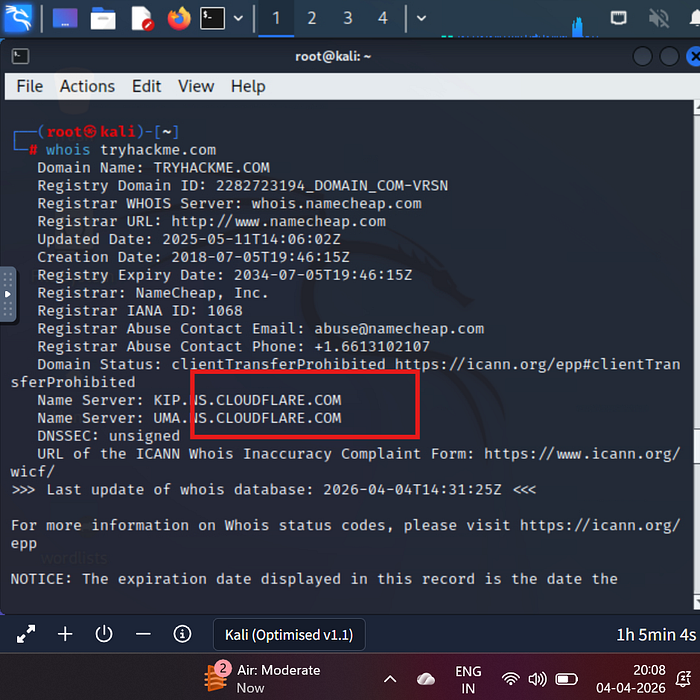
- When was TryHackMe.com registered?
Ans: 20180705
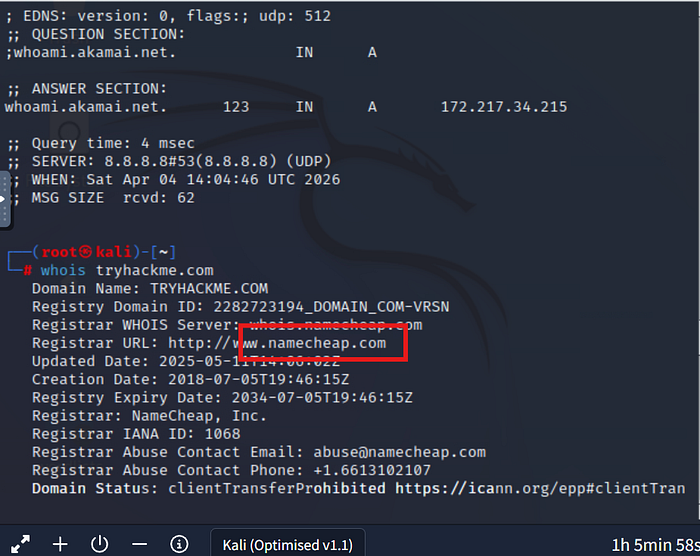
2. What is the registrar of TryHackMe.com?
Ans: namecheap.com
3. Which company is TryHackMe.com using for name servers?
Ans: cloudflare.com
Task 4: nslookup and dig
Both NSLOOKUP and DIG are tools used to get information about domain names using the DNS.
NSLOOKUP is a simple tool to find the IP address of a domain.
What it does:
- Converts domain → IP address
- Queries DNS servers
DIG is a more advanced DNS tool that gives detailed information.
What it does:
- Shows full DNS records
- Provides technical details
- Used more in cybersecurity & troubleshooting
Questions:
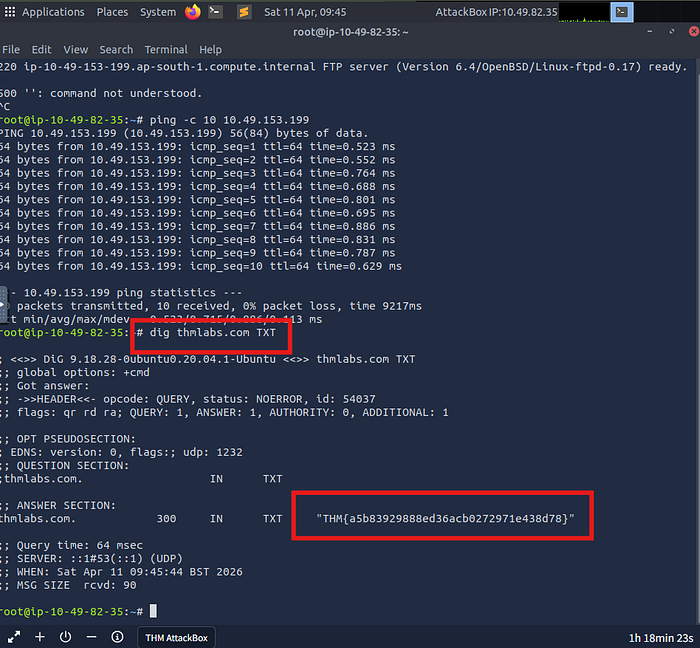
- Check the TXT records of thmlabs.com. What is the flag there?
Ans: THM{a5b83929888ed36acb0272971e438d78}
Task 5: DNSDumpster
DNSDumpster is an online tool used to gather detailed information about a domain's DNS records.
It is commonly used in passive reconnaissance in Cybersecurity.
What DNSDumpster does:
- Finds subdomains of a target domain
- Shows DNS records (A, MX, NS, TXT)
- Maps network infrastructure
- Displays relationships between hosts
Why it is used:
- To understand a target's network structure
- To discover hidden subdomains
- To identify possible attack points
- Useful before active scanning
Questions:
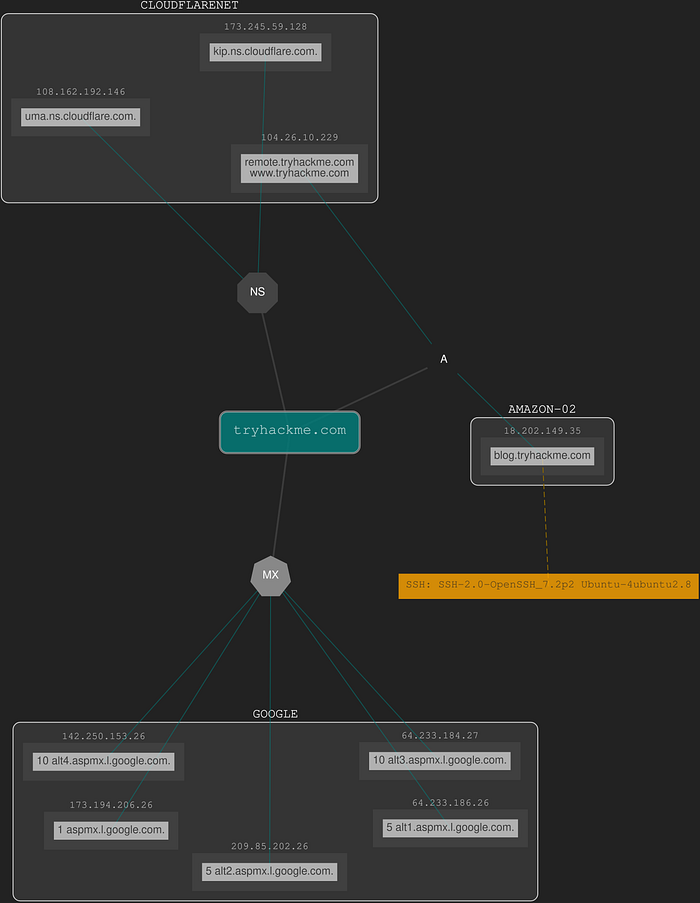
- Lookup tryhackme.com on DNSDumpster. What is one interesting subdomain that you would discover in addition to www and blog?
Ans: remote
Task 6: Shodan.io
Shodan.io collects information related to any device it can find connected online. Searching for tryhackme.com on Shodan.io will display at least the record shown in the screenshot above. Via this Shodan.io search result, we can learn several things related to our search, such as:
- IP address
- hosting company
- geographic location
- server type and version
Questions:
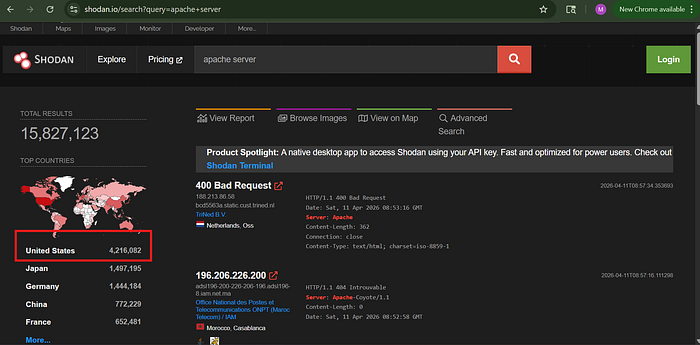
- According to Shodan.io, what is the first country in the world in terms of the number of publicly accessible Apache servers?
Ans: United States
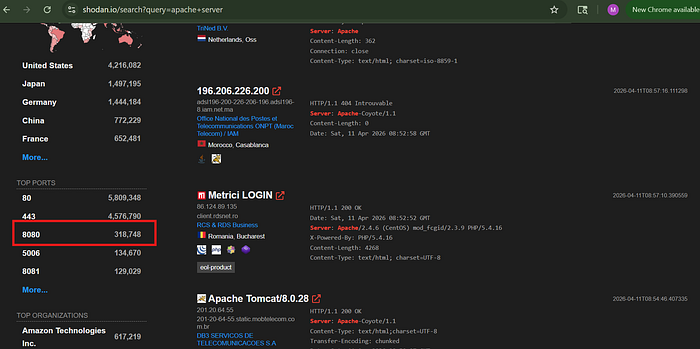
2. Based on Shodan.io, what is the 3rd most common port used for Apache?
Ans: 8080
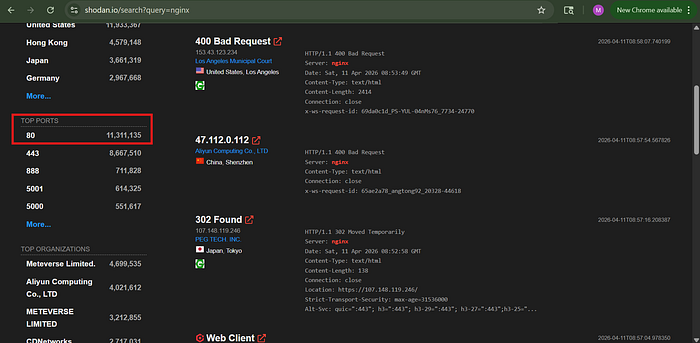
3. Based on Shodan.io, what is the most common port used for nginx?
Ans: 80
Task 7: Summary
In this room, we focused on passive reconnaissance. In particular, we covered command-line tools, whois, nslookup, and dig. We also discussed two publicly available services DNSDumpster(opens in new tab) and Shodan.io(opens in new tab). The power of such tools is that you can collect information about your targets without directly connecting to them.
Questions:
- Make sure you note all the points discussed in this room, especially the syntax for the command-line tools.
Ans: No Answer Needed