

Introduction
Cross-Site Scripting (XSS) is one of the most common and impactful vulnerabilities found in modern web applications. It occurs when an application fails to properly handle user-supplied input, allowing attackers to inject malicious JavaScript that executes in another user's browser.
Among the different forms of XSS, DOM-Based XSS is particularly interesting because the vulnerability exists entirely on the client side, without direct involvement from the server.
In this lab, I demonstrate how user input is rendered directly into the webpage's DOM, how basic payloads behave in such an environment, and how attackers can ultimately execute JavaScript to manipulate user actions.
Understanding Cross-Site Scripting (XSS)
Definition
Cross-Site Scripting (XSS) is a web security vulnerability where an attacker injects malicious JavaScript into a web application, causing it to execute within the browser of another user.
If exploited successfully, XSS can allow attackers to:
- Execute arbitrary JavaScript
- Steal session cookies
- Redirect users to malicious websites
- Modify webpage content
- Perform actions on behalf of the victim
Types of XSS
Stored XSS
The malicious payload is stored in the application's database and executed whenever the affected page loads.
Reflected XSS
The payload is sent in a request and immediately reflected back in the response from the server.
DOM-Based XSS
The vulnerability exists entirely on the client side where JavaScript dynamically processes and inserts user input into the DOM without proper validation.
When to Test for XSS
Testing for XSS is important when:
- User input is rendered back onto the page without sanitization
- Client-side JavaScript modifies or updates the DOM
- Applications rely heavily on dynamic content
- User-controlled data is inserted directly into HTML elements
DOM-Based XSS is typically identified when:
✔ The payload appears in the page ✔ No request is sent to the server ✔ The vulnerability occurs purely in the browser
Objective of the Lab
The goal of this lab is to:
- Understand how DOM-based XSS works
- Test different JavaScript payloads
- Observe how the application handles injected HTML
- Identify why some payloads fail while others succeed
- Demonstrate how attackers can trigger actions using XSS
Lab Behavior and Analysis
This lab provides a Todo List application where users can add tasks that appear instantly on the page.
When analyzing the application using:
Ctrl + Shift + C → Network Tab → Reload
We observe:
- No request is sent to the server
- No server response is received
- All processing happens locally in the browser
This confirms that the application is vulnerable to:
DOM-Based XSS
The client-side JavaScript inserts user input directly into the DOM without proper validation or sanitization.
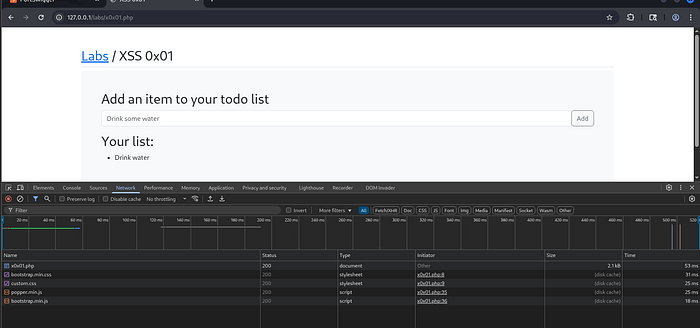
Lab Interface
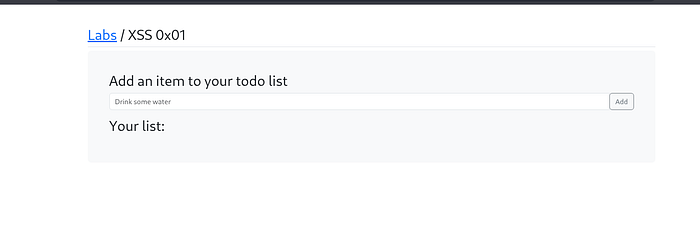
Exploitation Process
Step 1 — Adding Normal Inputs
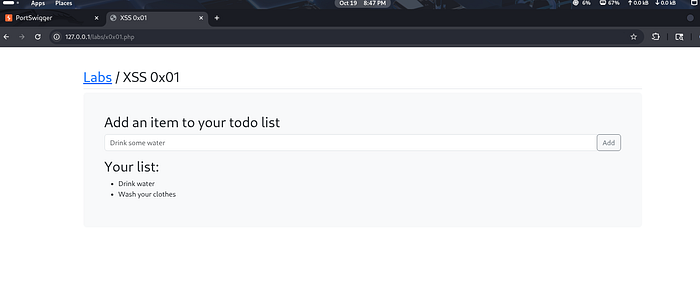
To understand the application behavior, I first added two normal todo items:
- Drink water
- Wash scooty
These items appear instantly in the todo list, confirming that user input is rendered directly into the page.
Step 2 — Testing a Basic XSS Payload
Initial payload used:
<script>prompt(1)</script>Observed Behavior
- The payload appears in the list
- The script does not execute
- The browser treats the script tag as text
This suggests that the application is likely using a method similar to:
.innerTextor another approach that escapes <script> tags.
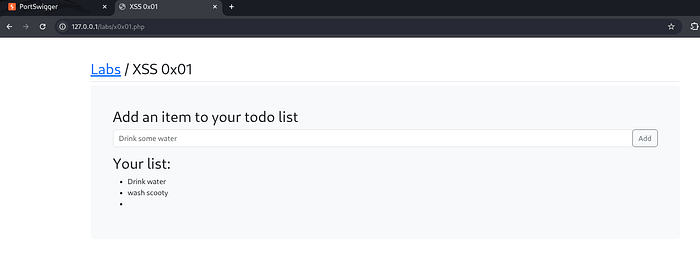
Why This Payload Fails
The application prevents the <script> tag from executing because the content is rendered as plain text rather than executable HTML.
This is a common defensive behavior in modern JavaScript frameworks.
However, this does not fully protect the application from XSS attacks.
Step 3 — Using an Alternative XSS Payload
To bypass this limitation, I used an image error handler payload.
Payload used:
<img src=x onerror="prompt(1)">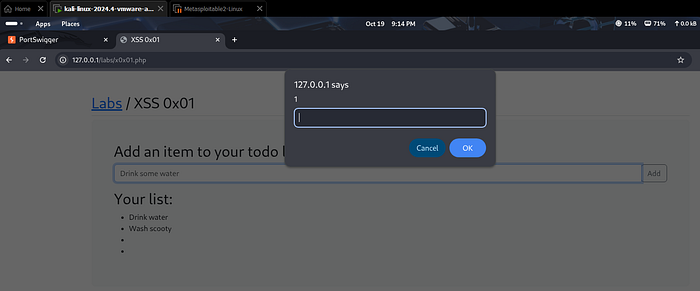
What Happens
- The browser attempts to load the image
- The image source is invalid
- The loading fails
- The
onerrorevent triggers - JavaScript executes successfully
Result
✔ The prompt box appears ✔ JavaScript executes successfully ✔ A broken image icon is displayed in the list

This confirms the presence of a DOM-Based XSS vulnerability.
Step 4 — Exploiting XSS to Redirect the User
After confirming code execution, I tested a payload that performs a user redirection.
Payload used:
<img src=x onerror="window.location.href='https://tcm-sec.com'">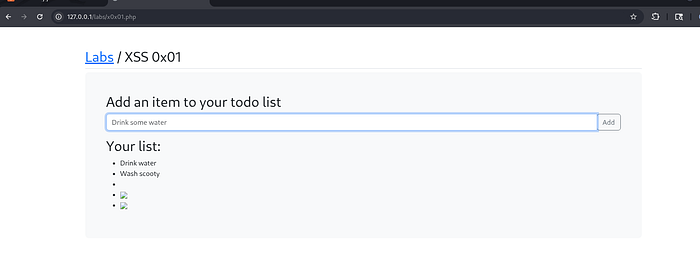
What This Payload Does
- The image fails to load
- The
onerrorevent triggers - JavaScript redirects the browser to another website
Result
✔ The image breaks ✔ JavaScript executes ✔ The user is redirected automatically

This demonstrates how attackers could redirect users to malicious websites.
Why This Vulnerability Exists
This DOM-based XSS vulnerability occurs because:
- User input is inserted directly into the DOM
- Input is not properly sanitized
- Event handlers like
onerrorare allowed - Client-side scripts trust user-controlled data
This creates an environment where attackers can execute arbitrary JavaScript.
Security Impact
If exploited in real-world applications, DOM-based XSS can lead to:
- Session hijacking
- Credential theft
- Phishing attacks
- Unauthorized user actions
- Malicious redirects
- Data manipulation within the page
Because DOM XSS occurs on the client side, it can sometimes be harder to detect during traditional server-side security testing.
Mitigation Strategies
To prevent DOM-Based XSS vulnerabilities, developers should:
Use secure coding practices such as:
- Sanitizing all user inputs
- Avoid inserting raw HTML into the DOM
- Using safe DOM manipulation methods
- Implementing Content Security Policy (CSP)
- Escaping special characters
- Avoiding dangerous attributes like inline event handlers
- Validating input before rendering it
Additionally, developers should prefer methods like:
textContent instead of innerHTMLThis significantly reduces the risk of XSS vulnerabilities.
Conclusion
This lab demonstrated how DOM-Based Cross-Site Scripting works and how attackers can bypass basic protections to execute JavaScript in a victim's browser.
Even when script tags are blocked, alternative payloads such as event handlers can still trigger code execution.
Understanding how DOM manipulation works is critical for identifying and mitigating these types of vulnerabilities in modern web applications.
Ethical Note
This lab was conducted in a controlled and authorized environment strictly for educational and cybersecurity research purposes.
Web Security Series
This article is part of my ongoing Web Security Series, where I explore real-world web application vulnerabilities through hands-on labs.
Web Security Series #10 — Exploiting DOM-Based Cross-Site Scripting (XSS)
Connect With Me
If you are interested in cybersecurity, web application security, or penetration testing, feel free to connect with me.