

Hi everyone, in this article, I'll explain a very easy IDOR that I came across one of my assessments. The reason I'm writing this article is because it's on cloud and you'll get to learn how to enumerate the attack surface. So, instead of focusing on the IDOR, we would be focusing on the cloud element.
Note: Due to the sensitivity of the application and the nature of the engagement, screenshots and specific identifiers have been intentionally omitted.
During a recent security assessment, I identified an Insecure Direct Object Reference (IDOR) vulnerability in a loan processing system used by banking staff. What made it interesting it that it intersected with Azure Blob Storage — creating a broader attack surface than typical database-driven IDORs.
Application Overview
The application was designed to handle loan requests from customers, with a multi-level review workflow involving over 50 distinct user roles, including:
- Administrator
- Manager
- Ops 1
- Other operational roles
Workflow Summary
- A customer submits a loan application.
- A banker reviews the application.
- If valid, the application is forwarded up the chain.
- At each stage:
- Reviewers can request additional documents.
- They can suggest corrections.
5. The customer updates the application accordingly.
This creates a dynamic system where documents and application data are constantly uploaded, reviewed, and modified.

Document Storage Architecture
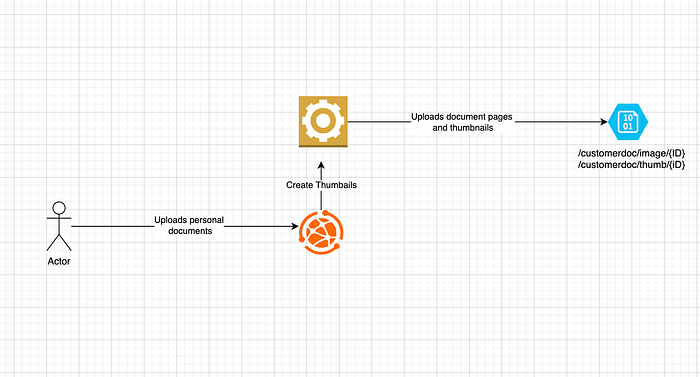
Every document uploaded by the customer was stored in Azure Blob Storage, a cloud-based object storage service provided by Microsoft Azure.
For each uploaded document:
- The original file was stored
- A thumbnail preview was generated
These assets were later fetched and displayed within the application UI. A user above or equal to the role of a Ops 1 could view the document by clicking on the thumbnail.
The Vulnerability
While testing with a low-privileged user account, I noticed something unusual:
- I could access document previews (thumbnails)
- I could also retrieve full document content
This was unexpected because:
These documents were supposed to be accessible only to users with roles such as Ops 1 or higher.
Predictable Object Identifiers
Each uploaded document was assigned 10-digit numeric ID which was incremental in nature. So, if I had just one ID (imagine any number), I could just add 1 to it and view someone's document.
Exploitation Path
The application exposed two API endpoints:
/api/fetchCompleteImage
/api/fetchThumbnail
These endpoints accepted a document ID and returned full document content and thumbnail previews and there was no authorization check to verify whether the requesting user had permission to access that document or whether their role met the required level (Ops 1 or above)
The Cloud Angle
In traditional IDOR cases:
- Data is stored in a database (such as MySQL, MSSQL)
- The backend fails to enforce authorization checks
However, in this case:
- The data resided in Azure Blob Storage
- And the cccess was abstracted through backend APIs
When accessing documents, I observed:
- No visible request to Azure Blob Storage
- No token or signed URL being passed in the client-side traffic
Understanding Shared Access Signatures (SAS)
A Shared Access Signature (SAS) is a secure way to grant temporary access to resources in Azure Storage. So, generally, if you want to access an image, a developer could either make their blob storage public and directly provide a link to the blob storage object. But this would be a security hazard.
So, instead what they could do is first generate a SAS for that object and then provide you a link containing an SAS. The link remains valid for some time and because there are signatures, you cannot guess it making it hard to remember of forge. So, a SAS token:
- Grants time-limited access
- Specifies permissions (read, write, etc.)
- Restricts access to specific resources
What Likely Happened Here
Although no SAS token was visible in requests, there are a few standard ways Azure access can be handled:
1. Backend-Generated SAS (Hidden from Client)
- The backend may generate a SAS internally
- Fetch the blob itself
- Return the content to the user
2. Managed Identity
The virtual machine or service hosting the application might have used a Managed Identity in Azure.
This allows the application to:
- Authenticate to Azure services without storing credentials
- Access Blob Storage directly
So, if, somehow I hack into the VM, I can get unrestricted access to the blob storage without requiring any special permissions. Also, in theory, if I was able to guess the IDs or names of the other objects stored in the blob storage, I would be able to get them with ease.
I hope this helped you get a peek into how complex cloud systems can get and how easy it would be to move laterally in cloud hosted systems.
Hope you enjoyed reading the article. Please consider subscribing and clapping for the article.
In case you are interested in CTF/THM/HTB writeups consider visiting my YouTube channel.