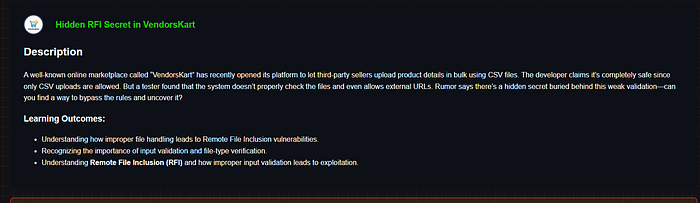

CTF Write-Up: Hidden RFI Secret in VendorsKart
Challenge Description
Learning Outcomes from the challenge:
- Understanding how improper file handling leads to Remote File Inclusion vulnerabilities
- Recognizing the importance of input validation and file-type verification
- Understanding Remote File Inclusion (RFI) and how improper input validation leads to exploitation
Reconnaissance — Understanding the Target
The challenge pointed to a live web application at challenge.razzify.in/challenge_19/. On visiting, I found a marketplace-style platform called VendorKart with login, register, and product management features.
After registering and logging in, I navigated to the Products page at /challenge_19/products. This is where things got interesting.
The page had a feature called "Add your Products" with the following description:
"Enter a URL or path to a csv file. The server will fetch and include it in your database."
The placeholder text in the input field read:
http://example.com/test.csv or http://<your-host>/file.csvThis immediately screamed RFI — the server was fetching user-supplied URLs server-side. Looking at the HTML source, I found the input parameter name was page.
<input class="form-control" name="page" placeholder="...">🧪 Step 1 — Confirming the RFI Behavior
My first instinct was to test if the server actually fetches the URL I provide. I tried pointing it to the challenge's own products page with a query string:
https://challenge.razzify.in/challenge_19/products=flag.csv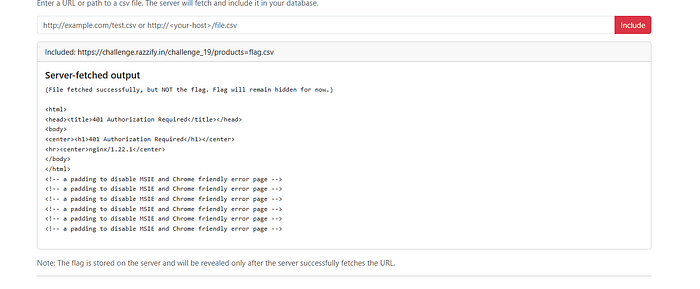
Result: The server-fetched output showed an nginx 401 Authorization Required response. This was huge — it confirmed:
- ✅ The server is genuinely fetching external URLs (RFI confirmed)
- ✅ There's an internal nginx server running
- ✅ Some resources are protected behind auth
Step 2 — Probing the Internal Server (SSRF)
Since the server was fetching URLs server-side, I shifted to SSRF thinking — can I make the server fetch something internal that I can't access directly?
I tried localhost directly:
http://localhost/flag.txt
http://127.0.0.1/flag.txt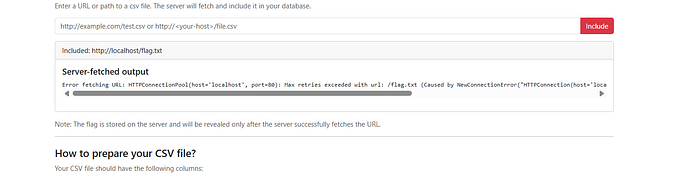
Result:
Error fetching URL: HTTPConnectionPool(host='localhost', port=80):
Max retries exceeded... Connection refused
Port 80 was closed. The error message also revealed this was a Python requests library behind the scenes (the "HTTPConnectionPool" error is characteristic of Python's requests). This meant file:// protocol wouldn't work — Python's requests library only handles http:// and https://.
I tried various internal ports (5000, 8000, 8080, 3000) — all refused. Dead ends.
Step 3 — Following the Hints
The challenge hint said:
- "A URL ending differently might open unexpected possibilities."
- "PDF files might hold more value than they appear."
The hint about PDF files was a direct nudge. What if there's a flag.pdf somewhere on the server? I tried feeding the server its own URL:
https://challenge.razzify.in/challenge_19/flag.pdf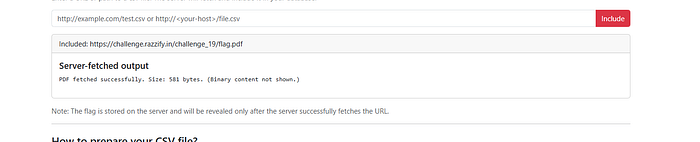
Result:
PDF fetched successfully. Size: 581 bytes. (Binary content not shown.)🎉 The PDF exists! The server successfully fetched it internally — but it suppressed binary output. Visiting the URL directly in the browser returned 404 Not Found, confirming the PDF is not publicly accessible through the normal routing. The server was fetching it through some internal path that bypassed the public 404.
Step 4 — Bypassing the Binary Content Filter
The server fetched the PDF but refused to display it because it detected binary content. I needed a way to trick the server into displaying the PDF's content anyway.
I tried various extension tricks (classic bypass attempts):
https://challenge.razzify.in/challenge_19/flag.pdf?.csv

https://challenge.razzify.in/challenge_19/flag.pdf#.csv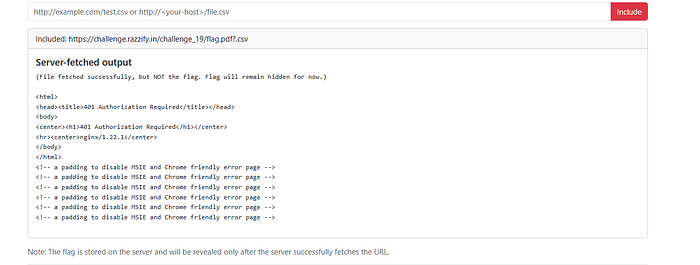
These didn't help directly. I then thought about using an open redirect service — if I could make the server follow a redirect to the PDF, perhaps the content filtering would behave differently.
I used a public redirect service and crafted a URL that redirected to the flag PDF:
**********url=https://challenge.razzify.in/challenge_19/flag.pdfResult:
PDF fetched successfully. Size: 16889 bytes. (Binary content not shown.)
Hidden Secret: 🫡🫡🫡🫡
FLAG CAPTURED! 🚩
The open redirect caused the server to re-fetch the PDF through a different code path, and this time the hidden secret embedded in the PDF was extracted and displayed!
Real-World Impact
This vulnerability chain demonstrates a serious security risk that exists in real production applications. Here's what an attacker could do in a real-world scenario:
1. Internal Network Scanning (SSRF) An attacker can use the server as a proxy to map internal infrastructure — scanning ports and services that are hidden from the public internet. Cloud environments (AWS, GCP, Azure) are especially vulnerable because internal metadata services (like http://169.254.169.254/) can expose cloud credentials.
2. Credential Theft from Cloud Metadata In AWS environments, an attacker could fetch:
http://169.254.169.254/latest/meta-data/iam/security-credentials/…and obtain temporary AWS access keys, leading to full cloud account compromise.
3. Reading Internal Files & Secrets If file:// or other protocols are not blocked, attackers can read sensitive server files like /etc/passwd, application config files, .env files containing database passwords and API keys.
4. Pivoting to Internal Services The attacker can reach databases, admin panels, internal APIs, and other services that are only accessible from within the server's network — bypassing all perimeter security.
5. Data Exfiltration Sensitive documents, PDFs, and files that are protected from public access can be exfiltrated by routing requests through the vulnerable server itself.
Remediation
To fix this class of vulnerabilities in production:
- Validate and whitelist allowed URL schemes (only
https://to trusted domains) - Block private/internal IP ranges — reject requests to
127.0.0.1,10.x.x.x,172.16.x.x,192.168.x.x,169.254.x.x - Use a dedicated fetch worker with no access to internal networks
- Never trust file extensions — validate actual content-type of fetched files
- Disable follow-redirects or validate redirect destinations
- Implement allowlists for domains the server is permitted to fetch from
Conclusion
This challenge was a great exercise in chaining multiple techniques:
RFI → SSRF → Internal Resource Discovery → Binary Content Bypass via Open Redirect
The key takeaways:
- Always check what parameter names reveal about the backend logic
- Error messages from Python's
requestslibrary tell you exactly what's happening internally - When binary content is filtered, think about redirect chains that might bypass the filter
- Hints in CTF challenges are carefully worded — "PDF" and "ending differently" were precise nudges toward the solution
This type of vulnerability is one of the most impactful in real-world bug bounty programs and is consistently found in production applications that allow user-supplied URLs for fetching external content.
📬 Stay Connected
If you found this helpful and want to learn more about web security and hands-on labs, feel free to follow me for upcoming write-ups and practical cybersecurity content.
✍️ Follow me for more cybersecurity write-ups
🔗 LinkedIn — codermayank
📸 Instagram — @mayhack_
I've already published several lab write-ups, and more labs will be uploaded soon — also from Razzify. Stay tuned for upcoming posts covering additional labs and web security concepts.
💬 Still stuck on this challenge or a similar one? Feel free to reach out on Instagram @mayhack_ — I'm happy to give a nudge in the right direction without spoiling the fun!
Happy Hacking! 🔐