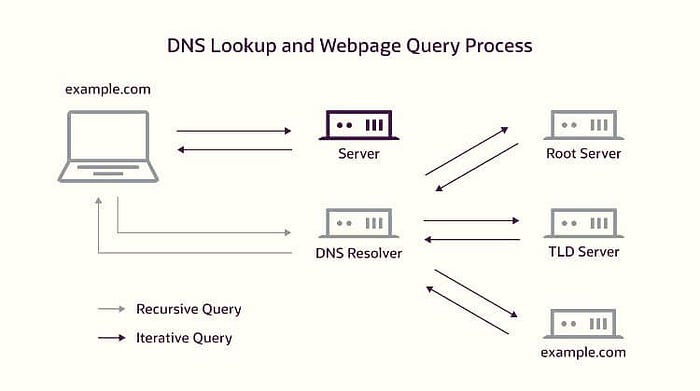

Every device on the internet communicates using IP addresses but IP address are difficult memorize since there are too many devices on the internet. So instead of memorizing the IP address we give a domain name to each ip for instance google.com, facebook.com etc.
To translate these domain names with its crossponding ip address we have something called DNS protocol. It is a globally distributed, hierarchical database that translates human-readable hostnames into IP addresses (and vice versa). When i said hierarchical database this is what i meant.
First, understand few things:
What is a query? A query just means a question. When your computer wants to find Google, it is literally asking the internet:"hey, what is the address of this website?" That question is called a query.
What is resolving? Resolving means getting the ip address associated with the domain like www.google.com into a real IP address that computers can actually use.
Types of resolving
Iterative resolving — your computer does all the work itself. It asks the root server, root server says "I don't know, go ask TLD", your computer then goes and asks the TLD server, TLD says "go ask authoritative servers", your computer then asks authoritative servers and gets the IP address associated with the target domain name. Your computer is making every single request in this scenario.
Recursive resolving — your computer is lazy (in a smart way). It hands the entire job to one middleman called the recursive resolver and says "you figure it out, just bring me the answer." The recursive resolver then does all the iterative work on your behalf — asking root, then TLD, then authoritative — and only comes back to you when it has the final answer. This is what actually happens in real life.
For the sake of understanding the mechanism practical we will go with Iterative method. There is a tool in linux named "dig", we are going to use this tool. I am assuming you have linux installed in your system and dig command is working as well.
Here is the imporant information about the hierarchical structure
Root Servers
Root servers are the starting point of every DNS lookup on the entire internet. A DNS lookup is simply the process of translating a human-readable domain name into an IP address that computers use to communicate. Every single domain name resolution begins from Root servers. When a resolver asks a root server about example.edu.pk, the root server responds with two things — the NS records (names of the .pk TLD servers) and glue records (A records containing the actual IPs of those TLD servers).
What Root Servers actually are? A cluster of servers. A clustor is a group of multiple systems that work together as a single system. So basically Root servers are a cluster of servers that hold the root zone file. This file is a simple list that tells you about the handler of the Top Level Domains like (.com, .edu, .pk, .org and 1500+ more). The entire file is ~2MB in size. Here is an example of root zone file:
com.        172800  IN  NS  a.gtld-servers.net.
com.        172800  IN  NS  b.gtld-servers.net.
com.        172800  IN  NS  c.gtld-servers.net.
edu.        172800  IN  NS  a.edu-servers.net.
edu.        172800  IN  NS  b.edu-servers.net.
pk.         172800  IN  NS  ns1.pknic.net.pk.
pk.         172800  IN  NS  ns2.pknic.net.pk.
org.        172800  IN  NS  a0.org.afilias-nst.info.
org.        172800  IN  NS  a2.org.afilias-nst.info.
net.        172800  IN  NS  a.gtld-servers.net.
net.        172800  IN  NS  b.gtld-servers.net.
NS servers (Name Server servers) are the servers that tell you where to find DNS information for a domain. Read the above example like this .com is managed by these NS servers. .edu is managed by these NS servers. .pk is managed by these NS servers. That is literally all the root zone file says. Notice google.com, mit.edu, facebook.comnone of these exist in this file. The root has no idea that those exist. It only knows about the TLD level, nothing below it. You can find root zone file there https://www.internic.net/domain/root.zone
The 13 cluster system: There are exactly 13 root server clusters. Each cluster is labeled from A to M. Each cluster has a fixed IP address that never changes.
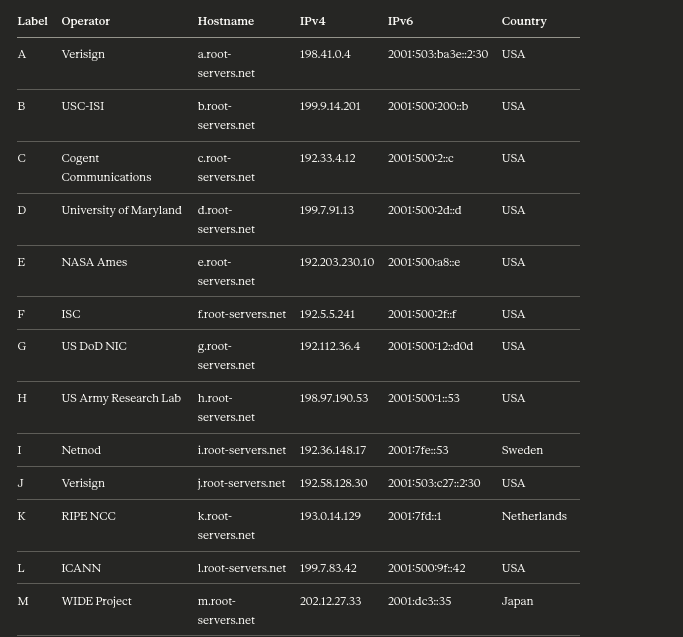
13 labels does not mean 13 machines: Each of these 13 labels represents a cluster of machines distributed worldwide using Anycast routing. Anycast means multiple physical machines in different countries share the exact same IP address. When your resolver sends a query to that IP, the internet's routing system automatically directs it to the nearest physical machine. In total there are over 1,600 physical root server instances deployed across 130+ countries. You can see all of them at root-servers.org.
ICANN (Internet Corporation for Assigned Names and Numbers) manages the root zone (root servers). The root zone file is maintained by IANA (Internet Assigned Numbers Authority) which is a department of ICANN. Changes to the root zone — like adding a new TLD — require IANA approval. This is why control of root servers is a geopolitical issue. The fact that 9 of the 13 operators are American organizations has caused significant debate about US dominance over the global internet infrastructure.
For instanace .edu TLD is strictly controlled by the U.S. Department of Education. Only accredited U.S. higher education institutions can register .edu domains. Examples: harvard.edu, mit.edu etc. A university in Pakistan (like Lums) cannot register lums.edu because they are outside the U.S. So inshort If you see a .edu, .gov, .mil, .us, or .k12.us, it's officially tied to U.S. entities only. Other countries create their own TLDs like .edu.pk, .gov.pk, etc.
TLD Servers
Root servers know all TLDs: .com, .org, .edu, .pk, etc. They do NOT know example.edu.pk directly. They respond for .pk TLD NS servers only. Now if you want to reach all the domains under .pk you have to ask .pk TLD servers, we recieved these names from the root servers. These TLD servers resolve generic domains .com .org etc and specific domains like gov.pk edu.pk etc.
The three categories of TLDs:
gTLD (Generic TLD) — not tied to any country. These are the most common ones most people know. .com (commercial), .org (organizations), .net (networks), .gov (US government), .edu (US educational institutions), .mil (US military). In recent years ICANN opened up new gTLDs so now you have .photography, .tech, .bank, .shop and hundreds more.
ccTLD (Country Code TLD) — two letter codes assigned to every country on earth based on the ISO 3166 standard. .pk for Pakistan, .uk for United Kingdom, .de for Germany, .in for India, .cn for China. Each country's government or a designated authority manages its own ccTLD. PKNIC manages .pk in Pakistan.
sTLD (Sponsored TLD) — restricted TLDs where only certain organizations can register. .edu is restricted to accredited US universities only — Educause verifies every applicant. .gov is restricted to US government entities. .mil is restricted to US military.
TLD servers do not store IP addresses of websites. They only store NS records of the authoritative nameservers for every domain registered under them. So the .edu TLD server has an NS record for mit.edu, harvard.edu, stanford.edu and every other .edu domain. When you register a domain, your registrar submits your chosen nameserver names to the TLD operator and they add an NS record into the TLD zone.
What it responds with: It responds with the authoritative name servers of that particular domain for example if you qurey for example.edu.pk Root server will give you NS record of NS servers which are handling .pk domain. TLD server will handle you the NS record of server which are handling domain .edu under the domain .pk. These NS records contains the details related to authoritative name servers.
Authoritative Name Servers
This is the final destination. This is where real DNS records live. When you query this server it returns you the ip of domain you were asking for all the time for example:
lums.edu.pk
authoritative name server will now return you the address of lums.
Who run these servers? The domain owner themselves. MIT operates ns1.mit.edu and ns2.mit.edu. Google operates ns1.google.com. A small company might outsource this to Cloudflare or AWS Route 53 and those companies operate the authoritative servers on their behalf. When you buy a domain from Namecheap or GoDaddy you can either use their authoritative servers or point to your own.
What they actually store is the zone file. Everything is stored in a zone file which is a plain text file with a specific format defined in RFC 1035. Every DNS record type A , AAAA, CNAME, MX, NS, TXT, SOA, PTR, SRV, CAA lives there. I am leaving it for you, google about DNS record types.
Primary vs Secondary authoritative servers: Almost every domain runs at least two authoritative servers for redundancy. The primary is where an administrator makes changes. If the primary goes down, secondaries keep answering.
So the flow was like
Query Root Server -> Get the TLD NS Record.
Query TLD Server -> Get Authoritative NS Record.
Query Authoritative Server -> Get the actual IP.
Here is the implementation of our theoretical knowledge
We will use example.edu.pk as our target. Remember +norecurse is the key flag, it tells the server "do not do the work for me, just tell me who to ask next."
Step 1 — Ask a root server
To find the root server you can use this command
dig NS .The dot . means the root zone. This returns all 13 root server hostnames and their IPs. Now you have the starting point legitimately. Then pick any IP from that output and start the chain. I picked a.root-servers.net:
dig @a.root-servers.net pk. NS +norecurseRoot does not know lums.edu.pk but it knows who manages .pk. It returns PKNIC's nameservers in the AUTHORITY section with their IPs in the ADDITIONAL section as glue records.
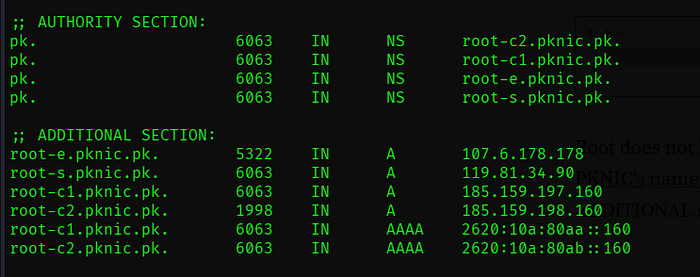
Step 2 — Ask the .pk TLD server
dig @root-e.pknic.pk (university_name).edu.pk NS +norecurseSince this is the TLD server so now we can ask it for the Authoritative name server of our target. You can place domain of your university.
Step 3 — Ask the pu.edu.pk authoritative server
dig @place_the_ip_address_you_got_from_the_addition_section_of_previous_command (university_name).edu.pk NS +norecurseSince we received the Authoritative name server of our target now we can -use this to get the ip of the target itself.
This Protocol is important from the security perspective. One of the example of DNS misconfiguration is DNS Zone Transfer (AXFR) Misconfigured authoritative server allows anyone to request a complete copy of the zone file. One command dumps every subdomain, every internal hostname, every IP in the entire domain instantly. Here is the command for testing if this configuration is present on target:
dig @the-authoritative-nameserver target.com AXFRThough there can be many other issues in a dns server but this was just one of them. I hope you enjoyed the reading.