

When securing web applications, we often rely on a reverse proxy like Nginx to handle access control lists (ACLs) before traffic ever hits our backend. The logic is simple: if Nginx blocks /admin, no one touches the admin panel. But what happens when your proxy and your backend application disagree on what a URL looks like?
This is a classic "parser differential" vulnerability. Recently highlighted in the Skyfall machine on HackTheBox (and detailed by Ippsec), this technique exploits a discrepancy between how Nginx matches regex paths and how Python (specifically Flask/Werkzeug or custom application logic) sanitizes inputs.
The Setup
Imagine a standard architecture:
Nginx sitting in front of a Python Flask application.
The administrator wants to protect the /admin endpoint, so they add a restriction in nginx.conf. To ensure they are being precise, they might use a regular expression anchor to prevent accessing /admin but allow /admin-public.
Nginx Configuration:
location ~ ^/admin$ {
    deny all;
    return 403;
}
In the backend, the Flask application routes traffic. Perhaps there is a piece of middleware or a specific route handler that sanitizes the incoming path to ensure cleanliness, often using Python's built-in .strip() method to remove trailing whitespace.
Python/Flask Code (Conceptual):
@app.before_request
def sanitize_path():
    # Attempt to clean up the path by removing trailing whitespace
    request.path = request.path.strip()
The Attack: \x09
An attacker tries to access /admin. Nginx sees the request matches ^/admin$, and instantly returns a 403 Forbidden.
However, the attacker then sends a request with a trailing horizontal tab character (0x09), often URL-encoded as %09.
Request
GET /admin%09 HTTP/1.1
1. The Nginx Check
Nginx receives the URI /admin\t (where \t is the tab character). It compares this string against the regex ^/admin$.
- Does
/admin\tmatch/admin? No. The$anchor asserts the end of the string, and the tab character means the string hasn't ended yet (or rather, the characters don't match exactly).
Result Nginx allows the request to pass through to the backend.
2. The Flask/Python Processing
The request arrives at the Flask application. The application logic (or a zealous middleware) takes the path /admin\t and runs .strip().
- In Python,
'string\t'.strip()evaluates to'string'. The tab is removed. - The path becomes
/admin.
Result
Flask routes the request to the /admin view function, serving the restricted content.
Fuzzing whitespace characters
While \x09 is the common example, let's see exactly what Python considers "strippable" versus what Nginx passes through.
A quick script to iterate through all byte values (0–255):
for byte in range(256):
    char = chr(byte)
    if len(char.strip()) == 0:
        print(f"{byte:02X} was stripped")
Running this locally shows the issue is broader than just tabs.
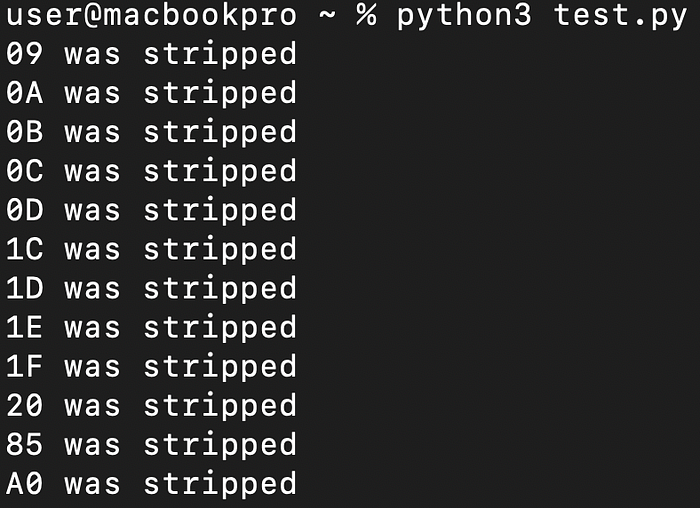
Python strips the following:
- Standard:
09(Tab),0A(Line Feed),0D(Carriage Return),20(Space) - Separators:
1C,1D,1E,1F(File/Group/Record/Unit Separators) - Other:
0B(Vertical Tab),0C(Form Feed),85(Next Line),A0(Non-breaking Space)
This means vectors like /admin%1C or /admin%A0 are also valid bypasses if the regex isn't strict enough.
Why This Happens
This vulnerability exists because of inconsistent normalization. Nginx assumes the URL it sees is the final URL and performs a strict regex match. Python's .strip() method, however, is aggressive—it removes far more than just standard spaces and tabs. It effectively "heals" the malformed URL into a valid one after the security check has already passed.
While \x09 (Tab) is the most common example, the fuzzing results show that this bypass works with a wide range of bytes that Python considers whitespace:
- Standard Whitespace:
\x09(Tab),\x20(Space),\x0a(Line Feed),\x0d(Carriage Return) - Vertical/Page Breaks:
\x0b(Vertical Tab),\x0c(Form Feed) - Separators:
\x1cthrough\x1f(File, Group, Record, and Unit Separators) - Extended:
\x85(Next Line),\xa0(Non-breaking Space)
Any of these characters appended to a URL will break the Nginx $ anchor match but will be silently removed by the backend.
Remediation
To fix this, you must ensure that your proxy and your backend normalize URLs identically, or simply make your proxy rules broader.
- Avoid Regex Anchors for Security
Instead of
location ~ ^/admin$, use a prefix match likelocation /admin(without the regex~and strict anchors), which will catch/admin,/admin/, and/admin%09. - Reject, Don't Sanitize In your backend, if a URL contains unexpected control characters, reject the request (return 400 Bad Request) rather than silently stripping them and processing the request.
Thanks for reading!
Hopefully, this helps you catch similar bugs in your next engagement. You can add me on LinkedIn.
Happy Hacking!
Filip Kecman Penetration Tester eWPTX • CBBH • eMAPT • ejPT