In this project, I took on the role of an ethical hacker to demonstrate how a simple web vulnerability can lead to a full-scale cloud data breach. By simulating the Capital One attack pattern, I learned exactly how SSRF and IMDSv1 work together to expose sensitive data.
1. The Vulnerable Architecture
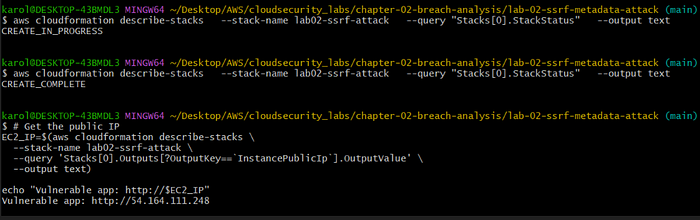
Using AWS CloudFormation, I deployed an intentionally weak infrastructure:
- EC2 Instance: A web server running a Flask app with an unvalidated
/fetchendpoint. - IAM Role: An over-permissioned identity with full access to S3.
- S3 Bucket: A "private" storage container holding simulated customer records.

2. Understanding the SSRF Vulnerability
The flaw was a Server-Side Request Forgery (SSRF) vulnerability. The application code allowed me to pass a URL as a parameter, which the server would then fetch on my behalf without checking if that URL was internal or external.
The Vulnerable Code:
Python
@app.route('/fetch')
def fetch_url():
    url = request.args.get('url')
    # VULNERABLE: No validation of the URL
    response = requests.get(url)
    return response.text
3. The Attack Chain
Step 1: Accessing the Internal Metadata Service
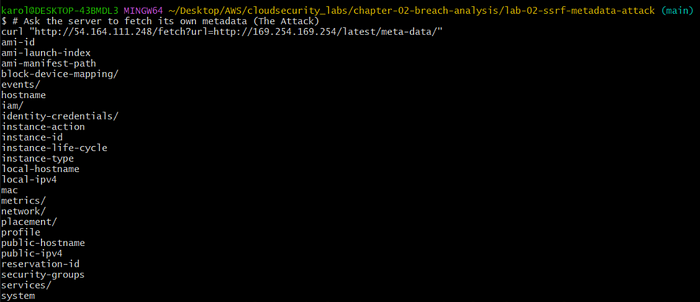
I started by tricking the server into querying its own Instance Metadata Service (IMDS) at the internal IP 169.254.169.254. Because the server was using IMDSv1, it responded to my simple GET request immediately.
Step 2: Stealing the Identity Keys
Once I saw the iam/ directory, I knew I could find the server's security credentials. I used the SSRF to pull the temporary AccessKeyId, SecretAccessKey, and SessionToken.

Step 3: Exfiltrating the Data
With the stolen keys configured, I had the server's permissions. I listed the S3 buckets and found the target: lab02-ssrf-data-490017368516.

Finally, I downloaded the sensitive file directly to my terminal, completing the simulation of the 106-million-record breach.
4. The Fix: Defense-in-Depth with IMDSv2
To stop this, I implemented the industry-standard fix: IMDSv2.
IMDSv2 requires a session token obtained via a PUT request before it will provide metadata. Since SSRF attacks are typically restricted to GET requests, the attacker can no longer "reach" the keys.
The Remediation Command:
Bash
aws ec2 modify-instance-metadata-options \
  --instance-id i-06fa60b8ad2545ac7 \
  --http-tokens required
After enforcing this, my attack attempts returned a 401 Unauthorized error. The application code was still "broken," but the infrastructure was now secure.
5. Key Lessons
- Infrastructure is your Safety Net: Applications will always have bugs; IMDSv2 provides a critical layer of defense that prevents a bug from becoming a breach.
- Least Privilege: If the IAM role didn't have S3 permissions, the stolen keys would have been useless.
- Framework Thinking: Security is about auditing every layer of the Defense-in-Depth model, from the network to the data itself.