
Security is the topic every engineer nods along to in planning meetings and then underinvests in until something goes wrong.
The mental model that actually helps: every attack is an attacker executing something outside the defined boundary of your system. Your job is to know where your boundaries are and defend them not assume that most inputs will be reasonable, not assume that your internal network is safe, not assume that a logged-in user is acting in good faith.
That last point is the one that bites people most. "False assumption" is the real attack surface. The more your code assumes, the more gaps an attacker can exploit.
SQL Injection
SQL injection is old. It's also still in the OWASP Top 10 every year, which tells you something.
The attack is simple: if you build queries by concatenating strings, an attacker sends SQL instead of data, and your database executes it. The fix is equally simple: use parameterized queries. Never build SQL with string interpolation.
// DON'T vulnerable
const query = `SELECT * FROM users WHERE email = '${email}'`;

// DO parameterized
const result = await db.query(
  'SELECT * FROM users WHERE email = $1',
  [email]
);
with parameterised query user input is treated as a literal value ,not executable sql even if someone passed DROP table users; it get passed to the database as string not parsed as a command.
a few things to also lock down:
- validate and sanitise all inputs before they reach query
- restrict your db user's permission means your app user shouldn't have drop table privileges.
Command Injection:
Same idea different target. If your backend takes user input and passes it to the shell command you've handed the attacker OS-level access.
// DON'T letting user input touch exec()
import { exec } from 'child_process';
exec(`convert ${req.body.filename} output.pdf`); // never do this

// DO use libraries, validate input, avoid shell
import sharp from 'sharp';
const safeName = path.basename(req.body.filename); // strip path traversal
await sharp(`/uploads/${safeName}`).toFile('output.pdf');
If you genuinely need to run a shell command with user-provided input, use execFile with arguments as an array (no shell interpolation) and validate the input against a strict allowlist before that.
Authentication
Authentication is one of those things where the cost of getting it wrong is enormous and the right answer is almost always "use an existing solution."
Auth0, Supertokens, Clerk these handle the hard parts: OAuth 2.0 flows, SAML federation, session revocation, MFA, refresh token rotation. Building this from scratch is a meaningful engineering project with a long tail of edge cases, and most enterprise will not do that they will relay on Oauth solutions.
but if you are startup they charge you what matters to you that is daily active users if you have more they will charge more so it's always best to build your own auth system with minimal third party logins with strong checks like:
- Check verified boolean from Oauth return response
- Don't include multiple integration analyse your user market according that user behaviour pattern choose the integration
- Use stable identifiers like sub id instead of email to uniquely map the user in db so that if user changes email in the third party platform the system can update user email by adding verification layer
That said, when you do need to build it yourself, here's what actually matters.
Password storage
Plain text: obviously not. MD5 or SHA256: also no fast hash functions can be brute-forced at billions of guesses per second with a GPU.
The right answer is a slow hashing algorithm designed specifically to be expensive: Argon2 , bcrypt, or scrypt.
import argon2 from 'argon2';

// On registration
const hash = await argon2.hash(password, {
  type: argon2.argon2id,
  memoryCost: 65536,  // 64MB makes GPU attacks expensive
  timeCost: 3,
  parallelism: 4,
});

// On login
const valid = await argon2.verify(hash, inputPassword);
One point to highlight If hashing happens on the server, an attacker can send 10,000 "Login" requests per second. Your server will spend all its CPU power trying to hash those 10,000 passwords, effectively crashing your site. By moving the heavy work to the client, you force the attacker to use their own CPU power to generate those hashes, making a high-speed attack much more expensive
To do this securely, you must use a multi-stage hashing approach:
- Client Side: Hash the password (e.g., using Argon2) to handle the heavy CPU lifting with web workers without blocking the main thread
- Server Side: Take the incoming client hash and hash it again (even with a fast algorithm like SHA-256) before comparing it to your database.
- This ensures that the "secret" stored in your database is different from what travels over the network.
Token strategy (stateless)
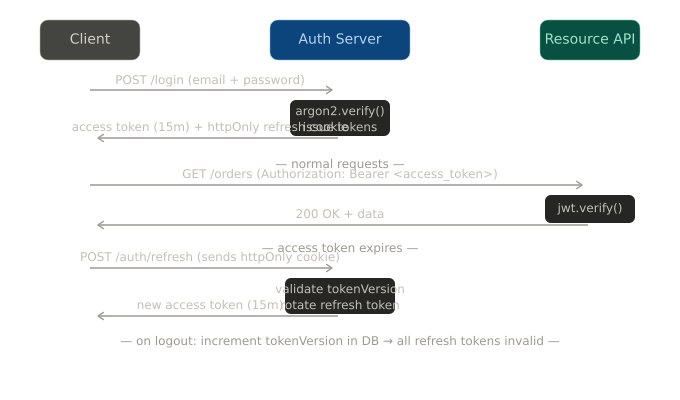
Access token + refresh token is the standard. Short-lived access tokens (15 minutes) limit the damage window if one is stolen. Long-lived refresh tokens stay in an httpOnly cookie and are used only to get new access tokens.
// Access token short-lived, in memory on client
const accessToken = jwt.sign(
  { userId: user.id, role: user.role }, // no PII in payload
  process.env.JWT_SECRET,
  { expiresIn: '15m' }
);

// Refresh token long-lived, stored httpOnly
const refreshToken = jwt.sign(
  { userId: user.id, tokenVersion: user.tokenVersion },
  process.env.REFRESH_SECRET,
  { expiresIn: '7d' }
);

res.cookie('refresh_token', refreshToken, {
  httpOnly: true,
  secure: true,
  sameSite: 'strict',
  maxAge: 7 * 24 * 60 * 60 * 1000,
});
What goes in the JWT payload: user ID, role, anything needed for authorization. What doesn't go in the payload: email, name, phone the payload is base64-encoded, not encrypted.
Rate limiting on auth endpoints
Login endpoints get hit hard in credential stuffing attacks. Rate limiting is not optional.
import rateLimit from 'express-rate-limit';

const loginLimiter = rateLimit({
  windowMs: 15 * 60 * 1000, // 15 minutes
  max: 10,                   // 10 attempts per IP
  message: { error: 'Too many attempts, try again later' },
  standardHeaders: true,
});

app.post('/auth/login', loginLimiter, loginHandler);
Layer this with user-level limits too (not just IP) a distributed attack from many IPs still shouldn't let one account get hammered.
Authorization (and BOLA)
Authentication answers "who are you?" Authorization answers "what are you allowed to do?" Most security bugs I've seen are authorization bugs, not authentication bugs.
The check that teams most often skip: resource-level ownership. You verify the user is logged in. You verify the user has the right role. You forget to verify the user owns the specific resource they're accessing.That's Broken Object Level Authorization (BOLA)
// BAD only checks that user is authenticated
app.get('/orders/:id', auth, async (req, res) => {
  const order = await Order.findById(req.params.id);
  return res.json(order); // returns any user's order
});

// GOOD checks ownership
app.get('/orders/:id', auth, async (req, res) => {
  const order = await Order.findOne({
    _id: req.params.id,
    userId: req.user.id, // must belong to THIS user
  });

  if (!order) return res.status(404).json({ error: 'Not found' });
  return res.json(order);
});
Notice the 404, not 403. This is intentional. A 403 tells the attacker the resource exists and they just don't have access a useful signal for probing. Returning 404 for unauthorized resources gives away nothing.
The broader principle: default deny. Every endpoint should require explicit permission to be accessible. If the middleware doesn't explicitly grant access, the request should fail.
// NestJS guard requires both authentication and the right role
@UseGuards(JwtAuthGuard, RolesGuard)
@Roles('admin')
@Delete('/users/:id')
async deleteUser(@Param('id') id: string, @Request() req) {
  // Resource ownership check still needed even with role guard
  if (req.user.role !== 'superadmin' && req.user.id !== id) {
    throw new ForbiddenException();
  }
  return this.usersService.delete(id);
}
XSS
Cross-site scripting happens when user-provided content gets rendered in the browser as HTML meaning an attacker can inject a script tag, and that script runs with full access to the page's cookies, tokens, and DOM.
The primary defence is server-side sanitisation before storing or rendering any user HTML.
 import DOMPurify from 'isomorphic-dompurify';

// Sanitize before storing
const cleanHTML = DOMPurify.sanitize(req.body.content, {
  ALLOWED_TAGS: ['b', 'i', 'em', 'strong', 'p', 'ul', 'li'],
  ALLOWED_ATTR: [],
});

await Post.create({ content: cleanHTML, authorId: req.user.id });
The second layer is a Content Security Policy header that tells the browser which scripts are allowed to run:
app.use((req, res, next) => {
  res.setHeader('Content-Security-Policy', [
    "default-src 'self'",
    "script-src 'self'",           // no inline scripts
    "style-src 'self' 'unsafe-inline'",
    "img-src 'self' data: https:",
    "frame-ancestors 'none'",      // prevents iframe embedding
  ].join('; '));
  next();
});
Security Misconfiguration
This is less a specific attack and more a category of "things developers do that hand attackers easy wins"
The most common ones:
- Pushing
.envfiles to GitHub (usegit-secretsor pre-commit hooks) - Running debug log level in production (leaks stack traces, query details, internal paths)
- Leaving default credentials on databases.
// Validate environment at startup log nothing sensitive
const requiredEnvVars = ['DATABASE_URL', 'JWT_SECRET', 'REDIS_URL'];
const missing = requiredEnvVars.filter(k => !process.env[k]);
if (missing.length) {
  throw new Error(`Missing env vars: ${missing.join(', ')}`); // names only, not values
}

// Log level from environment
const logLevel = process.env.NODE_ENV === 'production' ? 'warn' : 'debug';
Defense in Depth
No single layer holds. The point of layered security is that an attacker who gets through one layer hits another.
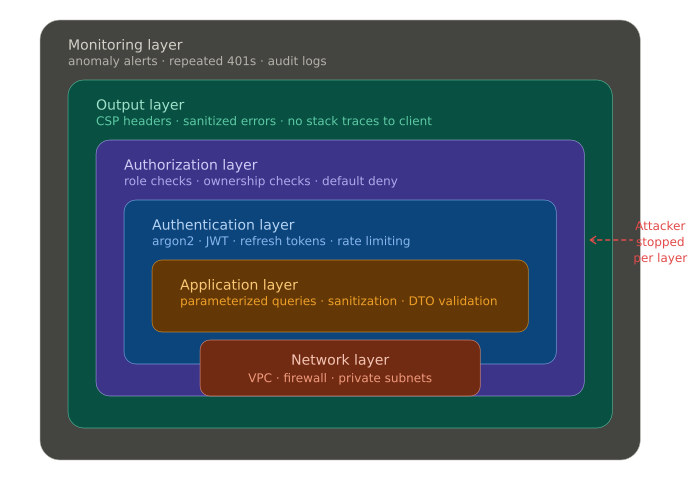
A reasonable stack looks like this:
- Network layer: firewall rules, VPC isolation, private subnets for databases
- Application layer: input validation, parameterized queries, sanitization
- Auth layer: strong hashing, short-lived tokens, rate limiting, MFA
- Authorization layer: role checks + ownership checks on every resource
- Output layer: CSP headers, sanitized error responses (no stack traces to clients)
- Monitoring layer: anomaly detection, alert on repeated 401s, suspicious query patterns
- Use API Gateways and proxies to route into your backend endpoints with proper health checks and security configurations to prevent abuse early
When one layer fails and at some point, something fails the others limit the blast radius.
Part 5 will cover performance: profiling, N+1 queries, connection pooling, and what to reach for before you scale horizontally. Drop questions below if anything here needs more detail.