
Overview
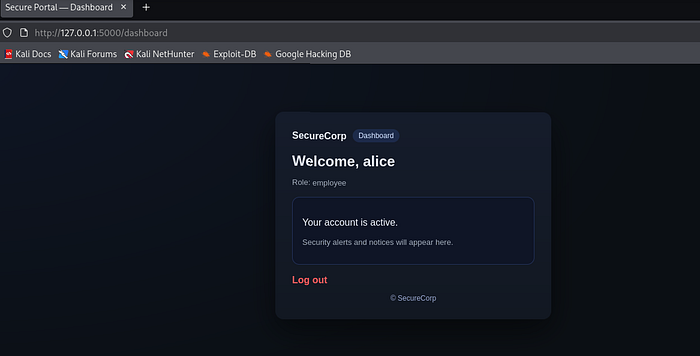
In this lab, the objective was to identify and exploit weaknesses in the password reset mechanism of a simulated corporate web application. After launching the application, the SecureCorp login portal was presented. Initial access was available using the default credentials provided for testing — username Alice and password password_123. Login was successful, confirming the application and authentication flow were functioning normally.
The primary goal of the exercise was to analyze and abuse the password reset functionality to achieve account takeover without needing the original user's email access. The focus was specifically on identifying logic flaws in how reset tokens were generated, exposed, and validated.
Vulnerability Discovery Process
The first step was exploring the Forgot Password functionality. When submitting a username through the forgot password endpoint, the application generated a password reset token. In a real production environment, this token should only be sent to the user's registered email. However, the first major flaw was discovered here — the reset token was directly displayed on the user interface.
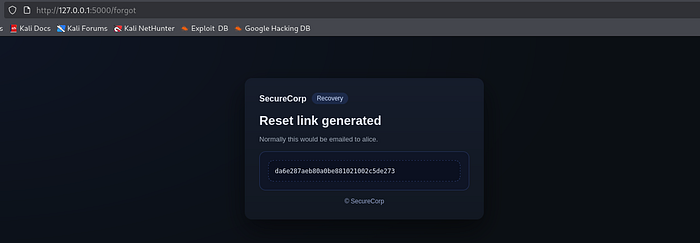
This immediately broke the trust boundary. Any user capable of triggering the reset flow could obtain valid reset tokens for other users without needing email access.
Further testing was performed by generating multiple reset tokens for the same account. The system allowed multiple tokens to be generated consecutively, with each token being displayed openly on the screen. This demonstrated poor token lifecycle control and lack of rate limiting or token invalidation strategy.
The same process was then repeated for other accounts available in the lab, specifically Bob and Charlie. By entering their usernames into the forgot password field, valid reset tokens were generated and exposed on the UI for those accounts as well.
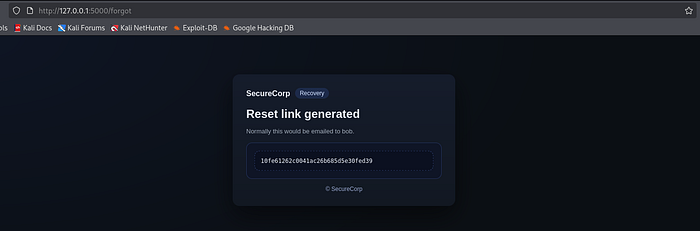
Since no email verification was required and tokens were visible directly, the next logical step was identifying where these tokens were consumed. Using the browser Network tab, application requests and responses were monitored to understand how authentication and reset flows were structured. This helped confirm endpoint behavior and identify how the application handled reset logic internally.
Testing revealed the existence of a /reset endpoint. By manually navigating to the reset endpoint and passing the token as a query parameter, the application accepted the token and redirected to the password reset form.
http://127.0.0.1:5000/reset?token=e501051c453548335a9363d9d93f79cd
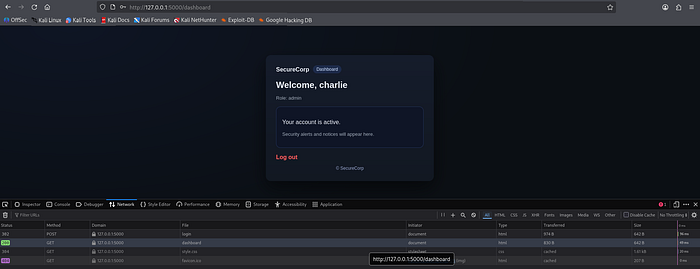
Once on the reset page, a new password could be set successfully. After resetting the password, login using the newly set credentials worked successfully for both Bob and Charlie accounts, confirming full account takeover.
Core Security Flaws Identified
1. Token Exposure on UI
Reset tokens were displayed directly to users instead of being delivered through a secure out-of-band channel such as email.
2. Lack of Token Access Control
Anyone could request reset tokens for any username without verification.
3. Direct Token Consumption via Endpoint
The reset endpoint accepted tokens without additional identity verification.
4. Weak Token Lifecycle Management
Multiple tokens could be generated without invalidating previous ones.
Impact
The impact of this vulnerability is critical. It enables full account takeover without needing access to victim credentials or email accounts. Attackers could reset passwords for any user simply by knowing their username.
Potential real-world consequences include:
- Unauthorized access to sensitive corporate accounts
- Privilege escalation if admin accounts are targeted
- Data theft or manipulation
- Loss of user trust and regulatory compliance issues
- Large-scale automated account compromise attacks
Since password reset flows are part of authentication systems, any weakness here directly compromises account security.
Secure Fix Recommendations
1. Remove Token Exposure from UI
Reset tokens must never be displayed to users. Tokens should only be sent through secure channels like email or SMS.
2. Implement Token Expiry
Tokens should expire within a short timeframe (typically 10–15 minutes).
3. Enforce Single-Use Tokens
Once a token is used, it must be immediately invalidated server-side.
4. Bind Tokens to User Context
Tokens should be strongly associated with specific user accounts and reset sessions.
5. Add Rate Limiting
Limit reset requests per account and per IP to prevent abuse.
6. Add Secondary Verification
Consider requiring additional verification such as OTP or device confirmation.
7. Store Tokens Securely
Store hashed versions of tokens server-side to reduce risk if the database is compromised.
Conclusion
This lab demonstrated how password reset mechanisms can become a critical attack vector when implemented incorrectly. The vulnerability was not caused by weak cryptography, but by flawed application logic and trust assumptions. Proper handling of reset tokens, strict validation, and secure delivery mechanisms are essential to prevent account takeover attacks.