
If you've ever tried iterating SVG elements with Alpine's <template x-for="...">, you've probably hit a wall. One moment the markup looks fine; the next, Chrome spits out Failed to execute 'importNode' on 'Document'; Firefox says the argument isn't an object.
At the time of writing, the workaround is buried in the repo. Even if you're happily using it, it's worth understanding why this breaks. The root cause is a matter of namespaces, not Alpine doing something weird.
In this post, we'll reproduce the failure, step through what Alpine is trying to do, explain namespaces, and finish with a fix you can run in a few common setups.
My fix is based on the README workaround, with a couple of small improvements explained in the conclusion.
tl;dr: If you just want my fix, scroll to The Fix.
Haven't heard of Alpine.js? It's a mini-Vue for jQuery-sized problems. It's not for SPAs, but for enhancing server-rendered HTML.
Ground Zero
Let's dive in with a simple example of the blow-up: two templates, one that works and one under the <svg> that doesn't.
<ol x-data="{items: ['Apples', 'Oranges']}">
  <template x-for="text in items"> 🙂R
 lt;li x-text="text"></li>
  </template>
</ol>

<svg>
  <g x-data="{}">
 <template x-for="i in 1"> ☹️
   <circle :cx="40" :cy="40" :r="20" stroke="black" fill="none"/>
 </template>
  </g>
</svg>
In Chrome/Edge, the pertinent error is:

In Firefox:

Since I'm an expert in code forensics, tracking this down was super easy 🤓
.
.
.
.
I'm lying.
I just searched the repo for importNode. It showed up in one place: packages/alpinejs/src/directives/x-for.js:
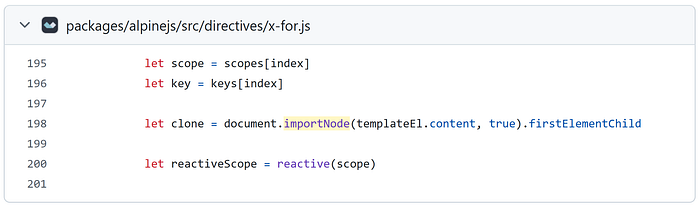
Here we are. Ground zero ☢️
Let's break it down, going inside-out:
document.importNode(templateEl.content, true).firstElementChildtemplateEl: The actual<template>node.templateEl.content: A specialDocumentFragmentthat holds the template's content (the nested markup).document.importNode: Copies a node. Alpine passesdeep = trueso it clones the fragment and its descendants..firstElementChild: Grabs the first child element (skipping text/comments) from the copy. That's why Alpine's docs say "only one root element".
So far, so good — until templateEl.content isn't what Alpine thinks it is…
The Smoking Gun
If we pause execution at ground zero and inspect the templateEl variable, the problem becomes obvious.
Starting with the working <template>, let's take a gander at its interface…
templateEl[Symbol.toStringTag] // "HTMLTemplateElement"And here's the .content Alpine expects to exist:
templateEl.content // "#document-fragment" or "DocumentFragment(...)"Moving on to the <template> inside the <svg> tag:
templateEl[Symbol.toStringTag] // "SVGElement"Huh? That's not an HTMLTemplateElement. What about its content?
templateEl.content // undefined❗And here's the smoking gun: document.importNode() requires a Node. Alpine passes templateEl.content, expecting a DocumentFragment (which is a Node). But inside SVG, the element lacks that property, so Alpine passes undefined, and the browser throws.
ℹ️ <template> is just markup. Once the browser parses it, it becomes a DOM node with an interface—and that interface determines what properties and behaviour you get in JavaScript. The interfaces are hierarchical, think class inheritance in Java/Python or prototype chains in JavaScript. You may have seen this on MDN's little inheritance diagrams when looking up an element.
But why do some <template> tags turn into objects following different interfaces? 🤔
The boring-but-useful answer: the browser doesn't interpret tags in a vacuum — it needs context.
Feel free to skip to The Fix if you've had enough theory.
Trees, and nodes, and specs, oh my! 🦁🐯🐻
One thing the DOM Living Standard ("the DOM spec") gives us is a rulebook for a tree of nodes — how they behave, and how the tree may be modified.
It describes a core interface called Node that all nodes in the tree follow, but also gives us some more specific kinds of nodes to work with like Element, Document, DocumentFragment, Text, Comment, etc.
We already saw the DOM part (cloning nodes and inserting them). The next piece in the tag → object pipeline is how the differences between HTML and SVG cause the same tag to map to different DOM interfaces.
Namespaces and Local Names
Imagine the word "chat".
In English, it means "to talk informally" 🗣️ In French, it means "cat" 🐈
Like you and me, the browser needs context to interpret tags. Namespaces provide that context. They tell the browser "we are currently speaking HTML" or "we are currently speaking SVG".
This works in tandem with the local name — boring, infrastructural 🏗️ spec terminology the whole web platform uses to be precise about "what element is this?". In everyday HTML, you can basically read that as 'the tag name'.
When the browser parses a document, it combines namespace + local name to decide which DOM interface to build.
So in Ground Zero, our first <template> (the one that works) ends up as:
HTML namespace +
templatelocal name =HTMLTemplateElement(has.content)
But the second <template> lives under <svg>. In a text/html document, <svg> won't stop the HTML parser; it just starts creating elements in the SVG namespace:
SVG namespace +
templatelocal name =SVGElement(no.content❗)
And that's why templateEl.content is undefined for the SVG one—Alpine expects an HTMLTemplateElement, but it got a plain SVGElement.
So the bug isn't Alpine's fault, per se — it was namespaces and DOM interfaces doing exactly what they're supposed to do 🤝🏼
⤵️ If you know about HTMLUnknownElement, you might wonder if there's an SVGUnknownElement. It was actually a thing at one point, but for historical reasons, browsers simply treat unrecognized SVG tags as generic SVGElement nodes.
The Fix
When the browser parses a <template> in the HTML namespace, it tucks the nested markup into a DocumentFragment and exposes it via the .content property.
We can fix this by creating a valid HTML template in memory, moving the children into its .content fragment, and replacing the original node:
function fixForeignTemplates(root = document) {
    // Explicitly identify the namespace we want
    const HTML_NS = "http://www.w3.org/1999/xhtml";

    for (const el of root.querySelectorAll("template")) {
        // Skip real HTML <template>
        if (el.namespaceURI === HTML_NS) continue;

        // Create a template element in HTML namespace
        /* We use ownerDocument to ensure the new node belongs to the same
           context (document/iframe/fragment) as the original. */
        const template = el.ownerDocument.createElementNS(HTML_NS, "template");

        // Copy attributes (x-for, :key, etc)
        for (const attr of el.attributes) {
          template.setAttribute(attr.name, attr.value);
        }

        // Move all child nodes into template.content
        while (el.firstChild) {
            template.content.appendChild(el.firstChild);
        }

        // Replace the old <template> in-place
        el.replaceWith(template);
    }
}
When To Run It
The goal is to run this before Alpine scans the DOM. If you're installing Alpine via the script tag:
1. alpine:init: Alpine dispatches alpine:init on document before it touches the DOM:
document.addEventListener("alpine:init", () => { fixForeignTemplates(); })2. End of body: Or just call it at the end of <body>. This works as long as Alpine is loaded with defer:
<body>

	<script>fixForeignTemplates();</script>
</body>
Modules: If you're using Alpine.js as a module, call the fix before Alpine.start().
Dynamic Content
If you inject SVG markup dynamically (via innerHTML, insertAdjacentHTML, etc.), you must run the fix on the newly inserted subtree.
const text =
  `<g x-data>
     <template x-for="i in 5">
       <line x1="0" y1="0" x2="50" :y2="i * 20" stroke="black" />
     </template>
   </g>`;

const svg = document.querySelector("svg");
svg.innerHTML = text;
// Pass the subtree so we don't have to re-scan the whole document
fixForeignTemplates(svg);
But won't Alpine try to use the template when you insert it? Only if you hand control back to the event loop…
// bad
svg.innerHTML = text;
await fetch(...); ❌
fixForeignTemplates(svg);

// good
svg.innerHTML = text;
fixForeignTemplates(svg);
await fetch(...); ✅
To notice DOM changes, Alpine passes a callback to a MutationObserver, but the callback will fire as a microtask. Microtasks are "polite" 😇: they wait for your sync code to finish. But the moment you await something, you've opened the door to them. Sure, you can still run the fix later and then the template will work—but you will end up with ugly console errors, and you're too good for that 😎
One last thing: The root parameter is useful to avoid walking the entire document again, but it also pairs well with the init lifecycle hook in Alpine.data components:
Alpine.data('diagram', () => ({
  init() {
    // Scope the fix to just this component's subtree.
    // this.$el is the component root element
    fixForeignTemplates(this.$el);
  }
}));
Conclusion
Quick recap: namespaces are the whole story. Inside <svg>, your <template> is an SVG-namespace element, not an HTML one — so .content is missing and Alpine trips over it. Swap it for a real HTML <template> before Alpine starts, and you're 👌🏼
Oh right, before I forget. My fix is based on two comments on the Alpine.js GitHub repo:
Some examples in the discussion tie workaround to DOMContentLoaded but as this lets Alpine see the broken template first, I thought alpine:init would be a cleaner choice.
I also opted for the approach in Simone's posted solution of moving all child nodes (including text and comments). Although Alpine's x-for ultimately grabs .firstElementChild (remember 🙂) and ignores the rest, preserving the original markup is the least surprising behaviour .
On a good day, an impatient dev might roll their eyes at "web specifications", but I really think this bug is a good segue into learning more about why specs matter. The web is not random; it's usually doing something boring and consistent.
That said, have namespaces ever bitten you in the 🍑 ?
I really hope you learnt a thing or two from this article and till next time…
Take care 🚀