Introduction
Source-code review can look very intimidating at first. You see thousands of lines of code in so many different languages using various packages and it feels like you need to be an expert in all the existing languages before you can understand what is happening.
After doing a few labs online I realized how tedious it can be to manually go through each and every line of code to try and find a vulnerability. So, I thought why not use AI to do this manual labour task while I just verify the findings, since I don't know all the languages but I can definitely understand what is happening and AI can simplify that for me.
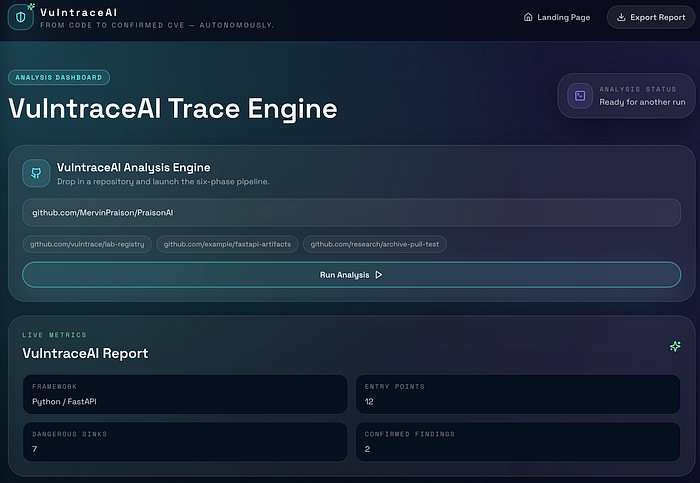
With that in mind I created VulntraceAI which is an AI powered CVE Discovery Engine that analyses the complete source code, helps map the entry points, dangerous sinks and the full source to sink path. It then generates a professional report containing the description, CVSS rating, PoC, Impact and Remediation. Using the PoC you can recreate and verify the vulnerabilities before reporting them.
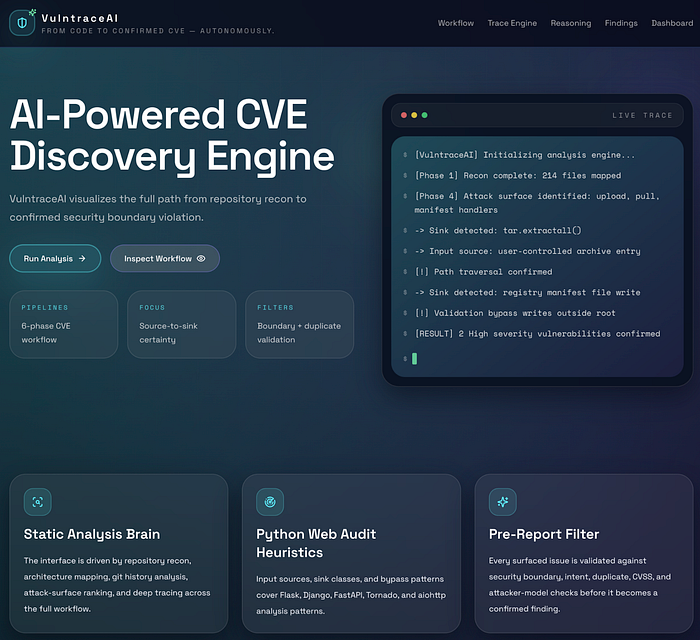
In this case, the target I used was the PraisonAI github repo and I found 2 path traversal vulnerabilities:
CVE-2026-39308in the publish flow.CVE-2026-39306in the pull flow.
These vulnerabilities can let an attacker write files outside the directory the application was supposed to use.
What Is Path Traversal?
Path traversal is a bug where the user-controlled input is able to escape the folder it was supposed to stay inside. The classic example is:
../This means "go up by one directory". So. if an application does not validate inputs properly and doesn't check for these kind of path inputs, an attacker can use it to keep going up and map the whole architecture.
Let me give you a simple real-world example. Suppose there is a hotel and you are staying in your room and you found a key-card (../) using which you are able to open a staff-only door and walk into an area guests were never meant to reach.
How VulntraceAI Actually Works
Here's a simple step-by-step breakdown of what happens behind the scenes:
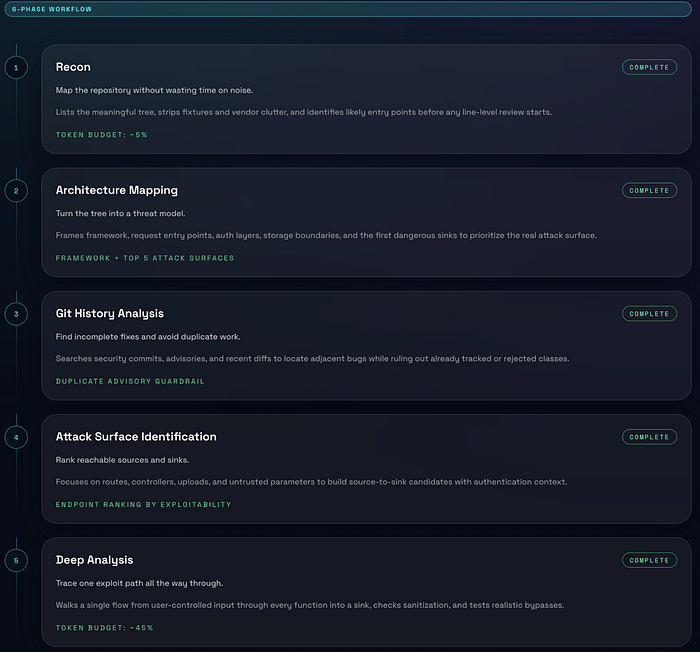
Phase 1: Understanding the Codebase (Recon)
The first step is to go through the whole source code and understand the architecture. VulntraceAI understands how the application is organized by analyzing the folders, important files and the code layout and ignores noise like configs, images and dependencies.
Phase 2: Understanding How the App Works
In this step it builds a mental model of the application. It also tries to answer these questions:
- Where does user input enter?
- How does authentication work?
- Where is data stored?
- Where are dangerous operations?
These dangerous operations are called sinks. For example, file writes, archive extraction and command execution. This step helps in identifying the top attack surfaces.
Phase 2.5: Avoid Wasting Time
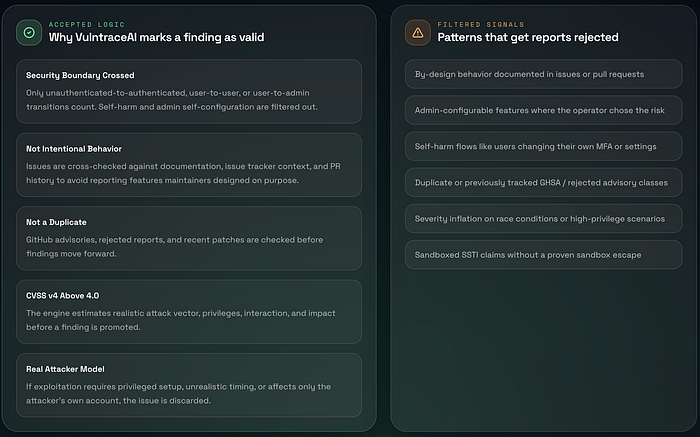
One of the important and most underrated steps. Before going further with the analysis, VulntraceAI checks if the behavior is intentional, if it's already documented and if it has been already reported or rejected. This matters a lot as many reports get rejected because the reported bugs are "by design", require admin access or is already known and reported before. This step prevents chasing useless or already reported findings.
Phase 3: Check History and Existing Fixes
In this step VulntraceAI looks at the recent commits, past security fixes and existing CVEs because it could happen that if something was fixed a similar vulnerability might still exist nearby. This also ensures that the finding is not a duplicate.
Phase 4: Identify Attack Paths
In the step VulntraceAI focuses on the entry points like API endpoints, request parameters or file uploads. For each one it tracks where the input comes from, where it goes and whether it reaches something dangerous. This helps in creating a list of possible attack paths.
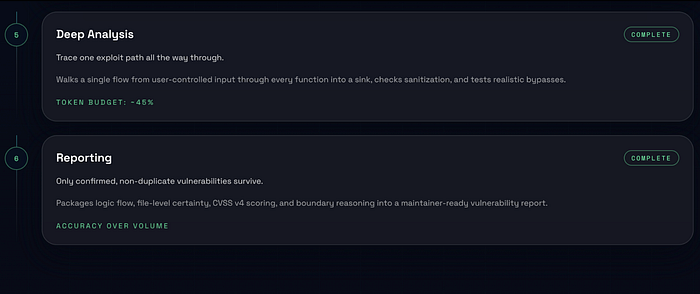
Phase 5: Deep Analysis
This is one of the most important steps. In this step for each potential path, VulntraceAI:
- Traces the full flow: user input -> functions -> dangerous sink
- Checks if the user input is sanitized, can validation be bypassed and is this reachable by an attacker.
- Identifies vulnerability types like Path Traversal, RCE, SSRF, SQL Injection, etc.
Phase 5.5: Validate Before Reporting
This is where generic scanners might fail. In this step VulntraceAI does strict validation before declaring something a vulnerability. It checks:
- If a real boundary is crossed. Like attacker getting system access is considered valid whereas a user harming themselves is considered invalid.
- If it's intentional. Like if it's a documented behavior then the bug is considered invalid.
- If it has been already reported and is an existing CVE then the bug is considered invalid.
- Is it actually severe - if the bug has low impact then it's considered invalid.
- Is the attack realistic - if it required impossible conditions then it's considered invalid.
So only if all the checks pass it becomes a vulnerability.
Phase 6: Report the Finding
Once everything is verified the VulntraceAI documents the vulnerability, explains the impact, creates the PoC and adds the remediation/fixes for the vulnerability. Then it generates a report which the user can go through and manually verify the vulnerability using the PoC.
Vulnerability #1 - CVE-2026-39308 (Publish)
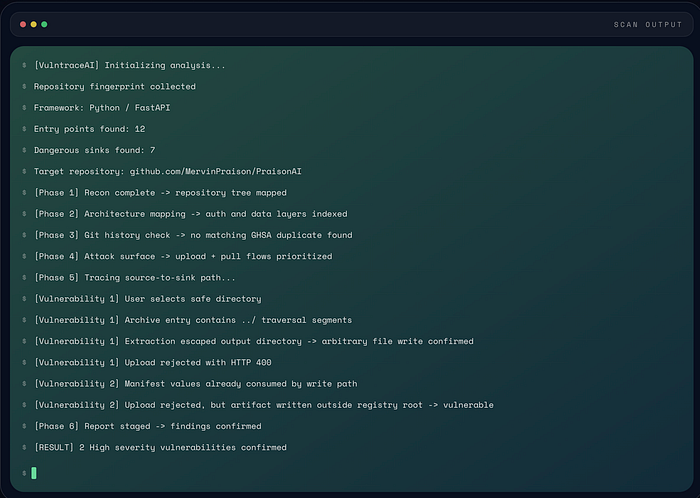
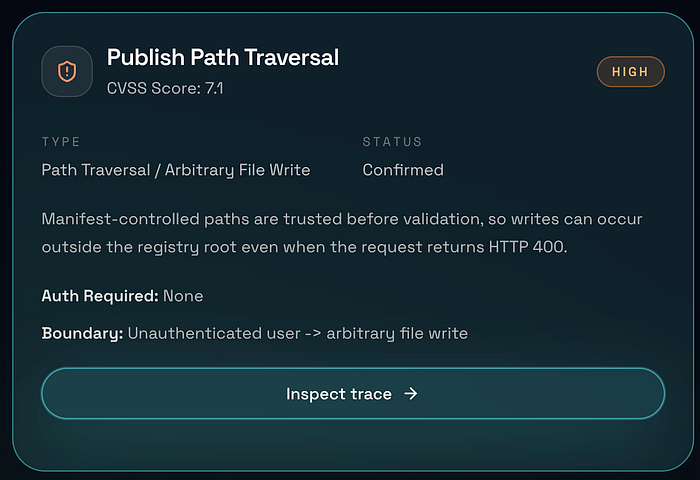
The publish flow is supposed to take incoming package data and store it in the correct place but the problem arises due to the manifest-controlled path values being trusted before being safely validated. Due to this the application starts using attacker-controlled path information during the write process and only later decides the request is invalid.
request looks rejected -> HTTP 400 returned -> file was already writtenAs can be seen that we get400 Bad Request but the error happens after the write has already happened outside the intended registry root. This means the response code is useless and gives a false sense of safety. This is important as an error response does not always mean the dangerous action failed. Sometimes it only means the application noticed the problem after the damage was done.

Vulnerability #2 — CVE-2026–39306 (Pull)
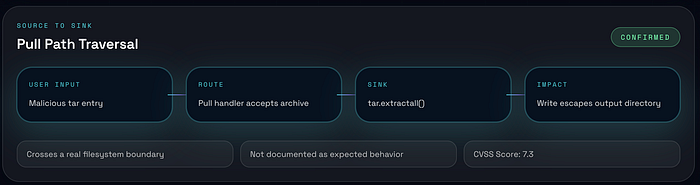
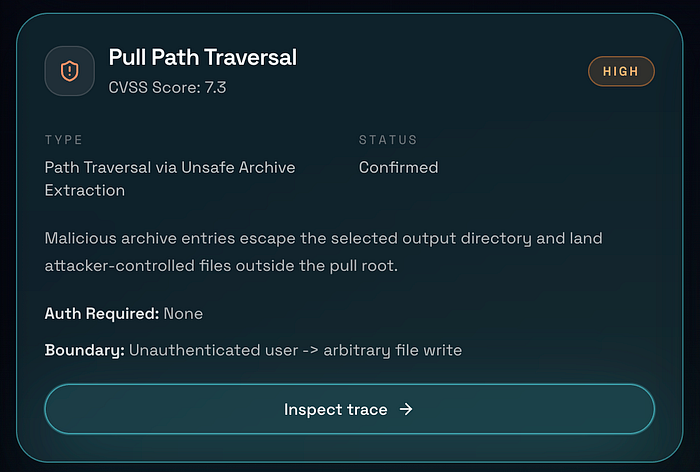
The second issue appears in the pull flow. This time the dangerous point is archive extraction. The key sink is:
tar.extractall()This function becomes risky when the archive member names are not checked before extraction. So, if an attacker creates a tar archive with filenames containing ../, the extraction process can escape the chosen output directory and write files somewhere else on disk. This means a user may think they are extracting into a safe folder whereas the archive quietly writes beyond it. It's a classic archive traversal pattern.
Impact
Both of these vulnerabilities lead to arbitrary file write behavior which is dangerous because writing a file in the wrong place can lead to a much bigger problem. For example, it may allow an attacker to:
- overwrite the application data.
- tamper with the stored artifacts.
- affect later workflows.
- place files in locations the application never meant to touch.
The documented scores for these issues were:
- Pull Path Traversal: CVSS
7.3 - Publish Path Traversal: CVSS
7.1
Conclusion
I have used VulntraceAI to report 3 more vulnerabilities this week which are currently being investigated and I am hopeful of getting a Critical vulnerability assigned probably by next week which has a CVSS rating of 9.3 😳. Its not necessary that all the vulnerabilities that are identified are correct and AI can't do everything. In the end a human is needed to verify them manually.
AI can only make our life easier by automating a lot of the tedious manual tasks but it can't take over your job as in the end it can always hallucinate and make mistakes which is why a human is needed to verify everything. That said, AI is definitely very powerful and kinda scary 🥲🥲. Use it wisely!!
Also, I won't be releasing VulntraceAI publicly as of now. It requires a few fixes here and there along with the UI part too. Will definitely release it in future so that ya'll can try and use it as well. I am also open to any advice on how I can improve the quality of the findings so definietly reach out. I would love all the guidance and help.
If you liked it please follow for more such content. Let's keep learning and growing together😎.