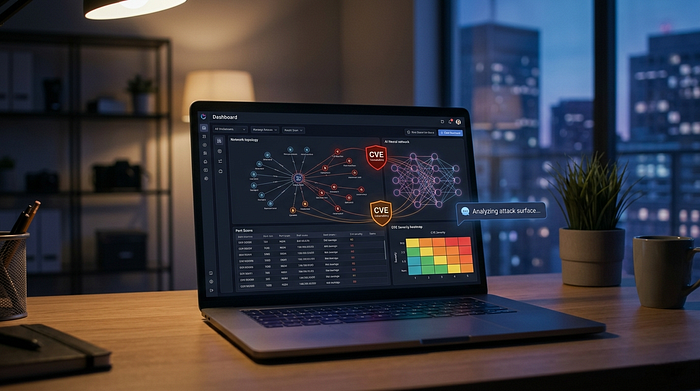

Turning Recon Chaos into AI-Powered Intelligence
There's a point in every recon workflow where things start to fall apart.
You've run your scans. You've pulled DNS records. Maybe you've even checked for known vulnerabilities. But now you're staring at a wall of raw data, trying to answer a simple question:
"What actually matters here?"
That exact problem is what led me to build Recon Buddy AI — a modular, AI-powered reconnaissance assistant designed to turn raw scan output into structured, actionable intelligence.
This wasn't just about automation. It was about building something that thinks with you, not just runs tools for you.
⚡ The Problem: Recon is Messy
If you've done any bug bounty hunting or pentesting, you already know the drill:
- Run multiple tools (Nmap, DNS lookups, Shodan, Censys, etc.) - Collect a ton of output in different formats - Manually correlate everything across terminals and tabs - Try not to miss something important while fighting copy-paste fatigue
It's slow. It's repetitive. And honestly… it's easy to mess up.
Most tools give you data, not insight.
So I asked myself:
What if recon could summarize itself?
🧠 The Idea: A "Hacker Assistant"
Instead of building yet another scanner, I wanted to build something different:
A system that collects, enriches, and explains reconnaissance data automatically
The goal was simple:
- Aggregate recon data from multiple sources - Enrich it with vulnerability intelligence (CVE mapping) - Use a local AI model to summarize and interpret findings - Output something a human can actually use in seconds
That's how Recon Buddy AI was born.
Target audience: Bug bounty hunters, security consultants, and red teamers who need to move fast without missing critical findings.
🏗️ Architecture: Thinking in Pipelines
The hardest part of this project wasn't the scanning… it was structuring everything in a way that didn't turn into spaghetti.
Early on, everything was flat. One script. A bunch of functions. Chaos.
The breakthrough came when I started thinking in terms of a pipeline:
🔄 Recon Pipeline
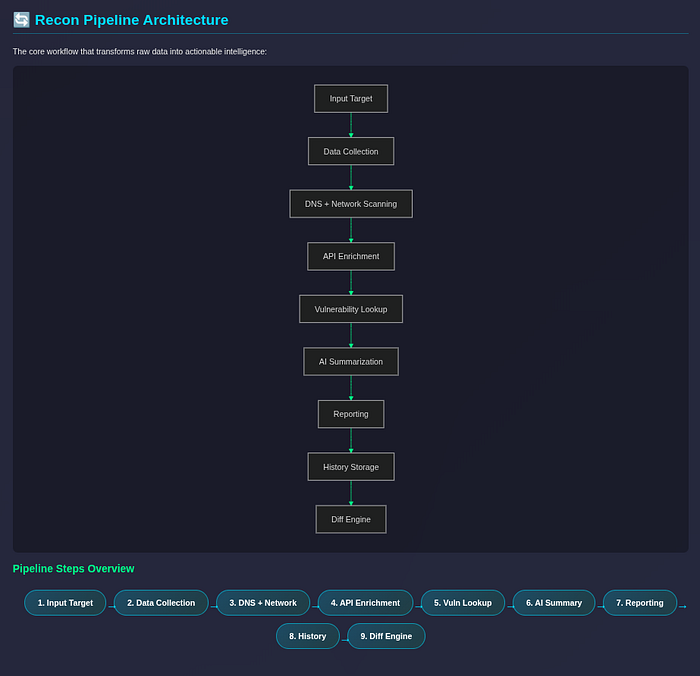
Each stage lives in its own module:
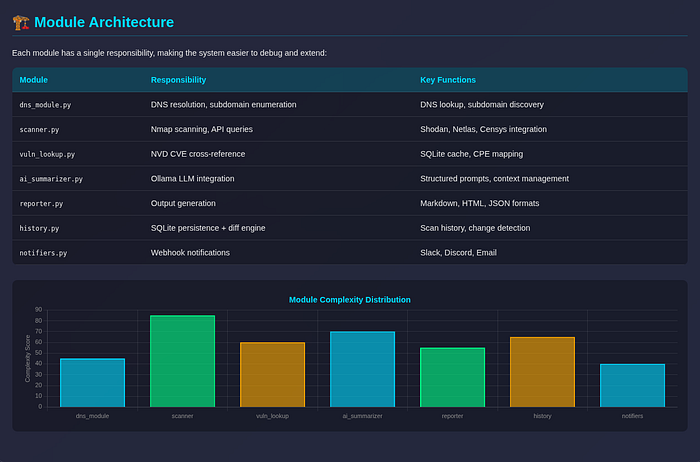
Once I separated each stage into its own module, everything clicked.
Each part had a single responsibility, which made the system:
- Easier to debug - Easier to extend - Way less painful to reason about
🚀 Quick Start
Want to try it yourself? Here's the fastest path:
# Clone the repo
git clone https://github.com/RyanMaxiemus/recon-buddy-ai.git
cd recon-buddy-ai

# Install dependencies (Poetry recommended)
poetry install

# Configure API keys
cp .env.example .env
# Edit .env with your Shodan, Netlas, NVD, etc. keys

# Run your first scan
python main.py --target example.com --format html
The HTML report opens in your browser with interactive tables, CVE badges, and an AI-generated executive summary.
🔍 Step 1: Data Collection
The first layer is straightforward:
- Network scanning via Nmap (local) or API fallbacks - DNS resolution with subdomain enumeration - External API enrichment from Shodan, Netlas, Criminal IP, Censys
This stage answers:
"What exists?"
Key upgrade: Parallel API queries with configurable timeouts. No more hanging indefinitely when Shodan rate-limits you.
🧨 Step 2: Vulnerability Enrichment (NVD Integration)
Raw recon data is nice… but it doesn't tell you what's dangerous.
So I added a CVE enrichment layer using the NIST National Vulnerability Database (NVD) API v2.
The system now:
1. Maps detected services to CPE strings (e.g., `cpe:2.3:a:apache:http_server:2.4.49`) 2. Queries NVD for matching CVEs 3. Caches results locally (SQLite) to avoid redundant API calls 4. Passes CVE data to the AI for informed risk summaries
This transforms the output into:
"What could be exploited?"
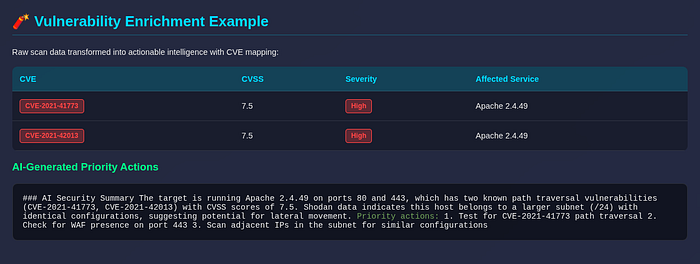
Real example:
🧠 Step 3: AI-Powered Summarization (Ollama)
This is where things get interesting.
Instead of dumping raw JSON into an LLM (please don't do that), I:
- Preprocessed and structured the data - Trimmed unnecessary noise (raw banners, SSL certs, verbose metadata) - Focused on high-signal inputs - Cap payload at ~8K tokens to respect context windows
Then passed it into a local model via Ollama (default: llama3).
The difference:
❌ Before (raw data):
Port 80: open
Port 443: open
Service: Apache httpd 2.4.49
Shodan ASN: AS12345
✅ After (AI intelligence):
### AI Security Summary

The target is running Apache 2.4.49 on ports 80 and 443, which has two
known path traversal vulnerabilities (CVE-2021–41773, CVE-2021–42013)
with CVSS scores of 7.5. Shodan data indicates this host belongs to a
larger subnet (/24) with identical configurations, suggesting potential
for lateral movement.

Priority actions:
1. Test for CVE-2021–41773 path traversal
2. Check for WAF presence on port 443
3. Scan adjacent IPs in the subnet for similar configurations
That's the difference between data and intelligence.
🧵 Step 4: Parallel Recon at Scale
One of the biggest upgrades was adding multi-target and subnet scanning.
Instead of scanning one target at a time, the system now:
- Expands CIDR ranges automatically (e.g., 192.168.1.0/24 → 256 targets) - Runs scans concurrently via ThreadPoolExecutor (configurable — concurrency) - Handles per-target failures without crashing the entire campaign - Aggregates results into a campaign summary table
Performance benchmark:
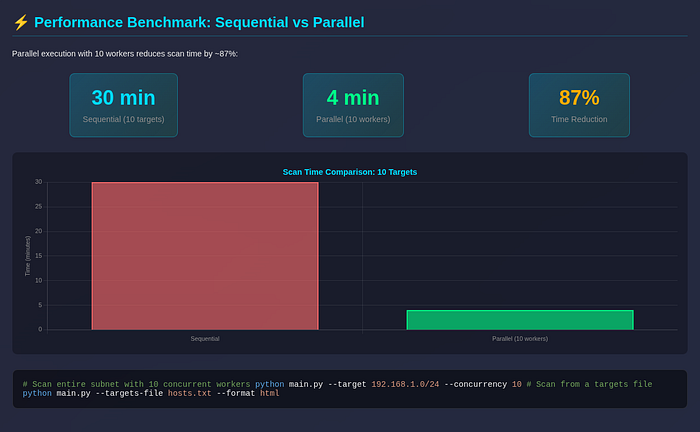
This turned Recon Buddy AI into something closer to a recon engine, not just a script.
Usage:
# Scan entire subnet with 10 concurrent workers
python main.py - target 192.168.1.0/24 - concurrency 10

# Scan from a targets file
python main.py - targets-file hosts.txt - format html
🕓 Step 5: History & Diffing (Underrated Feature)
Most tools tell you what's there.
Very few tell you what changed.
So I added:
- Persistent scan history in SQLite (~/.recon-buddy/history.db) - Automatic storage after every scan - Diff engine that compares current vs. previous results - Change detection for new ports, removed services, new CVEs
Example:
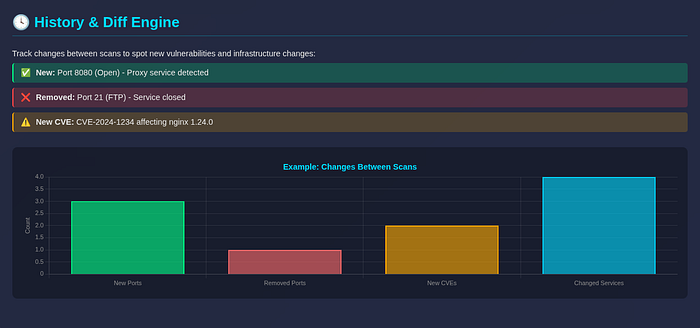
This enables:
- Spotting newly opened ports (potential misconfigurations) - Detecting infrastructure changes (dev → prod deployments) - Tracking vulnerability regressions over time - Continuous monitoring for bug bounty programs
Honestly, this ended up being one of the most useful features for ongoing engagements.
📊 Step 6: Reporting That Doesn't Suck
Raw terminal output is fine… until you need to share results with a client or team.
So I built three output formats:
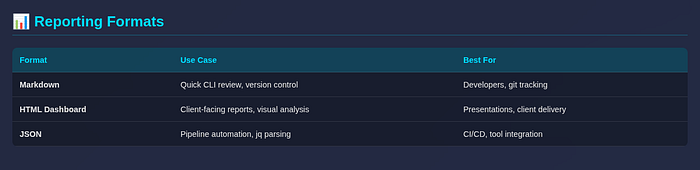
The HTML dashboard was a game-changer:
- Dark-themed glassmorphism UI - Sortable technical tables (ports, services, CVEs) - Chart.js visualizations for source reliability - Embedded CVE badges with CVSS color coding - Collapsible sections for executive vs. technical views
# Generate HTML + Markdown together
python main.py --target example.com --format both
🔔 Step 7: Notifications & Automation
At this point, it made sense to plug into real workflows:
- Slack webhooks: Post summary to security channel - Discord webhooks: Team notifications - Email (SMTP): Formal report delivery - JSON stdout mode: Pipe into other tools
# Scan with Slack notification
python main.py --target example.com --notify slack

# JSON export for automation
python main.py --target example.com --json | jq '.vulnerabilities'
Now it's not just a tool you run manually, it's something you can integrate into your pipeline.
🎯 The Five Major Features
Let me be explicit about what shipped:

⚠️ Lessons Learned
1. Structure > Features
The biggest challenge wasn't adding features — it was organizing them.
Once the pipeline was clean, everything else became easier. Technical debt hits harder in security tooling because you're often working with sensitive data and time-critical engagements.
2. AI Needs Context, Not Chaos
LLMs aren't magic. If you feed them garbage, you get garbage.
Preprocessing and structuring input made a massive difference in output quality. I learned to:
- Strip raw API responses (Shodan raw_data is massive) - Truncate service banners to ~500 chars - Cap total payload at ~8K tokens - Include CVE context in the prompt
3. Don't Overengineer Early
I stuck with:
- SQLite for storage (no PostgreSQL setup friction) - Simple modules (flat structure, no abstract base classes initially) - Minimal abstractions (YAGNI until you know you need it)
That decision made iteration fast. You can refactor once you know what patterns repeat.
4. Parallelism Changes Everything
Moving from sequential scans to concurrent execution was a huge performance win — but it introduced new complexity:
- Error isolation (one target failure shouldn't kill the campaign) - Rate limit handling (APIs have different thresholds) - Result aggregation (merge reports cleanly)
Worth it, but measure twice before you parallelize.
5. Security Hardening is Ongoing
Early code review found critical issues:
- API keys in plaintext .env (mitigated via gitignore + docs warning) - No input validation on --target (fixed with regex + `ipaddress` module) - Missing timeouts on API calls (added 15s defaults) - Overly broad exception handling (now catching specific types)
Shipping security tooling means you have to eat your own dogfood — run your own codebase through the scanner.
🆚 How This Compares

Key differentiators:
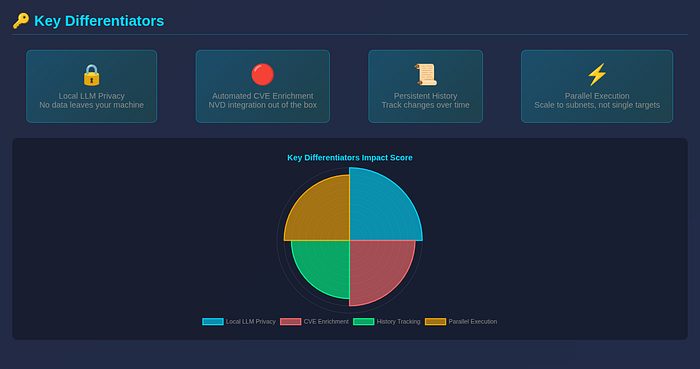
🚀R Wat's Next
There's still a lot of room to grow:
- Subdomain enumeration: Integrate with crt.sh, DNSTwyk, etc. - Deeper service fingerprinting: Grab banners, parse tech stacks - Exploit suggestion engine: Map CVEs to public exploits (ExploitDB, GitHub) - Web UI / SaaS version: Make this accessible to non-CLI users - Better correlation: Link findings across data sources (e.g., Shodan + NVD + DNS)
This project started as a small idea… but it's quickly turning into something much bigger.
🧠 Final Thoughts
Recon Buddy AI isn't just about automation.
It's about reducing cognitive load.
It's about turning:
"Here's everything we found"
into:
"Here's what you should care about, here's why, and here's what to do next"
And honestly? That's the difference between a tool and an assistant.
If you're building in the security space, my biggest advice is this:
Don't just collect data. Build systems that understand it.
The future of security tooling isn't more scans — it's better synthesis.
📬 Try It Yourself
The code is open source (MIT license):
GitHub: https://github.com/RyanMaxiemus/recon-buddy-ai
Clone it, break it, extend it. That's half the fun anyway.
If you find bugs or have feature ideas, open an issue — I read every single one.
Found this useful? Drop a clap (or fifty) on Medium, share it with your security team, and let me know what you'd build next.