Hey!! Everyone, recently I was testing on a private pentest program, where I found a lot of functionality to test, but the interesting one from all those was my favorite File Upload Functionality.
Whenever the beginner found this feature, they usually started flooding the malicious files, this might sometimes work but I think it is not the right way to do it. Instead of uploading the random files, we should understand how actually the website deals with all these files, like how they accept the files, what are the restricted file extensions , how the applications store the file and how to sanitize it or process it. If one gets a clear idea about how the application deals with the files then the next step is to plan the attack, which means choosing the correct file, extension, methodology or payload etc.
On that private web application I started with uploading the simple image file and analyzed the response and the process of how the files are processed. The application was very well sanitizing the file content. Later I tried uploading the image files with double extension and triple extension method and null byte injection, but nothing works here. It simply means the website is only allowing PNG, JPEG and PDF files only.
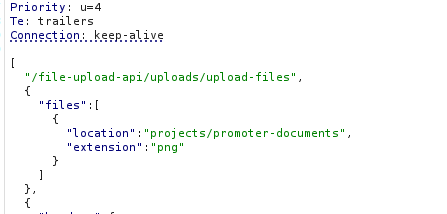
I noticed a parameter in the captured request, which automatically analyzes the file type of the file and saves the file accordingly. This is the thing which filtered the files, then i tried uploading an SVG file with js content and changed that parameter named extension: png.
The website successfully saved my svg file i.e. payload.svg at some location as https://comapny/domain/ramdom/location/22e3e3343e334.png. This was quite interesting, then I visited this location and simply changed my extension from png to svg and then BOOOOOMMM …. Nothing happens , just an error like 22e3e3343e334.svg is not found.
This was so frustrating, later I noticed something interesting which I ignored earlier, that the web application is also accepting PDFs. Yes this is a crazy thing. PDF format has built-in support for embedded JavaScript. After this everything became easy. I found a tool named JS2PDFInjector which I used to inject a JS code into my PDF file. You can find that tool by simply clicking on this link https://github.com/cornerpirate/JS2PDFInjector/blob/master/README.md . Just git clone this and give it a sample PDF path which you want to use as a payload file and also give it a payload file path which you want to execute along with this PDF.
Just Follow The Command:
java -jar JS2PDFInjector-1.0.jar /path/to/dummy.pdf /path/to/test.js
test.js file contains this payload:-> app.alert("Hello world!");
After making this malicious PDF, I just uploaded this to the file upload feature and as i visited the path to that file then an alert popup.
Now I can say BOOOOMM…
I hope you learned something from this post.For more amazing content you can visit my YouTube Channel: Root Security Academy.