
Introduction
Hello everyone! Truthfully, I have no clue how to start a blog, so I figure the best place to start is by introducing myself. Throughout this blog series, I'm just going to stick with my alias "Fwoba". I've been working in Cyber Security for roughly 5 years now across various positions, including SOC analyst, Information Security Officer, and IT Security Analyst. Throughout my years, I've gained experience with SIEMs, EDRs, Malware analysis, Vulnerability Management, Penetration Testing and much more. So far, throughout my career, I've had a lot of fun learning and appreciate all the people I've met along the way. I think my journey in Cyber Security has led me to my love of Penetration Testing.
I'm not sure what it is about Pentesting, but there's a tickle in my brain when attempting to find a way to break into a system. Now, most of my experience comes purely from labs and certification training, which led me to make this blog. I wanted to document my Web Application Pentesting Journey to track my progress and see how far I've come. Web Application Pentesting has always been an interest of mine since I got into Cyber Security, but I never took the step to actually learn it. But that ends today! I've set a few goals for myself this year and plan to achieve each one. So, I'll start with my first goal: learning through the Burp Suite Academy, completing all the labs, and eventually taking the certification exam. So, in all, I hope you enjoy the blogs. If you have any feedback or tips on how I can improve, please let me know. I love good, constructive criticism because it helps me see things I may have missed and improve. I mean, that is what this whole journey is about, right?
Burp Suite Academy
Let's get started! After looking over some of the material in Burp Suite Academy, I've decided to focus on Cross-Site Scripting (XSS). I think this provides a helpful introduction to how an application works overall: how user inputs are captured, how that data might be stored or reflected, and how those inputs can dynamically interact with the Document Object Model (DOM). The first thing I wanted to work on was reflected cross-site scripting, since it's the simplest variety of cross-site scripting. It arises when an application receives data in an HTTP request and includes that data within the immediate response in an unsafe way. So, in today's blog, we will go over the first three "Apprentice" labs for reflected XSS.
What is Cross-Site Scripting? "Cross-site scripting is a web security vulnerability that allows an attacker to compromise the interactions that users have with a vulnerable application. The vulnerability can allow an attacker to inject malicious scripts, typically JavaScript, into a site. When a user visits the compromised site, the malicious code executes in their browser, allowing attackers to steal session cookies, hijack accounts, or even deface websites. Cross-site Scripting can also allow an attacker to circumvent the same-origin policy, which is designed to prevent different websites from accessing each other's content."
Lab 1 — Reflected XSS into HTML context with nothing encoded
Scenario: A simple reflected cross-site scripting vulnerability in the search functionality.
First, knowing that this is a reflected cross-site scripting, and that the lab scenario indicates this occurs within the search functionality, I wanted to provide some input to see where my input is reflected.

Also, inspecting the DOM, it looks like the name is reflected within the <h1></h1> tags.

If I supply special characters within these tags, they should be encoded, which would prevent potentially malicious HTML from being added to the input. But since there is no encoding within the HTML tags, the browser can still interpret the supplied special characters as HTML markup, thus executing our payload.
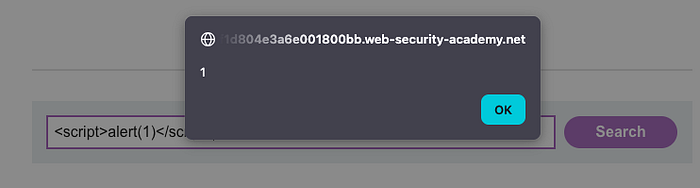
Lab 1 Answer: <script>alert(1)<script>
Lab 2 — Reflected XSS into attribute with angle brackets HTML-encoded:
Scenario: Reflected cross-site scripting vulnerability in the search blog functionality where angle brackets are HTML-encoded.
So, with this lab, we're approached with essentially the same scenario. We can supply input, it gets reflected, and we're within the <h1></h1> tags. But this time, when supplying the <script> payload we previously used, it looks like it doesn't work, which might point to the angle brackets being blocked or possibly encoded.

Since the angle brackets might be encoded, I checked the DOM to see if they are, in fact, encoded. Which, for angle brackets, you would typically see HTML encoding like "< and >".

Since angle brackets are not encoded and the payload still does not work, I think we can safely assume they are being blocked. So, I decided to read the "XSS in HTML tag attributes" section of Burp Suite Academy. It looks like we can potentially terminate the attribute value and inject our payload this way.
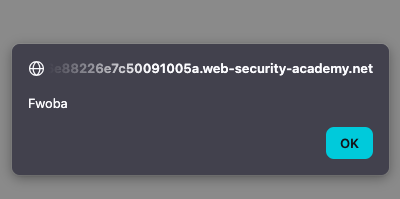
Voila! Our payload works! In this instance, all we had to do was break out of the original attribute value and then introduce a new attribute event, like "autofocus", along with an event handler, like "onfocus", which allows us to execute our XSS payload. Since the autofocus triggers the onfocus event automatically, the onfocus event handler executes our injected payload.
Lab 2 Answer: " autofocus onfocus=alert("Fwoba") x="
Lab 3 — Reflected XSS into a JavaScript string with angle brackets HTML encoded:
Scenario: Reflected cross-site scripting vulnerability in the search query tracking functionality where angle brackets are encoded. The reflection occurs inside a JavaScript string.
Approaching Lab 3 is a little different: in this lab, we're supposed to break out of JavaScript to have our payload execute. What I'm typically used to, which definitely shows myself as a beginner, is that I just typically check the "Inspector" tab within the "Dev Tools" to see my reflected input:

But after some looking, I figured you can also use the debugger to check your reflected input, especially in the context of injecting into JavaScript.

Since my input is inside this quoted string literal, we can attempt to break out of this string by just using the single quote '. I decided to use one of the Burp Suite Academy provided payloads to see what might work, and with just one payload, we were able to complete this lab!
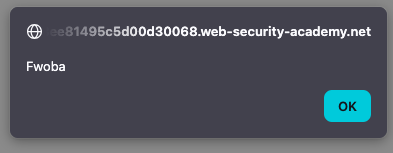
Lab 3 Answer:'-alert("Fwoba")-'
Closing Thoughts
The first three labs were pretty easy, but that's a little expected given that they're rated "Apprentice" and geared more toward teaching you the basics of Reflected XSS. But in all, I thoroughly enjoyed working through these labs. It showed me how to look for the context in which your input is reflected, how to break out tags and attributes, and which payloads can be used.
Now that these labs are complete, I plan to knock out a few more and provide updates in the next post. I think I will also add some other articles or blogs that I find along the way that help me improve my skills in Cross-Site Scripting.
Thank you to all who have made it this far! I really hope you've enjoyed my first blog post and that you'll join me on this journey through learning Web Application Penetration Testing.