Most fuzzers haven't really changed in years.
You pick a wordlist. You fire thousands of requests. You filter responses. You manually figure out what actually matters.
It works. But it's inefficient.
After years in bug bounty and building security tooling, I kept running into the same problem:
- too much noise
- not enough context
- too many manual decisions
At some point, the bottleneck isn't speed anymore. It's how you approach the target.
So I started building my own tool.
From Side Project to Something Useful
PSFuzz didn't start with a big vision. It started with a simple idea:
"build a fast, minimal web fuzzer in Go that I fully control"
Classic stuff: directories, endpoints, status codes Nothing fancy. But very quickly, one thing became obvious:
Finding endpoints is easy. Understanding them is not.
Adding Context Where It Actually Matters
Most fuzzers stop at "found something".
But that's just the beginning. So I started adding more context directly into the scan:
- technology fingerprinting
- CORS analysis
- security headers
- secrets in responses (JWTs, API keys, etc.)
- authentication signals
The goal wasn't to generate more output. It was to make better decisions while testing.
The Real Problem: Wordlists
Even with all that, one issue remained:
Wordlist selection is still guesswork.
You pick something like:
- common.txt
- raft-large.txt
- some CMS list
…and hope it fits.
But that's not how experienced testers work.
They:
- look at the system
- understand what's running
- adapt their approach
So the obvious question was:
→ why is the tool still guessing?
Explore AI: Understand First, Then Fuzz
This is where things changed.
Instead of starting with brute force, PSFuzz starts with understanding.
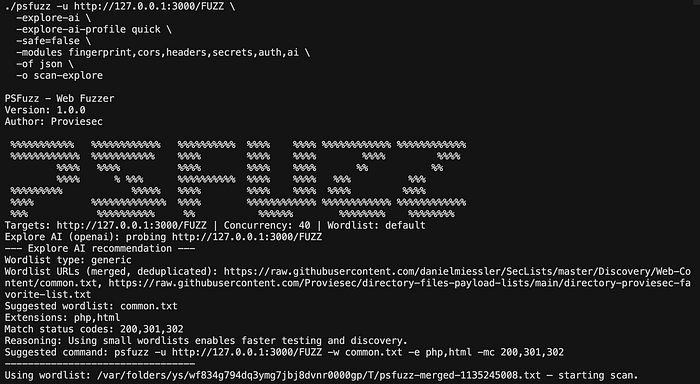
Explore AI does the following:
- Send a single probe request
- Extract headers, response, fingerprints
- Feed that into an LLM (OpenAI, Ollama, or Gemini)
- Get back:
- likely technologies
- relevant wordlists
- potential attack surface
PSFuzz then:
- fetches the lists
- merges and deduplicates them
- starts the scan automatically
Why This Matters
Traditional fuzzing is:
→ high volume, low precision
This shifts it towards:
→ lower volume, higher relevance
Less noise. More signal.
And in bug bounty, signal is everything.
Still Just a CLI Tool (and that's intentional)
One thing I explicitly didn't want:
→ an "AI black box"
PSFuzz is still just a normal tool:
go build -o psfuzz .
./psfuzz -u https://target.tld/FUZZ -w default -o scan- familiar flags (-mc, -fc, -x, etc.)
- proxy support (Burp)
- predictable behavior
If you've used ffuf or gobuster, you'll feel at home.
From Hits to Understanding
Every response can be enriched with modules:
- fingerprint → tech detection
- cors → misconfigurations
- headers → security posture
- secrets → exposed credentials
- auth → protected areas
- links / urlextract → discovery
- ai → optional interpretation
This changes one important thing:
→ you're not just collecting endpoints → you're understanding the system while scanning
Discovery Should Feel Like Exploration
One feature I use a lot:
-enqueue-module-urls linksInstead of static fuzzing, PSFuzz follows the application itself.
That makes the whole process feel much closer to how a human would actually test something.
Real Targets Aren't Clean
In reality, targets:
- have WAFs
- behave inconsistently
- block aggressively
So PSFuzz includes:
- recursion strategies (default & greedy)
- 403/401 bypass attempts
- adaptive throttling
- presets like
stealthandquick
Because clean lab environments don't exist in real testing.
What Actually Changed for Me
The interesting part isn't the tool itself. It's the shift in approach.
From: "throw bigger wordlists at it"
to: "understand what you're looking at first"
That's it. Simple, but it changes how you test.
Security Still Matters
PSFuzz is intentionally restrictive:
- safe mode enabled by default
- no private/internal targets
- scope control
- login support
- sensitive data redaction before AI usage
It's built for authorized testing only.
Example Workflows
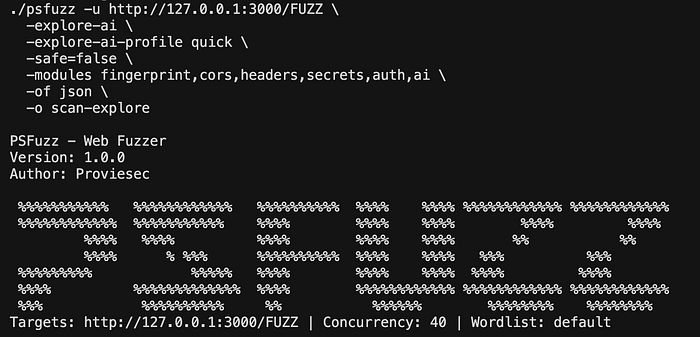
Classic scan with context
./psfuzz -u https://target.tld/FUZZ -w default \
  -modules fingerprint,cors -of json -o scan
AI-assisted discovery
./psfuzz -u https://target.tld/ -explore-aiBurp integration
./psfuzz -u https://target.tld/FUZZ -w list.txt \
  -x http://127.0.0.1:8080 -replay-proxy http://127.0.0.1:8080
Open Source
👉 https://github.com/Proviesec/PSFuzz
If you're doing pentesting or bug bounty, give it a try. Feedback is always welcome.
Conclusion
PSFuzz is not trying to replace existing fuzzers.
It's trying to improve how we use them:
- less blind brute force
- more context
- AI where it actually helps
Without losing control or transparency.
PSFuzz: Less guessing. More understanding.