This is a writeup for the End-Point Detection and Response (EDR). A security solution designed to monitor, detect, and respond to advanced threats at the endpoint level.
End-Point Detection and Response (EDR)
A security solution that offers deep-level protection for endpoints. It also makes sure that these devices are monitored constantly and threats are detected even if they are out of the perimeter protection deployed on the organization's network. An EDR also provides organization-wide visibility of any activity (If a suspicious file is detected on one endpoint, the EDR will also check it across all the other endpoints).
Famous EDR solutions:
- CrowdStrike Falcon.
- Microsoft Defender for Endpoints.
- OpenEDR.
Core features of EDR:
- Visibility: EDR collects detailed data from the endpoints, which includes process modifications, registry modifications, file and folder modifications, user actions, and much more. It then presents this information in a very structured format to the analyst. The analyst can see the whole process tree with a complete activity timeline of the sequence of actions. The analyst can also access the historical data of any endpoint for threat hunting or any other purpose.
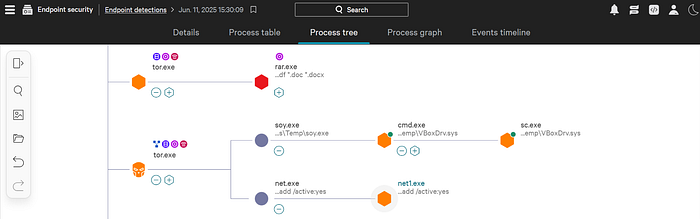
- Detection: EDR incorporates signature-based detections as well as behavior-based detections. With modern machine learning capabilities, it identifies any deviation from the baseline behavior and instantly flags it. It can also detect fileless malware that resides in memory (Not a .exe file that is loaded to the disk).
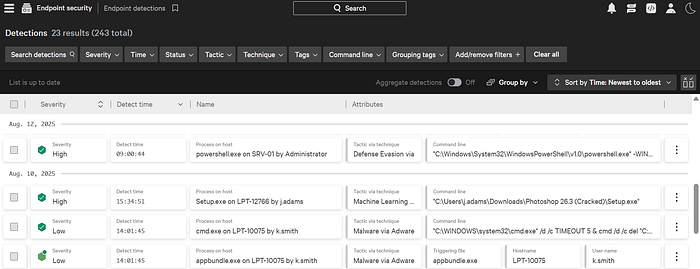
- Response: EDR helps analysts to take action on detected threats. A SOC analyst may decide to isolate a complete endpoint, terminate a process, quarantine some files, or connect to the host remotely and execute actions independently via the EDR console.
EDR vs Antivirus:
- The main difference between an Antivirus and an EDR is that the Antivirus only checks for files on the computers disk against its database of signatures (Signature-based detection) to detect some basic threats. However the EDR monitors every event that happens inside your computer and correlates them providing a context, that's how it can detect any malicious behavior on a computer and provides the analyst with an Attack Chain.
EDR components:
- Agents: Monitors all the activities of the endpoints. Multiple agents are integrated and managed by one centralized EDR console. The information about the behaviors of the endpoints with the deployed agents are sent to the EDR console in real-time. The EDR agents can do some basic signature-based and behavior-based detections by themselves and send them to the EDR console, which triggers alerts.
- EDR console: The sent information is analyzed through complex logic, machine learning algorithms and threat intelligence information.
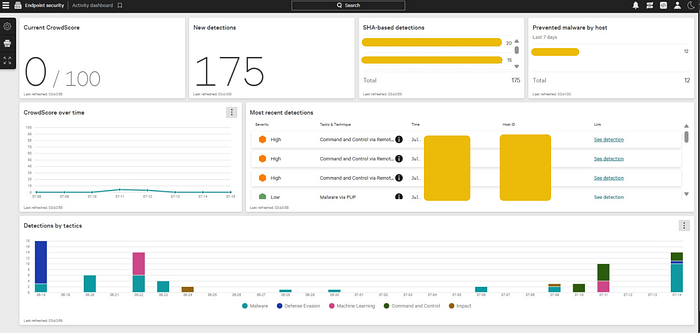
- The EDR facilitates the prioritization process for the SOC analyst as it gives severities to all the alerts (Critical, High, Medium, Low, Informational). The alert with the highest severity is investigated first as a priority. EDR also facilitates investigation, once the alert is clicked, the analyst can see all the details of the detection (executed files, processes, network connection attempts, registry modifications, and much more), so the analyst will use his expertise and the available information to determine if the generated alert is a false positive or a true positive. In case of a true positive, the analyst can take actions from within the EDR console.
- EDR works alongside other security solutions to form a larger security ecosystem (such as: Firewalls, DLPs, Email Security Gateways, IAMs). Each security solution protects different components of the network. All these security solutions are integrated with a SIEM solution that it becomes the central point of investigation for the analysts.
Data that are collected by an EDR is called Telemetry which has some categories:
- Process Executions and Terminations: ِAll the running and idle processes are being monitored, which helps to identify suspicious child-parent process relationships, suspicious executables initiating a process, malware payload, etc.
- Network Connections: All the endpoints' network connections are being monitored, which helps identify any connection to a C2 server, unusual port usage, data exfiltration, or lateral movement within the network.
- Command Line Activity: All the commands executed on the endpoints in CMD, PowerShell, etc. are monitored, which helps to identify malicious command execution, obfuscated PowerShell script executions (a script that has been intentionally modified to make it difficult for humans to read and understand through encoding commands, removing whitespaces, or replacing meaningful variable names with random characters), which are often missed by a traditional antivirus.
- Files and Folders Modifications: Threat actors modify different files and folders during data staging (ransomware executions, and malicious file dropping) and the EDR tracks this.
- Registry Modifications: The registry contains information about the configurations of a Windows system. There are many registry modifications that occur during a malicious activity, and most of these are monitored by the EDR.
Detection and Response techniques used by an EDR:
1- Detection techniques:
- Behavioral Detection: Instead of just matching the signatures of known threats, it observes the complete behavior of a file. Advanced threats craft their malware to look clean and use legitimate processes to carry out their attack. EDR can catch this behavior.
- Anomaly Detection: EDR understands the baseline behavior of the endpoints as time passes. Any malicious activity that deviates from this behavior will be flagged and the EDR will pick it up. Sometimes, this can generate false positives as well. However, with the full context given the analyst can identify the alert legitimacy.
- IOC matching: EDRs have some strong threat intelligence field integrations. Except for zero-day attacks, most of the attacks have indicators published in the threat intelligence feeds. EDR flags any activity that matches any known Indicator Of Compromise (IOC).
- MITRE ATT&CK Mapping: Any activity flagged by the EDR is not only marked as malicious or suspicious but also mapped with the MITRE Tactic and Technique (attack stage) of that particular activity which can be very helpful to an analyst.
- Machine Learning Algorithms: Modern EDRs have machine learning models trained by a large dataset of normal and malicious behaviors which gives the EDR the ability to detect complex patterns of an attack.
2- Response techniques:
- Isolate Host: During any malicious activity on an endpoint, you can isolate that endpoint from the network through EDR. This is a very effective function for containing malicious activity (stopping threat actors from moving laterally from one endpoint to another to compromise the whole network).
- Terminate Process: Some hosts run the core business operations, isolating them can cause more loss than the malicious activity. In such cases, EDR gives the option of terminating a process to contain the malicious activity. This action should be taken carefully since terminating a legitimate process can disrupt the endpoint.
- Quarantine: If a malicious file comes into the endpoint, it can be quarantined. Quarantine ensures that the file is moved to an isolated location where it can not be executed. The analysts can then review the file to restore or permanently remove it.
- Remote Access: Analysts can also remotely access the shell of any endpoint. Through remote access, analysts can gain deeper visibility into the system or take custom actions within the endpoints. The analysts can also run scripts or collect their desired data from the host through remote access.
- Artefacts Collection: Sometimes, the analysts may need to extract some data from the endpoints for detailed forensic investigation. Analysts can extract important artefacts (Memory Dump, Event Logs, Specific Folder Contents, Registry Hives) from the endpoints without physically accessing the device.