
Introduction
Biometric authentication, such as Touch ID on iPhone and fingerprint authentication on Android, has become a widely adopted standard in modern applications. It provides convenience, speed, and a strong perception of security. For the average user, the feeling is that only they are capable of unlocking and authenticating on the device through their biometric data.
To a certain extent, that perception is correct.
However, there is a specific scenario in which a third party, being in possession of the device and its unlock password or PIN, can bypass this layer of security. By adding their own biometric data to the operating system, this individual becomes recognized as authenticated by the application if the application relies exclusively on the biometric validation provided by the system.
This article does not focus on a specific application. Instead, it analyzes an architectural issue that may occur in any application where biometric authentication is implemented without fully understanding the underlying trust model.
In many cases, biometrics are added merely as a convenience feature or user experience enhancement to make login more fluid and attractive, without a proper assessment of the associated security risks.
Scenario
To begin the analysis, consider a plausible and frequently occurring real-world scenario.
A victim damages their smartphone screen, making it difficult or impossible to use due to display or touch layer failure. Faced with the urgent need to continue using the device whether for work, personal communication, or access to financial services — they seek a repair service.
The repair shop may be chosen through a quick Google search or by recommendation. However, the victim has no prior relationship or established trust with the person handling the repair.
Upon arrival, an initial conversation takes place. The quoted repair price is significantly lower than market standards, creating a positive first impression.
During the service process, the technician requests that the device be left at the shop for screen replacement. Additionally, they ask for the device's unlock PIN or password, justifying that it is necessary to fully test the device after the display replacement.
The estimated completion time is approximately six hours, allegedly due to the complexity of the procedure and required post-repair testing. This timeframe is sufficient not only to replace the screen, but also to perform any unauthorized interaction with the device.
At this point, three critical factors are present: physical access to the device, voluntary disclosure of the unlock credential, and absence of owner supervision.
This combination creates a clear technical opportunity for exploitation, particularly in applications that implement biometric authentication without proper validation of the biometric set state.
Exploitation
For practical validation, two devices were used: one running iOS and another running Android, demonstrating that the behavior occurs across both ecosystems.
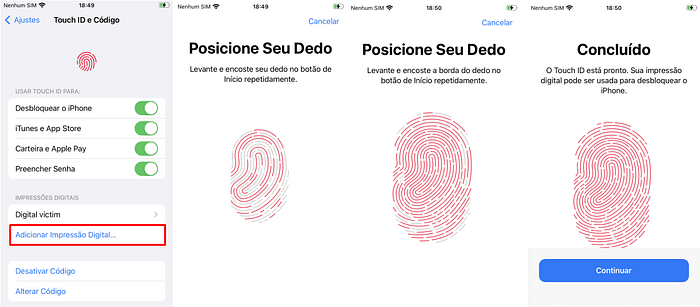
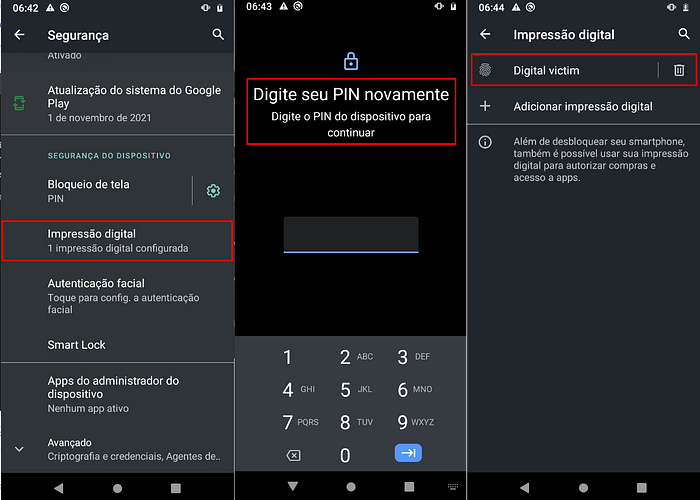
In the attack scenario, the malicious actor already possessed the physical device and its unlock PIN/password. With these elements, they accessed the operating system settings and navigated to the Security section, where biometric credentials can be managed.
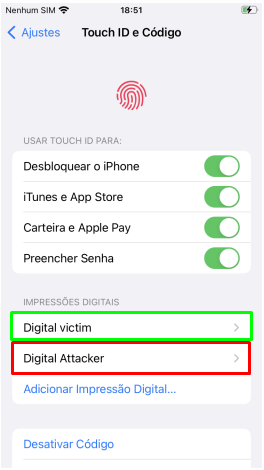
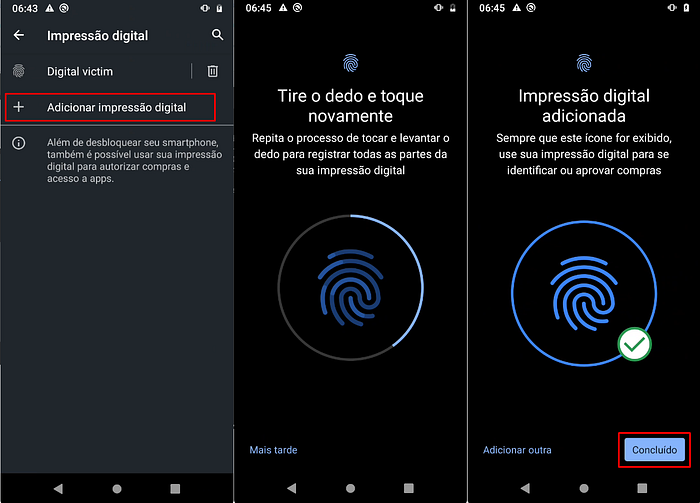
Upon accessing this menu, it was verified that the victim's biometric data was already registered. The attacker then enrolled a new fingerprint belonging to themselves. From that moment forward, the operating system recognized the new fingerprint as valid.
When opening applications that rely on biometric authentication without additional verification mechanisms, the newly enrolled fingerprint was accepted normally, allowing full authentication. In applications that do not validate changes to the biometric set, this results in a bypass of the biometric authentication layer.
Technically, this occurs because biometric APIs in both iOS and Android return only a success or failure result. They do not disclose which specific biometric was used, nor do they automatically inform the application that the biometric set has changed. The operating system simply verifies whether the provided fingerprint matches any currently registered biometric.
If the application does not bind authentication to a specific biometric state for example, by invalidating cryptographic keys when biometric reenrollment occurs it will continue trusting the environment even after modifications. As a result, authentication becomes tied to the device's current state rather than the identity originally associated with the account.
In practical terms, the application authenticates any valid biometric registered on the device, as long as the operating system reports a successful authentication. This is the core weakness exploited in the described scenario.
See the images below for an example of how biometric enrollment is performed within the device settings.
iOS

Android

Impact
The impact of this vulnerability is critical in applications handling sensitive data or financial assets. If a third party gains physical access to the device and its unlock credential, they can enroll their own biometric data and authenticate within the application as if they were the legitimate user.
In applications where biometrics serve as the sole factor for login or authorization of critical operations, this can lead to unauthorized account access, financial transfers, modification of security settings, and even total compromise of digital assets. Since the application trusts the device's current state rather than the identity originally bound to the account the biometric layer ceases to function as an effective identity mechanism and becomes merely a reusable local unlock method for any subsequently enrolled biometric.
Recommendation for Mitigation(iOS)
On iOS, developers should bind biometric authentication to a cryptographic key protected by the Secure Enclave and configured to be invalidated if the biometric set changes. This can be implemented using access control policies that require the current biometric set state. When a new fingerprint is enrolled on the device, the stored key becomes automatically invalid.
In such cases, the application must detect key invalidation and require full account authentication (e.g., password) before allowing biometric authentication to be re-enabled. This approach prevents biometric reenrollment from maintaining previously trusted sessions.
Recommendation for Mitigation(Android)
On Android, mitigation should be implemented using the Android Keystore with cryptographic keys configured to be automatically invalidated upon biometric enrollment changes. When generating the key, developers must enable invalidation on new biometric enrollment.
If a new fingerprint is added, the key becomes unusable, forcing the application to request the primary credential (account password or another strong factor) before reactivating biometric login. Additionally, critical actions such as financial transfers or modification of sensitive settings should not rely exclusively on biometric authentication and must require additional revalidation independent of the device's biometric state.
Final Considerations
As a final consideration, it is essential to understand that biometric authentication on mobile devices was primarily designed as a convenience and local unlocking mechanism not as an absolute and immutable proof of identity of the account holder.
When applications fully delegate identity validation responsibility to the operating system without controlling biometric state changes or adding complementary security layers, they create excessive dependency on the device environment. Proper security architecture requires state validation, cryptographic binding to hardware-backed storage, and strong authentication for high-risk operations to effectively balance usability and protection.